kanchengw/dsh-mindseye
Plug-in vision for text-only models on DSH, with native multimodal interaction, layered evidence memory and cache, and intent router.
Listed
1
Vision
Bundle verified
Preview
What it does
Vision plugin for text-only DeepSeek Harness models: native image paste, layered evidence memory and cache, and intent-driven tool selection.
Best for
- DSH users who need intent-specific visual QA, OCR, layout, chart, color, pixel-diff, or coordinate-grounding tools.
- Repeated image-analysis workflows that benefit from structured evidence, exact caching, and persistent research memory.
- Users who want both image understanding and configurable image generation or editing routes.
Not ideal for
- Setups without a configured general vision model endpoint, key, and model ID.
- Simple one-off image transcription where layered memory, routing, and multiple tools add little value.
- Workflows expecting generated images to be automatically saved into the project or automatically verified; the plugin does neither.
README
MindsEye


Let DeepSeek see images natively — model-driven vision tools for DeepSeek Harness
| English | 中文 |
Current version: 0.2.4
MindsEye is a vision plugin for DeepSeek Harness (dsh). Pasted images stay visible in the conversation while DeepSeek keeps reasoning and the vision model does the seeing. The plugin exposes task-specific vision tools that the model selects by intent; each tool maps to a fixed intent and model route, returns structured JSON, and reduces repeated calls through caching and evidence reuse.
Core Experience
-
Paste and see: automatically attempts the
deepseek-officialbridge so images enter the conversation natively; when unavailable it falls back to path-based paste, so new images always get through -
Model picks the intent, plugin routes the model:
mindseye_read_imagetakes anintent(visual-qa / ocr / layout / chart / color / pixel-diff / general) plus optionalextractfor combined structured evidence in one call;mindseye_groundstays separate for coordinates -
Generated images appear in the conversation:
mindseye_generate_imagedelegates to a dedicated image generation model and returns the result as a dsh attachment, without auto-saving to the project or running automatic verification - Automatic mounting on image turns: vision tools are registered when an image message arrives; text-only turns keep only one activation entry so tools do not occupy model context permanently
- Batch reads in one call: multiple images are read together, with exponential split fallback on batch 4xx so a failure affects only the failed image
- Old sessions stay clean: image-bearing history remains usable in fallback mode, with image blocks rewritten into attachment markers
- Every call is transparent: provider, model, latency, token usage, and fallback markers are returned for auditability

Implemented Features
Image Input
- Native paste/drag (automatic bridge, no duplicate model selector entry)
-
paste-to-pathfallback: pasted images are converted to path text in text-only model scenarios -
mindseye_read_imagegeneral vision, supporting local paths, single attachment ids, and batch attachment ids
Tools and Routing
| Tool | Intent | Route | Batch |
|---|---|---|---|
mindseye_read_image |
General vision QA + intent tasks (ocr / layout / chart / color / pixel-diff / general), optional extract for combined evidence |
understand / extract per intent | Yes |
mindseye_ground |
Target pixel coordinate location | locate | No |
-
understand / extract / locatemodel routes are independently configurable and fall back to the general understanding model when unset - Vision tools auto-mount on image turns; text-only turns keep only
mindseye_vision_activateso tools do not permanently consume model context - Structured JSON:
images/evidence/answer/meta;metaincludes real token usage, call attempts, and fallback markers - Exact cache: image sha256 + normalized query + region + baseUrl + model + prompt version; a hit skips the vision model call
Image Generation
-
mindseye_generate_image(intentId): text-to-image throughimage.generate -
mindseye_edit_image(intentId, attachmentId): image-to-image throughimage.edit, sending the reference image to the provider - Generated results are displayed as dsh attachments with a
(token_usage=..., widthxheight, size)audit line
Providers
- OpenAI-compatible Chat Completions and Responses protocols
-
vision.fallbacksis the recognition-chain fallback list; image generation and editing use the orderedimage.generateandimage.editchains directly - Image routes expose configurable
endpoint,bodyMode(jsonormultipart), andimageFieldfor provider compatibility - Multi-image batch calls with exponential fallback (batch 4xx retries by halving;
locatedoes not support batch)
Memory
- Image-level hard facts are persisted by sha256, with evidence evicted by capacity LRU (default 1000 entries)
- Soft memory uses BM25 retrieval of historical Q&A injected as context, evicted by capacity (default 1000 entries)
-
mindseye_memory_put / get / search / diffare exposed as dsh tools; calls are visible in the session and audited
Data Handling and Security
- Native attachments first: image-capable models keep native dsh attachments; MindsEye associates images by attachment id and does not ask the user to choose local files manually
-
Automatic temporary path fallback: when the current model is confirmed text-only and
paste-to-pathis enabled, freshly pasted PNG, JPEG, WebP, or GIF files (up to 25 MiB each) are validated, stored in an isolated system temp directory, and returned as a path. Temp files use0600mode - External vision calls: image bytes and question text are sent only to the vision provider’s Base URL when a MindsEye tool executes; configure only services you trust
- Credentials and cache: API keys resolve from environment variables, dsh Credentials, or plugin settings and are sent as Bearer auth to the matching provider only. The exact cache lives only in the current dsh process memory (max 500 entries), is never persisted, and clears on process exit
- Execution boundary: the plugin never starts shells, child processes, or executes downloaded code. The normal web paste fallback only reads the temporary image just created by the plugin; tools also accept dsh attachment ids
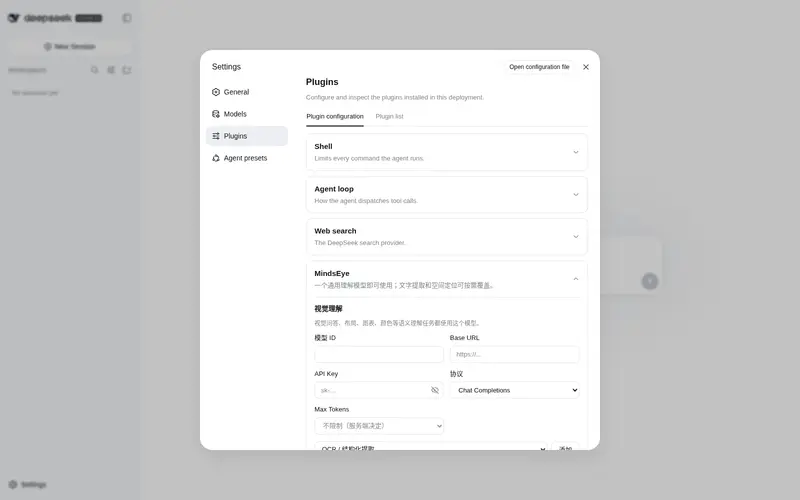
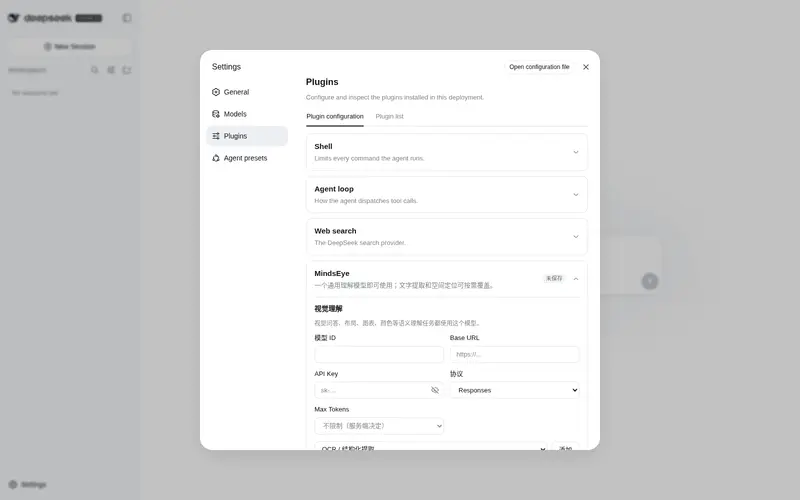
dsh Web Settings Card
-
understand / extract / locateroutes can be added as needed; unset routes fall back to the default model - Base URL, API key (masked with eye toggle), model id, protocol (explicit), and common Max Tokens values
- Model takeover is always attempted at startup; a failed attempt restores the official adapter and continues in path-paste mode
Installation
npx @deepseek-ai/dsh plugin --profile web add dsh-mindseye
Restart dsh web to paste images natively. Takeover is automatic and is not exposed as a user setting.
On first use, configure one general vision model (Base URL, API key, model id) in the MindsEye settings card; unconfigured OCR / locate routes fall back to the general model automatically.
Development
pnpm install
pnpm test
pnpm typecheck
pnpm build
Frequently Asked QuestionsFAQ
Use the verified command dsh plugin --profile default add github:kanchengw/dsh-mindseye in a DSH-enabled shell. The command resolves the public package metadata and keeps the plugin attached to the catalog identity shown on this page.
Compatibility follows the bundle and profile status shown above. If a profile is not detected, keep the plugin disabled there and check the repository documentation before enabling it in production.
The GitHub link and activity metadata are the source of truth for releases and maintenance. Revisit this page after a new release to confirm the catalog has observed the latest version.