kelearns/dsh-navigation-bar
Piano-key style conversation navigation bar for the DeepSeek Harness web GUI
Listed
5
Ui
Bundle verified
Preview
What it does
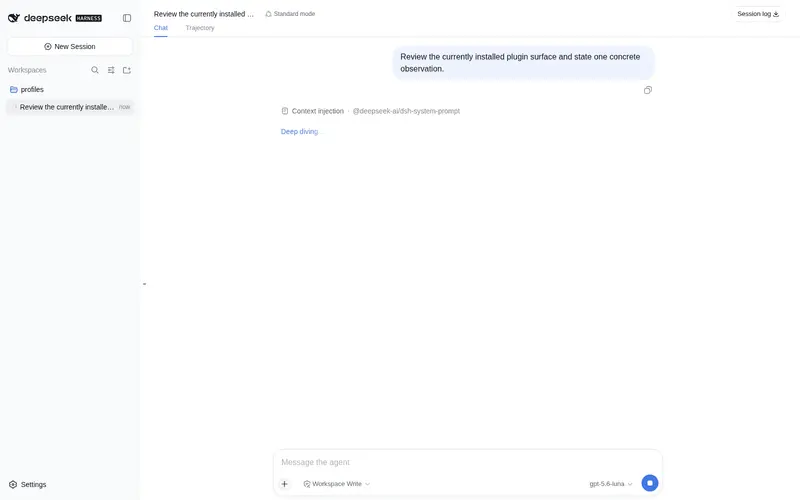
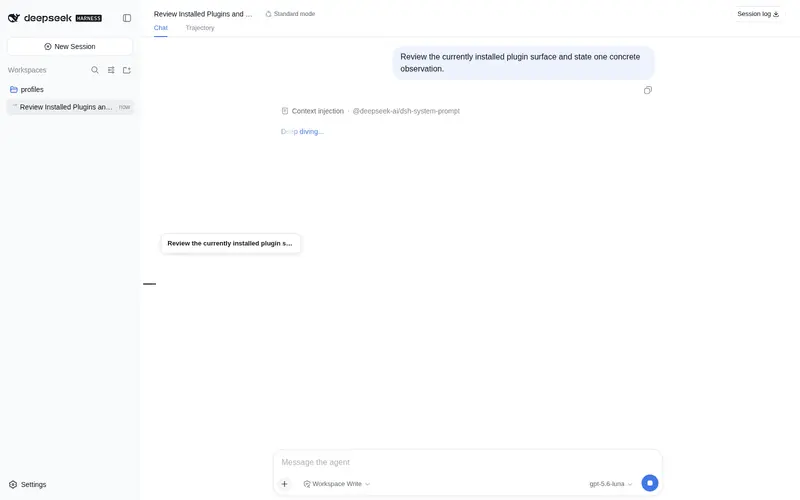
Piano-key in-conversation navigation for the Web UI: one key per user message with hover ladder, message-preview tooltip, and active-message highlight; click to smooth-scroll.
Best for
- Users navigating long, multi-turn DSH Web conversations with many user messages.
- Workflows where message previews and active-position highlighting help locate an earlier exchange quickly.
- Users who prefer compact click-to-scroll navigation that adapts to light and dark themes.
Not ideal for
- Short conversations where direct scrolling is already sufficient.
- Headless, TUI, or other non-Web profiles because the navigation is a browser-side interface.
- Workflows that need navigation anchors for every assistant response; keys correspond to user messages, with replies folded into previews.
README
dsh-navigation-bar
钢琴键风格的会话内导航条 —— 为 DeepSeek Harness Web GUI 的单个会话提供多轮对话导航: 每根键锚定一条用户消息,悬停显示该轮「用户消息 + 模型回复」预览,点击平滑跳转到对应消息。 基于 DSH 官方双面插件机制(host + browser half),不侵入 DSH 源码。
截图
深色主题 · 悬停态(全屏 + 聚焦细节):

| 深色悬停聚焦 | 深色非悬停聚焦 |
|---|---|
 |
 |
浅色主题(悬停 / 非悬停全屏):

| 浅色悬停聚焦 | 浅色非悬停聚焦 |
|---|---|
 |
 |
全屏图展示导航条在会话界面中的实际位置;聚焦图展示钢琴键细节(键形、悬停阶梯与消息预览气泡)。
功能
- 会话内导航:一根键 = 一条用户消息(含 agent 运行中发送的 steering 消息),按时间正序; 模型回复不单独占键,并入对应轮次的预览。
-
参考图级视觉:键簇固定 10px 键距、2px 键高、6px 最短长、26px 悬停长(≈4.3×),
在消息区内垂直居中;配色由参考图逐像素测量(浅色
#D2D3D3/#767779/#1A1C1F, 深色#454545/#A3A3A3/#FFFFFF)。 - 悬停阶梯:悬停键变长变色,上下相邻 3 级阶梯(20 / 14 / 10px,≈77% / 54% / 38%), 第 4 邻恢复最短,首/尾键悬停时阶梯自然单侧裁剪。
-
悬停气泡:用户消息单行省略 + 对应模型回复最多 3 行(宽度模型 JS 截断 +
-webkit-line-clamp双保险,超出以 … 省略)。 - 当前位高亮:非悬停时当前查看内容对应的键仅变色(长度不变),随滚动实时联动。
-
点击跳转;深浅色主题自适应(
data-ds-dark-theme+ prefers-color-scheme 兜底)。
安装



基于 DSH 官方插件机制安装到 web profile:
# 从 npm 安装(正式发布)
dsh plugin --profile web add @kelearns/dsh-navigation-bar

# 或本地开发(link 方式;改 lib/client.js 后刷新页面即生效)
dsh plugin --profile web add link:<本目录>
npm 包已发布:npmjs.com/package/@kelearns/dsh-navigation-bar
已收录于 awesome-dsh-plugin 精选目录, 也可以在 dsh 设置页的 Plugin Market(dsh-market)中搜索
navigation-bar一键安装。
注意:插件名单在实例启动时加载 —— 新装插件后需重启 dsh web 实例再刷新页面。
结构
| 文件 | 说明 |
|---|---|
index.js |
host 半端(空操作 cordis 插件) |
lib/client.js |
browser 半端(手写 bundle,无构建步骤;window.__ModuleLoader__.load) |
cordis.patch.yml |
bundle patch:把插件行插入 web profile 名单 |
package.json |
dsh.bundle.patch + dsh.client(platform web)声明 |
test/ |
CDP 无头浏览器诊断脚本 + 独立离线测试页 |
数据来源(全部官方 API):
-
ctx.sessions.binding(currentId).session→ConversationSnapshot(useSyncExternalStore实时订阅) - DOM 锚点:滚动容器
[data-conversation-scroll],消息行[data-chat-anchor-key]
开发 / 测试
# 无头 Edge + CDP 审计:打开真实会话,检查键布局 / 颜色 / tooltip
node test/cdp-audit.mjs

# 参考图像素测量(生成视觉规格:键距 / 阶梯 / 配色)
node test/img-analysis.cjs   # 非悬停参考图
node test/img-strip.cjs      # 悬停参考图(阶梯长度与颜色)
License
MIT
Frequently Asked QuestionsFAQ
Use the verified command dsh plugin --profile default add github:KeLearns/dsh-navigation-bar in a DSH-enabled shell. The command resolves the public package metadata and keeps the plugin attached to the catalog identity shown on this page.
Compatibility follows the bundle and profile status shown above. If a profile is not detected, keep the plugin disabled there and check the repository documentation before enabling it in production.
The GitHub link and activity metadata are the source of truth for releases and maintenance. Revisit this page after a new release to confirm the catalog has observed the latest version.