KIDLi1412/dsh-token-heatmap
DSH web plugin: GitHub-style daily token-usage heatmap on the new-session screen with a selectable calendar-year view, green/blue color schemes and a display switch, plus today / this-month / all-time totals.
Listed
1
Usage
Bundle verified
Preview
What it does
GitHub-style daily token-usage heatmap on the new-session screen with a selectable calendar-year view, green/blue color schemes, and today / this-month / all-time totals.
Best for
- Users who want token activity visible on the new-session screen before starting a conversation.
- Users comparing daily usage across selectable calendar years.
- Users who prefer a compact heatmap with today, current-month, and all-time totals.
Not ideal for
- Users who need the heatmap inside active or completed conversation views; it appears only on the blank new-session screen.
- Workflows needing weekly, cumulative, provider, or model drilldowns rather than daily calendar totals.
- Environments without a session or workspace context, where the heatmap is not rendered.
README
dsh-token-heatmap
DSH Web GUI 插件:在新会话(hero)屏幕的输入框下方显示一个 GitHub 风格的 token 用量热力图 —— 当前自然年(1月–12月)每天的 token 用量,颜色深浅表示用量多少;同一行展示今日 / 本月 / 累计 token 用量。
A DeepSeek Harness web plugin: a GitHub-style daily token-usage heatmap of the current calendar year (Jan–Dec) rendered below the composer input card on the new-session screen only, with today / this-month / all-time totals on the same line.
界面 / What you get
新会话屏幕输入框正下方出现一张统计卡(只在新会话显示;已对话的会话不显示):

- 📊 自然年热力图:GitHub 风格,覆盖所选自然年 1月–12月(可切换年份,
‹ 年份 ›选择器在统计行右侧,最多到当前年),列为周(周一起),行为星期(左侧标注一~日全部 7 天);顶部月份标签按列跨度标注(左侧与格线对齐),今日之后的日期显示为空格。 - 🎨 六套配色:绿色(经典 GitHub 风格)、蓝色、橙色、红色、紫色、青色,可在 设置 → 插件 → 插件配置 切换;颜色按绝对阈值分档(按天 token 数,非相对排名):0 / <1M / 1M–10M / 10M–100M / ≥100M 共 5 级,图例悬停显示各档范围;61M/天 显示为第 3 级。悬停任意格子显示日期与精确 token 数。
- 🔢 统计行(与标题同一行):今日 / 本月 / 累计,悬停显示完整数值。
- 🔄 自动每 5 分钟刷新,窗口重新可见时也会刷新;行尾可手动刷新。
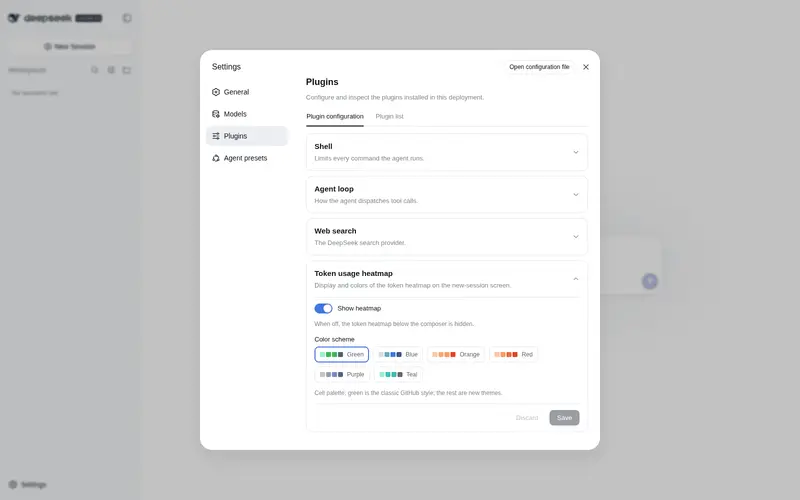
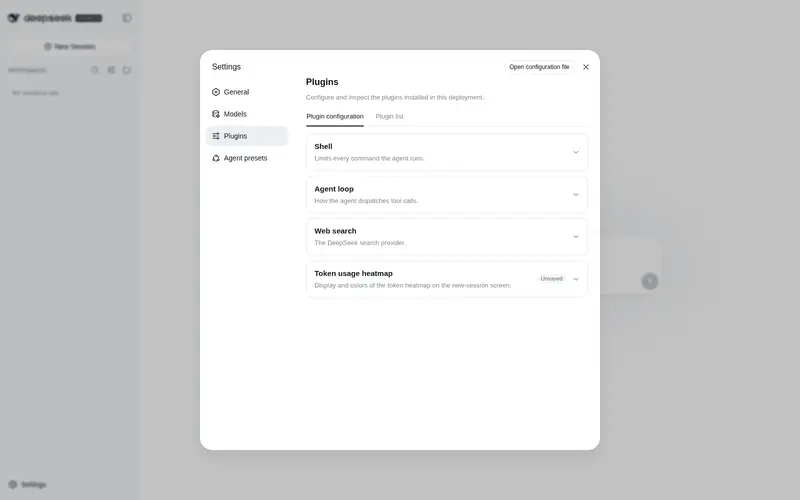
- ⚙️ 插件配置卡(设置 → 插件 → 插件配置,随官方”插件配置”页签渲染):
- 显示热力图 开关:关闭后新会话页面不再显示热力图卡片。
- 配色方案:绿色 / 蓝色 / 橙色 / 红色 / 紫色 / 青色,六个色板按钮即时预览。
- 修改后需点”保存”(显示”未保存”徽标提示),”放弃修改”可丢弃草稿;配置经
token-heatmapsettings namespace 持久化到<DSH_HOME>/settings.yaml(0.1.1 及更早版本存在<DSH_HOME>/storages/token-heatmap-config.json的旧配置会在启动时自动迁移)。
安装 / Install
需要 web profile(@deepseek-ai/dsh >= 0.1.0-rc.6)与 pnpm。
从 npm 安装:
dsh plugin --profile web add @kidli1412/dsh-token-heatmap
从 GitHub 安装:
dsh plugin --profile web add github:KIDLi1412/dsh-token-heatmap
本地开发(手动,本地链接):
dsh plugin --profile web add "link:path/to/dsh-token-heatmap"
安装完成后重启正在运行的 dsh web,并在浏览器中硬刷新(Ctrl+Shift+R)。侧边栏无新增入口——统计卡直接出现在新会话输入框下方。卸载:
dsh plugin --profile web remove @kidli1412/dsh-token-heatmap
工作原理 / How it works
-
服务端(
lib/index.js+lib/usage.js+lib/config.js):作为 profile bundle 挂载,增量折叠全部会话事件日志中的 token 用量样本(assistant/chunk的usage与assistant/message的usage;同(turn, step)的重复样本按”替换”语义处理,归属后一天),按天、按模型聚合,缓存到<DSH_HOME>/storages/token-heatmap-cache.json,并通过回环受限端点GET /api/token-heatmap/usage提供;显示配置(开关 + 配色)由插件注册的token-heatmapsettings namespace 持有(settings.yaml),GET/POST /api/token-heatmap/config作为回环兼容 API 读写同一 namespace,0.1.1 及更早的token-heatmap-config.json文档在启动时一次性迁移。 -
客户端(
lib/client.js):手写__ModuleLoader__bundle,注册进会话conversation.input.dock列表插槽,仅当session.composerPhase === "blank"(新会话 hero 屏)且配置开关开启时渲染。框架真正的”卡片下方”插槽conversation.composer.dock在 hero 屏被!hero门控禁用,因此本插件利用input.dock容器(flex 列)的 CSSorder把自己排到输入卡片之后。配置卡注册进官方settings.plugin.item插槽(设置 → 插件 → 插件配置页签),经 settings scope 读写token-heatmapnamespace(该 namespace 由本插件在服务端注册,官方页签只渲染”Host 实际 serve 的 namespace ∩ 已注册 key”的卡片)。 - 语义与
dsh-token-meter的tokenUsage投影一致(参考插件 dsh-usage-stats,MIT)。
说明 / Notes
- 仅回环地址可访问数据端点,凭据不外发;插件只读,不修改任何会话数据。
- 无会话/无工作区时(
input.dock需要会话上下文)统计卡不渲染。 - 服务端与客户端都随
dsh web启动加载,因此新增/更新插件后需要重启。
License
MIT。聚合与回环端点实现参考了 dsh-usage-stats(MIT © Ychris12138)。
Frequently Asked QuestionsFAQ
Use the verified command dsh plugin --profile default add github:KIDLi1412/dsh-token-heatmap in a DSH-enabled shell. The command resolves the public package metadata and keeps the plugin attached to the catalog identity shown on this page.
Compatibility follows the bundle and profile status shown above. If a profile is not detected, keep the plugin disabled there and check the repository documentation before enabling it in production.
The GitHub link and activity metadata are the source of truth for releases and maintenance. Revisit this page after a new release to confirm the catalog has observed the latest version.