kun2-5code/dsh-plugin-template
A starter template for DeepSeek Harness (dsh) plugins: six plugin shapes, fourteen browser UI surfaces, and demo slash commands in one installable bundle.
Listed
3
Dev
Bundle verified
Preview
What it does
A starter template for dsh plugins covering config, tools, events, services, hooks, browser UI slots, and slash commands.
Best for
- Developers starting a DSH plugin who need working examples of configuration, model tools, events, services, hooks, and commands.
- Plugin authors learning how to register host behavior and browser UI across the documented DSH extension surfaces.
- Teams that want an installable TypeScript bundle structure they can adapt for their own plugin.
Not ideal for
- End users seeking a focused production feature; this repository is a development starter and demonstration bundle.
- Projects that already have an established plugin architecture and do not need reference implementations for multiple extension shapes.
- Users expecting every demonstrated component to be active by default; the service and permission-gate examples are optional and disabled by default.
README
dsh-plugin-template
| English | 简体中文 |
A ready-to-run, ready-to-install starter template for DeepSeek Harness (dsh) plugins. It demonstrates the six most common plugin shapes in one minimal installable bundle:
-
Config —
Configinterface + Schemastery schema; validation and defaults apply at load time (docs) -
Tool —
ctx.tools.register(defineTool(...))registers a model-callable tool (docs) -
Events —
ctx.on/ctx.emitwith declaration merging for typed events (docs) - Service — a class-form plugin that provides a service to other plugins (docs)
-
Hook — a
tools/pre-executepermission gate that denies tool calls by config (docs) -
Browser half (client) —
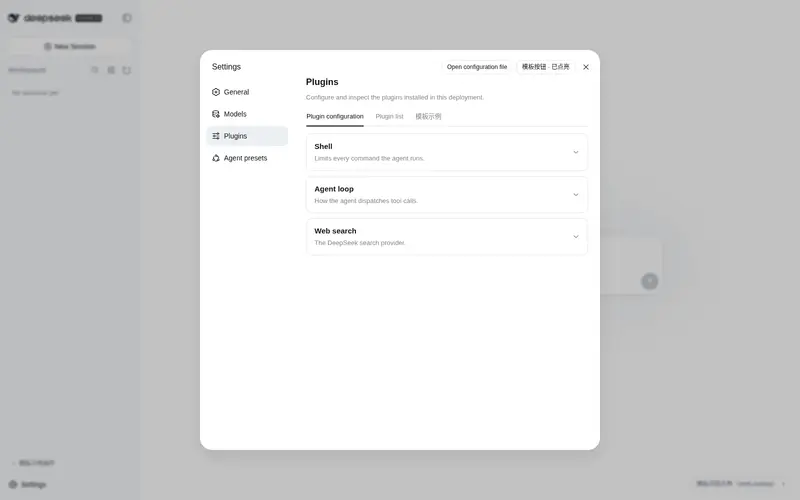
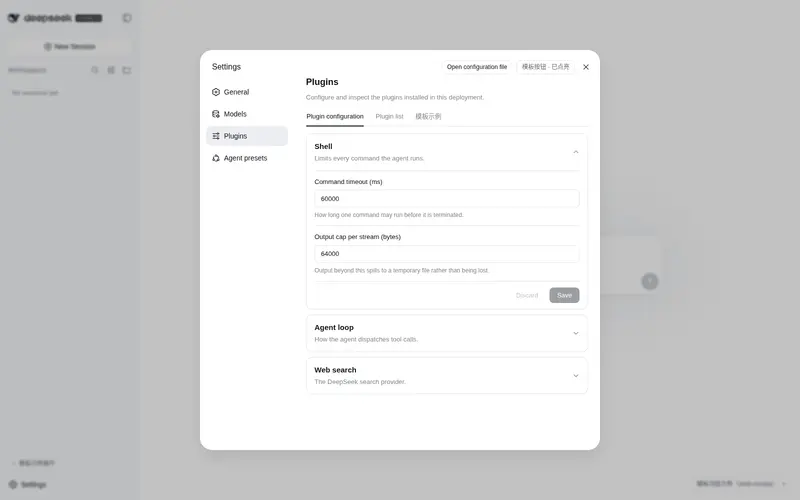
src/client/registers browser UI on fourteen surfaces (index: docs/ui-surfaces.md): a clickable config card under Settings → Plugins → Configurable (writesgreeting/maxRetries/verboseinto the settings document, taking effect live; on a stock harness the card renders a read-only “not exposed” explainer instead of vanishing), a sidebar footer action button, an input dock strip above the composer, a shell overlay pill, a header utility badge, input tool-row buttons (left/right), a custom command row for/dsh-demo, a General settings row, a Plugins tab, a settings header action, a session header action, a composer dock strip, and per-message actions on AI replies — plus apresentResultrender intent on thegreettool. Only the config card’s data path is gated by the harness allowlist; the other thirteen are pure slot registrations that work on any harness.
The template follows the official bundle distribution model: the package declares dsh.bundle plus cordis.patch.yml, and dsh plugin add activates it as a config layer.
Directory structure
dsh-plugin-template/
├── package.json        # npm manifest + dsh.bundle / dsh.client declarations + prepare build script
├── tsconfig.json       # strict type-check configuration (tsc --noEmit)
├── tsdown.config.ts    # build config: Node library (lib/) + client bundle (lib/client.js), self-contained for git-install prepare
├── cordis.patch.yml    # bundle config layer: inserts the plugin rows
├── dev/cordis.yml      # local dev overlay (points at source; use with dsh web --patch; host half only)
├── docs/
│   └── ui-surfaces.md  # where the plugin registers UI + index of every slot (bilingual: ui-surfaces.zh.md)
├── src/
│   ├── index.ts        # main plugin: Config + tool + events + effect, config wired through the settings namespace
│   ├── commands.ts     # host half: demo slash commands /hello (replies world) and /dsh-demo (custom row)
│   ├── service.ts      # optional example: Service provider (disabled by default)
│   ├── hook.ts         # optional example: hook permission gate (disabled by default)
│   └── client/         # browser half: one module per UI surface (see docs/ui-surfaces.md)
│       ├── index.ts        # client entry: inject + apply, assembles the registrations
│       ├── constants.ts    # shared NAMESPACE + DEMO_COMMAND_NAME (keep in sync with package.json name / cordis.patch.yml)
│       ├── types.ts        # minimal structural types for ctx services (no @deepseek-ai client imports)
│       ├── styles.ts       # one injected <style> with all dtpl-* classes (theme tokens only)
│       ├── config-card.ts  # settings.plugin.item: the clickable config card (staged form + status states)
│       ├── sidebar-action.ts # sidebar.footer.action: sidebar-footer button
│       ├── input-dock.ts   # conversation.input.dock: strip above the composer (session-scoped)
│       ├── shell-overlay.ts # shell.overlay: frame-wide floating pill
│       ├── header-utilities.ts # conversation.session.header.utilities: right-aligned header badge
│       ├── input-left.ts   # conversation.input.left: tool-row control at the left end
│       ├── input-right.ts  # conversation.input.right: tool-row control next to send
│       ├── commandview.ts  # conversation.chat.commandview: custom row for /dsh-demo
│       ├── general-item.ts # settings.general.item: one preference row in Settings → General
│       ├── plugins-tab.ts  # settings.plugins.tab: a new tab in the Plugins page
│       ├── settings-action.ts # settings.action: button in the settings header
│       ├── header-actions.ts # conversation.session.header.actions: session-title action button
│       ├── composer-dock.ts  # conversation.composer.dock: strip under the composer card
│       └── assistant-actions.ts # conversation.chat.assistant-actions: per-message button
└── test/smoke.mjs      # smoke test on the build output (incl. settings wiring unit test)
Quick start
Install as a bundle (for users)
From any directory, install this package (or your fork) into a dsh profile:
# local directory
dsh plugin --profile demo add /path/to/dsh-plugin-template

# or directly from GitHub (replace with your own repo after forking)
dsh plugin --profile demo add github:you/dsh-plugin-template
A GitHub install pulls source; pnpm runs prepare (i.e. tsdown) to build lib/. On pnpm ≥10 the first git-dependency prepare is refused; add the package name pnpm prints to the profile’s pnpm-workspace.yaml and retry:
allowBuilds:
  dsh-plugin-template: true
This allowlist authorizes executing that package’s code at install time — only allow source you trust, and prefer pinning a commit:
github:you/dsh-plugin-template#<sha>.
Verify the config layer and boot:
dsh --profile demo --dump-config   # should show a "# == dsh-plugin-template" layer
dsh --profile demo
Note: a custom-named profile (e.g.
demo) contains onlydsh-baseand is headless (no GUI). For the Web GUI and the config card below, use thewebprofile (= dsh-base+dsh-web-app) — see testing the config card.
Local development (modifying the plugin)
From the root of a deepseek-harness source checkout, load this repo’s source directly via an overlay (no install, no build):
pnpm dsh web --patch /absolute/path/to/dsh-plugin-template/dev/cordis.yml
Set name in dev/cordis.yml to this repo’s absolute path on your machine, open http://127.0.0.1:3080, and ask the model to call the greet tool.
⚠️ A
--patchoverlay only loads the plugin’s host half (module resolution cannot reach package-level declarations). To test the browser-half config card you must install into a profile (resolved byname: dsh-plugin-template) — see the next section.
Run the checks yourself during development:
pnpm install
pnpm typecheck
pnpm build
node test/smoke.mjs
If this repo sits INSIDE a
deepseek-harnesscheckout (nested, as in the harness repo root),pnpm installis captured by the parent workspace and installs nothing here — the template is not a workspace member. Usepnpm install --ignore-workspace(pnpm ≥9.5) so the template installs its ownnode_modulesfrom its own lockfile; or clone the template standalone.
Testing the config card (in the GUI)
The config card renders in the browser and depends on dsh’s client-modules discovering the dsh.client declaration by package name, so the package must be installed into a profile (a --patch source path won’t do):
# 1. Build (produces lib/index.js + lib/client.js)
cd /path/to/dsh-plugin-template && pnpm build

# 2. Install into the web profile (= dsh-base + dsh-web-app, full GUI)
dsh plugin --profile web add /path/to/dsh-plugin-template

# 3. Boot the web GUI (`dsh web` is equivalent to `dsh --profile web`)
dsh web
Open http://127.0.0.1:3080:
- Bottom-left Settings → Plugins → Configurable tab: you should see a
dsh-plugin-templatecard. On a stock harness it renders a read-only “not exposed” status card (see below); after the one-line harness change it renders the editablegreeting/maxRetries/verbosefields; - Change
greeting, click Save — the status line should confirm it takes effect immediately; - Back in a session, ask the model to call the
greettool — you should see the new greeting (the host half reads the resolved namespace value live, no restart); - The change lands in the settings document (
settings.yamlunder$DSH_HOME) and survives restarts; to restore a default, edit the field back or clear it in the card.
After editing the client half (src/client/), rerun pnpm build and refresh the page (the client bundle’s rev query cache-busts).
The config card on a stock harness (no source edits)
The card is a browser plugin (src/client/config-card.ts) that binds the settings namespace dsh-plugin-template through the settingsScope service. It always renders — but on a stock harness it shows a read-only “not exposed” status card instead of editable fields. Why: dsh’s web gateway serves settings namespaces only from an explicit allowlist (WEB_SETTINGS_NAMESPACES in packages/host/apiproxy/src/api-proxy.ts), and a namespace absent from it answers settings-not-exposed even when its owner plugin registered it. This is a harness-side registration decision (the same source comment calls moving the declaration into settings.register() “deferred work”), not a template defect: the built-in cards render because their namespaces (shell, agent-loop, …) are allowlisted, and there is currently no plugin-side channel to add one — the gateway’s RPC map is compile-time fixed and no registration flag exists yet.
What works on a stock harness with zero edits:
- the entire host half — the
greettool, events, the service, the hook gate — including live config reads: writes are only gated at the web RPC, the plugin itself reads the resolved namespace value on every execution; - the card slot itself: the card appears under Settings → Plugins → Configurable and explains the exposure state instead of vanishing silently.
To make the card editable, pick one:
- add
'dsh-plugin-template'toWEB_SETTINGS_NAMESPACESinpackages/host/apiproxy/src/api-proxy.ts(one line; rebuild/restart the harness; lost when you update the checkout):
const WEB_SETTINGS_NAMESPACES = [
  'agent-loop', 'shell', 'locale', 'permission', 'ui-conversation', 'ui-theme', 'web-search-deepseek',
  'dsh-plugin-template',   // ← add this line
] as const
- wait for the harness’s deferred work — moving the exposure declaration into
settings.register()— which this template already targets by registering the namespace the canonical way (installSettingsSection).
Making it your own plugin
- Rename the package: keep
package.jsonname(npm name, e.g.dsh-my-plugin),src/index.tsname, andcordis.patch.ymlid/nameconsistent; when renaming the./servicesubpath, updateexports/filestoo. Renaming also touches browser-half spots: the client bundleidintsdown.config.ts(__ModuleLoader__.load({ id })),NAMESPACEinsrc/client/constants.ts, anddsh.clientinpackage.json(if you needinject). - Change the
Configinterface andConfigschema: anything two deployments should be able to set differently must be a config field (design principles). The config is wired to the settings namespace — does the GUI card auto-render a form from your schema? No: the card insrc/client/config-card.tsis hand-written; add a field row there for each new config field. - Register your tool in
apply:ctx.tools.register(defineTool({...}));executereturns the canonical value declared byoutput.schema, andoutput.renderis the pure function for model-visible rendering (tool reference). - To provide capabilities to other plugins, enable
src/service.tsand uncomment its row incordis.patch.yml. - Remember to
declare module '@deepseek-ai/cordis'to mergeContext/Eventstypes — that is what keeps cross-package boundaries type-safe. - To intercept tool calls, act as a permission gate, or respond to system hooks, enable
src/hook.ts(uncomment itscordis.patch.ymlrow):ctx.on('tools/pre-execute', ...)returns{ kind: 'deny', reason }or callsnext()to allow (extension cookbook). - Config reads: every read in
src/index.tsgoes throughconfigSource()(the resolved settings-namespace value, falling back to the composition entry). If you derive registration-level facts from config inapply(e.g. register different tools by config), rebuild them ininstallSettingsSection’sonChangerather than reading only at execution points (see bash-local).
How the browser half works
-
package.jsondeclaresdsh.client: { platform: "web" }+exports["./client"]→ dsh’s client-modules discovers it and loadslib/client.jsas a browser plugin; - the client entry (
src/client/index.ts) assembles one registration per UI surface — the config card (settings.plugin.item), the sidebar footer action (sidebar.footer.action), and the input dock (conversation.input.dock) — see the UI surfaces index; - the config card binds the
dsh-plugin-templatenamespace via thesettingsScopeservice: reads snapshots, stages drafts, and writes field-by-field on save (revision-fenced); - the host half (
src/index.ts) registers the same namespace withinstallSettingsSection(the cordis.yml config is thebaselayer) and reads the resolved value lazily in the tool → saving takes effect immediately; - at runtime the client half depends only on
react(provided by the browser platform module table); everything else goes throughctxservices and no@deepseek-aiclient package is imported — keep that discipline when editing the template.
Publishing
-
npm:
pnpm publish(filesalready includes the build output and the patch; no extra steps) -
tarball:
pnpm pack, thendsh plugin --profile demo add ./dsh-plugin-template-0.1.0.tgz -
git:
dsh plugin add github:you/dsh-plugin-template(combined with theallowBuildsstep above)
Related docs
- Plugin development intro: basic/index.md
- Plugin config: basic/config.md
- Tool development: basic/tool.md
- Packaging & installation: basic/publish.md
- Plugins & lifecycle: framework/index.md
- Services & dependencies: framework/service.md
- Event system: framework/events.md
- Cordis tutorial: cordis-tutorial
Frequently Asked QuestionsFAQ
Use the verified command dsh plugin --profile default add github:kun2-5code/dsh-plugin-template in a DSH-enabled shell. The command resolves the public package metadata and keeps the plugin attached to the catalog identity shown on this page.
Compatibility follows the bundle and profile status shown above. If a profile is not detected, keep the plugin disabled there and check the repository documentation before enabling it in production.
The GitHub link and activity metadata are the source of truth for releases and maintenance. Revisit this page after a new release to confirm the catalog has observed the latest version.