kw78/dsh-office-tools
Model-facing Office tools for DeepSeek Harness: Word (.docx), Excel (.xlsx), and PowerPoint (.pptx) create/read/update with workspace-safe paths and PPT image embedding.
Listed
2
Docs
Bundle verified
Preview
What it does
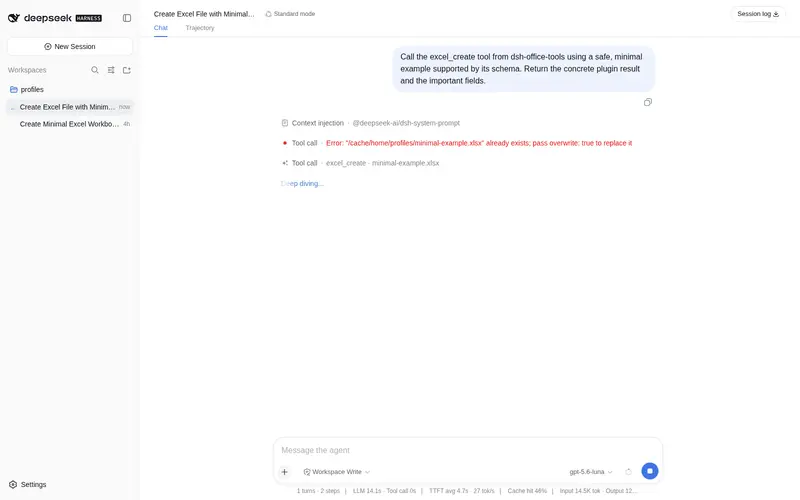
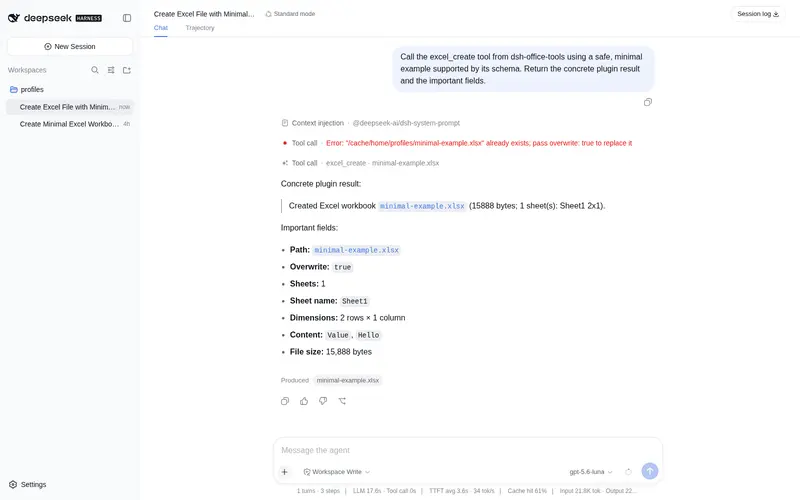
Workspace-safe Office tools for agents: create/read Word, create/read/update Excel, and create/read PowerPoint decks with PNG/JPG/GIF image placement.
Best for
- Agents that need to create or extract text from Word documents inside the current session workspace.
- Workflows that create, read, or update Excel workbooks using sheets, scalar grids, and A1 cell addresses.
- Teams generating or inspecting 16:9 PowerPoint decks with text, notes, and workspace-local PNG, JPG, or GIF images.
Not ideal for
- Office files or images located outside the calling agent's session workspace.
- Workflows requiring rich Word editing beyond titles, paragraphs, bullets, and one table, or PowerPoint editing of an existing deck.
- Large or unbounded documents; reads are capped at 50 MiB, image files at 20 MiB each, and text or cell output may be truncated.
README
dsh-office-tools
Seven model-facing Office file tools for DeepSeek Harness, running entirely in the plugin host half.



Install:
dsh plugin --profile web add github:kw78/dsh-office-tools
| Tool | Purpose | Library |
|---|---|---|
word_create |
Create .docx (title, paragraphs, bullets, one table) |
docx |
word_read |
Extract plain text from .docx
|
mammoth |
excel_create |
Create a multi-sheet .xlsx from scalar cell grids |
SheetJS (xlsx) |
excel_read |
Read one or all sheets as scalar rows | SheetJS |
excel_update |
Replace/create whole sheets, or write cells by A1 address | SheetJS |
ppt_create |
Create a 16:9 .pptx (title slide, titles, paragraphs, bullets, notes, PNG/JPG/GIF images) |
pptxgenjs |
ppt_read |
Extract per-slide paragraph text, speaker notes, and image counts | jszip |
Harness integration
The plugin follows the standard DSH host-plugin contract:
- It exports
name/inject/apply;inject = ['tools']is its only runtime service dependency (@deepseek-ai/dsh-tools). -
apply(ctx)wraps everyctx.tools.register(defineTool({...}))inctx.effect(...)so Cordis disposes the registrations with the plugin fiber. -
defineTooldeclares model-visibleparameters, a validated canonicaloutput.schema, and a pureoutput.rendertext projection. -
execute(args, exec)resolves every path againstexec.agent.session.header.cwd; relative paths stay in the session workspace and absolute paths are accepted only when still inside it. Arealpathcheck on the nearest existing ancestor closes the symlink escape hatch. - Image files must live inside the session workspace (
.png/.jpg/.jpeg/.gif, 20 MiB each); explicit inch coordinatesx/y/w/hare supported, or omit them for automatic placement below the text. - Writes go through a same-directory temp file +
rename;overwritedefaults tofalse.
Build
pnpm install
pnpm run check   # typecheck + tests + build
Artifacts: lib/index.js (ESM host bundle with Office libraries inlined; @deepseek-ai/* and cordis stay external) and lib/types/**/*.d.ts.
Install
# npm (recommended)
dsh plugin --profile web add dsh-office-tools

# GitHub source
dsh plugin --profile web add github:kw78/dsh-office-tools

# local checkout
dsh plugin --profile web add /path/to/dsh-office-tools
Restart the DSH server after installation. The seven tools appear in the next prompt assembly.
Community indexes
- Registration blocks for awesome-dsh-plugin / dsh-market are in docs/hub-registration.md.
- Recommended repository topics:
dsh,dsh-plugin,deepseek-harness,office.
Safety
- All file access is confined to the calling agent’s session workspace.
- Reads are capped at 50 MiB; text/cell results are bounded and mark
truncated. - Creates/updates are bounded by row and cell limits and refuse overwrites by default.
- No LibreOffice/PowerPoint/Word subprocess is spawned; formats are generated and parsed with pure-JS libraries.
Frequently Asked QuestionsFAQ
Use the verified command dsh plugin --profile default add github:kw78/dsh-office-tools in a DSH-enabled shell. The command resolves the public package metadata and keeps the plugin attached to the catalog identity shown on this page.
Compatibility follows the bundle and profile status shown above. If a profile is not detected, keep the plugin disabled there and check the repository documentation before enabling it in production.
The GitHub link and activity metadata are the source of truth for releases and maintenance. Revisit this page after a new release to confirm the catalog has observed the latest version.