Laplace-bit/dsh-smooth-stream
DeepSeek Harness (dsh) plugin: silky streaming reveal, no flicker. dsh 丝滑流式渲染插件。
Listed
23
Ui
Bundle verified
Preview
What it does
Silky streaming reveal for the Web UI: text appears at the model's arrival rate, new lines glide in, no flicker; follow stays with the user and prefers-reduced-motion is respected.
Best for
- DSH Web users who read long streaming responses and want steadier text and layout updates.
- Users who want streaming follow behavior that yields when they manually move away from the output.
- Interfaces that need an explicit reduced-motion fallback.
Not ideal for
- Headless, CLI, or other non-Web workflows where visual streaming behavior is irrelevant.
- Non-streaming responses, where the plugin adds little value.
- Users with reduced motion enabled who expect animation; that preference causes full text to appear directly and disables follow takeover.
README
dsh-smooth-stream
| English | 中文 |
dsh-smooth-stream 为 DeepSeek Harness(dsh)Web UI 带来流畅的流式渲染和丝滑滚动。文字、Markdown、代码块、表格以及工具结果会随着输出自然呈现;内容逐步增长时,页面平稳跟随,整轮回复保持连贯的视觉节奏。
项目主页:https://laplace-bit.github.io/dsh-smooth-stream/
效果
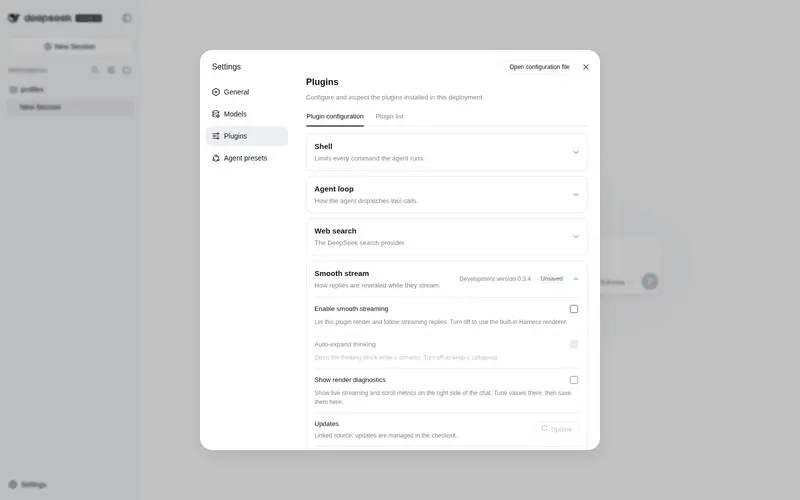
左:默认 Web UI。右:dsh-smooth-stream。

核心体验
- 流畅渲染。 文字边到边呈现,Markdown 结构持续更新,标题、列表、代码块和表格在流式过程中保持自然的阅读状态。
- 丝滑滚动。 内容逐步变高时,页面沿连续的滚动轨迹平稳跟随,视线始终贴着正在生成的内容。
- 统一过渡。 换行、代码块、表格和工具结果使用一致的过渡方式,正文、思考过程与工具输出衔接自然。
- 自适应节奏。 渲染速度会根据输出速度和待显示内容调整,让慢速输出从容呈现,快速输出及时跟上。
安装
在 DeepSeek Harness 源码仓库里:
pnpm dsh plugin --profile web add dsh-smooth-stream
如果 PATH 上已经有 dsh:
dsh plugin --profile web add dsh-smooth-stream
npm 包带预构建的 lib/,无需 pnpm ≥10 的构建脚本授权,直接可装。
启动界面:
pnpm dsh web
Host 日志里应出现 [dsh-smooth-stream] plugin loaded!。
卸载:pnpm dsh plugin --profile web remove dsh-smooth-stream(或 dsh plugin --profile web remove dsh-smooth-stream)。
配置
组合包默认 preset: balanced。要换节拍,在 profile 的 cordis.patch.yml 里改:
preset |
手感 |
|---|---|
realtime |
更贴模型到达 |
balanced |
默认 |
silky |
缓冲更大,追上更慢 |
旧版的 mode、revealCharsPerSec、scrollSpeedPxPerSec 和 maxScrollSpeedPxPerSec 字段仍可被加载,以兼容已有 profile;当前自适应引擎仅使用 preset 调整节拍。
用户设置
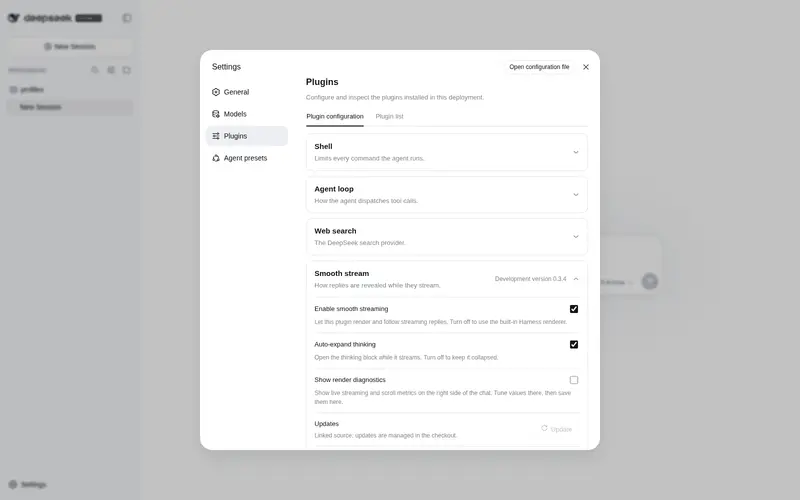
在 Web 界面打开 设置 → 插件 → 插件配置,会看到一张 丝滑流式(Smooth stream) 卡片,其中包含:
- 启用丝滑流式渲染(默认开启):开启时由本插件接管回复和工具行的渲染与跟随;关闭后会撤销接管,完整使用 Harness 内置渲染。
- 自动展开思考:控制思考块在流式期间是否自动展开。主开关关闭时此选项不会生效。
“自动展开思考”开启时,思考块会在流式时自动展开、思考结束后收起;关闭后思考块保持折叠,仍可手动点开,且不会被流式状态抢回控制。
这些设置是用户级的持久化偏好,改完即生效,无需重启;会写进 DeepSeek Harness 的用户设置文档,而不是插件的组合配置。
关于与更新
-
版本 / 主页 / 许可证:见本页顶部与 package.json 的
version、homepage、repository、license字段;安装的插件列表可在 设置 → 插件 → 全部 里查看。 -
更新:卡片会显示 Host 当前加载的版本。只有当前 profile 明确把
dsh-smooth-stream声明为 npm 依赖时,更新按钮才会对该 profile 执行固定的包更新,并提示重启 Harness。link:或file:本地开发安装会显示为开发版本,更新按钮会保持禁用,避免覆盖你的源码目录。
也可以通过命令行更新 npm 安装的 profile:
dsh plugin --profile web update dsh-smooth-stream
(也可用 dsh plugin --profile web outdated 查看是否有新版本。)
常见问题
这是 DeepSeek 官方插件吗?
不是。它是面向 DeepSeek Harness(dsh)Web UI 的独立维护项目,采用 MIT 许可证,和 DeepSeek 没有从属关系。
dsh 插件怎么安装?
用内置插件命令:在 dsh 源码目录运行 dsh plugin --profile web add dsh-smooth-stream(见安装)。
能用 npm 安装吗?
能。dsh-smooth-stream 已发布到 npm,dsh plugin --profile web add dsh-smooth-stream 安装的就是预构建的 npm 包。
支持 prefers-reduced-motion 吗?
支持。系统开启减少动态效果时直接显示完整文本、不接管跟随;帧率低于 30 fps 且回复在屏外时,揭示自动暂停、恢复后再补上。

许可证
Frequently Asked QuestionsFAQ
Use the verified command dsh plugin --profile default add github:Laplace-bit/dsh-smooth-stream in a DSH-enabled shell. The command resolves the public package metadata and keeps the plugin attached to the catalog identity shown on this page.
Compatibility follows the bundle and profile status shown above. If a profile is not detected, keep the plugin disabled there and check the repository documentation before enabling it in production.
The GitHub link and activity metadata are the source of truth for releases and maintenance. Revisit this page after a new release to confirm the catalog has observed the latest version.