ldchaowin/dsh-plugin-notify-sound
notify sound for DeepSeek harness
Listed
2
Voice
Bundle verified
Preview
What it does
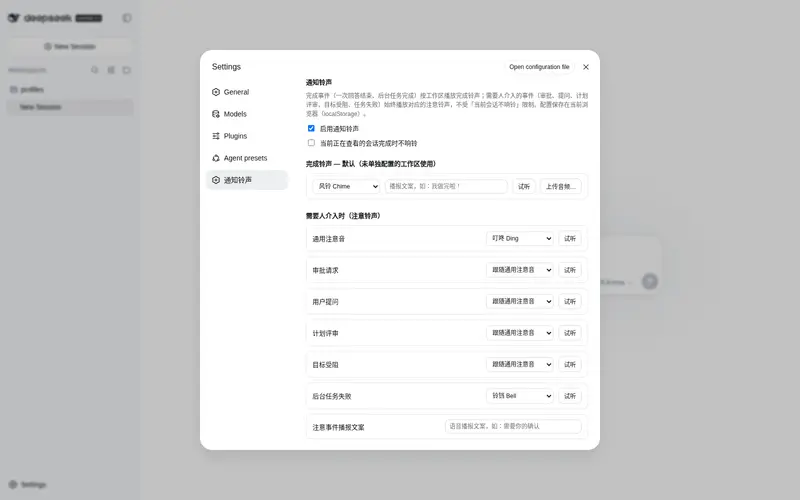
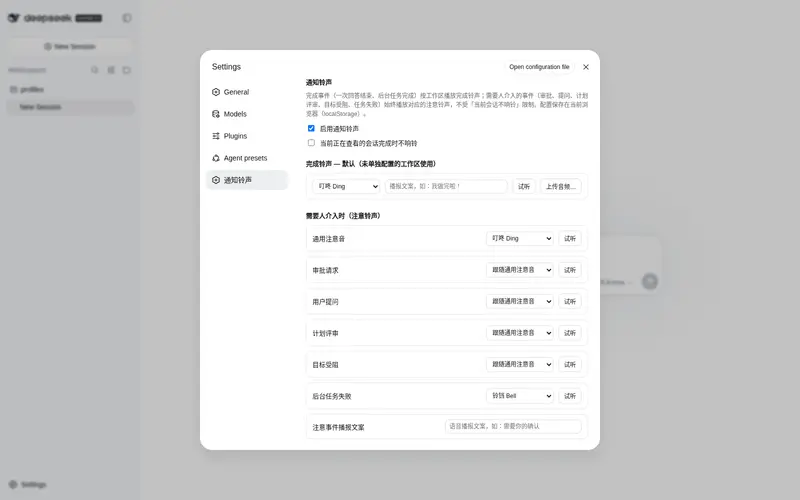
Per-workspace completion ringtones plus attention sounds for approval, question, plan-review, goal-blocked, and task-failure events, with built-in synth, voice (TTS), and custom audio.
Best for
- Users who leave long-running DSH Web tasks unattended and need an audible completion cue.
- Multi-workspace users who want different completion sounds for different workspaces.
- Workflows with approvals, questions, plan reviews, blocked goals, or failed background jobs that need prompt human attention.
Not ideal for
- Headless workflows or environments where browser audio and TTS are unavailable or intentionally muted.
- Users who need notification settings synchronized across browsers or devices; current configuration is stored in browser localStorage.
- DSH installations without bundle-plugin support or the documented pnpm prerequisite.
README
dsh-plugin-notify-sound
| English | 中文 |
A DeepSeek Harness (DSH) plugin for the Web UI: play a customizable ringtone when a task finishes — per workspace — and an attention sound whenever something needs a human.
Features
Completion sounds (per workspace)
- Plays when a session turn finishes (
running: true → false) or a background job completes. - The sound is resolved per workspace: a workspace-specific override wins, otherwise the default.
- Three sound sources:
- Built-in synthesized sounds — 6 options (Ding / Chime / Bell / Complete / Success / Mute), generated live with Web Audio, no audio files required.
- Voice announcement (TTS) — the browser speaks a custom phrase (e.g. “我做完啦!”, “All done!”) using a system Chinese voice; voice and rate are configurable.
- Custom audio — upload any MP3/WAV/etc. file.
Attention sounds (when a human is needed)
The following events always ring (they are not affected by the “quiet current session” option):
| Event | Detection | Default sound |
|---|---|---|
| Approval request | session pendingInteraction: approval
|
generic attention sound |
| User question | pendingInteraction: question |
generic attention sound |
| Plan review | pendingInteraction: plan-review |
generic attention sound |
| Goal blocked | goal projection enters blocked
|
generic attention sound |
| Background task failure | job status failed
|
Bell (dedicated failure sound) |
Each kind can override the generic attention sound, or use a shared TTS phrase (e.g. “需要你的确认” / “Your confirmation is needed”).
Settings panel (Settings → 通知铃声 / Notification Sounds)
Master switch, “quiet when viewing the current session”, default completion sound, per-workspace completion sounds, generic + per-kind attention sounds, voice settings (voice / rate / preview / refresh), per-row preview and custom-audio upload.
Install
Requires a DSH version with bundle-plugin support (dsh.profile.bundles + dsh.bundle.patch)
and pnpm on PATH (corepack enable or npm i -g pnpm).
# One command: pnpm installs the package and adds it to the profile's bundle layer
dsh plugin --profile web add dsh-plugin-notify-sound

# Restart the server (or refresh the page), then open Settings → 通知铃声
Other profiles work the same way: dsh plugin --profile <name> add dsh-plugin-notify-sound.
Manual install (without pnpm)
- Copy this package and its runtime deps (
@deepseek-ai/schemastery,@deepseek-ai/cosmokit,@standard-schema/spec) into$DSH_HOME/profiles/web/node_modules/. - Append
"dsh-plugin-notify-sound"todsh.profile.bundlesin$DSH_HOME/profiles/web/package.json. - Restart
dsh web.
Configuration storage
- The browser half persists its configuration in localStorage (key
dsh-notify-sound:config), sanitizing every read and filling defaults. - The host half also registers the
dsh-plugin-notify-soundsettings namespace: on rc.6 the settings API allowlist (WEB_SETTINGS_NAMESPACESindsh-host-apiproxy) does not expose third-party namespaces to browsers, so the client does not depend onsettingsScopetoday; the registration keeps the migration path open for future releases.
Development
npm test      # 50+ assertions across host and client halves (Node only, no browser needed)
npm run check # syntax check
Layout:
-
lib/index.js— host half: registers the settings namespace (schema + defaults) -
lib/client.js— browser bundle: completion/attention event detection, sound engine (Web Audio / TTS / Audio), settings panel -
lib/types/index.d.ts— host-side type declarations -
cordis.patch.yml— bundle patch layer (inserts thenotify-soundrow) -
tools/— tests and verification scripts (not shipped in the npm package)
Publish
npm login                       # npm account (2FA recommended)
npm publish --access public
License
Frequently Asked QuestionsFAQ
Use the verified command dsh plugin --profile default add github:ldchaowin/dsh-plugin-notify-sound in a DSH-enabled shell. The command resolves the public package metadata and keeps the plugin attached to the catalog identity shown on this page.
Compatibility follows the bundle and profile status shown above. If a profile is not detected, keep the plugin disabled there and check the repository documentation before enabling it in production.
The GitHub link and activity metadata are the source of truth for releases and maintenance. Revisit this page after a new release to confirm the catalog has observed the latest version.