Leeminjing/dsh-eyes
Give text-only DeepSeek models on-demand vision: upload images, DeepSeek answers by calling a view_image tool backed by any OpenAI-compatible vision endpoint (Qwen/DashScope by default).
Listed
1
Vision
Bundle verified
Preview
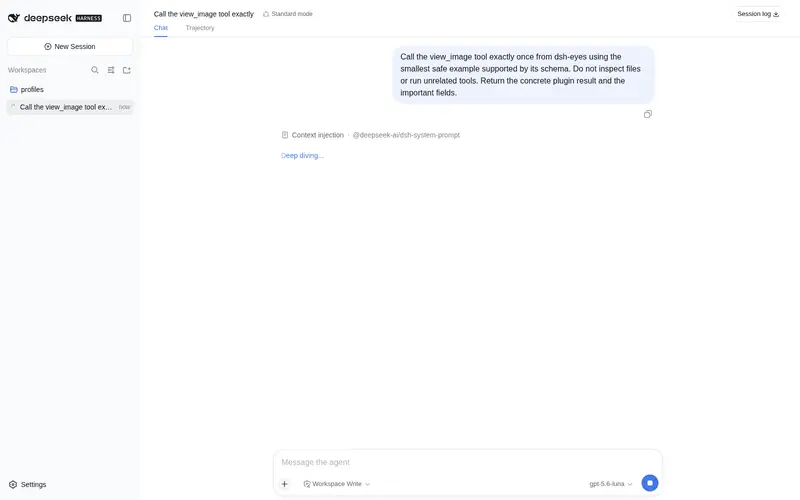
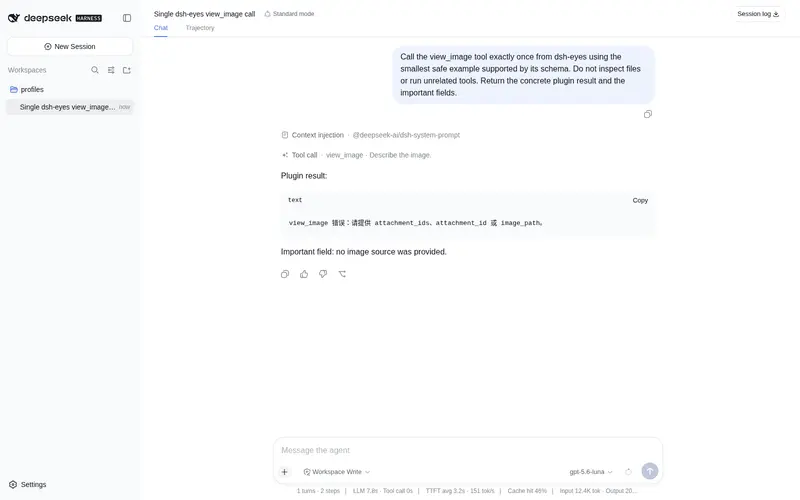
What it does
On-demand vision for text-only DeepSeek models: upload images, and the model calls a view_image tool backed by any OpenAI-compatible vision endpoint (Qwen/DashScope by default).
Best for
- Users who want text-only DeepSeek models to inspect pasted or attached images on demand.
- Workflows where a main text model should decide when to request image description or OCR.
- Teams with an OpenAI-compatible vision endpoint and configured vision API credentials and model.
- Sessions that need to revisit persisted image attachments after context compression or process restart.
Not ideal for
- Deployments without a configured `VISION_API_KEY`, `VISION_MODEL`, and reachable compatible vision service.
- Native Anthropic or Gemini vision APIs without an OpenAI-compatible gateway.
- Users unwilling to have text-only models shown as image-capable in the model selector; this is required for attachment admission.
- Local-path image workflows involving files over the documented 15 MB limit, or attachments exceeding Harness storage limits.
README
dsh-eyes
中文 · English
给 DeepSeek Harness 里的纯文本大模型(如 DeepSeek)装上「随时可用的眼睛」:图片粘贴/附件后留在后台,模型自己在需要时调用 view_image 工具去看图(底层走任意 OpenAI 兼容视觉接口,默认百炼 Qwen),就像模型原生具备多模态一样。
快速体验:上传图片,自然丝滑
不需要开关、不需要手动调用工具——直接 Ctrl+V 粘贴一张截图,像发普通消息一样提问即可。DeepSeek 会在思考里自然地决定「我要看这张图」,自己调用 view_image,然后直接给出结构化回答,一气呵成:

上图实拍:粘贴一张 MSN 截图,问「介绍这个页面的布局」。注意中间的
Think → Tool call · view_image → Think过程——识别不是被强行塞进第一步,而是模型在需要时自己决定看图;视觉提取与最终回答无缝衔接,就像 DeepSeek 原生具备多模态一样丝滑。
解决的问题
DeepSeek 是纯文本模型,Harness 默认不允许给「当前模型不支持图片」的会话发送带图消息。本插件:
- 让带图消息能通过发送准入并被持久化保存;
- 在把消息交给主模型之前把图片剥离成一句引用说明;
- 注册
view_image工具,主模型随时调用它看图,视觉模型提取描述/OCR 文字后交给主模型继续回答。
安装
# 1) 安装插件(github 方式,也可以换成 npm 包名)
dsh plugin --profile web add github:Leeminjing/dsh-eyes

# 2) 配置 API Key(Windows;换成你所用视觉提供商的 key)
setx VISION_API_KEY "sk-你的key"

# 3) 配置视觉模型(必填,换成你账号里可用的视觉模型)
setx VISION_MODEL "qwen-vl-plus"

# 4) 配置接口端点(默认百炼;换其他 OpenAI 兼容提供商时必改)
setx VISION_ENDPOINT "https://dashscope.aliyuncs.com/compatible-mode/v1/chat/completions"

# 5) 重启 dsh,让环境变量生效
setx只对新启动的进程生效,所以配置后要重启 dsh。 模型名与端点因提供商而异:百炼用qwen-vl-plus/qwen-vl-max,OpenAI 用gpt-4o,OpenRouter 用qwen/qwen2.5-vl-72b-instruct等。详见下表。
使用
- 在会话里粘贴一张图片(Ctrl+V)或拖拽/点附件;
- 发一句问题,例如「这张图里写了什么?」;
- 主模型收到的是「图片引用说明」,它需要看图时会自动调
view_image(attachment_id=…); -
view_image用视觉模型提取图片内容,主模型基于这些文字回答。
你可以在后续任意一轮继续追问同一张图(「再看一下图里第二行的数字」),图片一直留在后台,可反复查看。
工作原理
粘贴图片 + 提问
   │
   ▼
发送准入 ──(1) 把目标模型标记为“支持图片”── 图片持久化(生成 attachment_id)
   │
   ▼
请求派发前 ──(2) 剥离图片:image 块 → 【图片N attachment_id=…】引用说明,登记到本会话分片
   │
   ▼
主模型收到纯文本(引用说明 + 你的问题)
   │   主模型决定看图时
   ▼
调用 view_image(attachment_id) ──(3) 读字节 → base64 → 调视觉接口
   │
   ▼
视觉模型返回描述/OCR 文字
   │
   ▼
主模型基于文字作答
三个环节:
-
准入放行:包装
llm.resolveModelInfo,让目标主模型声明inputModalities: ['text','image'],使带图消息能通过 Host 的发送准入检查并被保存。 -
图片剥离:包装
llm.streamWithRegistration,在请求派发给模型前把每个image块(含嵌套在tool-result里的)换成带序号的引用说明(【图片N attachment_id=…】),并按sessionId分片登记attachment_id → ImageAttachmentRef。构造新的 options 对象传下去(原对象可能被冻结)。 -
view_image工具:按单个attachment_id、或attachment_ids数组一次看多张(或本地image_path)读出图片字节,转成data:URL,POST 到配置的视觉接口(按VISION_API_STYLE自动选用 Chat Completions 或 Responses 协议),返回文本(多图时带【图片N】分段)。
配置
| 配置项 | 环境变量 | 默认值 |
|---|---|---|
| API Key | VISION_API_KEY |
(必填) |
| 视觉模型 | VISION_MODEL |
(必填,无默认) |
| 接口端点 | VISION_ENDPOINT |
https://dashscope.aliyuncs.com/compatible-mode/v1/chat/completions |
| API 风格 | VISION_API_STYLE |
auto(按端点路径自动判断) |
| 目标主模型 | —(代码内 targetProvider) |
deepseek-official |
本地图片大小上限(image_path) |
—(代码内 maxImageBytes) |
15 MB |
粘贴/附件图片的大小受 Harness 附件存储限制(默认 5 MB),与上表「本地文件」上限无关。
同时支持 Chat Completions 与 Responses API:
VISION_API_STYLE取值auto(默认)/chat/responses。
auto:按端点路径自动识别——.../chat/completions→ Chat Completions,.../responses→ Responses API;裸 base URL 默认 Chat Completions 并自动补全路径。chat/responses:强制指定,插件会把端点路径自动归一化到对应协议。 请求体与响应解析都随风格切换(messages/image_url↔input/input_image),对使用方式完全透明,切换无需任何改动。
常见 OpenAI 兼容视觉提供商:
| 提供商 | 端点 | 模型示例 |
|---|---|---|
| 阿里云百炼 | https://dashscope.aliyuncs.com/compatible-mode/v1/chat/completions |
qwen-vl-plus / qwen-vl-max
|
| OpenAI | https://api.openai.com/v1/chat/completions |
gpt-4o / gpt-4o-mini
|
| Moonshot | https://api.moonshot.cn/v1/chat/completions |
moonshot-v1-8k-vision-preview |
| OpenRouter | https://openrouter.ai/api/v1/chat/completions |
qwen/qwen2.5-vl-72b-instruct |
也可在 cordis.patch.yml 里给该行传 config(会覆盖默认值 / 环境变量):
- insert:
    - id: dsh-eyes
      name: dsh-eyes
      config:
        apiKey: sk-xxx          # 同 VISION_API_KEY
        model: qwen-vl-plus     # 同 VISION_MODEL
        # endpoint, targetProvider, maxImageBytes 同理
已知限制与说明
-
两个内部包装点:因为 Harness 目前没有公开的扩展点用于「发送准入的图片能力判断」和「派发前剥离图片」,本插件直接包装了
llm.resolveModelInfo与llm.streamWithRegistration两个方法。副作用是:纯文本主模型会在模型选择器里显示为支持图片(这是有意为之,才能放行带图消息)。 - 主模型自动适配:任何纯文本主模型(不限 provider)都会被自动保护;本身原生支持图片的多模态主模型不受干预,图片直接原生通过。
- 视觉接口要求 OpenAI 兼容(Chat Completions 或 Responses API);Anthropic / Gemini 的原生接口不直接支持,需走它们的 OpenAI 兼容网关。
-
会话隔离与持久化:图片引用索引按
sessionId分片(一个会话只能查看自己的附件),并持久化到.dsh/attachments/v1/dsh-eyes-index.json(启动时读回、新图落盘)。因此即使上下文被压缩、或进程重启,模型仍能通过attachment_id查看历史图片。 - API Key 请用环境变量 / 凭证服务管理,不要硬编码进仓库。
License
Frequently Asked QuestionsFAQ
Use the verified command dsh plugin --profile default add github:Leeminjing/dsh-eyes in a DSH-enabled shell. The command resolves the public package metadata and keeps the plugin attached to the catalog identity shown on this page.
Compatibility follows the bundle and profile status shown above. If a profile is not detected, keep the plugin disabled there and check the repository documentation before enabling it in production.
The GitHub link and activity metadata are the source of truth for releases and maintenance. Revisit this page after a new release to confirm the catalog has observed the latest version.