LeslieWylie/dsh-fleet-audit
DSH agent-fleet hygiene audit plugin: credential-file permissions, embedded git-remote credentials (masked), provider token literals. Read-only, zero-dependency, deterministic.
Listed
1
Security
Bundle verified
Preview
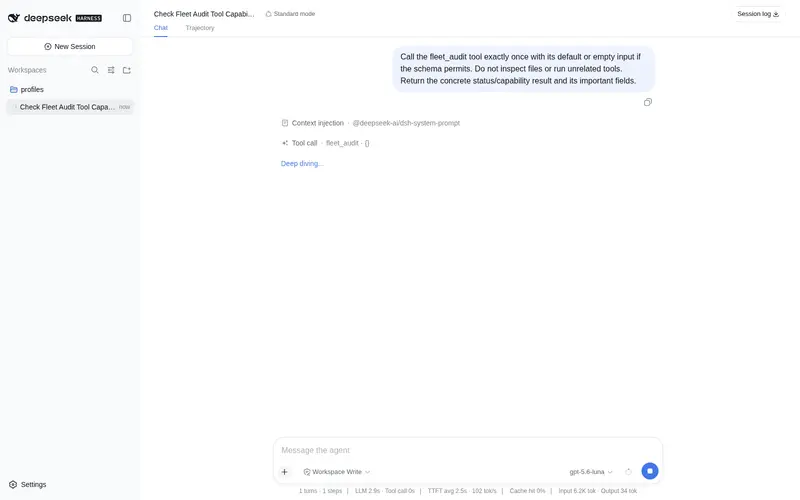
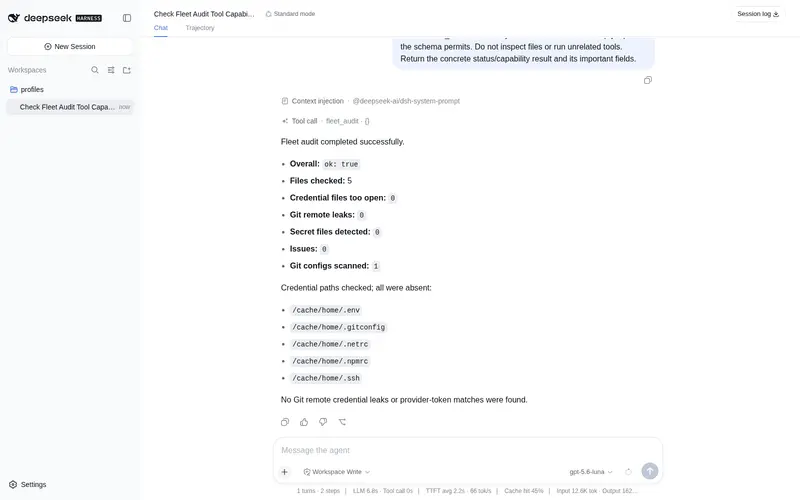
What it does
Read-only agent-fleet credential hygiene audit: credential-file permissions, embedded credentials in git remotes (masked in output), and provider token literal counts; zero-dependency and deterministic.
Best for
- Operators performing a bounded, read-only credential-hygiene check across agent machines or selected repositories.
- Teams checking credential-file permissions and embedded credentials in Git remote URLs without exposing raw values.
- Security reviews that need deterministic counts of common provider-token prefixes for manual follow-up.
Not ideal for
- Audits of encrypted stores, system keychains, or binary files; only text configuration files are scanned.
- Users expecting automatic remediation or credential rotation; the plugin never modifies files.
- High-assurance secret discovery where heuristic prefix matching is insufficient because it can miss or misclassify values.
- Broad filesystem discovery without explicit roots or files; default coverage is limited to a fixed credential list.
README
🔎 dsh-fleet-audit
DSH agent 舰队卫生审计插件:只读、零依赖、确定性。检查三件事,输出全程脱敏:
-
凭据文件权限 —— 常用凭据文件(
~/.gitconfig、~/.netrc、~/.npmrc、~/.env、~/.ssh/)应收紧为600/《700,组/其他可读一律标记为tooOpen` -
git remote 内嵌凭据 —— 扫描
~/.gitconfig与给定目录下的.git/config,识别https://user:pass@host、https://oauth2:TOKEN@host、token 型用户名等;输出 URL 中凭据以***掩码,逐字节保证不泄露原文 - provider token 前缀字面量(可关)—— github / github-fine-grained / gitlab / gitlab-ci / slack / aws / openai / jwt 常见前缀,只报「类型 × 出现次数」
为什么
多 agent 时代的机器上,凭据散落在 ~/.gitconfig、agent 配置、.git/config 与各种 .env 里。git 的 url.*.insteadof 或 pushurl 一旦嵌了 token(例如 https://oauth2:<token>@gitlab.example.com/...),任何 git remote -v 都会把密钥打印进日志/对话/CI。一键只读审计 + 脱敏输出,是安全基线体检的第一道。
安装
# 本地验证
dsh plugin --profile web add /path/to/dsh-fleet-audit

# 发布后(npm / GitHub)
dsh plugin --profile web add dsh-fleet-audit
# 或
dsh plugin --profile web add github:LeslieWylie/dsh-fleet-audit
安装后重启 dsh web,直接说「审计一下本机凭据卫生 / run fleet_audit」。
用法(工具参数)
| 参数 | 类型 | 说明 |
|---|---|---|
roots |
string[] | 递归扫描 .git/config 的目录(可选;默认只查 ~/.gitconfig) |
files |
string[] | 额外要查权限的凭据文件绝对路径 |
scanSecrets |
boolean | 是否扫描 token 前缀字面量(默认 true) |
maxGitConfigs |
number | git config 扫描上限(默认 200,上限 2000) |
maxDepth |
number | 目录递归深度(默认 5,上限 20) |
输出示例(脱敏)
{
  "ok": true,
  "summary": { "files": 5, "tooOpen": 1, "gitLeaks": 2, "secretFiles": 1, "issues": 4, "scannedGitConfigs": 12 },
  "checks": {
    "credentialFiles": [
      { "path": "/Users/alice/.gitconfig", "exists": true, "mode": "644", "tooOpen": true }
    ],
    "gitRemoteLeaks": [
      { "file": "/Users/alice/code/proj/.git/config", "host": "gitlab.example.com", "maskedUrl": "https://***:***@gitlab.example.com/group/proj.git" }
    ],
    "secrets": [
      { "file": "/Users/alice/.gitconfig", "providers": [ { "provider": "github", "count": 1 } ] }
    ]
  },
  "note": "Read-only audit; secret-like values are masked in the output. Fix permissions with chmod 600 and rotate any exposed credentials."
}
安全边界
- 只读:不写文件、不启进程、不访问网络、不保存状态
- 脱敏:所有疑似凭据一律掩码;测试同时断言「输出 JSON 不含原始密钥」
- 有界:git config 数量与递归深度均设上限,可防扫描失控
开发
npm install
npm run check   # typecheck + vitest + build
已知局限
- 仅扫描文本类配置文件(不会解析加密存储、系统钥匙串、二进制文件)
- token 前缀识别为启发式规则:可能漏报(非常规前缀)或误报(需人工复核)
- 默认只检查固定凭据列表;任意路径凭据请通过
roots/files显式指定 - 不主动修改任何文件;发现泄漏后请自行
chmod 600并轮换密钥
回滚
dsh plugin --profile <p> remove dsh-fleet-audit # 或从 dsh.profile.bundles 删除该行
插件只读、无状态,卸载不影响任何用户数据。
独立社区插件
本项目为独立社区插件,与 DeepSeek 官方或其 DSH 仓库无隶属关系;”official”
身份仅通过官方渠道授予。发布时会给仓库添加 dsh-plugin topic 以便发现。
许可
MIT © LeslieWylie
Frequently Asked QuestionsFAQ
Use the verified command dsh plugin --profile default add github:LeslieWylie/dsh-fleet-audit in a DSH-enabled shell. The command resolves the public package metadata and keeps the plugin attached to the catalog identity shown on this page.
Compatibility follows the bundle and profile status shown above. If a profile is not detected, keep the plugin disabled there and check the repository documentation before enabling it in production.
The GitHub link and activity metadata are the source of truth for releases and maintenance. Revisit this page after a new release to confirm the catalog has observed the latest version.