LeslieWylie/dsh-md-preview
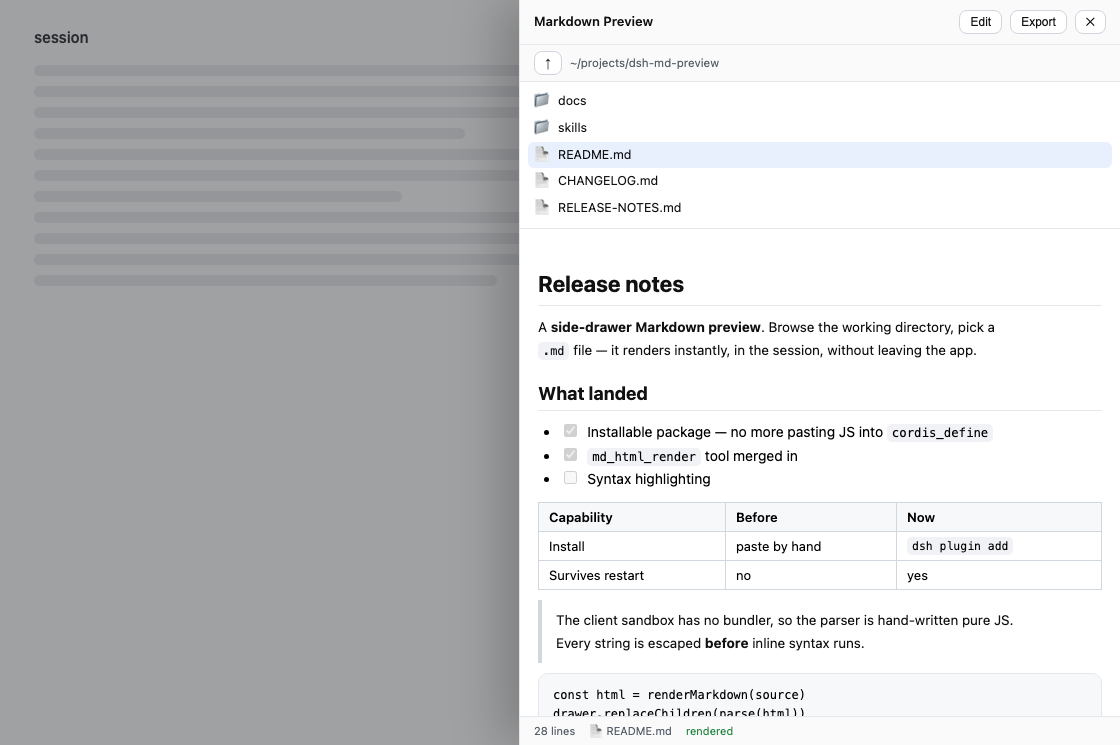
Render Markdown to standalone, self-contained HTML in the DeepSeek Harness — an md_html_render tool that works headless, plus a preview/export drawer in the web GUI. One renderer behind both. Zero dependencies.
Listed
2
Docs
Bundle verified
What it does
Render Markdown to a standalone, self-contained HTML page: an `md_html_render` tool that works in a headless profile, plus a web drawer to browse, preview, edit and export local `.md` files; both share one renderer, with no runtime dependencies.
Best for
- Users who need to turn Markdown into a portable, self-contained HTML file for sharing or offline viewing.
- Headless DSH workflows that need model-callable Markdown rendering without a GUI.
- DSH Web users who want to browse, preview, make light edits to, and export local `.md` files in place.
Not ideal for
- Users seeking a full-featured Markdown editor; the drawer provides a plain textarea rather than a second editor.
- Workflows requiring runtime-loaded fonts, scripts, stylesheets, or remote assets; exported pages are intentionally self-contained.
- Users installing the npm package named `dsh-md-preview`; the README states that name belongs to an unrelated project, while this plugin publishes as `dsh-md-html-render`.
- Save targets denied by the session filesystem sandbox; HTML is still returned, but the file cannot be written there.
README
📄 dsh-md-html-render
| English | 简体中文 |
Turn Markdown into a page you can send to someone.
A Markdown renderer for the DeepSeek Harness with two front doors and one engine behind them:
-
md_html_render— a tool the model can call. Give it Markdown, get back a complete, self-contained HTML document, optionally written to disk. Works in a headless profile with no GUI at all. -
The MD drawer — press MD in the web session header, browse your working directory, click a
.mdfile. It renders in place. No new tab, no second editor, no context switch.
Both go through the same renderer, so a page the model generates and a page you export from the drawer are byte-for-byte identical. A test asserts that on every case in the corpus.
Install
Renamed in v0.3.0. This package was
dsh-md-previewthrough v0.2.2. The npm namedsh-md-previewwas registered by an unrelated project from another author on 2026-08-17, so this one publishes asdsh-md-html-render— the name of the tool it has always shipped. Installingdsh-md-previewfrom npm gets you that other project, not this one. The GitHub repository path is unchanged, so existing git pins keep resolving; bump the pin to#v0.3.0, because the dependency key has to match this package’s new name.
Not on npm yet — install straight from GitHub. Add it to your profile’s package.json:
// ~/.dsh/profiles/<profile>/package.json
{
  "dependencies": {
    "dsh-md-html-render": "github:LeslieWylie/dsh-md-preview#v0.3.0"
  },
  "dsh": {
    "profile": {
      "bundles": ["dsh-md-html-render"]
    }
  }
}
Then reinstall and restart the profile:
cd ~/.dsh/profiles/<profile> && pnpm install
dsh --profile <profile>
Drop the #v0.3.0 to track the default branch instead of pinning.
Frequently Asked QuestionsFAQ
Use the verified command dsh plugin --profile default add github:LeslieWylie/dsh-md-preview in a DSH-enabled shell. The command resolves the public package metadata and keeps the plugin attached to the catalog identity shown on this page.
Compatibility follows the bundle and profile status shown above. If a profile is not detected, keep the plugin disabled there and check the repository documentation before enabling it in production.
The GitHub link and activity metadata are the source of truth for releases and maintenance. Revisit this page after a new release to confirm the catalog has observed the latest version.