linenxi-ctrl/dsh-vision
为 DeepSeek Harness 增加外挂识图模型:圆形鲸鱼按钮、发送图片识图自动回传、模型自主截图+识图工具、多协议自动适配、小白一键安装(未装 Node.js 自动下载)
Listed
12
Vision
Bundle verified
Preview
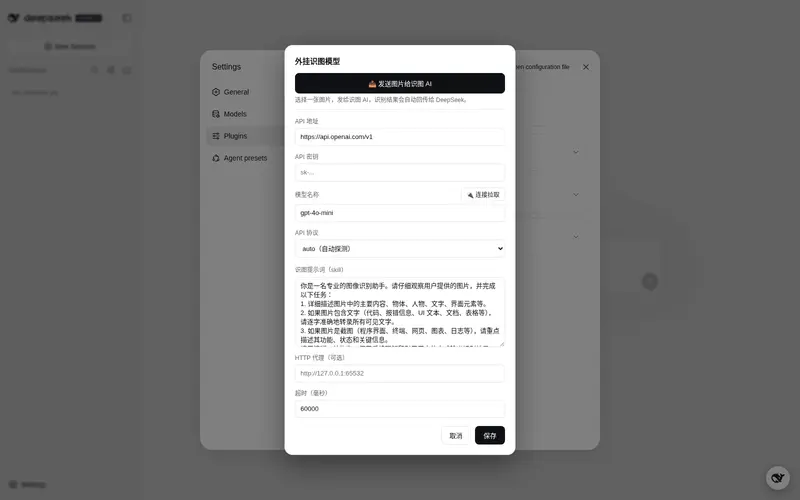
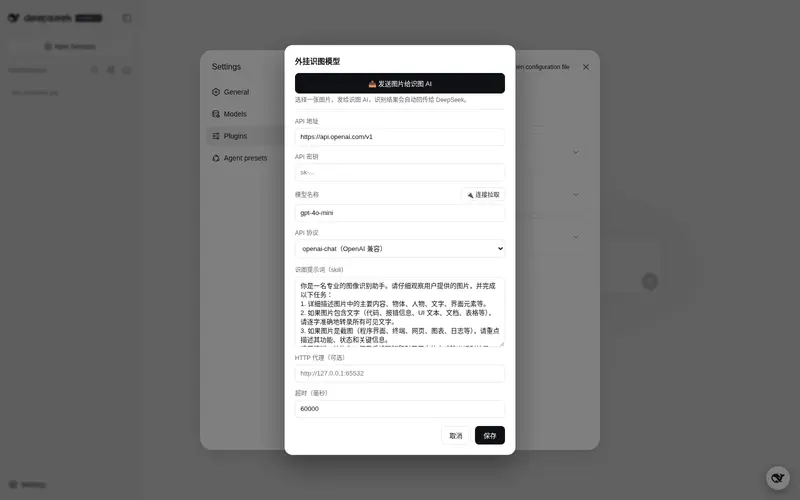
What it does
External vision plugin for DeepSeek Harness: whale-button config panel, image recognition with auto-reply, and agent screenshot/recognize tools.
Best for
- DSH users pairing a text-only agent with an external vision model for image understanding.
- Workflows where selected images should be recognized and the resulting text automatically returned to the current conversation.
- Agents that need screenshot-and-recognize tools and access to OpenAI, Anthropic, Gemini, or compatible custom vision endpoints.
Not ideal for
- Environments without an accessible external vision API, suitable model, and any required API credentials.
- Custom endpoints that require non-Bearer special authentication headers, which the custom protocol does not support.
- Screenshot workflows missing platform dependencies: PowerShell and System.Drawing on Windows, screencapture on macOS, or ImageMagick import on Linux.
- Users whose current model already handles images directly and who do not need a separate recognition service.
README
dsh-vision —— DeepSeek Harness 外挂识图模型插件





为 DeepSeek Harness 增加「外挂识图模型」能力:让本来不具备视觉能力的模型,通过一个可自定义地址/密钥/提示词的外部视觉模型来「看懂」图片与屏幕。
功能
- 网页配置按钮与面板:页面右下角出现一个DeepSeek 鲸鱼圆形按钮(可拖动),点击即可配置外挂识图模型的 API 地址、密钥、模型名、识图提示词(skill)、代理与超时。
- 发送图片识图并自动回传:点鲸鱼按钮打开面板,点「📤 发送图片」选图,插件会先把它发给外挂识图模型,等识别完成后把识别文本自动作为消息发回当前会话(无需手动复制粘贴),DeepSeek 基于识别文本作答。
-
模型自己截图 + 识图:插件为 agent 注入
screenshot(截屏)与recognize_image(识图)两个工具,并注入提示词,模型可自行「截图 → 识图 → 等待结果」。 -
自动适配识图 API 协议:内置 OpenAI Chat Completions、OpenAI Responses、Anthropic Messages、Google Gemini 四种协议,并按
apiBase自动探测;另有custom模板协议适配任意长尾接口。
文件结构
dsh-vision/
├── install.bat        # Windows 一键安装(双击)
├── install.sh         # macOS/Linux 一键安装
├── install.mjs        # 安装脚本本体(npm 场景只做 agent 工具平面;目录场景全自动)
├── bootstrap-node.ps1 # Windows 引导脚本:未装 Node.js 时从国内镜像自动下载免安装版
├── package.json       # 包定义(dsh.bundle + dsh.client 声明;tool 为独立子路径)
├── cordis.patch.yml   # 插件挂载声明(dsh.bundle.patch 自动应用到 profile layer)
├── lib/
│   ├── index.js       # host 平面插件:识图服务 + 协议适配 + settings 配置 + HTTP 路由
│   ├── tool.js        # agent 工具插件:recognize_image / screenshot + 提示词注入
│   └── client.js      # 客户端插件:鲸鱼按钮 / 配置面板 / 发送图片识图 / 自动回传
└── README.md
工作原理
[用户点鲸鱼按钮选图]                [模型调用工具]
      │                               │
      ▼                               ▼
  client 转 base64 发送          screenshot 工具截屏
      │                               │
      ▼                               ▼
  POST /api/vision/recognize    recognize_image 工具
      │                               │
      ▼                               ▼
  host 插件 ctx.vision 服务 ──► 协议自动适配后调用外挂识图 API
      │                               │
      ▼                               ▼
  识别文本 → 自动注入当前会话    识别文本返回给模型
识图请求在 host(Node)侧发起,因此不受浏览器 CORS 限制;图片请求走同源 /api/vision/recognize,同样无 CORS 问题。
安装
两种方式任选:npm 安装(标准,推荐)或手动 / 离线(下载 zip,无需 pnpm)。
方式一:npm 安装(推荐)
需要系统已装 Node.js 18+ 与 pnpm。
# 在 DSH 的 web profile 安装本插件(DSH 自动把 cordis.patch.yml 加入 profile layer)
dsh plugin --profile web add @linenxi-ctrl/dsh-vision

# (可选)配置 agent 工具平面:让模型能自己截图 + 识图
node ~/.dsh/profiles/web/node_modules/@linenxi-ctrl/dsh-vision/install.mjs
安装后无需手动改任何配置文件:package.json 的 dsh.bundle.patch 声明会被 DSH 自动 reconcile 进 profile 的 dsh.profile.bundles,cordis.patch.yml 即成为该 profile 的一个 bundle layer。
方式二:手动 / 离线(无需 pnpm,小白友好)
从 Releases 下载 zip 解压:
- Windows 双击
install.bat,macOS/Linux 运行bash install.sh——无需预装 Node.js:脚本检测不到时会自动从国内镜像(npmmirror / 华为云 / 腾讯云)下载免安装版(无需管理员权限); - 脚本会自动:复制英文副本、复制进每个 profile 的
node_modules、在cordis.patch.yml加 vision 行、创建 agent presetvision(复制随附 standard 并加入识图工具)并设为默认; -
重启 DSH(关闭后重新
dsh web)。
实测要点(DSH 0.1.0-rc.6):host + client 插件(
cordis.patch.yml)的name必须用「包名」,插件须在 profile 的node_modules下;agent 工具插件(preset)的name支持绝对路径(自动转file://);agent preset 不能叫standard(会被随附 standard 遮蔽)。
更新与卸载
更新:先卸载旧版,再安装新版即可(cordis.patch.yml 与 preset 会自动重建)。
一键卸载:
- Windows:双击
uninstall.bat - macOS/Linux:运行
bash uninstall.sh - 任意平台:
node uninstall.mjs
卸载脚本会自动:删除英文副本与 profile node_modules 里的插件、从 cordis.patch.yml 移除 vision 挂载行、删除 agent preset「vision」、恢复 settings.yaml 的默认 preset。
npm 方式安装的插件,请先用
dsh plugin --profile web remove @linenxi-ctrl/dsh-vision卸载 npm 包,再跑上面的卸载脚本清理 preset 与设置。
配置
点页面右下角鲸鱼按钮,或直接编辑 $DSH_HOME/settings.yaml 中的 vision 段:
| 字段 | 默认值 | 说明 |
|---|---|---|
apiBase |
https://api.openai.com/v1 |
识图模型地址(按所选协议填到基础路径即可) |
apiKey |
空 | API 密钥(secret,不回显) |
model |
gpt-4o-mini |
模型名称 |
protocol |
auto |
协议:auto / openai-chat / openai-responses / anthropic / gemini / custom
|
prompt |
见下 | 识图提示词(skill),可自定义 |
proxy |
空 | 可选 HTTP 代理,如 http://127.0.0.1:65532
|
timeoutMs |
60000 |
单次识图超时(毫秒) |
requestTemplate |
空 | 仅 custom:请求体 JSON 模板 |
responsePath |
空 | 仅 custom:响应文本取路径,如 choices.0.message.content
|
默认识图提示词:
你是一名专业的图像识别助手。请仔细观察用户提供的图片……(详细描述 + 逐字转录文字 + 截图场景重点描述)
使用
- 发送图片识图:打开一个会话后,点右下角鲸鱼按钮 → 面板点「📤 发送图片」选图。识别期间右上角显示「外挂模型正在识图当中」,完成后自动把识别文本发回当前会话。
-
模型自主识图:直接对模型说「看看我现在屏幕上的报错」,模型会调用
screenshot截图、再调用recognize_image识图并继续。
API 协议自动适配
protocol 默认 auto,按 apiBase 自动识别;也可手动指定:
| 协议 | 识别条件 / 用法 | 请求要点 | 响应取文本 |
|---|---|---|---|
openai-chat |
默认;apiBase 填到 /v1
|
POST /chat/completions,image_url 内嵌 data URL |
choices[0].message.content |
openai-responses |
apiBase 含 /responses
|
POST /responses,input_image
|
output[].content[].text |
anthropic |
apiBase 含 anthropic
|
POST /v1/messages,x-api-key 头,source.base64
|
content[].text |
gemini |
apiBase 含 gemini/generativelanguage/googleapis
|
POST /models/{model}:generateContent,inline_data,x-goog-api-key 头 |
candidates[0].content.parts[].text |
custom |
手动指定 | 按 requestTemplate 构造 |
按 responsePath 取路径 |
custom 模板协议
custom 用于适配上述四种之外的长尾接口:
-
requestTemplate:请求体 JSON 模板。占位符必须裸写(不带引号),替换时会自动补上 JSON 引号。支持的占位符:-
{{model}}→ 模型名 -
{{prompt}}→ 识图提示词 -
{{image}}→ 图片纯 base64(不含 data: 前缀) -
{{dataUrl}}→ 完整data:image/...;base64,... -
{{mime}}→ 图片 MIME 类型
示例(等价于 OpenAI Chat):
{"model":{{model}},"messages":[{"role":"user","content":[{"type":"text","text":{{prompt}}},{"type":"image_url","image_url":{"url":{{dataUrl}}}}]}]} -
-
responsePath:从响应 JSON 取文本的点号路径(数字为数组下标),如choices.0.message.content、data.text、result.0.content。 - 鉴权默认走
Authorization: Bearer <apiKey>(apiKey为空则不携带);需要特殊鉴权头的接口暂不支持,可提 issue 扩展。
提示:占位符若误加了引号(写成
"{{image}}"),替换后会得到""base64""导致 JSON 非法。请保持裸写。
故障排查
| 现象 | 处理 |
|---|---|
| 识图失败:HTTP 401/403 |
apiKey 未填或填错,去面板重新保存密钥 |
| 识图失败:HTTP 404 |
apiBase 拼错或与协议不匹配;确认填到基础路径(如 OpenAI 填到 /v1,Anthropic 填 https://api.anthropic.com,Gemini 填到 /v1beta) |
| 识图失败:结果为空 | 协议识别不对时手动指定 protocol;custom 协议检查 responsePath 是否正确 |
| 外网直连不通 | 在 proxy 填 http://127.0.0.1:65532(或你自己的代理) |
| 点「发送图片」没反应 | 确认已打开一个会话;确认右下角有鲸鱼按钮(client 插件已挂载) |
| 模型不调用识图工具 | 确认 tool.js 已加进 preset 的 agent.cordis.yml,且该会话使用该 preset |
| 截图失败 | Windows 下需 PowerShell 可用(System.Drawing);macOS 用 screencapture;Linux 需 ImageMagick import
|
Frequently Asked QuestionsFAQ
Use the verified command dsh plugin --profile default add github:linenxi-ctrl/dsh-vision in a DSH-enabled shell. The command resolves the public package metadata and keeps the plugin attached to the catalog identity shown on this page.
Compatibility follows the bundle and profile status shown above. If a profile is not detected, keep the plugin disabled there and check the repository documentation before enabling it in production.
The GitHub link and activity metadata are the source of truth for releases and maintenance. Revisit this page after a new release to confirm the catalog has observed the latest version.