litestartup-com/dsh-api-gateway
DeepSeek Harness's API Gateway plugin: Any third-party client can interact with your DSH Agent.
Listed
2
Remote
Bundle verified
Preview
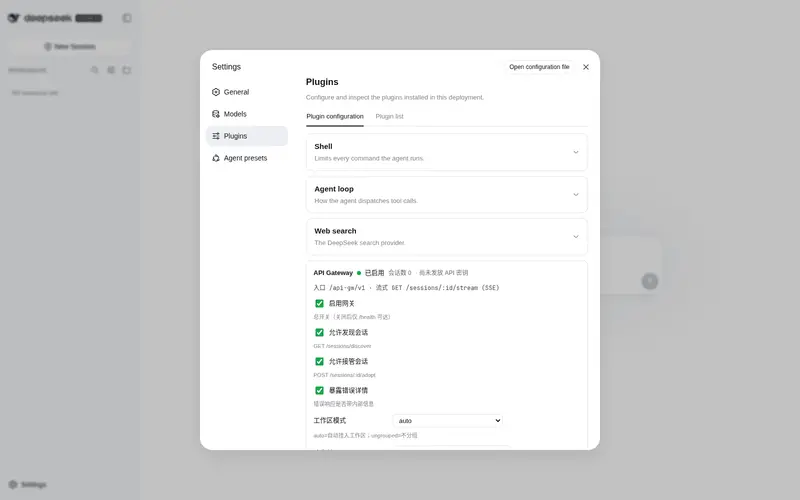
What it does
REST + SSE gateway exposing running Harness sessions to third-party clients: API-key auth, token streaming, workspace grouping, and adopting GUI sessions to keep chatting.
Best for
- Third-party clients that need to create and continue Harness agent sessions over REST.
- Applications that need token-level reply streaming over SSE with API-key authentication.
- Teams that want API sessions grouped into workspaces or need to adopt existing GUI sessions.
Not ideal for
- Deployments requiring built-in TLS termination or OAuth/OIDC authentication.
- Multi-tenant services that currently require per-key isolation, revocation, rate limits, or auditing.
- Horizontally scaled, multi-process deployments or sessions that must survive gateway restarts.
README
dsh-api-gateway
| English | 中文 |
A plugin for DeepSeek Harness that turns a running Harness into an HTTP API: any third-party client — curl, Python, a browser, an IM bridge — can create agent sessions, stream replies token-by-token over SSE, and continue conversations started in the Web UI, all behind API-key authentication. API sessions drive the same agent machine the GUI drives (inbox + session log), so both worlds stay in sync.
dsh plugin --profile web add github:litestartup-com/dsh-api-gateway
Features
-
REST + SSE: 9 endpoints; token-level streaming (
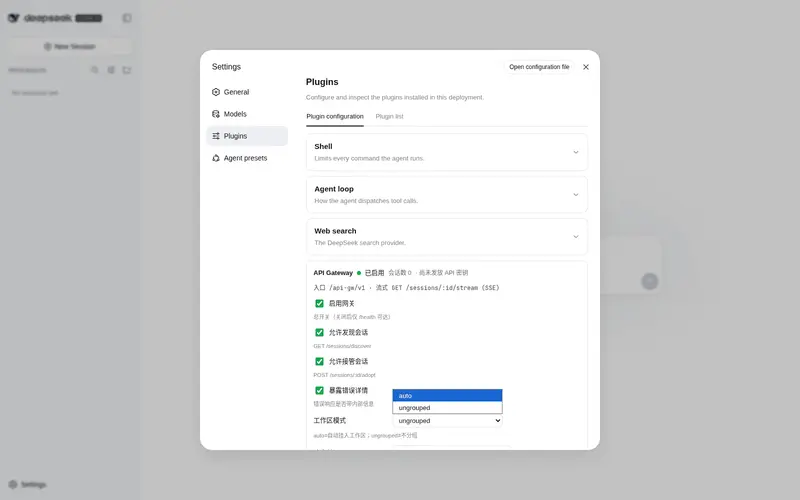
assistant/chunk), server closes the stream atturn_end - GUI settings card: Settings → Plugins → Configurable → API Gateway (status, soft on/off, key rotation)
- Workspace membership: API sessions land in real workspaces and show grouped in the sidebar, never under “ungrouped”
- Session discovery & adoption: list all sessions, read any session’s full history (read-only), and adopt a GUI session to keep driving it over the API — live co-driving or cold resume with full context
-
Reasoning split: replies separate
text(visible answer) fromreasoning(thinking), never concatenated -
Extensible: publishes
gateway/session-created/gateway/message/gateway/turn-endon the Cordis event bus for other host plugins - Any language client: works from Linux/macOS/Windows, PowerShell included (UTF-8 aware, GBK-tolerant server side)
Install
Recommended: dsh plugin add
# from GitHub (prebuilt lib/ committed — no build approval needed)
dsh plugin --profile web add github:litestartup-com/dsh-api-gateway

# from a packed tarball
dsh plugin --profile web add ./dsh-api-gateway-0.1.0.tgz
The built
lib/is committed, so GitHub installs need no build approval. Build scripts run only when packing or publishing (prepack).
Uninstall: dsh plugin --profile web remove dsh-api-gateway.
Manual composition row (no CLI)
The plugin is an ordinary Cordis row; you can also compose it by hand. It publishes a cross-session HTTP surface, so it belongs in the host composition (or the profile’s patch layer) — never inside an agent preset:
- id: dsh-api-gw
  name: dsh-api-gateway
  config:
    prefix: /api-gw/v1          # route prefix
    enabled: true               # master switch (also toggleable at runtime)
    apiKeys: []                 # pre-provisioned static API keys
    allowKeyProvision: true     # one-time POST /key bootstrap
    adminKey: change-me         # enables admin endpoints + card controls
    maxSessions: 20             # concurrent session cap
    workspaceMode: auto         # auto (join a workspace) | ungrouped
    defaultWorkspacePath: ''    # fallback directory for auto mode
    allowDiscover: true         # GET /sessions/discover
    allowAdopt: true            # POST /sessions/:id/adopt
    corsOrigin: '*'             # '*' or an explicit origin / list
    exposeErrors: true          # include internal details in error responses
    sseHeartbeatMs: 30000       # SSE heartbeat interval (0 disables)
    bodyTimeoutMs: 30000        # request body read timeout
Every key has a schema default — see examples/cordis.yml for the annotated row.
Quick start
BASE=http://127.0.0.1:3080/api-gw/v1
KEY=$(curl -s -X POST $BASE/key | jq -r .apiKey)              # first call claims the key, once
SID=$(curl -s -X POST $BASE/sessions -H "Authorization: Bearer $KEY" | jq -r .sessionId)
curl -N $BASE/sessions/$SID/stream -H "Authorization: Bearer $KEY" &    # SSE
curl -s -X POST $BASE/sessions/$SID/messages \
  -H "Authorization: Bearer $KEY" -H "Content-Type: application/json" \
  -d '{"content":"你好,介绍一下你自己"}'
Windows PowerShell (no extra tools; UTF-8 safe):
$BASE = 'http://127.0.0.1:3080/api-gw/v1'
$KEY  = (Invoke-RestMethod -Method Post "$BASE/key").apiKey
$SID  = (Invoke-RestMethod -Method Post "$BASE/sessions" -Headers @{ Authorization = "Bearer $KEY" }).sessionId
$json  = '{"content":"你好,介绍一下你自己"}'
$bytes = [System.Text.Encoding]::UTF8.GetBytes($json)
Invoke-RestMethod -Method Post "$BASE/sessions/$SID/messages" `
  -Headers @{ Authorization = "Bearer $KEY" } -ContentType 'application/json; charset=utf-8' -Body $bytes
PowerShell 5.1 sends ANSI/GBK by default → garbled Chinese. Use the UTF-8 byte form above (or declare
charset=utf-8); PowerShell 7 is UTF-8 by default. The server honors the requestContent-Typecharset (default UTF-8, GBK-tolerant). Nojq?brew install jq, or use the Python/PowerShell examples.
⚠️ In Windows PowerShell, do not inline JSON with
curl.exe -d '{"...":"..."}': PowerShell 5.1 strips the inner double quotes when passing arguments to native programs (a 58-byte JSON measured only 50 bytes on the wire), so the server receives invalid JSON and answers 400 — whichcurl -shides, making the request look stuck. Either write the body to a file and use--data-binary "@file", or use the Invoke-RestMethod form above (.NET argument passing is unaffected).
Python (httpx):
import httpx, json
base = "http://127.0.0.1:3080/api-gw/v1"
key = httpx.post(f"{base}/key").json()["apiKey"]
h = {"Authorization": f"Bearer {key}"}
sid = httpx.post(f"{base}/sessions", headers=h).json()["sessionId"]
httpx.post(f"{base}/sessions/{sid}/messages", headers=h, json={"content": "你好,介绍一下你自己"})
with httpx.stream("GET", f"{base}/sessions/{sid}/stream", headers=h) as r:
    for line in r.iter_lines():
        if line.startswith("data: "):
            print(json.loads(line[6:])["kind"])
Endpoints
| Method | Path | Auth | Description |
|---|---|---|---|
| GET | /health |
none | Status (reachable while disabled) |
| POST | /key |
first call only | One-time API key bootstrap |
| POST | /sessions |
API key | Create a session (provider/model/maxTokens/cwd/workspace) |
| GET | /sessions/discover |
API key | List sessions (id/title/cwd/live/persisted) — no content |
| POST | /sessions/:id/adopt |
API key | Adopt an existing session (live co-drive / resumed cold-resume); returns full history |
| POST | /sessions/:id/messages |
API key | Send a message (string or block array) |
| GET | /sessions/:id/stream |
API key | SSE: hello(replay)→chunk→message→tool_call/tool_result→turn_end |
| GET | /sessions/:id/history |
API key | Full history of any session (read-only) |
| POST | /sessions/:id/cancel |
API key | Cancel the active turn |
| POST | /admin/enable |
Admin key | Runtime soft switch {"enabled": bool}
|
| POST | /admin/rotate-key |
Admin key | Rotate the provisioned key |
Auth headers, either form: Authorization: Bearer <key> (recommended, RFC 6750) or X-API-Key: <key>.
Full spec: openapi.yaml.
Security model
Why can POST /key just hand out a key? It’s a first-call bootstrap, not an open mint:
- Only when no key exists yet does
POST /keygenerate a 32-char random key — exactly once. Afterwards the endpoint is locked (401 without a valid key). - By default the gateway listens on loopback, so the only possible “first caller” is you, the deployer — equivalent to setting a password at first boot.
- Don’t trust the window? Close it:
allowKeyProvision: false, keys only fromapiKeys: [...].
Defense in depth (production checklist):
-
allowKeyProvision: false+ pre-provisionedapiKeys - Keep the gateway loopback-bound; put a reverse proxy + TLS in front if exposed
- Separate
adminKeyfrom API keys - Per-session agent contexts; session ids are cryptographically random
-
Authorization: Beareras the canonical header (X-API-Keykept as an alias) - Constant-time key comparison (
crypto.timingSafeEqual), CSPRNG key generation
Known gaps (public, see roadmap): no per-key rate limiting/quotas, no revocation list, no multi-key management UI, no audit. For hostile multi-tenant scenarios wait for v0.2+, or front the gateway yourself. Holding an API key can discover/read/adopt all sessions — a feature for single-owner setups, a risk otherwise; disable via allowDiscover/allowAdopt (per-key allowlists land in v0.2.0).
Workspace membership
API sessions join workspaces just like GUI sessions — sidebar shows them grouped, never “ungrouped”. POST /sessions accepts workspace in three forms:
{ "workspace": "C:\\projects\\team-a" }                                // path string
{ "workspace": { "path": "C:\\projects\\team-a", "title": "Team A" } } // + title on create
{ "workspace": { "id": "ws-xxx" } }                                    // existing workspace id
Rules (deterministic, server-side):
- Path resolves to an existing workspace → reused; otherwise auto-created (title defaults to the basename)
- Unknown
id→ 400 with the current workspace list (id/title/path) - No
workspace→workspaceMode:auto(default — resolve-or-create for the session cwd /defaultWorkspacePath) orungrouped - Both
cwdandworkspacegiven → workspace wins; session cwd is forced to the workspace canonical path (the durable membership invariant: header cwd == workspace path) - Path pointing at a missing directory → 400 (the gateway never creates directories)
Responses and history include workspace: { id, path, title }. Shared collaborative workspaces (multiple keys on one path) arrive in v0.2.0.
Session discovery & adoption (continue GUI sessions over the API)
# ① discover sessions
curl -s $BASE/sessions/discover -H "Authorization: Bearer $KEY"

# ② adopt one: live co-driving, or cold resume; returns the full history
curl -s -X POST $BASE/sessions/$SID/adopt -H "Authorization: Bearer $KEY"
# → { "mode": "live" | "resumed", "history": [...] }

# ③ keep chatting — identical to gateway-created sessions
curl -s -X POST $BASE/sessions/$SID/messages \
  -H "Authorization: Bearer $KEY" -H "Content-Type: application/json" \
  -d '{"content":"continue where we left off"}'
| mode | Meaning | Lifecycle |
|---|---|---|
created |
Gateway-created session | Owned by the gateway |
live |
Co-driving a GUI-open session: API messages appear in the GUI flow, turns queue from both sides | Borrowed only — plugin stop just untracks it |
resumed |
Cold-resume of an offline session (needs sessionPersistence) |
Owned by the gateway after resume |
GET /sessions/:id/history works for any session (read-only, no adoption needed); /messages, /stream, /cancel require adoption first.
vs the official Python SDK
DeepSeek Harness also ships an official Python SDK (tutorial / SDK reference). The two are not the same thing and not substitutes:
| Official Python SDK | This gateway | |
|---|---|---|
| Nature |
Embedded runtime: pip install deepseek-harness-sdk ships a platform wheel and drives a bundled dsh-jsonrpc-agent subprocess over JSON-RPC stdio |
A door into a running Harness: a host-composition plugin exposing REST + SSE |
| Model credentials | DeepSeek API keys (DEEPSEEK_API_KEY / DEEPSEEK_BASE_URL) |
Gateway’s own API keys (independent of model credentials) |
| Sessions | Private JSONL under session_root, unrelated to any deployment or GUI |
The deployment’s shared session corpus: GUI-visible, workspace-grouped, adoptable |
| Capabilities | Minimal default composition (local bash etc., no skills, no compaction; customizable via cordis) |
The deployment’s default agent preset (tools/skills/sandbox policy) |
| Platforms | Linux x64/arm64, macOS 14+ arm64; no Windows | Any client language/platform, Windows PowerShell included |
| Isolation |
danger-full-access; run in disposable environments/containers |
Inherits the deployment sandbox and approval policy |
| Best for | One-off isolated tasks from Python scripts without a long-running deployment | Third parties connecting to your running deployment, multi-language, unified auth/limits/audit, continuing GUI sessions |
Choose the SDK for disposable Python tasks; choose this gateway for everything that needs a persistent, shared, cross-language door. Don’t mix the two: DeepSeek sk-… keys don’t open this gateway, and pip install deepseek-harness-sdk does not connect to it.
Extensibility (for other plugins)
The gateway publishes three events on the Cordis event bus; other host plugins subscribe with ctx.on(...) (listeners are fiber-owned and can never break the gateway):
-
gateway/session-created→{ sessionId, mode: 'created' | 'live' | 'resumed', workspace, cwd } -
gateway/message→{ sessionId, messageId, text }(on each committed assistant reply) -
gateway/turn-end→{ sessionId, turn, reason, detail }
Typical uses: audit persistence, external alerting, forwarding to IM/webhooks, custom rate-limit sidecars.
Development & testing
pnpm install
pnpm build        # tsc
pnpm smoke        # end-to-end smoke against a running gateway
Smoke env: DSH_AGW_BASE (default http://127.0.0.1:3080/api-gw/v1), DSH_AGW_KEY (optional — claims a key if absent), DSH_AGW_PROMPT. CI (.github/workflows/ci.yml) runs build + syntax checks, with an optional smoke job activated by repository variables.
Roadmap
Milestones ordered by “security first, then experience, then ecosystem”; each version ships independently.
| Version | Theme | Contents |
|---|---|---|
| v0.1.0 | Baseline (current) | REST + SSE, settings card, reasoning/text split, workspace membership, session adopt, cross-platform docs |
| v0.2.0 | Multi-tenant security ★ | Multi-key CRUD/revocation, per-key rate limiting (429 + Retry-After), workspace model: per-key isolated + shared collaborative workspaces (shared/isolated), per-key approval policy, audit (requests/sessions/token usage per key), session persistence (resume after restart) |
| v0.3.0 | Admin UI | Full admin settings page (keys/limits/workspace bindings, session monitor, usage audit, soft switch) + typert @Remote config surface (the admin page’s foundation) + per-key agent preset selection |
| v0.4.0 | Duplex streaming |
webServer.registerUpgrade WebSocket full-duplex (send/stream/cancel on one connection); SSE stays as the lightweight option |
| v0.5.0 | Ecosystem & ops | Python/Node HTTP thin clients (OpenAPI-generated — not the official embedded SDK, see above), deployment guide (reverse proxy + TLS, Docker Compose), metrics/telemetry export, OpenAPI generation in CI |
Out of scope / deferred: horizontal multi-process scaling, built-in TLS termination (a reverse proxy’s job), OAuth/OIDC (revisit after the key-based model settles).
License
MIT
Frequently Asked QuestionsFAQ
Use the verified command dsh plugin --profile default add github:litestartup-com/dsh-api-gateway in a DSH-enabled shell. The command resolves the public package metadata and keeps the plugin attached to the catalog identity shown on this page.
Compatibility follows the bundle and profile status shown above. If a profile is not detected, keep the plugin disabled there and check the repository documentation before enabling it in production.
The GitHub link and activity metadata are the source of truth for releases and maintenance. Revisit this page after a new release to confirm the catalog has observed the latest version.