lonelymoon87/dsh-code-intel
Symbol-aware code indexing and hybrid search for DeepSeek Harness.
Listed
0
Tools
Bundle verified
Preview
What it does
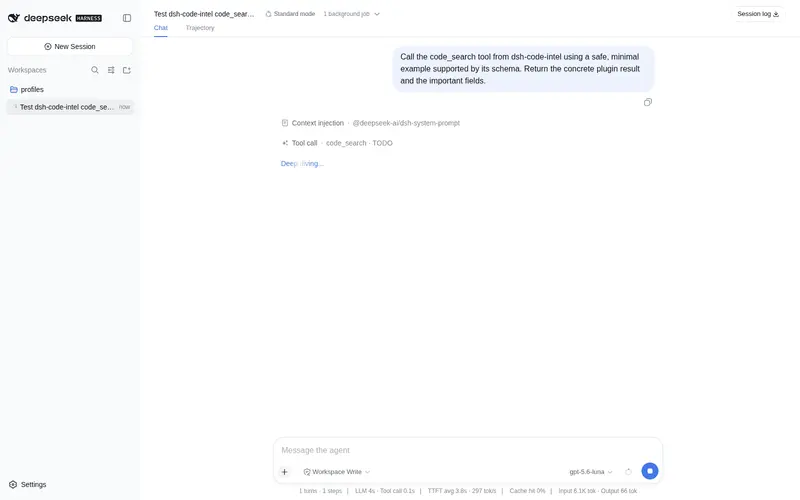
Indexes workspace symbols with Tree-sitter and provides lexical or optional embedding-assisted code search.
Best for
- Developers who need symbol-aware outlines and persistent search across TypeScript, JavaScript, Python, Go, Rust, or Java workspaces.
- Local-workspace users who want lexical search by default and optional OpenAI-compatible embedding-assisted ranking.
Not ideal for
- Remote filesystems whose paths are not accessible to the plugin host; cache creation requires host-accessible paths.
- Repositories centered on unsupported file extensions, or users expecting immediate first-search results without waiting for background indexing.
README
dsh-code-intel


Symbol-aware code outline, persistent workspace indexing, and explicit lexical or embedding-assisted search for DeepSeek Harness.
The installable v0.1.2 release targets DSH 0.1.0-rc.6. This project currently distributes prebuilt packages through GitHub Releases and is not published on npm.
MVP
-
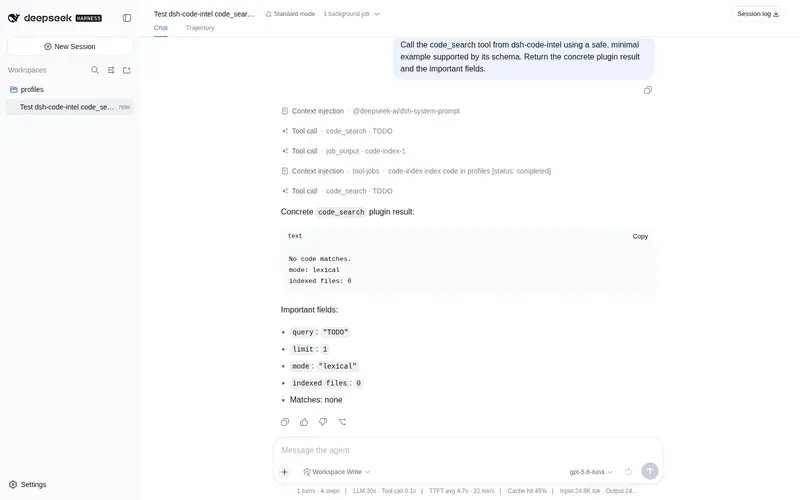
code_searchranks AST symbol chunks and bounded module windows, returningpath:line, symbol metadata, snippets, scores, and the active retrieval mode. -
code_outlineparses one file immediately or projects a directory from the persistent index. - The first workspace search starts a cancellable
code-indexbackground job instead of blocking the agent turn. - SQLite persistence under
.dsh/code-index/uses DSH filesystem versions for incremental rebuilds. -
fs/observedmarks successful DSH file operations dirty; a Chokidar watcher covers local shell, IDE, and external changes. - TypeScript, TSX, JavaScript, JSX, Python, Go, Rust, and Java use the install-script-free Tree-sitter WASM grammars published for VS Code.
- An optional OpenAI-compatible embedding endpoint adds cosine similarity to lexical ranking. Without it, results explicitly say
mode: lexical.
DeepSeek’s official API does not currently expose a public embedding endpoint, so this plugin does not invent one or silently label lexical results as semantic.
Index lifecycle
On the first code_search or directory code_outline, the tool returns an indexing result and a job id. Inspect or wait for that job with the built-in jobs tools, then call the code tool again. File outlines do not require a complete workspace index.
The cache contains derived source text and optional vectors. It stays inside the workspace, excludes .dsh from its own scan, and may be deleted at any time for a full rebuild. A retrieval-configuration fingerprint automatically invalidates vectors when the embedding endpoint or model changes.
Source traversal and reads use the mounted DSH filesystem service. SQLite and Chokidar require the provider’s processPath() to be accessible from the plugin host, so the MVP targets the standard local filesystem execution world. If a remote filesystem exposes paths that are not host-accessible, cache creation fails loudly instead of indexing a different directory.
Node 22 currently labels the built-in SQLite module experimental. The on-disk cache is disposable and schema-versioned; source files remain the only source of truth.
Retrieval modes
Lexical mode scores exact query matches, query tokens, symbol names, and paths. Hybrid mode combines that score with cosine similarity over endpoint-produced vectors. A configured endpoint or credential failure fails the indexing job or search; fallback occurs only when embedding is not configured.
Credentials are references, not secret values in YAML. The plugin resolves the reference through ctx.credentials for each indexing or query operation and never stores the credential.
Install
The package currently targets DSH 0.1.0-rc.6 plugin APIs and Node.js ^22.19 || >=24.
dsh plugin --profile web add https://github.com/lonelymoon87/dsh-code-intel/releases/download/v0.1.2/dsh-code-intel-0.1.2.tgz
The release tarball is prebuilt and needs no build allowance. A pinned source install is also supported:
dsh plugin --profile web add github:lonelymoon87/dsh-code-intel#v0.1.2
The source install runs this package’s prepare build. pnpm 10 and later reject it until the profile allowlists the exact package key printed by the failed command; apply that instruction and rerun the same dsh plugin add command. Replace web with headless to install into the one-shot agent profile.
To upgrade, rerun dsh plugin add with the newer release URL. To uninstall:
dsh plugin --profile web remove dsh-code-intel
Configuration
Lexical mode needs no provider configuration:
- id: code-intel
  name: dsh-code-intel
  config:
    indexDir: .dsh/code-index
    include: [.ts, .tsx, .js, .jsx, .py, .go, .rs, .java]
    exclude: [.dsh, .git, node_modules, dist, build, coverage, vendor]
    maxFileSize: 1000000
    maxChunkChars: 12000
    maxResults: 20
    watch: true
    embedding: false
Hybrid mode uses a complete OpenAI-compatible embeddings URL:
    embedding:
      provider: openai-compatible
      endpoint: https://embedding.example/v1/embeddings
      model: your-embedding-model
      credentialRef: EMBEDDING_API_KEY
      batchSize: 32
indexDir and exclusions must stay workspace-relative. Only the listed, parser-backed extensions are accepted in MVP.
Verification
Tests use real temporary workspaces and SQLite databases. They cover all parser families, background indexing, lexical retrieval, direct outline, fs/observed refresh, hybrid ranking, credential absence, vector persistence, cache replacement, and invalid configuration.
- The v0.1.2 tarball installs directly from its HTTPS release URL into a clean DSH profile.
- The packed bundle and pinned GitHub source install both appear in
dsh --dump-config. - CI covers Node 22.19 and Node 24; a scheduled workflow repeats the real install against
@deepseek-ai/dsh@latest. - Bugs and compatibility reports are tracked in GitHub Issues.
License
Frequently Asked QuestionsFAQ
Use the verified command dsh plugin --profile default add github:lonelymoon87/dsh-code-intel in a DSH-enabled shell. The command resolves the public package metadata and keeps the plugin attached to the catalog identity shown on this page.
Compatibility follows the bundle and profile status shown above. If a profile is not detected, keep the plugin disabled there and check the repository documentation before enabling it in production.
The GitHub link and activity metadata are the source of truth for releases and maintenance. Revisit this page after a new release to confirm the catalog has observed the latest version.