lussey820/dsh-http-tools
HTTP/API debugging toolset for DeepSeek Harness: http_request, curl_parse, request_history
Listed
0
Tools
Bundle verified
Preview
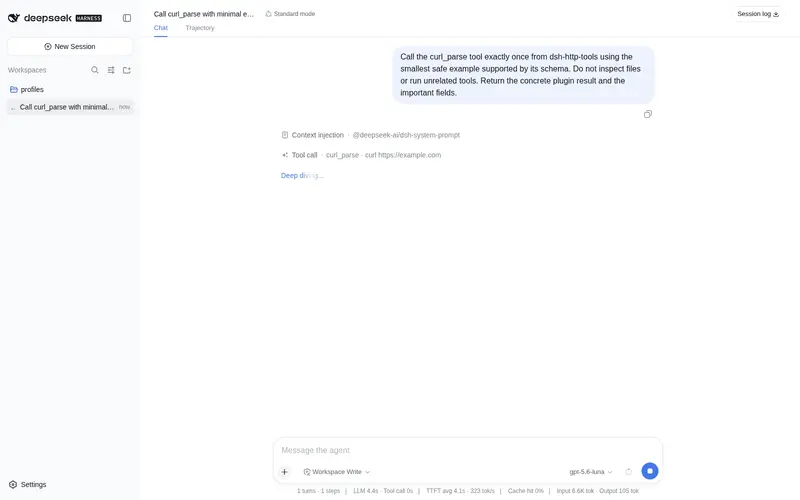
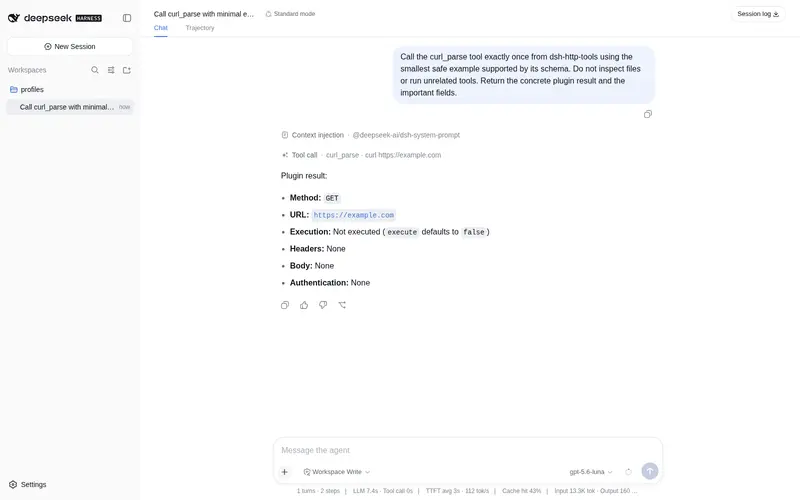
What it does
HTTP/API debugging toolset: full-control HTTP requests (method/headers/body/auth), curl command parsing and one-step execution, in-session request history with side-by-side response comparison, pagination-aware Link headers, and DeepSeek-branded UI cards (optional dsh-http-tools-ui).
Best for
- Developers debugging REST APIs from a DeepSeek Harness conversation.
- Workflows that start from existing curl commands and need parsing, modification, or immediate execution.
- Users comparing responses from requests made during the same session or following Link-header pagination.
- Teams that want configurable target restrictions, timeouts, response caps, and redacted generated curl commands.
Not ideal for
- Environments running Node.js earlier than 22, because the plugin requires Node.js 22 or newer.
- Workflows requiring request history to persist across sessions; history is session-scoped.
- Users expecting full response bodies regardless of size, because returned bodies are capped and logs retain only a preview.
- Users who need the branded cards but do not want to install the separate optional UI package.
README
dsh-http-tools
HTTP / API debugging tools for DeepSeek Harness (DSH).
dsh-http-tools gives your DeepSeek Harness agent a complete REST client: send any request with full control over method, headers, body, and auth, paste a curl command and let the agent run or tweak it, and review or compare past requests — all inside the chat.
Comes with an optional UI companion package (dsh-http-tools-ui) that renders every http_request / curl_parse call as a DeepSeek-branded card in the web UI.
Features
-
http_request— full REST client: GET/POST/PUT/PATCH/DELETE/HEAD, custom headers, body, basic/bearer auth. Returns status, duration, size, response headers, truncated body, and an equivalent redactedcurlcommand. -
curl_parse— parse acurlcommand into structured parts, or execute it in one step (execute: true). -
request_history— query in-session requests, inspect one, or diff two responses. -
Pagination-aware — the
Linkresponse header is surfaced to the model, so it can followrel="next"/rel="last"without re-reading raw headers. - Preview-slimmed logging — persisted session logs carry a 6000-char body preview, so logs stay readable as request volume grows.
-
DeepSeek-branded UI cards (with
dsh-http-tools-ui) — fish logo, brand-colored method badge, official state dot (running chase animation), theme-aware colors, collapsible JSON body (JsonTree), and copy-body / copy-curl buttons.
Tools
| Tool | Description |
|---|---|
http_request |
Send an HTTP request (GET/POST/PUT/PATCH/DELETE/HEAD) with custom headers, body, and auth. Returns status, duration, size, response headers, truncated body, and an equivalent curl command. |
curl_parse |
Parse a curl command into its structured parts (method, URL, headers, body, auth). Optionally execute it in one step with execute: true. |
request_history |
Query requests made in the current session, inspect one in detail, or compare two responses side by side. |
Install
dsh plugin --profile web add dsh-http-tools
# optional: DeepSeek-branded UI cards for the web client
dsh plugin --profile web add dsh-http-tools-ui
Works out of the box with zero configuration. Node.js >= 22 is required (uses the native fetch).
UI cards
dsh-http-tools-ui is a separate package that registers keyed tool views for http_request and curl_parse. Once installed, each call renders as a card in the conversation:
- Fish logo + brand-colored method badge (
GET/POST/ …) - Official state dot: green on success, amber on non-2xx, red on error, animated chase while running
- Status · duration · size · truncated summary on the row head
- Expandable response: key headers inline, JSON body as a collapsible tree (with copy actions), non-JSON bodies as text
-
Copy / Copy curl buttons, all colors theme-aware (
--dsw-*tokens)
Try it
Tell your agent things like:
用 http_request 调 https://api.github.com/repos/deepseek-ai/deepseek-harness 看看 star 数
POST https://httpbin.org/post,body 传 {"hello":"world"},看看返回什么
粘贴这个 curl 命令解析一下,然后改个 header 再重发:
curl -X POST https://api.example.com/v1/users -H "Content-Type: application/json" -d '{"name":"ada"}'
用 request_history 对比 #1 和 #3 两次请求的响应差异
Configuration
All options are optional. Set them in your profile’s cordis.patch.yml:
- id: http-tools
  name: dsh-http-tools
  config:
    maxBodyChars: 524288   # cap on response body characters returned to the model
    timeoutMs: 10000       # per-request timeout in milliseconds
    blockedHosts: []       # hostnames the plugin refuses to contact (e.g. ['169.254.169.254'])
    localOnly: false       # true = only loopback / private-network targets
    historyLimit: 50       # in-session request history retention
    auditHeader: true      # tag every request with an X-DSH-Request audit header
Security model
- By default every URL is allowed; the request is tagged with an
X-DSH-Requestaudit header so the server can identify agent traffic. -
blockedHostsrejects exact hostnames and their subdomains before any network I/O (e.g. block cloud metadata endpoints like169.254.169.254). -
localOnly: truerestricts requests to loopback and private networks — a one-switch “local debugging mode”. - Response bodies are capped at
maxBodyChars(default 512 KB) and timeouts attimeoutMs(default 10 s) so a runaway call can never flood the model context. - Credentials (Bearer tokens, basic-auth pairs) are sent only as request headers. Generated
curlcommands redactauthorization,cookie,proxy-authorization, andx-api-keyvalues as***, so secrets do not leak into session logs or request history.
Development
pnpm install
pnpm test          # vitest unit tests
pnpm run typecheck
pnpm run build     # tsdown -> lib/
pnpm --filter dsh-http-tools-ui run build   # UI client bundle -> ui/lib/
To smoke-test against a local DeepSeek Harness checkout, mount the built plugin with a patch overlay that references the built file:
pnpm run build

# http-tools.patch.yml — reference the built entry
# (on Windows, absolute paths must be file:// URLs, percent-encoded)
- insert:
  - id: http-tools
    name: /absolute/path/to/dsh-http-tools/lib/index.js   # POSIX
    # name: file:///C:/Users/.../dsh-http-tools/lib/index.js   # Windows

# from the deepseek-harness repo root:
pnpm dsh web --patch /absolute/path/to/http-tools.patch.yml
License
MIT
Frequently Asked QuestionsFAQ
Use the verified command dsh plugin --profile default add github:lussey820/dsh-http-tools in a DSH-enabled shell. The command resolves the public package metadata and keeps the plugin attached to the catalog identity shown on this page.
Compatibility follows the bundle and profile status shown above. If a profile is not detected, keep the plugin disabled there and check the repository documentation before enabling it in production.
The GitHub link and activity metadata are the source of truth for releases and maintenance. Revisit this page after a new release to confirm the catalog has observed the latest version.