magicOF2/dsh-chat-width-customizer
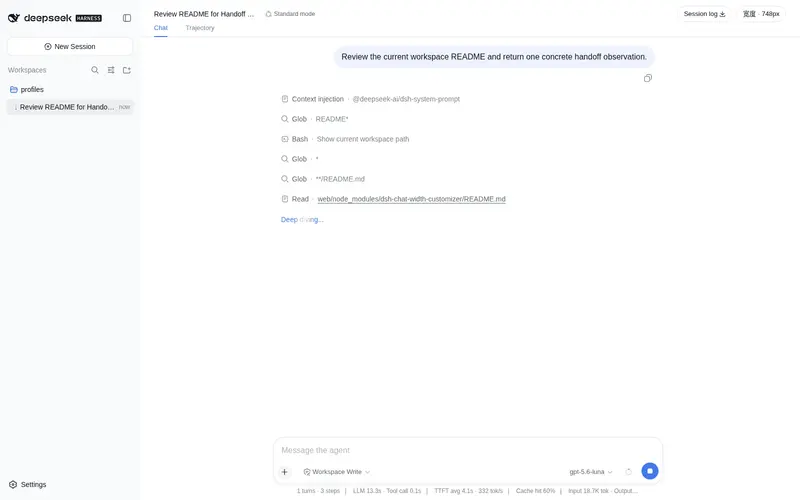
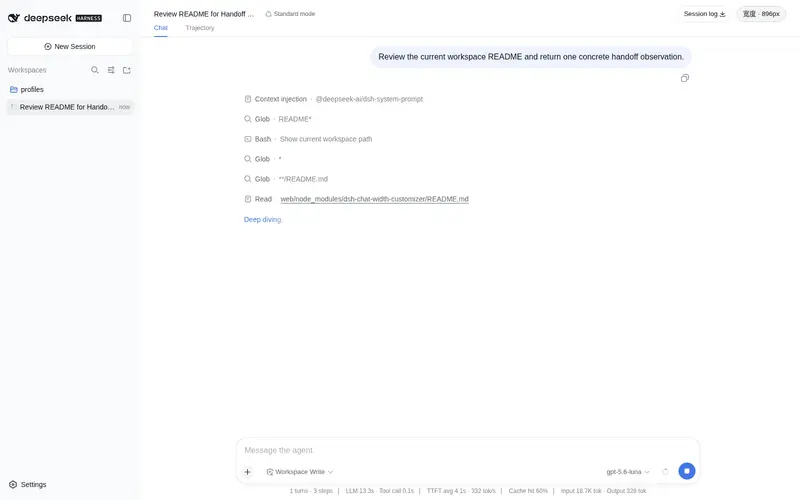
Session-header button that cycles the conversation width (748-1600px), widening the chat column, composer, and user bubbles together.
Listed
1
Ui
Bundle verified
Preview
What it does
Session-header button that cycles the conversation width (748-1600px), widening the chat column, composer, and user bubbles together.
Best for
- DSH Web users who frequently read code, tables, or long prose that benefits from a wider conversation column.
- Users who want one-click switching among seven chat widths from 748 to 1600 px.
- Users who want the chat column, composer, and user bubbles resized together and remembered across sessions.
Not ideal for
- Users satisfied with DSH's default 748 px chat width.
- Workflows requiring arbitrary per-session widths; the supplied choices are fixed presets shared globally.
- Non-Web clients or older environments outside the documented DSH and modern-browser compatibility range.
README
🐋 dsh-chat-width-customizer
聊天宽度自定义 · Chat Width Customizer — 为 DeepSeek Harness Web UI 一键加宽对话内容区的插件


在会话标题栏右上角加一个「宽度 · NNNpx」按钮,点击循环切换 7 档宽度预设, 对话内容区、输入框、用户消息气泡一起变宽,并记住你的选择。
✨ 特性 / Features
- 一键加宽:点击标题栏按钮循环切换宽度档位(748 → 1600 px),无需进设置页
- 整列联动:对话消息区、底部输入框(Composer)、用户气泡同步加宽,观感统一
- 全局共享:宽度是全局状态 —— 在 A 会话调到 1600,切到 B 会话依然 1600,按钮显示一致
-
持久记忆:选择写入
localStorage,刷新页面 / 重开浏览器后自动恢复,不丢失 - 零配置:纯浏览器端插件,无 Host 逻辑、无外部依赖、无网络请求,所有数据只存本机
- 主题友好:按钮样式完全使用 DSH 主题 CSS 变量,浅色 / 深色模式自动适配
🎯 界面位置 / Where it lives
按钮位于每个会话标题栏的右上角(标题、视图标签右侧的独立工具区):
┌──────────────────────────────────────────────────────────┐
│  💬 会话标题        [对话] [轨迹]      [宽度 · 1024px]     │
├──────────────────────────────────────────────────────────┤
│  (对话内容区 —— 宽度随按钮档位变化)                      │
└──────────────────────────────────────────────────────────┘
📦 安装 / Installation
方式一:从 GitHub 安装(推荐给其他用户)
dsh plugin --profile web add https://github.com/magicOF2/dsh-chat-width-customizer.git
方式二:从 npm 安装(发布后可用)
dsh plugin --profile web add dsh-chat-width-customizer
方式三:本地开发 / 自用(链接方式)
# 把仓库克隆到外部插件目录(或直接把本仓库目录放进去)
git clone https://github.com/magicOF2/dsh-chat-width-customizer.git ~/.dsh/external/dsh-chat-width-customizer

# 链接进你的 profile
dsh plugin --profile web add link:C:/Users/<你的用户名>/.dsh/external/dsh-chat-width-customizer
⚠️ 安装后需要重启
dsh web,并在浏览器里 Ctrl+Shift+R 强制刷新一次。 之后插件随 GUI 自动加载,无需任何手动启用。
🖱️ 使用 / Usage
- 打开任意会话,点击标题栏右侧的「宽度 · NNNpx」按钮
- 每点一次循环到下一档:
748 → 896 → 1024 → 1152 → 1280 → 1440 → 1600 → 748 … - 宽度立即生效,且全局共享:
- 切换会话 → 宽度与按钮显示保持一致
- 刷新页面 → 自动恢复上次选择的宽度
⚙️ 自定义宽度档位 / Custom presets
默认预设为 [748, 896, 1024, 1152, 1280, 1440, 1600](单位 px)。
想改档位、增减档数,编辑 lib/client.js 顶部的 PRESETS 常量即可:
const PRESETS = [748, 1024, 1280, 1600]; // 例如只保留 4 档
提示:
PRESETS[0]即默认宽度;localStorage 中只会保存预设列表里存在的值。
🔧 工作原理 / How it works
-
宽度控制:产品自带样式把对话列限制在
--dsh-chat-content-width(默认 748px)并居中。 插件在页面级<style>中覆盖该变量,同时联动--dsh-composer-card-max-width(输入框宽度), 并解除用户消息气泡栈默认的max-width: 525px上限,让两类消息都铺满加宽后的列:[data-conversation-scroll] { --dsh-chat-content-width: 1024px; --dsh-composer-card-max-width: calc(var(--dsh-chat-content-width) + 32px); } [data-conversation-scroll] [class*="userStack"] { max-width: 100% !important; } -
UI 挂载:注册在
conversation.session.header.utilities槽位(标题栏独立工具区), 不替换任何原生组件,纯增量添加,卸载干净无残留。 -
状态管理:当前宽度保存在插件模块级状态 +
localStorage(键名dsh-chat-width-customizer:width),所有会话的按钮实例共享并实时同步。 -
包结构:标准 DSH 插件 bundle(
dsh.bundle清单 +dsh.clientweb 平台声明), 浏览器启动时自动注入,重启后无需手动运行。
🧩 兼容性 / Compatibility
- DeepSeek Harness
0.1.0-rc.6及以上(开发环境验证版本),Cordis4.x - 现代浏览器(Chrome / Edge / Firefox / Safari 最新两个大版本)
- 纯前端实现,不依赖任何 API Key、无数据上传
🛠️ 开发 / Development
dsh-chat-width-customizer/
├── lib/
│   ├── index.js     Host 入口(空实现,仅占位 —— 纯前端插件)
│   └── client.js    浏览器端 bundle(__ModuleLoader__ 格式)
├── cordis.patch.yml profile 组合层插入条目
├── package.json     包清单(dsh.bundle / dsh.client 声明)
├── README.md
└── LICENSE          MIT
本地迭代:
# 改完 lib/client.js 后,重启 dsh web + 浏览器强制刷新即可验证
git add -A && git commit -m "your change" && git push   # 同步到 GitHub
发布到 npm(可选):去掉 package.json 中的私有标记后执行 npm publish,
用户即可通过 dsh plugin --profile web add dsh-chat-width-customizer 安装。
📄 License
English
A lightweight DSH (DeepSeek Harness) web plugin that adds a “宽度 · NNNpx” button to the conversation session header. Click it to cycle through 7 width presets (748–1600 px) and widen the chat column, composer, and user bubbles together.
Highlights: no host logic · theme-aware · width shared across sessions and
remembered across reloads (localStorage) · standard dsh.bundle plugin package,
loads automatically after install (no manual enable).
Install:
dsh plugin --profile web add https://github.com/magicOF2/dsh-chat-width-customizer.git
Then restart dsh web and hard-refresh the browser once.
Frequently Asked QuestionsFAQ
Use the verified command dsh plugin --profile default add github:magicOF2/dsh-chat-width-customizer in a DSH-enabled shell. The command resolves the public package metadata and keeps the plugin attached to the catalog identity shown on this page.
Compatibility follows the bundle and profile status shown above. If a profile is not detected, keep the plugin disabled there and check the repository documentation before enabling it in production.
The GitHub link and activity metadata are the source of truth for releases and maintenance. Revisit this page after a new release to confirm the catalog has observed the latest version.