mengyun233/dsh-codex-pet
将 Codex 桌宠皮肤自动迁移到 DeepSeek Harness,在 DSH Web 界面渲染功能一致的桌宠:动画、多会话对话框、设置面板,一键迁移即插即用。
Listed
5
Ui
Bundle verified
Preview
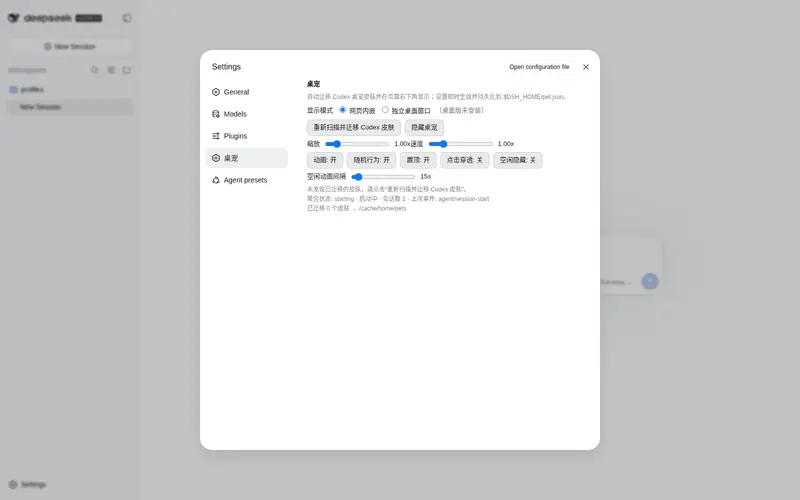
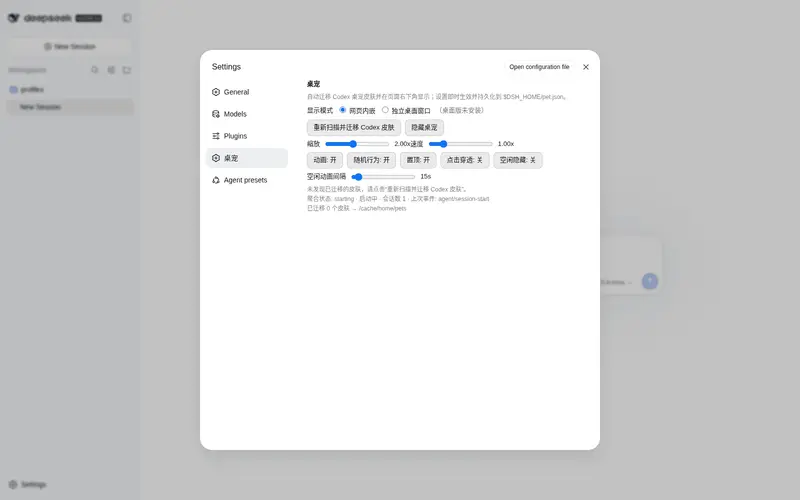
What it does
Auto-migrate Codex desktop-pet skins into DSH: an animated corner pet that mirrors agent state (thinking, tool use, awaiting approval, failed, done), with per-session frosted-glass dialogs and a full settings panel.
Best for
- DSH Web users who already have compatible Codex pet skins and want them migrated automatically.
- Users who want a visual, animated indication of agent thinking, tool use, approval, failure, and completion states.
- People monitoring multiple active sessions through per-session dialogs.
- Users who want detailed controls for pet skin, scale, speed, idle behavior, and interaction.
Not ideal for
- Productivity-focused users who do not want animated overlays or session dialogs in the interface.
- Users without readable Codex pet assets containing pet.json and spritesheet.webp.
- DSH versions below 0.1.0-rc.6 or hosts missing the documented Web services.
- Users installing by npm package name; the documented repository is Git-source only and that npm name belongs to another plugin.
README
dsh-codex-pet 
把 OpenAI Codex 桌面宠物(Codex Pet)的社区皮肤自动迁移到 DeepSeek Harness(DSH),在 DSH Web 界面右下角渲染一只功能与 Codex 完全一致的桌宠:动画状态、多会话对话框、设置面板,一键迁移、即插即用。

图片来源声明:示例图中的鲸鱼娘皮肤图片来源于网络分享,仅用于演示本项目功能,版权归原作者所有;如涉及侵权,请联系作者删除。
特性
-
自动迁移 Codex 皮肤:自动扫描
CODEX_HOME(及LOCALAPPDATA/APPDATA下的 Codex 路径)中的社区皮肤(pet.json+spritesheet.webp),拷贝到 DSH 家目录,无需手动操作。 - 逐帧动画:完整支持 Codex 精灵表动画轨——待机、行走、挥手、跳跃、失败、等待、奔跑、审查、视线跟随,以及 v2 皮肤的双向注视。
- 状态驱动的行为:根据当前对话阶段自动切换动画与气泡——思考、使用工具、等待批准、出错、完成、睡眠(90 秒无活动后打盹)。
- 多会话对话框:每个活跃会话一个白色毛玻璃对话框,第一行加粗显示会话标题,第二行显示最新输出或状态;单击折叠、双击跳转并移除气泡、悬停显示终止按钮。
- 设置面板:DSH 设置页新增「桌宠」栏目——皮肤选择、缩放/速度滑杆、动画/随机行为/置顶/点击穿透/空闲隐藏开关、空闲动画间隔、重新扫描并迁移。
-
持久化:位置、缩放、速度与各项开关保存在
$DSH_HOME/pet.json,刷新/重启后自动恢复。 - 全部事件映射:会话启动、思考、工具执行、审批等待、错误、工作流阶段、流式输出均实时反映到桌宠。
安装
方式一:作为 profile bundle(推荐)
⚠️ 注意包名冲突:
dsh-codex-pet在 npm 上已被另一个同名桌宠插件占用(skr311/dsh-codex-pet,路由/api/pets/*,与本仓库无关)。本仓库没有发布到 npm,请务必使用下面的 git 源安装,否则会装到错误插件。
# 在 DSH 安装目录下(profile 名按你的实际使用,如 web)
dsh plugin --profile web add github:mengyun233/dsh-codex-pet
git 源安装会自动把
dsh-codex-pet加入 profile 的dsh.profile.bundles,重启 DSH 后生效。
或手动安装(不使用 dsh plugin 时):
-
把本仓库复制到 profile 的
node_modules:cp -r dsh-codex-pet "$DSH_HOME/profiles/web/node_modules/" -
在
$DSH_HOME/profiles/web/package.json的dsh.profile.bundles中加入"dsh-codex-pet",并在dependencies中加入"dsh-codex-pet": "file:D:/path/to/dsh-codex-pet"。 -
重启 DSH,桌宠出现在页面右下角;设置 → 桌宠 可调整。
方式二:独立桌面应用(脱离网页,桌面上动)
桌宠也可以脱离浏览器,作为独立的透明置顶窗口显示在桌面上(需要已通过方式一迁移好皮肤):
cd desktop
npm install        # 首次需要(安装 Electron)
npm start          # 启动桌面桌宠
功能:透明无边框置顶窗口(不占任务栏)、拖拽移动(位置自动保存到 $DSH_HOME/pet.desktop.json)、右键菜单(随机散步/摸摸/置顶/点击穿透/重新扫描/退出)、随 DSH agent 状态实时变化、多会话对话框。DSH 未运行时桌宠保持待机动画。
与网页设置联动:桌面窗口以 $DSH_HOME/pet.json 的 codexPet 为主配置源,网页设置面板(设置 → 桌宠)里的皮肤、缩放、速度、动画开关、随机行为、空闲动画间隔、置顶、点击穿透、空闲隐藏实时同步生效(每 1.5s 轮询);桌面右键菜单的置顶/穿透切换也会写回共享配置,两种模式始终一致。桌面窗口位置单独保存在 pet.desktop.json,不受网页位置影响。
方式三:动态插件(开发调试)
在 DSH 会话中通过 Cordis 工具 cordis_define / cordis_run 加载本仓库 lib/ 下的 host/client 代码(详见仓库内注释)。动态插件在 DSH 进程重启后丢失,仅用于开发调试。
前置条件
- Windows(皮肤迁移当前使用
node:fs直接扫描,跨平台通用;Codex 皮肤目录需可读)。 - DSH 0.1.0-rc.6+(依赖
webServer、slots、timer、agents、sessionTitle服务)。 - Codex 桌面宠物皮肤:
<CODEX_HOME>/pets/<name>/{pet.json, spritesheet.webp},社区皮肤可从 Codex 社区获取。
使用
| 操作 | 效果 |
|---|---|
| 拖动桌宠 | 移动位置(自动保存) |
| 单击桌宠 | 随机互动(开心/挥手/跳跃) |
| 右键桌宠 | 菜单:随机散步 / 隐藏桌宠 / 重新扫描皮肤 / 退出 |
| 双击桌宠 | 互动动画 |
| 单击对话框 | 折叠 / 展开 |
| 双击对话框 | 跳转到对应会话并移除该气泡(会话重新活动时气泡恢复) |
| 右键对话框 | 移除该气泡(桌面端特有) |
| 悬停进行中的对话框 | 显示 ⏹ 终止按钮,点击终止对话 |
| 设置 → 桌宠 | 皮肤、缩放、速度、行为开关、迁移 |
皮肤精灵表格式
Codex 皮肤为 8 列 × N 行精灵表(192×208 单元格):
| 行 | 动作 |
|---|---|
| 0 | 待机(idle) |
| 1 / 2 | 向右跑 / 向左跑 |
| 3 | 挥手 |
| 4 | 跳跃 |
| 5 | 失败 |
| 6 | 等待 |
| 7 | 奔跑 |
| 8 | 审查 |
| 9 / 10 | v2 皮肤左右注视 |
末尾全透明的帧会被自动跳过,地面对齐按每帧非透明像素自动计算。
事件 → 动画映射
| DSH 事件 | 桌宠状态 | 动画轨 |
|---|---|---|
agent/session-start |
启动中 | 挥手 |
agent/status running |
思考中 | 奔跑轨 |
tools/pre-execute / tools/execute(ask) |
等待用户批准 | 等待轨 |
approval/request |
等待用户批准 | 等待轨 |
tools/execute(其他工具) |
正在使用工具 | 奔跑轨 |
workflow/phase |
工作中 | 奔跑轨 |
llm/stream text-delta |
思考中 + 输出尾部 | 奔跑轨 |
agent/status idle |
完成 | 跳跃 + 审查 |
agent/error |
出错了 | 失败轨 |
多会话并行时按 失败 > 工作 > 等待 > 空闲 优先级聚合动画,对话框分别显示每个会话。
配置
所有配置保存在 $DSH_HOME/pet.json 的 codexPet 键下:
{
  "codexPet": {
    "name": "deepseek",          // 当前皮肤目录名
    "x": 640, "y": 480,          // 位置(按窗口尺寸归一化)
    "scale": 1.0,                // 缩放 0.5–4
    "alwaysOnTop": true,         // 置顶
    "clickThrough": false,       // 点击穿透
    "hideWhenIdle": false,       // 空闲隐藏
    "animationEnabled": true,    // 动画
    "animationSpeed": 1.0,       // 速度 0.25–4
    "idleFrequencySec": 15       // 空闲动画间隔(秒)
  }
}
目录结构
dsh-codex-pet/
├── package.json          # bundle 声明(dsh.bundle.patch / dsh.client)
├── cordis.patch.yml      # 插件行插入补丁
├── lib/
│   ├── index.js          # host 半:迁移 + webServer API + 事件监听
│   └── client.js         # client 半:渲染、动画、对话框、设置页
├── desktop/              # 独立桌面应用(Electron,脱离网页)
│   ├── main.js           # 透明置顶窗口 + 状态轮询 + 配置
│   ├── preload.js        # IPC 桥
│   └── renderer/         # 动画渲染(复用 client 逻辑)
└── docs/
    └── pet-demo.webp     # 示例图
开发
# 语法检查
node --check lib/index.js
node --check lib/client.js
host 半使用 Node 原生 node:fs 扫描与复制皮肤,通信走 webServer HTTP 路由;client 半为标准 window.__ModuleLoader__.load bundle 格式,通过 fetch 调用 host API。
许可证
MIT
Frequently Asked QuestionsFAQ
Use the verified command dsh plugin --profile default add github:mengyun233/dsh-codex-pet in a DSH-enabled shell. The command resolves the public package metadata and keeps the plugin attached to the catalog identity shown on this page.
Compatibility follows the bundle and profile status shown above. If a profile is not detected, keep the plugin disabled there and check the repository documentation before enabling it in production.
The GitHub link and activity metadata are the source of truth for releases and maintenance. Revisit this page after a new release to confirm the catalog has observed the latest version.