michaelcode-wang/dsh-wecom
WeCom (Enterprise WeChat) Smart Robot bridge for DeepSeek Harness — two-way chat over the aibot WebSocket gateway, no public endpoint needed.
Listed
0
Notify
Bundle verified
Preview
What it does
WeCom (Enterprise WeChat) Smart Robot bridge: two-way chat over the aibot WebSocket gateway, no public endpoint needed.
Best for
- Teams that want employees to chat with a DSH agent directly through a WeCom Smart Robot.
- Deployments that cannot expose a public callback endpoint and prefer the aibot WebSocket gateway.
- Multi-user chat workflows needing per-chat agent sessions, retained context, allowlisting, and automatic idle cleanup.
Not ideal for
- Organizations without a WeCom Smart Robot bot_id and secret.
- Standalone im profiles where the required preset roster has not been added manually.
- Security-sensitive deployments that leave allowedUserIds empty, because any user could then drive host tools.
README
dsh-wecom
企业微信(WeCom)智能机器人桥接插件:通过 aibot WebSocket 网关,让 DeepSeek Harness 的智能体变成能在企业微信里双向对话的助手。无需公网地址、无需自建应用回调,只需智能机器人的 bot_id + secret。
协议移植自 Hermes Agent 的 plugins/platforms/wecom/adapter.py(aibot_subscribe 认证 → aibot_msg_callback 收消息 → aibot_respond_msg / aibot_send_msg 回复)。
特性
- 企业微信智能机器人 WebSocket 长连接(
wss://openws.work.weixin.qq.com),断线自动退避重连 - 每个聊天一个独立 agent 会话,多轮上下文保留,空闲自动回收
- 白名单访问控制(
allowedUserIds) - markdown 回复 + 超长消息自动分片(默认 4000 字符)
- 聊天命令:
/help、/reset、/status
安装
# 从 npm(推荐)
dsh plugin --profile im add dsh-wecom

# 或从 GitHub
dsh plugin --profile im add github:michaelcode-wang/dsh-wecom
前置条件
-
企业微信智能机器人:在企业微信后台创建一个「智能机器人」,拿到
bot_id和secret。 -
im profile 需要 preset roster:独立
improfile(dsh-base+ 本插件)没有 web 层,而 preset roster(agent-presets)默认由dsh-web-app提供。若要让 agent 挂载某个 preset,需在 im profile 的cordis.patch.yml里手动插入 roster(见下方完整示例)。
配置
在 $DSH_HOME/profiles/im/cordis.patch.yml 中:
# 1) 插入 preset roster(im profile 无 web 层,需手动补)
- insert:
    - id: agent-presets
      name: '@deepseek-ai/dsh-agent-presets'
      config:
        default: taibai          # 默认 preset;可按需改成你自己的 preset

# 2) 启用本插件
- id: dsh-wecom
  disabled: false
  config:
    botId: '你的机器人ID'
    secret: '你的机器人密钥'
    allowedUserIds: ['你的企业微信userid']
    agent:
      preset: taibai             # 每个企业微信聊天对应的 agent preset
启动:
dsh --profile im(建议配 launchd / systemd 常驻)。
配置项
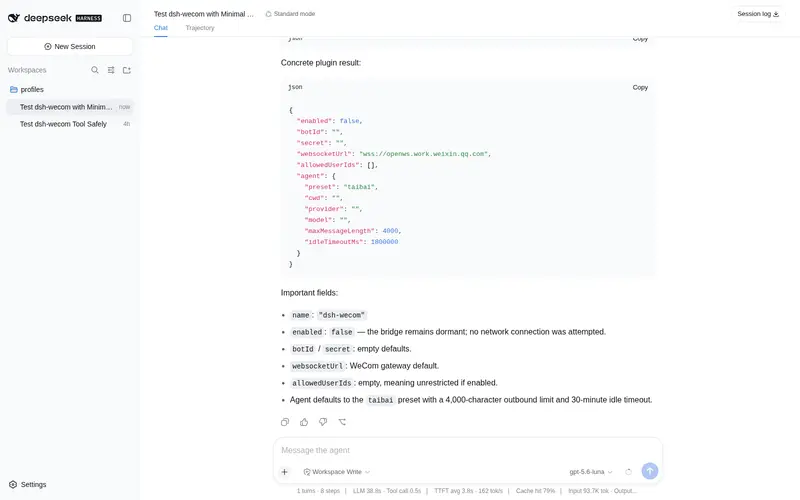
| 键 | 默认 | 说明 |
|---|---|---|
enabled |
true |
总开关 |
botId |
'' |
企业微信智能机器人 ID |
secret |
'' |
企业微信智能机器人密钥(只写) |
websocketUrl |
wss://openws.work.weixin.qq.com |
WebSocket 网关地址 |
allowedUserIds |
[] |
允许对话的 userid 白名单;留空=所有人 |
agent.preset |
taibai |
挂载的 agent preset |
agent.cwd |
'' |
agent 工作目录(默认进程 cwd) |
agent.provider / agent.model
|
'' |
模型覆盖;留空=部署默认 |
agent.maxMessageLength |
4000 |
单条外发消息最大字符数 |
agent.idleTimeoutMs |
1800000 |
聊天空闲多久后释放 agent(0=永不) |
安全
-
务必配置
allowedUserIds白名单——留空意味着任何人都能驱动你的智能体执行主机工具。 -
secret标记为role('secret'),不会回显到浏览器。
Frequently Asked QuestionsFAQ
Use the verified command dsh plugin --profile default add github:michaelcode-wang/dsh-wecom in a DSH-enabled shell. The command resolves the public package metadata and keeps the plugin attached to the catalog identity shown on this page.
Compatibility follows the bundle and profile status shown above. If a profile is not detected, keep the plugin disabled there and check the repository documentation before enabling it in production.
The GitHub link and activity metadata are the source of truth for releases and maintenance. Revisit this page after a new release to confirm the catalog has observed the latest version.