MichengAI/dsh-automation
DSH Automation 基于 DeepSeek Harness 的定时任务、自动化任务插件
Listed
2
Workflow
Bundle verified
Preview
What it does
Runs scheduled coding tasks in isolated DeepSeek Harness sessions, managed from Settings or the agent.
Best for
- Teams that need recurring or one-time coding tasks to run unattended in isolated DSH sessions.
- Users who want to create and manage schedules from Settings or through approved agent tool calls.
- Operational workflows that need durable run history, overlap handling, and per-task workspace, model, skill, and permission choices.
Not ideal for
- Tasks that depend on inheriting the source conversation's history; each run starts in a fresh root agent and session.
- Rules that must run concurrently with themselves; only one active run per rule is allowed and collisions are skipped.
- Workflows that expect schedule creation to grant permanent execution approval; future runs still follow unattended approval policy.
README





DSH Automation is a community-maintained DeepSeek Harness (DSH) plugin, not an official DeepSeek AI product.
Features
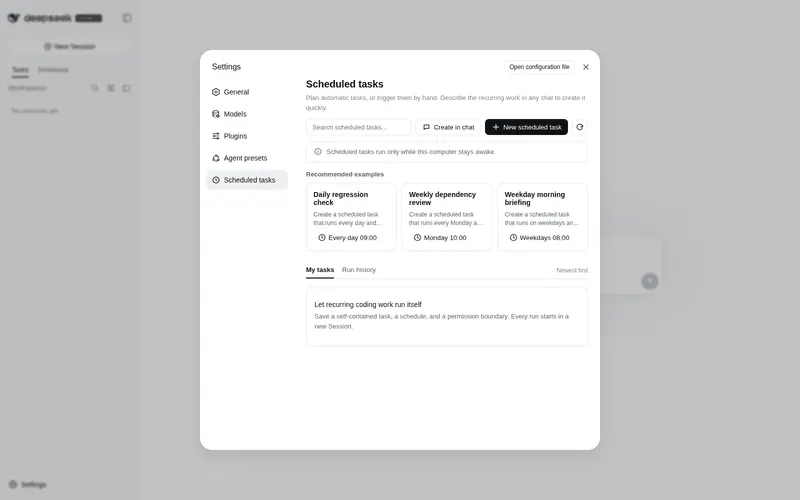
- Manage scheduled tasks from Settings → Scheduled Tasks.
- Create, pause, resume, run now, and delete rules from the Web UI or Agent tools.
- Start each occurrence in a fresh root Agent and Session. Source-chat history is not inherited.
- Support once, interval, hourly, daily, weekly, monthly, and custom-every-N-days schedules.
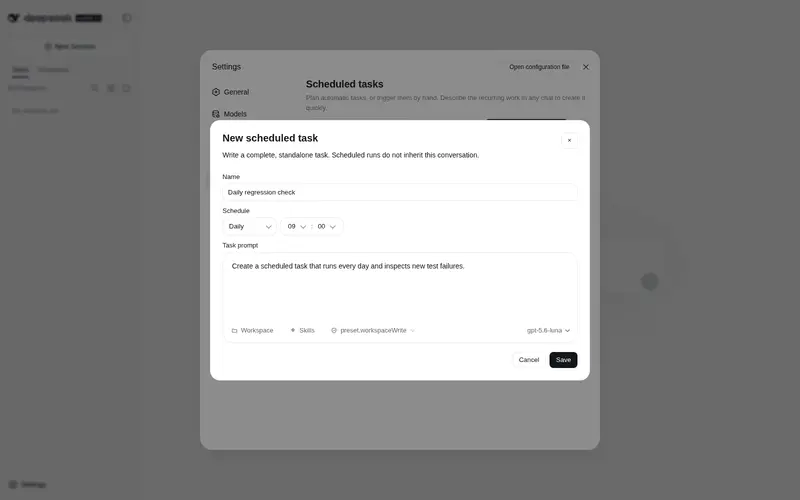
- Pick workspace, model, skills, and
read-only/workspace-writein the create dialog. - Create from chat: describe the schedule in any conversation, then confirm with the official approval card.
- Keep durable run history:
queued,running,succeeded,failed,skipped,cancelled. - Add a sidebar Scheduled tab. Folders are task names and child sessions are run times. On stock DSH it wraps the official workspace tree and does not depend on
dsh-codex-ui.
Interface
Scheduled tasks live in the workspace Scheduled tab, next to Tasks and Channels:

Open Settings → Scheduled Tasks to search, create, pause, and inspect rules:

Describe the job in chat. The agent calls automation_create and asks through the official approval card:


After approval, the rule is saved and summarized in the conversation:

Run history stays in Settings and can be filtered by day, week, month, task, or status:

Prerequisites
- A working DeepSeek Harness Web installation with
dshavailable in PowerShell. - Examples use the
webprofile; replace it with the target profile. - Source installation and development require Node.js 22.19+. npm installation does not require running
npm installin an arbitrary directory.
Installation
dsh plugin add forwards to pnpm add in the profile directory. If you omit a version or the official registry, a local mirror may leave you on an old build.
Install from npm
[Console]::OutputEncoding = [System.Text.Encoding]::UTF8
$OutputEncoding = [System.Text.Encoding]::UTF8
dsh plugin --profile web add @michengai/dsh-automation@latest --registry=https://registry.npmjs.org/
dsh --profile web --dump-config
Restart DSH Web and hard-refresh the browser. Pin a version with @0.1.5 instead of @latest when needed.
Install from source
Use this for debugging or unpublished changes. The cloned directory becomes the plugin source path:
[Console]::OutputEncoding = [System.Text.Encoding]::UTF8
$OutputEncoding = [System.Text.Encoding]::UTF8
Set-Location D:\Repository\deepseek-harness-plugin
git clone https://github.com/MichengAI/dsh-automation.git
Set-Location .\dsh-automation
pnpm install
pnpm test
pnpm build
dsh plugin --profile web add .
dsh --profile web --dump-config
Restart DSH Web and hard-refresh the browser. Local installation reads and applies cordis.patch.yml; do not copy lib files manually.
Usage
Open Settings → Scheduled Tasks, then use the panel as follows:
| Goal | Action | Scope |
|---|---|---|
| Create a rule | Select New scheduled task, then set name, schedule, prompt, workspace, model, skills, and permission. | Host-wide |
| Create from chat | Describe the schedule in any conversation, or select Create in chat. | Current conversation |
| Pause or resume | Use the switch on a task card. | One rule |
| Run now | Open the card menu and select Run now. | One rule |
| Delete | Open the card menu and select Delete task. Run history is kept. | Definition only |
| Inspect runs | Open Run history, then filter by day, week, month, task, or status. | Host-wide |
Each dispatched run uses the saved prompt, workspace, model, and permission boundary. It does not reuse approvals from the source chat.
Safety boundary
| Item | Behavior |
|---|---|
| Permission | Default is read-only. File writes require an explicit workspace-write choice. |
| Full access | Unattended danger-full-access is not offered. |
| Approval | Chat create follows the session policy. Full access (never) proceeds; Workspace Write / Read Only (ask) shows the official card. Unattended runs stay fail-closed never. |
| Retry | No automatic retry after a started run. |
| Host restart | Leftover queued / running records become failed(host_interrupted). |
| Overlap | One active run per rule. A colliding occurrence is recorded as skipped(overlap). |
A schedule stores future intent. It is not a cached permission grant.
Development
Current sources live in src and build into lib:
- src\index.ts: Host plugin, tools, and RPC.
- src\service.ts: Durable definitions, clock, and run admission.
- src\client\index.ts: Settings page and chat prefill.
-
tests\*.test.ts: Domain, recurrence, service, client, and package-contract tests.
After changing files, run tests, rebuild, and reinstall from the local directory:
[Console]::OutputEncoding = [System.Text.Encoding]::UTF8
$OutputEncoding = [System.Text.Encoding]::UTF8
pnpm check
dsh plugin --profile web add .
Keep the at-most-once dispatch policy, workspace scoping for Agent tools, and fail-closed unattended approval when changing execution code.
Verification
[Console]::OutputEncoding = [System.Text.Encoding]::UTF8
$OutputEncoding = [System.Text.Encoding]::UTF8
pnpm test
pnpm build
pnpm check runs typecheck, tests, and build together.
Project docs and license
Start from the documentation entry for project status, architecture, and the current iteration. Product notes live in NOTICE.
This project uses Apache License 2.0.
Frequently Asked QuestionsFAQ
Use the verified command dsh plugin --profile default add github:MichengAI/dsh-automation in a DSH-enabled shell. The command resolves the public package metadata and keeps the plugin attached to the catalog identity shown on this page.
Compatibility follows the bundle and profile status shown above. If a profile is not detected, keep the plugin disabled there and check the repository documentation before enabling it in production.
The GitHub link and activity metadata are the source of truth for releases and maintenance. Revisit this page after a new release to confirm the catalog has observed the latest version.