MicroHEROX/dsh-unsloth-hands
Unsloth for DeepSeek Harness — a pure-client tool plugin that connects the DeepSeek Harness online model to a locally running Unsloth Desktop for repetitive text and vision (OCR) labor.
Listed
0
Vision
Bundle verified
Preview
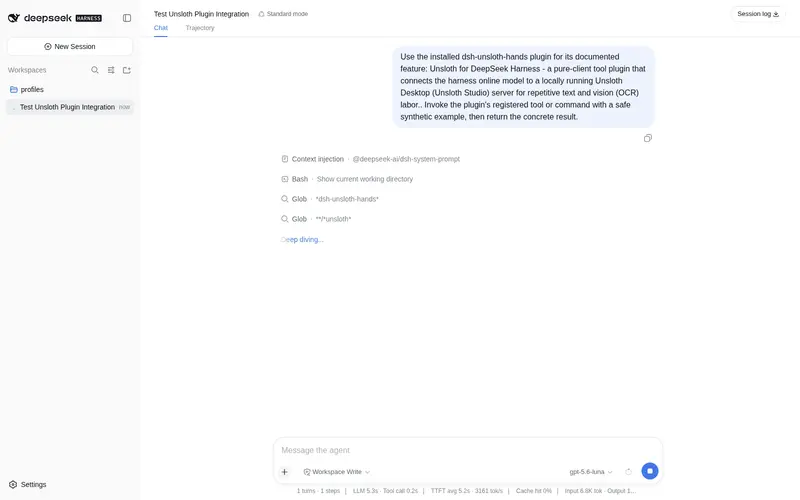
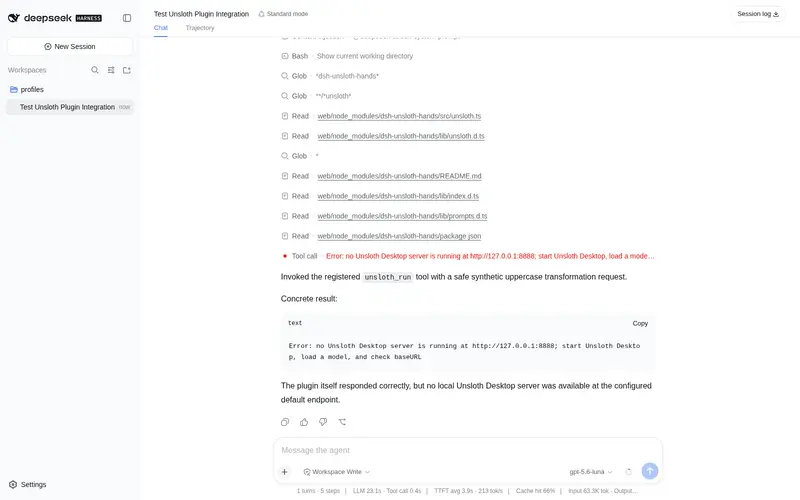
What it does
Hands repetitive text and vision labor (OCR, image analysis, comparison) to a locally running Unsloth Desktop (Unsloth Studio) server through unsloth_run and unsloth_vision tools; pure HTTP client, never spawns or owns processes.
Best for
- DSH users who want to offload repetitive rewrites, extraction, short summaries, or string processing to a local model.
- Workflows that need local OCR, image analysis, or multi-image comparison while keeping the online model as the main agent.
- Users already running Unsloth Desktop who want a pure HTTP integration without process management.
Not ideal for
- Environments without a running Unsloth Desktop instance, a loaded model, and an API key.
- Users seeking a replacement for the Harness LLM provider or automatic model download and server lifecycle management.
- Workflows requiring streamed tool responses; calls return the complete answer in one round trip.
- Vision tasks without a multimodal model loaded in Unsloth.
README
Unsloth for DeepSeek Harness
dsh-unsloth-hands — give your DeepSeek Harness agent a pair of local hands.





A third-party tool plugin for DeepSeek Harness that lets the online model (your main conversation model) hand repetitive, token-cheap labor to a local Unsloth Desktop (Unsloth Studio) server — plain text work and vision work (image analysis / OCR / comparison).
The main model stays where your deployment puts it. When it decides a job is better done locally, it calls:
-
unsloth_run— run one prompt on the local text model (batch rewrites, name translations, string munging, short summarization, extraction). -
unsloth_vision— send images to the local multimodal model (OCR, image analysis, multi-image comparison) with structured report templates.
The plugin is a pure client: it only connects to the Unsloth Desktop you are already running. Model selection, downloading, quantization and context settings all happen in the Unsloth app itself — the plugin never starts, owns, or stops any process, and never kills anything.
✨ What it does
-
Two model-facing tools registered on the harness tool registry (
ctx.tools), following the officialdsh-toolscontract (defineTool, canonical JSON values, pure render/presenters,exec.signalforwarding). -
Authenticated wire calls: every request carries
Authorization: Bearer sk-unsloth-…. The key comes from theapiKeyconfig or theUNSLOTH_API_KEYenvironment variable (create it in Unsloth Settings → API). -
Friendly failure modes: before each call the plugin probes
/v1/models; if Unsloth Desktop is not running you get a clear, actionable error instead of a generic network failure. A wrong/missing key surfaces asAUTHwith a hint. -
Text + vision wire support: non-streaming OpenAI-compatible chat-completions; images sent as the standard multimodal
contentarray. -
Three image sources for the vision tool: local file paths,
data:/http(s):URLs, or the images attached to the current conversation (read through the harness attachment service). -
Structured vision prompts — machine-verifiable report contracts:
analyze(8-section report),ocr(character-exact),compare(multi-image, 5-section) — plus a fidelity rule for the online model (relay verbatim, never invent, preserve uncertainty). -
Live config: a
llm-unsloth:section in the harness user-settings document overrides the plugin config without a restart. - Safe by construction: nothing is ever spawned or killed — the plugin only talks HTTP to your Unsloth Desktop.
🚫 What it does NOT do
- Does not replace the harness LLM provider — the online model stays the main model; the local model is only reached through the two tools.
- Does not launch, configure, or stop Unsloth — you run Unsloth Desktop and load the model you want (quantization, context size, GPU settings) in its UI.
- Does not modify any DeepSeek Harness or Unsloth file; it is a pure add-on plugin.
- Does not bundle or host GGUF model files — Unsloth downloads and caches them for you.
- Does not stream responses (tool calls get the full answer in one round trip).
📋 Requirements
| Item | Requirement |
|---|---|
| Node.js | ≥ 20 |
| DeepSeek Harness | installed (npx @deepseek-ai/dsh web or a source checkout), 0.1.0-rc series |
| Unsloth Desktop | running, with a model loaded and an API key created (Settings → API) |
| Model | any GGUF/safetensors model loaded in Unsloth; vision needs a multimodal model (e.g. Qwen3-VL / Gemma vision GGUFs) |
📦 Install
The package is a standard harness bundle (declares dsh.bundle with its cordis.patch.yml), so the official install path works:
dsh plugin --profile <name> add dsh-unsloth-hands        # from npm registry
dsh plugin --profile <name> add github:MicroHEROX/dsh-unsloth-hands   # straight from GitHub
It can also be installed as a plain npm dependency in your harness project (the directory whose cordis.yml / cordis.patch.yml composes your deployment), then add the plugin row yourself:
npm install dsh-unsloth-hands
- insert:
    - id: unsloth-tool
      name: 'dsh-unsloth-hands'
From a source checkout of the harness, you can point the plugin row directly at a clone of this repo:
- insert:
    - id: unsloth-tool
      name: '../dsh-unsloth-hands'
Installing from GitHub? pnpm may refuse to run the package’s
preparebuild script until you allowlist it (exact package key printed by pnpm) in your profile’spnpm-workspace.yaml:allowBuilds: dsh-unsloth-hands: trueThen re-run the
add. Installing from the npm registry needs no such step.
⚙️ Configure
- Start Unsloth Desktop, load the model you want (the model hub downloads GGUFs; the loaded model is the one the tools reach).
- Create an API key: avatar → Settings → API → Create, copy the
sk-unsloth-…value (it is only shown once). - Add the plugin row to your profile
cordis.patch.yml:
- insert:
    - id: unsloth-tool
      name: 'dsh-unsloth-hands'
      config:
        baseURL: 'http://127.0.0.1:8888'              # Unsloth's default port
        apiKey: 'sk-unsloth-xxxx...'                   # from Unsloth Settings → API
That’s it. The plugin connects to whatever model is currently loaded — no model names, no config files, no launch flags. Alternatively set UNSLOTH_API_KEY in your environment instead of apiKey.
Installed via
dsh plugin add? The bundle already inserts theunsloth-toolrow — just override its config in your profile’scordis.patch.yml(the harness override form, nonameneeded):- id: unsloth-tool config: apiKey: 'sk-unsloth-xxxx...'
Full config reference (all 10 fields with defaults): docs/api.md §1.2.
🛠 Using the tools
unsloth_run — text
| param | type | required | meaning |
|---|---|---|---|
prompt |
string | yes | instruction/text sent as a user message |
system |
string | no | optional system instructions |
temperature |
number | no | sampling temperature (0–2) |
max_tokens |
integer | no | output cap (default maxTokens) |
stop |
string[] | no | stop sequences |
Returns { text, reasoning?, model, usage, elapsedMs }.
unsloth_vision — images / OCR
| param | type | required | meaning |
|---|---|---|---|
mode |
analyze/ocr/compare
|
no | built-in prompt template (default analyze) |
prompt |
string | no | custom instruction (overrides the template) |
image_paths |
string[] | no | local images (png/jpg/jpeg/webp/gif/bmp, ≤20 MB each) |
image_urls |
string[] | no |
data:image/... or http(s):// URLs |
temperature |
number | no | sampling temperature (lower for OCR, ~0.2) |
max_tokens |
integer | no | output cap |
stop |
string[] | no | stop sequences |
Image sources resolve in order: explicit image_paths + image_urls → the most recent image(s) attached to the conversation → clear error. compare sends 2–4 images in ONE request for joint reasoning.
Returns { text, reasoning?, model, images, usage, elapsedMs }.
Vision requires the model currently loaded in Unsloth to be multimodal. Unsloth serves one loaded model at a time — switch to a vision model in the app before calling
unsloth_vision.
❓ FAQ
My main model is text-only — how do images get in?
DeepSeek’s flagship chat models (and most other routes) are text-only: the harness refuses to send image messages to them (the adapter rejects them with UNSUPPORTED_CONTENT), so you cannot attach an image to the conversation. That is exactly the case unsloth_vision is built for — no harness upload is involved:
- When you paste/drop an image in a text-only model’s composer, the harness (like OpenCode and Pi) lands it as a temporary file path in your message instead of pixels.
- The model sees that path, calls
unsloth_visionwithimage_paths: ["<that path>"](or animage_urlsentry), and the local vision model reads the file directly. - You can also just tell the model a path to any image on disk.
For a main model that DOES support images, the conversation-attachment source also works automatically.
My requests get 401 Unauthorized?
Unsloth requires a valid key on every request. Create one in Settings → API (revoked keys fail with 401) and put it in apiKey or UNSLOTH_API_KEY. The health probe treats a 401 as “server is running” — the error surfaces from the tool call itself with an actionable message.
🗺 Roadmap
Possible / planned directions:
- More vision modes and prompt templates (document layouts, table extraction).
- Reading the currently loaded model from
/v1/modelsto fill the wiremodelfield automatically. - Publishing to the npm registry and the
dsh-plugintopic. - Batch jobs: drive many local calls from one agent turn.
Deliberately NOT planned:
- Launching or managing the Unsloth process — the plugin stays a pure client; you own the app.
- Becoming an LLM provider adapter — the plugin stays a tool; the online model stays the main model.
- Streaming responses — tool calls get the full answer in one round trip (simpler and sufficient).
- Bundling model files or modifying DeepSeek Harness / Unsloth itself.
🗑 Uninstall
-
Remove the plugin row from your profile
cordis.patch.yml(orcordis.yml): ```yamldelete this block
- insert:
- id: unsloth-tool
name: ‘dsh-unsloth-hands’
```
Installed via
dsh plugin?dsh plugin --profile <name> remove dsh-unsloth-handsremoves both the dependency and its bundle layer.
- id: unsloth-tool
name: ‘dsh-unsloth-hands’
```
Installed via
- insert:
-
Restart the harness (or let HMR reload if you edit the config live). The two tools (
unsloth_run,unsloth_vision) are unregistered automatically — the online model no longer sees them. -
No residue: the plugin never spawned anything, so there is nothing to stop; your Unsloth Desktop keeps running untouched. Installed via npm?
npm uninstall dsh-unsloth-hands.
📌 Version & compatibility
| Component | Version |
|---|---|
| This plugin | 0.1.0 |
| DeepSeek Harness |
0.1.0-rc series (tested against npm @deepseek-ai/* 0.1.0-rc.8) |
| Node.js | ≥ 20 |
| Unsloth Desktop | any version exposing the external API (/v1/chat/completions) |
Peer dependencies (runtime): @deepseek-ai/cordis ^4.0.1, @deepseek-ai/dsh-tools/dsh-llm/dsh-session/dsh-attachment/dsh-settings/dsh-launch-environment >=0.1.0-rc.2, @deepseek-ai/schemastery ^3.18.1.
🛠 Development
npm install
npm run typecheck   # tsc --noEmit
npm test            # vitest run (46 tests: unit, tool, integration, Loader composition)
npm run build       # clean + tsc -> lib/
Tests include a REAL-composition tier (app boot → Cordis Loader → cordis.yml) per the harness testing policy, and a real-machine driver (tests/real-driver.mjs) for main / auth / not-running scenarios.
📚 Documentation
| doc | content |
|---|---|
| docs/engineering.md | structure, plugin contract, commands, test tiers |
| docs/api.md | authoritative API reference (Config, tools, classes, error codes) |
| docs/glossary.md | standard terminology |
| docs/solutions.md | pitfalls, troubleshooting, methodology |
🙏 Credits & thanks
-
DeepSeek AI — the DeepSeek Harness platform this plugin plugs into, and the reference implementations (
dsh-llm-deepseek,dsh-tool-todo) that define the patterns we follow. - Unsloth — the local training/inference stack and Desktop app whose OpenAI-compatible API makes all of this possible (llama-server underneath), and its docs that guided the integration.
- Cordis — the plugin runtime that powers the harness.
-
LostRuins / KoboldCpp — the sibling plugin
dsh-koboldcpp-handsthis project evolved from. - The open-source models and quantizers (llama.cpp ecosystem, GGUF) that run locally on your machine.
License
MIT. Not affiliated with DeepSeek AI or Unsloth AI; dsh and unsloth are trademarks of their respective owners.
Frequently Asked QuestionsFAQ
Use the verified command dsh plugin --profile default add github:MicroHEROX/dsh-unsloth-hands in a DSH-enabled shell. The command resolves the public package metadata and keeps the plugin attached to the catalog identity shown on this page.
Compatibility follows the bundle and profile status shown above. If a profile is not detected, keep the plugin disabled there and check the repository documentation before enabling it in production.
The GitHub link and activity metadata are the source of truth for releases and maintenance. Revisit this page after a new release to confirm the catalog has observed the latest version.