moon09300731/dsh-approval-gate
DeepSeek Harness 自动审批门控:Flash 预判不可回补操作,安全自动批准、危险转人工(fail-safe)
Listed
2
Security
Bundle verified
Preview
What it does
Risk-gated approval automation for DeepSeek Harness: flash pre-classifies whether a write/command is irreversible — safe operations are auto-approved, dangerous ones are escalated to human approval (fail-safe).
Best for
- DSH users who want routine sandbox-crossing writes and commands pre-classified for automatic approval while hard risks remain human-gated.
- Teams that want approval timelines, file diffs, and snapshot-based guidance for reverting approved edits.
- Workflows that benefit from learning only from repeatedly human-confirmed operation fingerprints.
Not ideal for
- Environments where a model-based Flash classification step is not acceptable for approval decisions.
- Users expecting deletion, credential, remote or production, system-path, or bulk irreversible operations to be auto-approved; these always escalate to a person.
- Setups where the required auto-approve permission preset cannot be configured and selected.
README
| 简体中文 | English |
dsh-approval-gate
DeepSeek Harness 自动审批门控 —— 最小人工介入,安全自动放行、危险转人工(fail-safe)。
Flash 模型预判每次沙箱越界:常规操作自动放行,硬风险操作(删除 / 凭据 / 远程 / 系统 / 批量)永远转人工确认;学习沉淀只针对你确认过的操作,并提供界面化人工审查入口。
✨ 特性
- ⚡ Flash 风险预判:每次沙箱越界由 Flash 模型判定(
SAFE/RISKY:<类别>),可回补操作自动放行 - 🛡️ 硬风险永远人工:删除、凭据、远程/生产、系统路径、批量不可回补五类操作直接转人工,不计数、不学习
- 🎯 确认制学习:同一操作确认 N-1 次后自动放行;沉淀规则携带操作指纹,只放行你确认过的操作
- 🧠 语义同类验证:措辞变化但意图相同的操作,由 Flash 对照你的确认样本语义判断,不再依赖关键词
- 🔧 配置热更新:
allowlist.json修改即时生效,无需重启 - ✅ 人工审查 UI:自动放行时输入框上方出现绿色提示;「审批」视图(轨迹右侧)展示当前会话完整放行时间线
- 📄 文件改动对比与撤销(v0.5.0+):审批涉及的文件可点击查看 unified diff——变动行带上下 5 行上下文、多处修改按 hunk 分区并以「N unmodified lines」分隔条折叠、绿加红删灰上下文、双行号;一键「撤销此改动」投递指令让 AI 按快照恢复文件
- 🗂️ 会话级快照管理(v0.5.0+):快照按事件归属会话,审批视图按当前会话统计;清理支持「仅清本会话」与「清空全部」两档,避免误删其他会话未查看的 diff 记录
📸 界面速览
① 审批视图

「审批」标签页(轨迹右侧)按时间倒序展示当前会话的自动放行与人工审批记录:每条记录含工具名(bash / edit)、判定标签(「自动放行 · Flash 判定安全」「人工通过」等)、时间与操作说明。顶部统计栏显示本会话的 diff 快照占用(2.9 KB · 3 条),并提供两个清理入口:「仅清本会话」(只删除当前会话的快照,不影响其他会话未查看的 diff)与 「清空全部」(二次确认后清空所有会话,防止误删)。
② 文件改动对比(diff)

点击审批记录中的文件即可打开对比面板:以 unified diff 展示改动前后差异——新增行绿底(+)、删除行红底(-)、上下文行灰底;左侧显示原/新双行号;多处修改按 hunk 分区,块间以灰色「6 unmodified lines」分隔条折叠未变更区间。顶部统计 +2 / -2 行变更 · 20 行未变。底部 「撤销此改动」 一键向对话投递撤销指令,AI 将按审批前的快照恢复文件。
③ 设置 · 自动审批

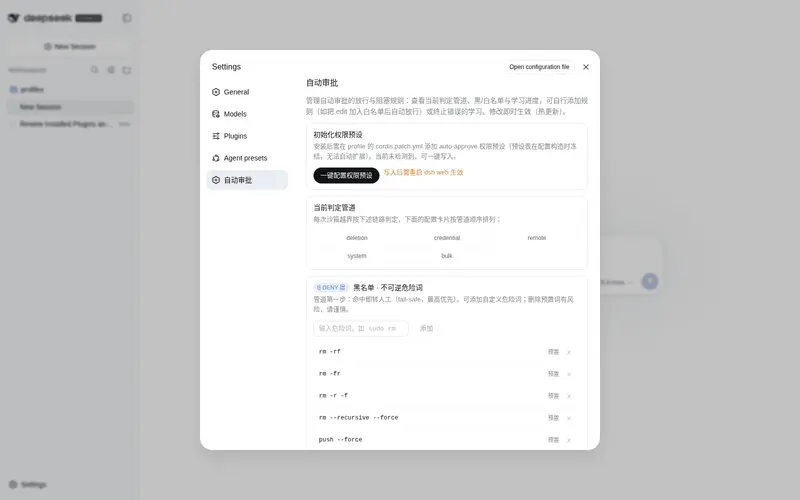
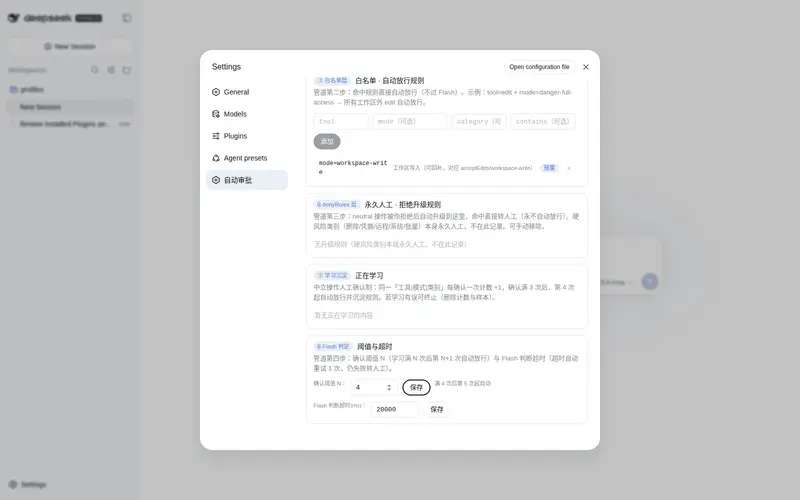
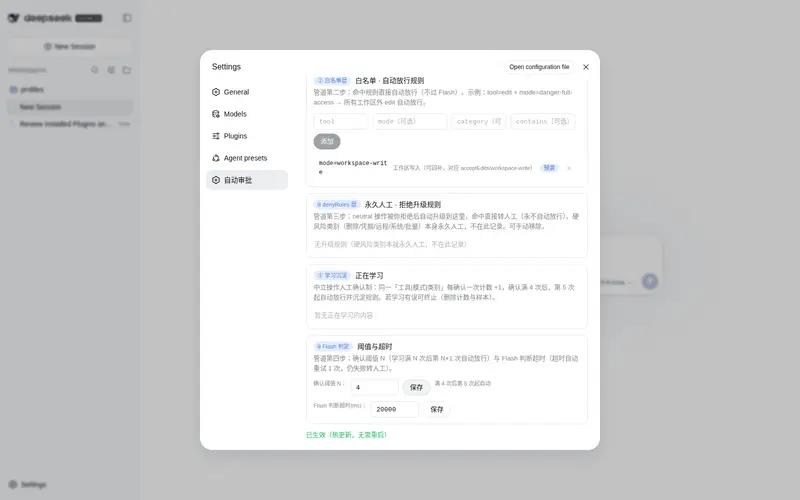
设置页「自动审批」分区提供完整配置:初始化权限预设(一键写入 cordis.patch.yml 的 auto-approve 预设)、当前判定管道总览(DENY → 白名单 → denyRules → Flash → 学习)、危险词黑名单(预置条目 + 自定义添加)、以及热更新说明(修改即时生效,无需重启)。
🚀 快速开始
dsh plugin --profile web add dsh-approval-gate
-
配置权限预设:在
~/.dsh/profiles/web/cordis.patch.yml添加auto-approve预设(详见指南) -
重启
dsh web - 选择预设:会话权限下拉选中「自动审批(Flash)」
📖 文档
📄 License
MIT
Frequently Asked QuestionsFAQ
Use the verified command dsh plugin --profile default add github:moon09300731/dsh-approval-gate in a DSH-enabled shell. The command resolves the public package metadata and keeps the plugin attached to the catalog identity shown on this page.
Compatibility follows the bundle and profile status shown above. If a profile is not detected, keep the plugin disabled there and check the repository documentation before enabling it in production.
The GitHub link and activity metadata are the source of truth for releases and maintenance. Revisit this page after a new release to confirm the catalog has observed the latest version.