NEAZ71eve/dsh-tool-github
GitHub REST API tools + browser sidebar panel for DeepSeek Harness (DSH): repos, search, issues, PRs, comments, account binding, and workspace integration
Listed
0
Git
Bundle verified
Preview
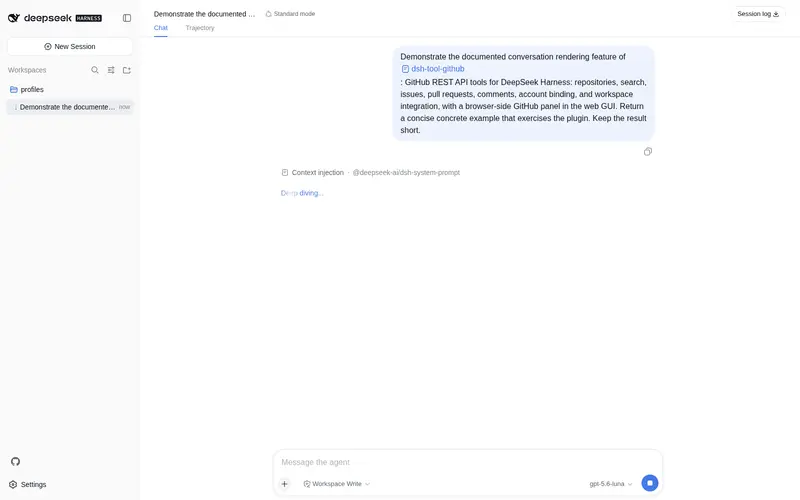
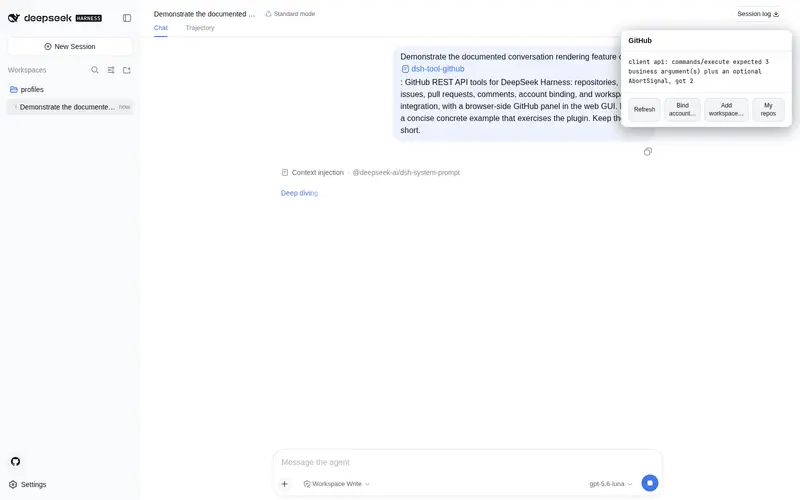
What it does
GitHub REST API tools + browser sidebar panel: repos, search, issues, PRs, comments, account binding (credential-store), and one-click clone-as-workspace.
Best for
- DSH users who want an agent to inspect repositories, search GitHub, and read issues, pull requests, or file content.
- Authenticated workflows that create issues, pull requests, or comments from DSH.
- Web GUI users who prefer a sidebar for account status, repository selection, and workspace management.
- Developers who frequently clone GitHub repositories and register them directly as selectable DSH workspaces.
Not ideal for
- Authenticated or write operations without a GitHub personal access token of sufficient scope.
- Users unwilling to grant the plugin local cloning and workspace-registration access.
- Installations that cannot perform the required full Web GUI restart after adding or updating the client plugin.
- Git hosting workflows outside GitHub's REST API and repository model.
README
dsh-tool-github
GitHub REST API tools for DeepSeek Harness (DSH). Registers model-facing github_* tools so the agent can bind a GitHub account, query repositories, search code/issues, read file content, create issues / pull requests / comments, and clone repositories into selectable workspaces. Also ships a browser-side GitHub panel for the web GUI (sidebar icon → account status, workspace list, bind / add-workspace actions) backed by /github-* commands.
Web GUI panel
After install and a full GUI restart (dsh web — the client plugin discovery only runs at process start and caches “not a client package” verdicts, so a running GUI will not pick up a newly added dsh.client declaration), a GitHub icon appears in the sidebar rail (next to the settings button). Click it to open the GitHub panel:
-
Status — bound account (@login, token source) and registered GitHub workspaces (from
/github-status) -
My repos — list the bound account’s repositories as clickable rows; click one to clone and register it as a workspace (from
/github-my-repos+/github-workspace-add) -
Bind account… — paste a personal access token (runs
/github-bind <token>) -
Add workspace… — enter
owner/repo(orowner repo [branch]) to clone and register a workspace (runs/github-workspace-add) - Refresh — re-read status
The panel talks to the host only through the /github-* commands (ctx.remote.commands.execute), so it never holds a token or touches the GitHub API itself. The same commands are also typed directly in the composer:
/github-status              Show account + workspace status
/github-bind ghp_xxx        Bind an account
/github-unbind              Remove the stored token
/github-workspace-add owner repo [branch]
/github-workspace-list      List cloned GitHub workspaces
Tools
Account binding
| Tool | Description |
|---|---|
github_bind |
Validate a personal access token against the API and persist it to the credential store. After binding, every github_* tool authenticates as that account automatically. |
github_whoami |
Show the bound account, token source (credential store / plugin config / environment), and public profile. |
github_unbind |
Remove the stored token and disconnect the account. |
GitHub API
| Tool | Description |
|---|---|
github_repo |
Repository metadata (stars, forks, language, license, topics, activity) |
github_search |
Search repositories, code, or issues |
github_my_repos |
List the bound account’s repositories (public + private per token scope) — pick one to work on or add as a workspace |
github_issues |
List repository issues (state / label filters) |
github_create_issue |
Create an issue (requires a bound account / token) |
github_prs |
List pull requests (state filter) |
github_create_pr |
Create a pull request (requires a bound account / token) |
github_content |
Read a file or list a directory at any ref |
github_comment |
Comment on an issue or PR (requires a bound account / token) |
Workspaces
| Tool | Description |
|---|---|
github_workspace_add |
Clone a repository into the local workspace root (~/.dsh/github-workspaces) and register it with the harness workspace registry — it then appears in the workspace picker (sidebar / new-session hero) and can be selected as the working directory. Uses git clone when possible and falls back to a codeload tarball download when git TLS is unavailable. |
github_workspace_list |
List repositories cloned by github_workspace_add, with local paths and registration state. |
Install
# from this checkout directory
dsh plugin --profile web add .
Or via a local path:
dsh plugin --profile web add D:\keep_try\dsh-tool-github
Restart the web GUI (dsh web) after installing or updating so the new bundle loads.
Usage examples
"帮我绑定 GitHub 账号"                       → github_bind (输入 token)
"当前登录的 GitHub 账号是谁"                 → github_whoami
"把 deepseek-ai/DeepSeek-Harness 加为工作区" → github_workspace_add
"有哪些 GitHub 仓库可以作为工作区"           → github_workspace_list
"deepseek-harness 有多少 star"               → github_repo
"搜 python 的 PDF 解析库 stars:>3000"        → github_search
Configuration
The plugin accepts a Config with:
-
token— GitHub personal access token (default:""). Prefergithub_bind(credential store) or theGITHUB_TOKENenvironment variable; resolution order is credential store → plugin config → environment. -
baseUrl— API base URL (defaulthttps://api.github.com; set to your GitHub Enterprise URL, e.g.https://github.example.com/api/v3). -
timeoutMs— per-call timeout (default30000). -
maxResults— list/search result cap (default10). -
workspaceRoot— wheregithub_workspace_addclones repositories (default~/.dsh/github-workspaces).
Example profile patch (~/.dsh/cordis.patch.yml or profiles/<name>/cordis.patch.yml):
- id: tool-github
  config:
    maxResults: 20
    workspaceRoot: D:\github-workspaces
How account binding works
github_bind validates the token against GET /user, then stores it through DSH’s credential seam (ctx.credentials) under the GITHUB_TOKEN reference — the same store the Models page writes, persisted in $DSH_HOME/.credentials.yaml. Every other tool resolves the token per operation, so a changed credential takes effect on the next call without a restart. github_unbind removes only a credential-store binding; environment and plugin-config tokens are read-only sources.
How workspace integration works
github_workspace_add clones <owner>/<repo> into <workspaceRoot>/<owner>/<repo>, then calls ctx.workspaceRegistry.create(path, title) — the same registry the workspace picker renders. The repository immediately becomes a selectable workspace: sessions opened there use the repo as their working directory, with the agent’s file tools operating inside the clone.
Development
npm install          # install dev/test dependencies
npm run check        # syntax-check both bundles
npm test             # full test suite (host + client + schema + contract)
npm run test:host    # host tests only (commands, schema, contracts)
npm run test:client  # client DOM integration test
CI (.github/workflows/ci.yml) runs on push/PR: syntax check + full test suite on Node 20 & 22, plus an npm pack --dry-run package sanity job.
License
MIT
Frequently Asked QuestionsFAQ
Use the verified command dsh plugin --profile default add github:NEAZ71eve/dsh-tool-github in a DSH-enabled shell. The command resolves the public package metadata and keeps the plugin attached to the catalog identity shown on this page.
Compatibility follows the bundle and profile status shown above. If a profile is not detected, keep the plugin disabled there and check the repository documentation before enabling it in production.
The GitHub link and activity metadata are the source of truth for releases and maintenance. Revisit this page after a new release to confirm the catalog has observed the latest version.