NewDaNew/dsh-voice-input
DeepSeek Harness 语音输入插件:在 Web GUI 输入框添加麦克风按钮,基于浏览器 Web Speech API 的语音转文字输入,支持可选自动发送。
Listed
0
Voice
Bundle verified
Preview
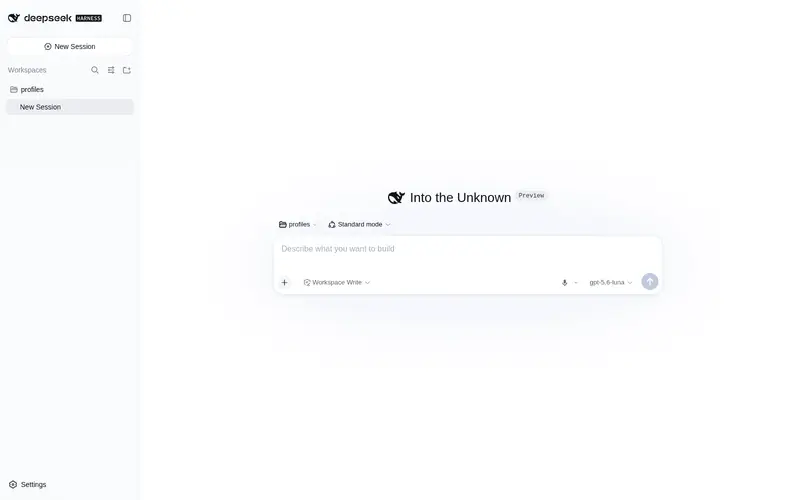
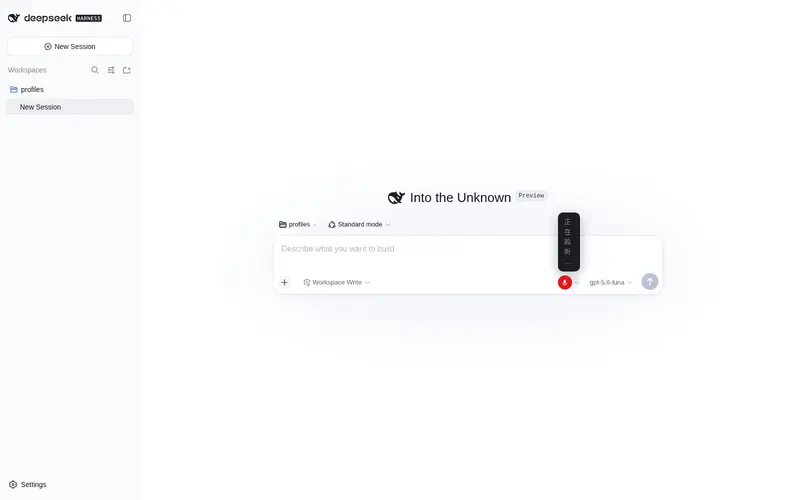
What it does
Voice input for the web UI: a mic button in the composer that transcribes speech into the draft via the Web Speech API, with an optional auto-send toggle.
Best for
- Chrome or Edge users who want to dictate prompts directly into the DSH Web composer.
- Hands-free drafting workflows that benefit from optional automatic sending after recognition.
- Users who want browser-based speech recognition without configuring an API key or a server-side transcription service.
Not ideal for
- Browsers without Web Speech API support; the microphone control is disabled there.
- TUI, headless, or other non-Web DSH clients.
- Voice entry before a conversation has been opened, because the microphone is hidden in the hero state.
- Use during message submission or adjudication, when the control is temporarily disabled.
README
🎤 dsh-plugin-voice-input — DeepSeek Harness 语音输入插件
给 DeepSeek Harness Web 的输入框加一个麦克风按钮:点一下,说话,语音自动变成文字填进输入框,可开启「识别后自动发送」。
语音在本地浏览器识别(Web Speech API):不上传语音、不需要 API Key、不用服务器参与。
🚀 最快安装(一条命令,约 1 分钟)
打开 PowerShell,粘贴回车:
irm https://raw.githubusercontent.com/NewDaNew/dsh-voice-input/main/install.ps1 | iex
脚本会自动完成:定位 DSH 目录 → 下载插件 → 写入配置,全程不用手动改任何文件。
然后做两步:
-
重启 dsh web:结束当前
dsh web进程,重新运行dsh web - 刷新浏览器:输入框右侧出现 🎤 按钮,点它说话即可
不放心执行远程脚本?可以先用手动安装,或先把
install.ps1下载下来看一眼再运行。
📦 手动安装(不想跑脚本)
- 下载本仓库 ZIP(Code → Download ZIP)并解压
- 打开 PowerShell,进入解压目录,运行:
powershell -ExecutionPolicy Bypass -File install.ps1 - 重启
dsh web→ 刷新浏览器
纯手动(连脚本都不用)
- 把整个仓库(含
package.json)复制到$env:DSH_HOME\profiles\node_modules\@local\dsh-plugin-voice-input(DSH_HOME默认C:\Users\你的用户名\.dsh) - 编辑
$env:DSH_HOME\profiles\web\cordis.patch.yml,末尾追加: ```yaml- insert:
- id: voice-input name: ‘@local/dsh-plugin-voice-input’ ```
- insert:
- 重启
dsh web→ 刷新浏览器
🎙️ 怎么用
| 操作 | 效果 |
|---|---|
| 点 🎤 | 开始聆听(说完自动停止,按钮上方实时显示转写),结果自动填入输入框 |
| 再点一次 🎤 | 立即停止,把当前内容提交到输入框 |
| 点 ⚙️(🎤 右侧小箭头) | 设置:识别后自动发送、识别语言(自动 / 中文 / English) |
✅ 要求
- DSH
0.1.0-rc.6+(webprofile) - Chrome / Edge(支持 Web Speech API);不支持的浏览器按钮会自动禁用
🔧 注意事项
- 未进入会话(hero 状态)时不显示麦克风按钮
- 消息提交/裁定阶段按钮暂时禁用
- 识别语言默认跟随浏览器语言(中文系统自动用 zh-CN)
🧩 原理(给开发者)
- DSH client plugin:
package.json声明dsh.client(platform=web,inject 依赖 runtime 与 ui-conversation),exports["./client"]指向浏览器端 bundle - DSH 的 client-modules 把它注入
window.__DSH_BOOT__,前端通过/plugins/@local/dsh-plugin-voice-input/client.js加载 - 插件在
apply(ctx)中用ctx.slots.inject("conversation.input.right", …)把按钮注册到输入框右侧工具栏,识别结果通过inputActions.setDraft()写入草稿
Frequently Asked QuestionsFAQ
Use the verified command dsh plugin --profile default add github:NewDaNew/dsh-voice-input in a DSH-enabled shell. The command resolves the public package metadata and keeps the plugin attached to the catalog identity shown on this page.
Compatibility follows the bundle and profile status shown above. If a profile is not detected, keep the plugin disabled there and check the repository documentation before enabling it in production.
The GitHub link and activity metadata are the source of truth for releases and maintenance. Revisit this page after a new release to confirm the catalog has observed the latest version.