nonentity303/dsh-plugin-manager
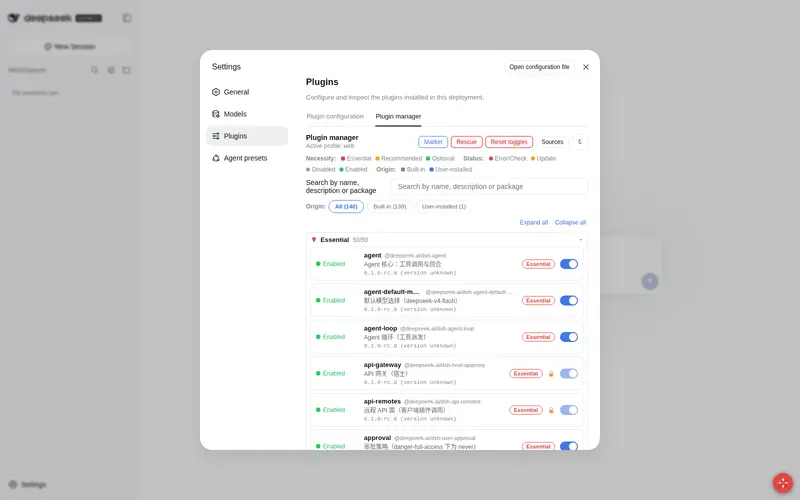
Plugin manager with a rescue center: grouped enable/disable by necessity, multi update sources (npm / dshfind market / GitHub), browser-first downloads with an auto-install folder, P2P fallback, pre-boot self-check and broken-bundle quarantine.
Listed
2
Market
Bundle verified
Preview
What it does
Plugin manager with a rescue center: grouped enable/disable by necessity, multi update sources (npm / dshfind market / GitHub), browser-first downloads with an auto-install folder, P2P fallback, pre-boot self-check and broken-bundle quarantine.
Best for
- DSH installations with many plugins that need grouped status, enablement, and update management
- Operators who need pre-boot checks, broken-bundle quarantine, or recovery while the main engine is down
- Environments that benefit from npm, dshfind, GitHub, browser-download, or P2P acquisition paths
Not ideal for
- Small, stable DSH setups with few plugins and no need for marketplace or rescue tooling
- Hosts without Node.js 18 or pnpm, which are explicit requirements for management and updates
- macOS or Linux users expecting the Windows-specific desktop rescue shortcuts described by the project
README
dsh-plugin-manager-pro
本地插件管理器 —— 为 DeepSeek Harness(DSH) 提供 Web 可视化插件管理 + 独立救砖工具链。



社区/本地插件,非 DSH 官方包。npm:
dsh-plugin-manager-pro· GitHub:nonentity303/dsh-plugin-manager · 跨平台(Windows / macOS / Linux)
✨ 亮点
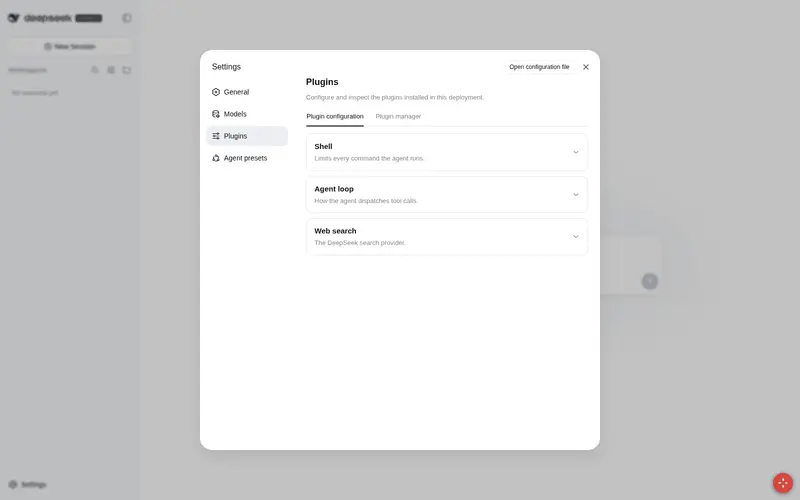
- 可视化插件管理:「设置 → 插件」内的完整管理页——分类折叠、来源筛选、启停开关、版本更新、市场安装
- 救砖能力彻底解耦(v0.7+):主引擎挂了,独立守护服务(3081 端口)照样能自检、修复、拉起——不再依赖主进程
-
浏览器即启动器:把主页设为
http://127.0.0.1:3081/,打开浏览器 = 自动自检 → 修复 → 启动 → 跳转主界面 - 多源更新聚合:npm registry / 插件超市 dshfind / GitHub / 自定义镜像并行查询,限流熔断,公平取最高版本
📋 功能总览(v0.7.3)
插件列表
- 分类折叠:按必要程度收纳为 🔴 必须 / 🟡 推荐 / 🟢 可选 三组可折叠分组(头部显示启用计数与可更新角标,搜索自动展开)
-
来源分类:区分架构自带(随 dsh 提供)与用户安装(
dsh plugin add/ 市场安装),顶部 chips 筛选 + 行徽标 - 状态一目了然:启用状态(🔴 错误/需检查 · 🟡 需更新 · ⚪ 未启用 · 🟢 启用)、名称、功能简介、必要程度、已装→最新版本 + 来源、开关按键
-
简介自动提取:内置中文目录优先;未收录的 mod 自动从
README.zh.md(优先)/package.json.description/README.md提取一句话简介 - 架构保护:web 层刻意禁用的行(tool-fs 等)与界面骨架插件(ui-layout 等)禁止开关(🔒 标记 + 原因)
-
配置卡片(v0.6.9):检测
settings.plugin.item注册,大 mod(vision-router 等)行内直接出配置卡片,带错误边界
📥 更新与下载
- 多源并行 + 权重一致:所有启用源并行查询取最高版本;并列时随机挑选(官方源权重一致,不偏列表顺序)
- 限流熔断:GitHub API 403/429 自动冷却 10 分钟;全量刷新 8 并发(冷缓存约 13-20s,二次刷新命中 30 分钟缓存瞬时返回)
- 下载优先级:① 浏览器原生下载(隐藏 iframe,NDM 等扩展可捕获)→ ② 外部下载软件(NDM/比特彗星)→ ③ 内置下载器兜底(HTTP 直链 / aria2c / P2P magnet·torrent)
-
下载目录自动安装:
.tgz放入$DSH_HOME\downloads→ 自动拾取pnpm add安装
🛒 插件市场
-
dshfind 精选目录:awesome-dsh-plugin 官方收录池(1160+ 插件、14 分类、本地化描述/星标/收录日期),host 10 分钟缓存;在线不可用自动兜底 GitHub
topic:dsh-plugin搜索 - 零往返过滤:目录一次拉全量,搜索 / 分类 chips / 排序 / 分页全部客户端本地完成
- 一键安装:带 npm 名的条目优先 npm registry 直装;GitHub 仓库走内置下载器;两步确认防误触;已装 ✓ 徽标
-
装后防砖校验:自动验证
dsh.bundle/dsh.client清单,缺失自动卸载;pnpm hoist 漂移 /minimumReleaseAge陷阱自动恢复
🛟 救砖
-
独立救援页
/rescue:自包含 HTML 直连宿主网关,UI 全坏仍可诊断/隔离/一键修复/重启/卸载 - 浮动救援球:右下角 🛟 按钮,设置页损坏时的入口
- 自动隔离:可选开关(默认关),加载失败的插件自动禁用
-
启动前自检:
verifyProfile/fixProfile——坏 bundle 会在启动阶段拖垮引擎,管理器提供一键检查与隔离修复
🧰 独立救砖工具链(v0.7+,核心亮点)
传统救砖页由主引擎注册——主引擎挂了,救砖页也跟着瘫。v0.7 起救砖能力独立于主进程运行,主引擎宕机依然可用。零新依赖(纯 Node + 项目已有 yaml)。
| 工具 | 用途 | 用法 |
|---|---|---|
bin/rescue-daemon.mjs |
独立救砖守护(端口 3081):自包含中文救援页 + verify/fix/start/stop/status API,不依赖主引擎 |
node bin/rescue-daemon.mjs --profile <dir> |
bin/open-boot.mjs |
网页启动器:打开 http://127.0.0.1:3081/ → 自动 自检 → 修复 → 启动 → 跳转 3080。设为浏览器主页即”打开即启动”(无端口争抢,稳定) |
node bin/open-boot.mjs --profile <dir> |
bin/dsh-boot.mjs / .cmd
|
Steam 式启动序列:verify → 自动隔离坏插件 → 启动 → 健康等待。--repair-only 供外部调用;退出码 0=就绪 / 1=启动失败 / 2=修复未完成 |
双击 dsh-boot.cmd 或 node bin/dsh-boot.mjs
|
-
公共模块:
lib/preflight.mjs(standalone 自检/修复,与 host 内verifyProfile/fixProfile同源)、lib/enginectl.mjs(引擎探测/拉起/停止/PID 管理) -
故障排查:引擎起不来 → ① 浏览器开
http://127.0.0.1:3081/→”运行检查 → 修复 → 启动”;②node bin/dsh-boot.mjs --repair-only看隔离列表;③ 双击bin/dsh-boot.cmd
环境要求
- Windows 10/11 · macOS · Linux(脚本层如桌面救援入口为 Windows 专属,macOS/Linux 直接
dsh web启动) - Node.js ≥ 18 · DeepSeek Harness
dsh(全局安装或 npx)·pnpm(dsh plugin与更新功能依赖)
安装
# 方式一:npm 一键安装(推荐)
dsh plugin --profile web add dsh-plugin-manager-pro

# 方式二:GitHub Release tarball(离线/自建,走 Release 页下载最新版)
dsh plugin --profile web add ./dsh-plugin-manager-pro-0.7.3.tgz

# 重启 web 生效
dsh web
打开浏览器:设置 → 插件 → 插件管理。右下角 🛟 打开救援中心;独立救援页 http://127.0.0.1:3080/rescue。
卸载:
dsh plugin --profile web remove dsh-plugin-manager-pro
救砖入口速查
| 场景 | 怎么做 |
|---|---|
| 引擎正常,UI 坏了 |
http://127.0.0.1:3080/rescue(救援页 / 右下角 🛟) |
| 引擎起不来 |
http://127.0.0.1:3081/(独立守护)→ 运行检查 → 修复 → 启动 |
| 想要”打开即启动” | 浏览器主页设为 http://127.0.0.1:3081/(open-boot) |
| 命令行一键自检+启动 | 双击 dsh-boot.cmd 或 node bin/dsh-boot.mjs
|
工作原理
-
宿主端(
lib/index.js):读取 Cordis Loader 实时状态(启用/运行期阶段/错误),经 Typert 网关暴露远程方法(list/setEnabled/update/verifyProfile/fixProfile/marketCatalog/…) -
开关持久化:写入 profile 的
cordis.patch.yml(带Managed by dsh-plugin-manager-pro注释行,不触碰用户自有补丁),Loader 热重载应用 -
更新源聚合(
lib/aggregate.js+compare-versions.js):多源并行 → 最高版本 → 并列随机;源级熔断(403/429 → 10 分钟冷却);完整支持预发布段 -
下载器(
lib/downloader.js):HTTP 直链流式;magnet/.torrent 优先外部下载器(跨平台 where/which 检测)→ 内置 webtorrent → 提示手动导入 -
跨平台(
lib/platform.js):npm 全局根 Windows 用APPDATA\npm\node_modules,macOS/Linux 用npm root -g+ 常见路径 + nvm 目录(10 分钟缓存) -
浏览器端(
src/client.jsx→lib/client.js):window.__ModuleLoader__.load({id, factory})契约注册,设置页 tab + 浮动救援球;run()统一处理操作与滚动位置恢复(禁用/启用不跳页) -
独立救砖(
lib/preflight.mjs+lib/enginectl.mjs):纯 Node 自检/修复 + 引擎生命周期,被三个 bin 工具复用;与 host 方法同源逻辑 - 受保护条目:管理器自身、loader 基础设施、webserver/connection/client-runtime 等禁开关;救砖时 RESCUE_NEVER 集合同样不可触碰
开发与测试
npm install        # 如遇 npm 拦截 esbuild 安装脚本:npm approve-scripts esbuild
npm run build      # esbuild 打包浏览器端 → lib/client.js(含 __ModuleLoader__ 包装)
node test-bundle.mjs   # 契约测试(bundle 契约 + 市场/来源/跨平台/require 回归断言)
node test-render.mjs   # 渲染测试(jsdom:搜索/开关/失败路径/来源筛选/市场面板)
node bin/dsh-boot.mjs --repair-only --profile <dir>  # 救砖工具链冒烟
npm pack           # 产出安装用 tarball
发布流程:本地验证 → bump 版本 → 打 tag 发 GitHub Release(附 tgz)→ 用户从 Release 下载安装。
常见问题(排错)
| 现象 | 原因与解决 |
|---|---|
| 禁用/启用 mod 后页面跳回顶部 | v0.7.2 已修复:run() 现在保存并恢复滚动位置;升级后不再跳页 |
启动器报 The argument 'stdio' is invalid
|
v0.7.2 已修复(spawn 改用数字 fd);升级救砖工具链 |
dsh plugin add 报 “Already up to date” 不更新 |
pnpm 按版本号缓存 tarball;修改后必须升版本号再 add |
| 引擎起不来(坏 bundle 进 package.json) | 开 http://127.0.0.1:3081/ 独立救援 → 运行检查 → 修复 → 启动;或双击 dsh-boot.cmd
|
| 救砖页自检总报”patch 解析失败” | 已修复:注释开头的合法 patch 不再被误判损坏(~/.dsh/scripts/dsh-web-rescue.ps1) |
| 桌面快捷方式双击没反应 | v0.7.1 修复:web.pid 陈旧(svchost)误判”已运行”导致拒绝启动——现在只认 node 进程 |
浏览器报 waiting for service: remote.xxx
|
客户端 inject 不能包含自身挂载的 remote(死锁);inject 只保留 ["slots","locale","remote"]
|
| P2P 磁力链接无法下载 | 安装 aria2c(自动启用)或装 webtorrent,或用 NDM/比特彗星手动导入 |
许可证
MIT。补丁持久化机制借鉴 hrhgit/deepseek-harness-plugin-manager(MIT)。
English
A local plugin manager for DeepSeek Harness: a “Plugin manager” tab under Settings → Plugins with collapsible necessity groups, origin classification (built-in vs user-installed), status/version/source columns and enable/disable toggles; multi-source parallel update checks with rate-limit circuit breaker; a plugin market over the awesome-dsh-plugin catalog; and a standalone brick-rescue toolchain (v0.7+): rescue-daemon (port 3081, works when the engine is down), open-boot (browser-triggered self-check/repair/start), and dsh-boot (Steam-style boot sequence with exit codes). Cross-platform, zero new runtime dependencies.
Install: dsh plugin --profile web add dsh-plugin-manager-pro → restart dsh web → Settings → Plugins → Plugin manager. Releases on GitHub Releases.
Frequently Asked QuestionsFAQ
Use the verified command dsh plugin --profile default add github:nonentity303/dsh-plugin-manager in a DSH-enabled shell. The command resolves the public package metadata and keeps the plugin attached to the catalog identity shown on this page.
Compatibility follows the bundle and profile status shown above. If a profile is not detected, keep the plugin disabled there and check the repository documentation before enabling it in production.
The GitHub link and activity metadata are the source of truth for releases and maintenance. Revisit this page after a new release to confirm the catalog has observed the latest version.