Nothree-code/folder-tree-sh
Workspace file-tree panel for the DSH web UI: explore, preview (DOCX / Markdown / PDF / code / CSV), and manage files with a real context menu.
Listed
2
Ui
Bundle verified
Preview
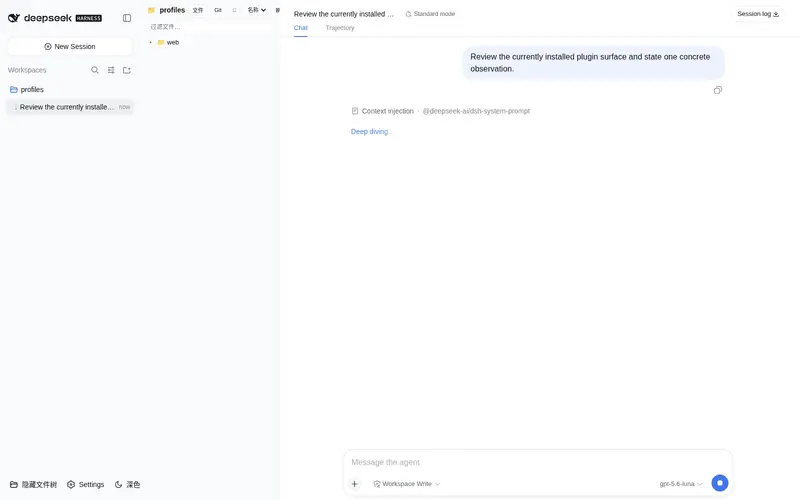
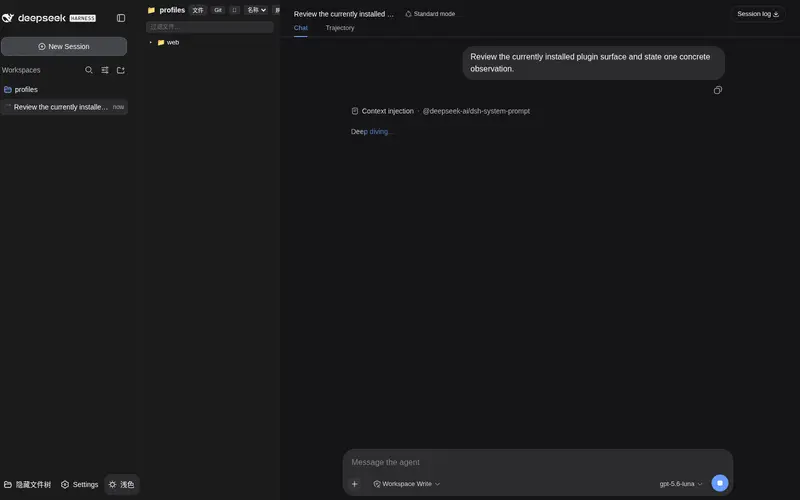
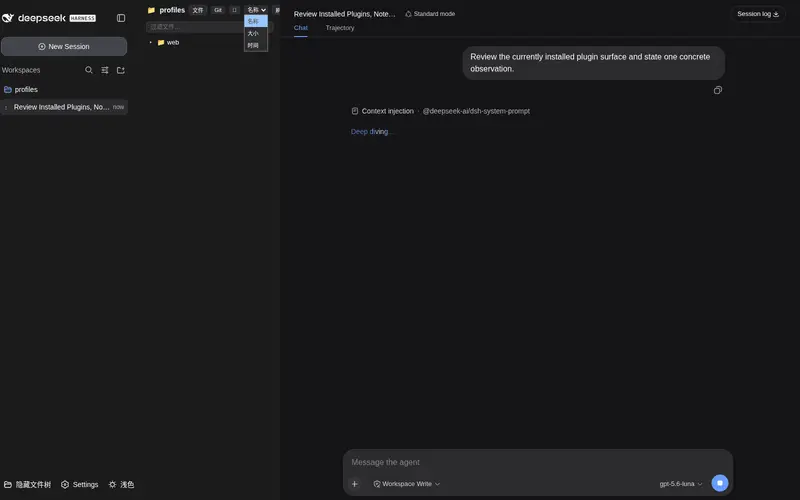
What it does
Workspace file tree for the Web UI: multi-tab preview (text/DOCX/PDF/Markdown/CSV/images), inline Markdown editing, a Git changes panel, and file operations (rename/delete/copy/move/create) via context menu.
Best for
- DSH Web users who need a workspace file tree with multi-tab previews for code, Markdown, CSV, PDF, DOCX, and images
- Workflows that edit Markdown and manage files without leaving the Web UI
- Developers who want Git status, diffs, staging, unstaging, and discard actions beside the file tree
Not ideal for
- Read-only browsing environments that do not want rename, delete, move, write, or Git mutation controls
- Text-file workflows above the documented 100 MB preview limit
- DOCX workflows requiring full rendering when mammoth is unavailable, because fallback extraction is plain text
- Non-Web DSH usage where the graphical tree and preview tabs are unavailable
README
folder-tree-sh
DSH Web GUI 的工作区文件树插件(dsh-ftree):文件浏览、多格式预览、内联编辑、Git 变更面板与完整文件操作,零核心修改、热插拔(profile bundle)。
功能
文件树
- 目录展开/折叠,5 秒自动刷新 + 手动刷新
- 过滤框:按文件名实时过滤
- 排序:名称 / 大小 / 修改时间(目录始终置顶)
- 隐藏文件开关:默认隐藏
.git/node_modules/.DS_Store - 宽度拖拽调整 + 面板开关状态持久化(localStorage)
预览(多标签)
-
Markdown:渲染 + 编辑双模式(工具栏、实时预览、自动保存、Ctrl+S),支持工作区相对路径图片(
经 host raw 路由渲染) - 代码:30+ 语言轻量高亮
-
CSV:自动分隔符检测(
,;Tab)+ 表格渲染 - 图片:缩放(Ctrl+滚轮)/ 双击复位
-
PDF:浏览器原生渲染(
no-cache字节流) - DOCX:mammoth → HTML 真渲染(含图片),无 mammoth 时自动降级为 PowerShell 提取纯文本
- 文本:分块加载(1MB/块,100MB 上限),GBK 编码自动检测回退
- 多标签同时打开多个文件,切换即时
编辑
- Markdown 内联编辑:自动保存(800ms 防抖)+ 手动 Ctrl+S,保存前滚动备份
.dshbak.1~3
Git 变更面板
- 分支显示 + 变更列表(未跟踪 / 已暂存 / 已修改)
- 操作:暂存(add)、取消暂存(restore –staged)、丢弃更改(checkout –,未跟踪文件走回收站删除)、查看差异(diff / diff –cached)
文件操作(右键菜单)
- 刷新、新建文件、新建文件夹、重命名、删除(回收站)、复制/剪切/粘贴、原地复制、打开源文件夹(资源管理器定位)、复制路径、添加到聊天(图片)
安全模型
-
Origin 白名单:从
webStartup动态派生(127.0.0.1 / localhost / [::1] / 配置的 host / trustedHosts),跨站请求一律 403;监听0.0.0.0(LAN)时退化为仅靠 CSRF token -
每进程 anti-CSRF token:所有变更路由(op / write / git-op)必须携带
/dsh-ftree-token颁发的 token - 工作区白名单:所有路径必须位于已注册 workspace 根(deny by default)
-
删除进回收站,不永久删除;写入前滚动备份
.dshbak.1~3 -
Shell 注入防护:所有 PowerShell 命令经单引号转义(
'→'') -
realpath 路径守卫(
lib/pathguard.js):所有路径经realpath规范化(跟随符号链接与 NTFS junction)后再做工作区前缀校验,..穿越、junction 与 symlink 逃逸均无法绕过白名单;不存在的写入目标自动回溯最近存在祖先(realpathLenient) - 预览缓存:按文件 size 校验自动失效,写入后主动清除
开发
# 同步修改到 node_modules 实体拷贝(改完 lib/ 后执行)
powershell -ExecutionPolicy Bypass -File sync.ps1
# 若 package.json 有改动(名称/版本/dsh.client)
cd ..\.. && pnpm add "file:./packages/dsh-ftree"
# 重启 dsh web 生效
版本号以 package.json 为准(host 启动时读取,/dsh-ftree-meta 暴露给客户端做 stale-cache 检测)。
路由一览(host)
| 路由 | 方法 | 说明 |
|---|---|---|
/dsh-ftree-meta |
GET | 版本信息 |
/dsh-ftree-token |
GET | CSRF token |
/dsh-ftree-list |
GET | 列目录(withMtime=1 时附修改时间) |
/dsh-ftree-read |
GET | 分块读文件(text/image/pdf/docx) |
/dsh-ftree-op |
POST | rename / delete / paste / open / mkdir / newfile |
/dsh-ftree-write |
POST | 保存文本(带 .dshbak 备份) |
/dsh-ftree-pdf |
GET | PDF 字节流 |
/dsh-ftree-raw |
GET | 工作区原始字节(markdown 图片) |
/dsh-ftree-git |
GET | git status(branch + 变更) |
/dsh-ftree-git-op |
POST | stage / unstage / discard / diff |
许可
MIT
Frequently Asked QuestionsFAQ
Use the verified command dsh plugin --profile default add github:Nothree-code/folder-tree-sh in a DSH-enabled shell. The command resolves the public package metadata and keeps the plugin attached to the catalog identity shown on this page.
Compatibility follows the bundle and profile status shown above. If a profile is not detected, keep the plugin disabled there and check the repository documentation before enabling it in production.
The GitHub link and activity metadata are the source of truth for releases and maintenance. Revisit this page after a new release to confirm the catalog has observed the latest version.