omdsh-dev/dsh-plugin-check
DSH 插件健康检查工具:扫描插件仓库的清单协议 / patch 格式 / 构建陷阱 / hub 收录状态,零依赖只读,注册 plugin_check 工具
Listed
24
Dev
Bundle verified
Preview
What it does
Plugin health checks: manifest protocol / patch format / build traps, zero-dependency and read-only.
Best for
- DSH plugin authors checking manifest protocol, bundle patches, static build traps, and Hub listing status before release.
- CI or agent workflows needing read-only, zero-build checks of one plugin repository or a directory of `dsh-*` repositories.
- Maintainers who need machine-readable verdicts, issue details, and remediation suggestions, with optional strict warning handling.
Not ideal for
- General application repositories that are not DSH plugins; its checks are specific to recognized plugin shapes and conventions.
- Teams expecting automatic repairs, compilation, or runtime validation; the tool only reads files and performs static checks.
- Audits that require authoritative online Hub status when neither a local catalog nor `gh` access is available; that check degrades to `skipped`.
README
dsh-plugin-check
DSH 插件健康检查工具 —— 扫描插件仓库,诊断清单协议 / patch 格式 / 构建陷阱 / hub 收录状态,输出合规报告与修复建议。只读,不修改、不构建被检查仓库。

动机
组织内插件仓库持续增长,作者踩过的坑(cordis 双副本、tsconfig 三件套、patch name 不一致、产物 .ts 残留——运行时必崩)本可以自动化拦截。本工具把全部实测踩坑变成可自动检查的门禁:模型或 CI 直接对仓库目录跑一次 plugin_check,拿合规报告与修复建议。
安全模型
-
只读:仅
readdir/stat/readFile,绝不修改或构建被检查仓库 - 零业务依赖:仅 node 内置模块(fs/path/child_process)
-
hub 检查离线优先:先读本地 hub catalog(
DSH_HUB_SOURCE或 cwd/hub/ 下),再通过gh读取公开omdsh-dev/dsh-hub-workshop/catalog.json;兼容dsh-hub-index/v0.4与旧repos[].name;全部失败静默降级skipped(报告如实标注,不算警告) - 不执行 tsc:构建陷阱全部静态文本扫描(快、无副作用)
工具声明
注册 plugin_check 工具(@deepseek-ai/dsh-plugin-check,row id tool-plugin-check),统一输出 JSON 文本。
| 参数 | 类型 | 必填 | 说明 |
|---|---|---|---|
action |
string | ✅ |
check / scan / schema
|
path |
string | 插件仓库目录(check)或父目录(scan);默认当前工作目录 | |
strict |
boolean | strict 模式:warning 升级为 error 影响 verdict,默认 false |
Actions
| action | 功能 |
|---|---|
check |
检查单个插件仓库目录 → 合规报告(verdict/errors/warnings/suggestions) |
scan |
扫描父目录下所有 dsh-* 插件仓库(有 package.json 者)→ 汇总报告 |
schema |
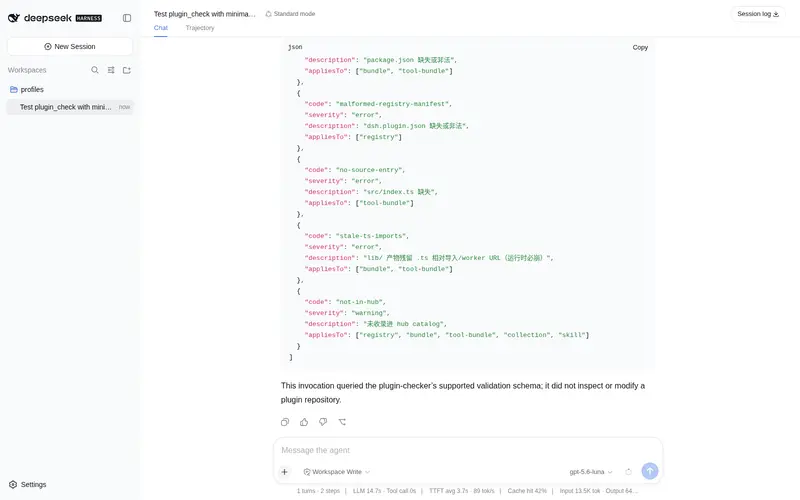
输出全部检测项清单与判定标准(按形态适用的检测项矩阵,供模型/人核对) |
形态识别与检测项(按形态适用,33 项)
| 类别 | error | warning |
|---|---|---|
| 清单协议 | no-manifest / invalid-name-format / missing-main-or-types / no-patch | incomplete-files / missing-peer / no-bundle-decl |
| patch 格式 | malformed-patch / patch-name-mismatch / duplicate-row-id | unexpected-fields |
| 构建陷阱 | no-source-entry / no-tsconfig / missing-ts-ext-imports / lib-layout-mismatch / stale-ts-imports | missing-rewrite-imports / types-path-mismatch / implicit-node-types / no-build-script |
| 生态合规(Profile Bundle) | core-row-id | missing-profile-install-example / manual-install-only / core-modification-required |
| hub 收录 | — | not-in-hub(hub-skipped 为 info) |
生态合规四项(immediate-adjustments-bundle-profile-plan §4.5):
-
core-row-id:patch 条目使用官方核心 row(tools/session/llm/web/permission); -
missing-profile-install-example:README 缺dsh plugin --profile ... add示例; -
manual-install-only:无法通过标准 Profile Bundle 安装(无 patch 或 README 无示例); -
core-modification-required:默认安装流程要求修改 DSH 核心(git apply / cp 进 monorepo;明确标注”手动安装与旧版本兼容”的段落不计入)。
命名策略:invalid-name-format 仅表示 npm 格式错误;合法的个人 scoped/unscoped 名称只产生 non-org-recommended-name(warning),不会 fail。推荐范围为 @deepseek-ai/*、@dsh-external/*、@omdsh/* 和 dsh-*。
verdict:0 error → pass;有 error → fail;仅 warning → warn。
kind:registry / skill / collection / tool-bundle / bundle / infra / unknown——按形态套用不同检查集(X-01 共享矩阵)。
checks:固定检查项的执行结果(total/passed/failed/warned/skipped),不再是 issue 数。
示例
plugin_check { action: "check", path: "C:/Users/admin/Desktop/dshext/dsh-tool-csv" }
  → {"repo":"dsh-tool-csv","kind":"tool-bundle","verdict":"pass","checks":{"total":24,"passed":24,...}}

plugin_check { action: "scan", path: "C:/Users/admin/Desktop/dshext" }
  → {"root":"...","scanned":11,"reports":[...]}   # dsh-my-rsi 等不合规仓库会带 error+suggestions
npm 0.1.0-rc.8 兼容(已验证)
本插件已迁移到 npm 0.1.0-rc.8 依赖线,并在 @deepseek-ai/dsh@0.1.0-rc.8 的隔离 consumer 中完成全链路验证:
-
类型/运行时:
@deepseek-ai/cordis@^4.0.1+@deepseek-ai/dsh-tools@>=0.0.1-rc.1 <0.2.0+@deepseek-ai/dsh-invariants@>=0.0.1-rc.1 <0.2.0(peer);不再依赖 unscopedcordis -
独立构建:
npm install(devDependencies 自包含 typescript/vitest/@types/node)→npm run typecheck→npm test→npm run build→npm pack -
消费验证:tarball 装入 0.1.0-rc.8 consumer →
dsh --profile compat --dump-config出现本插件 row → 工具真实注册与执行通过 -
启动方式:
npx -p @deepseek-ai/dsh@0.1.0-rc.8 dsh web(lib 生产模式;勿install -g全局安装)
安装
Profile Bundle(推荐)
仓库位于 omdsh-dev/dsh-plugin-check(public)。将本插件作为独立 bundle 安装到 profile(DSH 0.1.0-rc.8(npm)):
# 交互式(web)profile
dsh plugin --profile web add github:omdsh-dev/dsh-plugin-check
# 一次性任务(headless)profile —— dsh run 默认使用 headless
dsh plugin --profile headless add github:omdsh-dev/dsh-plugin-check
包内 dsh.bundle.patch 会在安装后自动把插件加入 profile 的 layer stack(row id:tool-plugin-check)。插件缺失的 peer 依赖(cordis、@deepseek-ai/dsh-tools)由 profile 的 healed profiles/node_modules 回退安装提供。
⚠️ web 与 headless 是不同 profile:web 安装不会自动覆盖 headless;
dsh run默认使用 headless profile。Windows 路径使用正斜杠(C:/...)。
npm pack tarball 安装
本地构建后用 tarball 路径安装(不依赖 GitHub):
# tarball 方式(web 为例;headless 同)
npm pack
dsh plugin --profile web add <npm pack 产物 tarball 路径>
验证安装
dsh --profile web --dump-config | grep tool-plugin-check
运行验证
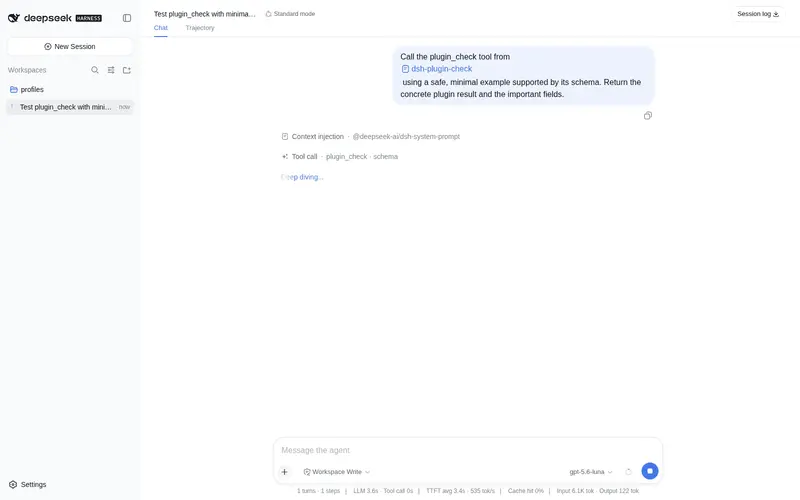
dsh run "使用 plugin_check 工具检查一个插件仓库"
手动安装与旧版本兼容
旧场景(monorepo 集成、不支持 Profile Bundle 的旧快照或插件开发调试环境——本地 junction/symlink、手动编辑 profile 层)。
测试
node <monorepo>/node_modules/vitest/vitest.mjs run tests # 38 用例
-
manifest.spec.ts/patch.spec.ts/build-check.spec.ts:每项检测的命中与不误报(fixtures 临时目录生成) -
report.spec.ts:verdict 判定(含 strict 升级)、suggestions 模板、hub-skipped 不升级 -
register.spec.ts:注册契约(AUDIT-CROSS-02 风格)
自检基线(2026-08-08 实测)
组织内 8 个插件(time/encoding/json/calculator/csv/regex/markdown/session-health)全部 pass、零 error、零 warning。检查过程发现并修复了 4 个旧插件的真实合规缺陷(tsconfig 缺三件套——重建会产生坏产物;缺 build/prepack scripts)。
许可
MIT
Frequently Asked QuestionsFAQ
Use the verified command dsh plugin --profile default add github:omdsh-dev/dsh-plugin-check in a DSH-enabled shell. The command resolves the public package metadata and keeps the plugin attached to the catalog identity shown on this page.
Compatibility follows the bundle and profile status shown above. If a profile is not detected, keep the plugin disabled there and check the repository documentation before enabling it in production.
The GitHub link and activity metadata are the source of truth for releases and maintenance. Revisit this page after a new release to confirm the catalog has observed the latest version.