omdsh-dev/dsh-session-health
DSH 会话健康检查插件:多帧 zstd 会话文件的帧级扫描诊断(torn/损坏/空会话检测),零依赖只读,注册 session_health 工具
Listed
8
Dev
Bundle verified
Preview
What it does
Frame-level scan diagnostics for session files (torn/corrupt/empty detection).
Best for
- DSH users diagnosing empty, torn, corrupt, interrupted, or unusually structured session files.
- Operators who need frame-level inspection of multi-frame zstd sessions without modifying them.
- Repair workflows that need a read-only health report before deciding what to clean up or recover.
Not ideal for
- Workflows that require the plugin itself to repair, delete, or rewrite session files.
- Exact event counting; the basic frame-level estimate is not an exact event count.
- Environments where deep event analysis is mandatory but the official decoder is unavailable; deep mode then degrades to frame-level scanning.
README
dsh-session-health
DSH 会话健康检查插件 —— 对 $DSH_HOME/sessions 下的多帧 zstd 会话文件做帧级扫描诊断(torn / 损坏 / 空会话 / stray 文件),输出健康报告与清理建议。只读:绝不修改或删除任何文件。

仓库:https://github.com/omdsh-dev/dsh-session-health(public)
动机
8/7 调查 issue #376 时对 39 个会话文件做了全量解码分析,过程中发现一个关键事实:DSH 会话文件是多个 zstd frame 的串联(一个 19MB 会话 = 119,952 个 frame),用单帧解码 API 读多帧文件只能看到 header——曾导致”会话全空”的误判。这套诊断逻辑值得产品化为工具:模型可以直接问”我的会话文件健康吗”,而不是靠人手工写脚本。
与 dsh-session-repair-skill(修复损坏会话)互补:本工具只读诊断发现 → repair 技能修复。
安全模型
- 只读保证:绝不修改/删除任何文件(测试覆盖”扫描后文件字节数不变”,见 files.spec SH-06 用例)
-
路径围栏:session id 严格目录名白名单(防
../穿越);绝对路径与最终文件均做fs.realpath真实路径 containment(防符号链接/junction 逃逸);枚举用 lstat 拒绝 symlink -
零业务依赖:zstd 帧扫描器为独立实现(DataView 读字节,RFC 8878 结构,与官方
scanZstdFrames差分一致) -
深度分析可选:
deep: true时动态 import 官方解码器;解析失败明确降级deep: "unavailable",绝不静默 - 输入范围固定(sessions 目录),无网络、无执行面
工具声明
注册 session_health 工具(@deepseek-ai/dsh-session-health,row id tool-session-health),统一输出 JSON 文本。
| 参数 | 类型 | 必填 | 说明 |
|---|---|---|---|
action |
string | ✅ |
scan / file / stats
|
path |
string | 文件绝对路径(须在 sessions 根内)或会话 id(file/stats 必需) | |
deep |
boolean | 深度分析(解码事件统计),默认 false | |
detail |
boolean | 列出异常文件(scan 默认 true);false 只出汇总 |
检测项
| 类别 | 判定 |
|---|---|
missing |
会话 id 解析不到文件 |
empty |
0 字节文件 |
not-zstd |
前 4 字节非 28 b5 2f fd(明文 .jsonl 或损坏) |
torn |
EOF 打断帧尾部(写入中断) |
reserved-header / reserved-block
|
帧头/块头保留位非法(结构损坏) |
bad-header |
deep 模式:首帧不是 session header |
empty-session |
只有 1 帧(header)且超过 1 分钟未更新 |
oversized-single-frame |
单帧 > 1MB(正常多帧写入不会这样) |
interrupted |
deep 模式:有 turn/start 无 turn/end(进程被杀/崩溃) |
stray-file |
*.tmp / 非标准命名残留文件 |
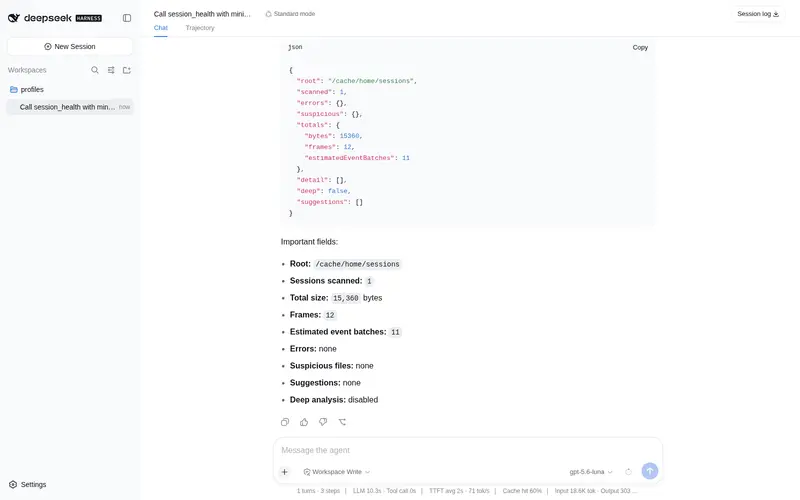
报告含:root / scanned / errors / suspicious / totals(字节·帧数·事件批次估算) / detail / deep / suggestions(suggestions 按 issue 模板给出清理/修复建议,不自动执行)。
示例
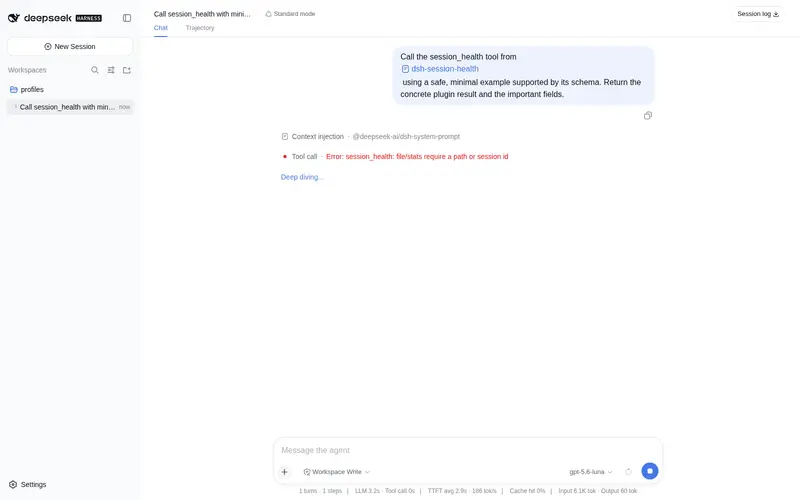
session_health { action: "scan" }
  → {"root":"C:\\Users\\admin\\.dsh\\sessions","scanned":39,"errors":{...},"suspicious":{...},"suggestions":[...]}

session_health { action: "file", path: "session-abc123", deep: true }
  → 单文件报告(含事件分布与中断检测)
npm 0.1.0-rc.8 兼容(已验证)
本插件已迁移到 npm 0.1.0-rc.8 依赖线,并在 @deepseek-ai/dsh@0.1.0-rc.8 的隔离 consumer 中完成全链路验证:
-
类型/运行时:
@deepseek-ai/cordis@^4.0.1+@deepseek-ai/dsh-tools@>=0.0.1-rc.1 <0.2.0+@deepseek-ai/dsh-invariants@>=0.0.1-rc.1 <0.2.0(peer);不再依赖 unscopedcordis -
独立构建:
npm install(devDependencies 自包含 typescript/vitest/@types/node)→npm run typecheck→npm test→npm run build→npm pack -
消费验证:tarball 装入 rc.8 consumer →
dsh --profile compat --dump-config出现本插件 row → 工具真实注册与执行通过 -
启动方式:
npx -p @deepseek-ai/dsh@0.1.0-rc.8 dsh web(lib 生产模式;勿install -g全局安装)
已知限制:npm 0.1.0-rc.8 下 deep 模式依赖的
@deepseek-ai/dsh-session-persistence-jsonltarball 仍不含src/,根入口仍不导出 zstd API,deep 降级decoder-unavailable;frame-level 扫描不受影响(已报 dsh-external/issues,该组织为组织基础设施,保留)。
安装
DSH 0.1.0-rc.8(npm)下,插件通过 dsh plugin --profile <profile> add <source> 安装,source 支持 GitHub 仓库或 npm pack tarball。
从 GitHub 安装(推荐)
# 交互式(web)profile
dsh plugin --profile web add github:omdsh-dev/dsh-session-health
# 一次性任务(headless)profile —— dsh run 默认使用 headless
dsh plugin --profile headless add github:omdsh-dev/dsh-session-health
从 npm pack tarball 安装
npm pack 产物可直接作为 source 安装:
dsh plugin --profile web add dsh-session-health-*.tgz
包内 dsh.bundle.patch 会在安装后自动把插件加入 profile 的 layer stack(row id:tool-session-health)。插件缺失的 peer 依赖(@deepseek-ai/cordis、@deepseek-ai/dsh-tools)由 profile 的 healed profiles/node_modules 回退安装提供。
⚠️ web 与 headless 是不同 profile:web 安装不会自动覆盖 headless;
dsh run默认使用 headless profile。Windows 路径使用正斜杠(C:/...)。
验证安装
dsh --profile web --dump-config | grep tool-session-health
运行验证
dsh run "使用 session_health 工具扫描会话目录健康状态"
旧场景:monorepo / 本地路径安装
monorepo 方式已标注为旧场景(本地 junction/symlink、手动编辑 profile 层、不支持 GitHub/tarball source 的旧快照):
dsh plugin --profile web add "C:/path/to/dsh-session-health"
测试
node <monorepo>/node_modules/vitest/vitest.mjs run tests
-
zstd-scan.spec.ts:官方压缩器生成帧的边界/多帧/not-zstd/截断/保留位 + 真实会话差分(大/中/小文件与官方scanZstdFrames逐帧一致;只读本机会话,不入库) -
files.spec.ts:两级目录枚举、stray/jsonl 识别、路径围栏(穿越/符号链接/越界拒绝)、会话 id 解析、只读保证 -
report.spec.ts:错误/可疑计数分桶、suggestions 模板、空结果、deep 降级标注 -
register.spec.ts:注册契约(AUDIT-CROSS-02 风格)
已知限制
-
deep依赖动态 import 官方解码器:在 profile 运行时若无法解析该包,明确降级为帧级扫描(报告标注deep: "unavailable") - 事件批次估算 = 帧数 - 1(每批至少 1 帧;不是精确事件数,报告已注明估算)
许可
MIT
Frequently Asked QuestionsFAQ
Use the verified command dsh plugin --profile default add github:omdsh-dev/dsh-session-health in a DSH-enabled shell. The command resolves the public package metadata and keeps the plugin attached to the catalog identity shown on this page.
Compatibility follows the bundle and profile status shown above. If a profile is not detected, keep the plugin disabled there and check the repository documentation before enabling it in production.
The GitHub link and activity metadata are the source of truth for releases and maintenance. Revisit this page after a new release to confirm the catalog has observed the latest version.