omdsh-dev/dsh-tool-csv
DSH CSV 数据工具插件:解析/查询/统计/转换 CSV 文本(RFC 4180),零依赖状态机解析器,注册 csv 工具
Listed
4
Tools
Bundle verified
Preview
What it does
Parse/query/aggregate/convert CSV (RFC 4180) with a zero-dependency state-machine parser.
Best for
- Agents processing pasted CSV exports, API tabular responses, or report fragments as structured JSON.
- Workflows that need RFC 4180 parsing, exact column-value filtering, or basic table-shape statistics.
- Users handling quoted commas, multiline fields, escaped quotes, BOMs, CRLF, or tab-delimited data.
Not ideal for
- CSV inputs larger than 256,000 bytes, which are rejected rather than truncated.
- Queries requiring substring, numeric-range, or expression-based filtering; matching is literal and exact.
- Workflows that require preserving inconsistent rows exactly; missing fields become null and surplus fields are merged into the last column.
README
dsh-tool-csv
DSH CSV 数据工具插件 —— 解析、查询、过滤、统计和转换 CSV 文本。零依赖、纯函数、RFC 4180 状态机解析器。

动机
Agent 会话里表格形态的数据(导出文件、API 响应、报告片段)出现频率很高。现有路径是起 bash 进程让模型现写解析脚本:
- 每次调用都起进程——Windows 上尤其昂贵
-
模型手写 CSV 解析器错误率高——引号内逗号、
""转义、BOM、跨行字段、CRLF 这些边界手写代码极易踩坑,且结果不可验证
本插件提供确定性、零依赖、纯函数的 CSV 处理:一次函数调用,毫秒级返回结构化 JSON。
与 dsh-tool-json 形成”结构化数据处理”对:JSON 管对象,CSV 管表格。
安全模型
- 零依赖:不引入 csv 解析库,手写状态机(单遍扫描,O(n))
- 纯函数:不读文件、不写文件、不联网、不 eval
-
无注入面:查询过滤只做字面精确匹配(
===),不支持表达式求值 -
预算:输入上限 256,000 字节(超限直接报错,不截断);
timeoutMs: 2000;limit默认 100 行防输出膨胀 - 工具参数会记入会话日志,不要传入敏感数据
工具声明
注册 csv 工具(@deepseek-ai/dsh-tool-csv,row id tool-csv),统一输出 JSON 文本字符串。
| 参数 | 类型 | 必填 | 说明 |
|---|---|---|---|
action |
string | ✅ |
parse / query / stats / to_json
|
csv |
string | ✅ | CSV 文本(RFC 4180;引号字段可含逗号/换行;"" 转义;忽略 BOM) |
column |
string | 查询列:列名(有表头时)或 1-based 索引如 "2"
|
|
value |
string | 查询精确匹配值(严格相等,非子串) | |
delimiter |
string | 分隔符,默认 ",";单字符或 "tab"
|
|
header |
boolean | 首行是否为表头,默认 true;false 时行解析为数组 |
|
limit |
integer | 返回行数上限(query/parse),默认 100 |
Actions
| action | 功能 | 输出示例 |
|---|---|---|
parse |
解析为 JSON 数组(有表头时每行一个对象) | [{"name":"Alice","city":"NYC"}] |
query |
按列名/索引精确过滤行(结果含表头,可回读) | [["name","city"],["Alice","NYC"]] |
stats |
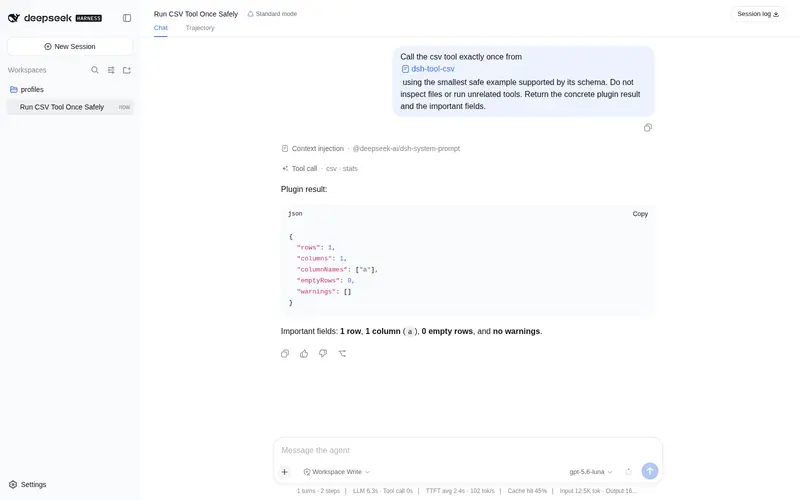
行数 / 列数 / 列名 / 空行数 / 警告(含重复列名、字段数不一致) | {"rows":2,"columns":2,...} |
to_json |
parse 的别名(模型友好) |
同 parse
|
示例
csv { action: "parse", csv: "name,city\nalice,nyc\nbob,la" }
  → [{"name":"alice","city":"nyc"},{"name":"bob","city":"la"}]

csv { action: "query", csv: "name,city\nalice,nyc\nbob,la", column: "city", value: "la" }
  → [["name","city"],["bob","la"]]

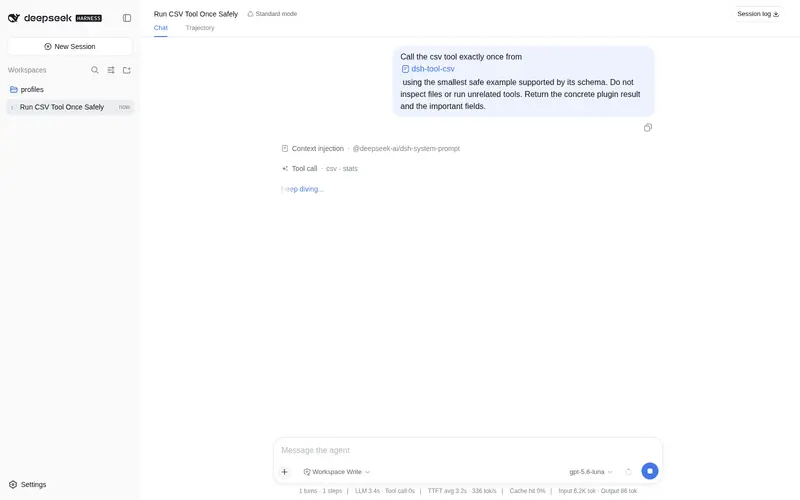
csv { action: "stats", csv: "name,city\nalice,nyc" }
  → {"rows":1,"columns":2,"columnNames":["name","city"],"emptyRows":0,"warnings":[]}
边界行为
| 情况 | 处理 |
|---|---|
| 引号内逗号/换行/CRLF | 视为字段内容(跨行字段) |
"" 转义 |
解码为单个 "
|
| 未闭合引号 |
报错:csv: unterminated quoted field(严格模式,不静默容错) |
| 闭合引号后非法字符 |
报错:csv: invalid character "x" after closing quote(RFC 4180:闭合后只允许分隔符/换行/EOF) |
| 首行 BOM | 剥离后再解析 |
| 空行 | 跳过(stats 报告空行数) |
| 字段数不一致 | 不报错:缺失补 null、多余并入最后一个字段(stats 记录警告) |
| 重复列名 | 后出现的列覆盖先出现的(stats 记录警告) |
__proto__/constructor/prototype 表头 |
null-prototype 对象写入,无损序列化({"__proto__":"value"}) |
| delimiter | 仅单 UTF-16 code unit 或 "tab";拒绝 surrogate pair(如 😀)与控制字符(除 \t) |
| 无表头 |
header: false,行解析为数组,column 用 1-based 索引 |
| 超 256KB 输入 | 直接报错(不截断) |
| 十万行级输入 | 单遍聚合计算列宽(无 spread),不触发 RangeError |
npm 0.1.0-rc.8 兼容(已验证)
本插件已迁移到 npm 0.1.0-rc.8 依赖线,并在 @deepseek-ai/dsh@0.1.0-rc.8 的隔离 consumer 中完成全链路验证:
-
类型/运行时:
@deepseek-ai/cordis: ^4.0.1+@deepseek-ai/dsh-tools: >=0.0.1-rc.1 <0.2.0+@deepseek-ai/dsh-invariants: >=0.0.1-rc.1 <0.2.0(peer);不再依赖 unscopedcordis -
独立构建:
npm install(devDependencies 自包含 typescript/vitest/@types/node)→npm run typecheck→npm test→npm run build→npm pack -
消费验证:tarball 装入 0.1.0-rc.8 consumer →
dsh --profile compat --dump-config出现本插件 row → 工具真实注册与执行通过 -
启动方式:
npx -p @deepseek-ai/dsh@0.1.0-rc.8 dsh web(lib 生产模式;勿install -g全局安装)
安装
Profile Bundle(推荐)
DSH 0.1.0-rc.8(npm)起,本插件可作为独立 bundle 一键安装到任意 profile(仓库位于 https://github.com/omdsh-dev,public):
# 交互式(web)profile
dsh plugin --profile web add github:omdsh-dev/dsh-tool-csv
# 一次性任务(headless)profile —— dsh run 默认使用 headless
dsh plugin --profile headless add github:omdsh-dev/dsh-tool-csv
也可以先用 npm pack 打出 tarball 再安装:
git clone https://github.com/omdsh-dev/dsh-tool-csv
cd dsh-tool-csv
npm install && npm pack
dsh plugin --profile web add ./deepseek-ai-dsh-tool-csv-*.tgz
dsh plugin --profile headless add ./deepseek-ai-dsh-tool-csv-*.tgz
包内 dsh.bundle.patch 会在安装后自动把插件加入 profile 的 layer stack(row id:tool-csv)。插件缺失的 peer 依赖(@deepseek-ai/cordis、@deepseek-ai/dsh-tools、@deepseek-ai/dsh-invariants)由 profile 的 healed profiles/node_modules 回退安装提供。
⚠️ web 与 headless 是不同 profile:web 安装不会自动覆盖 headless;
dsh run默认使用 headless profile。Windows 路径使用正斜杠(C:/...)。
验证安装
dsh --profile web --dump-config | grep tool-csv
运行验证
dsh run "使用 csv 工具解析 'a,b
1,2'"
手动安装(源码贡献 / 旧 snapshot 场景)
仅适用于源码贡献(在 monorepo 中开发调试本插件)或仍在使用旧 snapshot 的场景(本地 junction/symlink、手动编辑 profile 层)。
测试
node <monorepo>/node_modules/vitest/vitest.mjs run tests
-
parse.spec.ts:RFC 4180 边界(引号/转义/BOM/CRLF/空行/tab/大小上限/严格引号错误/delimiter 校验) -
query.spec.ts:列名/索引过滤、精确匹配、limit、错误路径、stats 警告、JSON 映射、危险表头、12.5 万行压力 -
register.spec.ts:注册契约(AUDIT-CROSS-02 风格)
许可
MIT
Frequently Asked QuestionsFAQ
Use the verified command dsh plugin --profile default add github:omdsh-dev/dsh-tool-csv in a DSH-enabled shell. The command resolves the public package metadata and keeps the plugin attached to the catalog identity shown on this page.
Compatibility follows the bundle and profile status shown above. If a profile is not detected, keep the plugin disabled there and check the repository documentation before enabling it in production.
The GitHub link and activity metadata are the source of truth for releases and maintenance. Revisit this page after a new release to confirm the catalog has observed the latest version.