omdsh-dev/dsh-tool-encoding
DSH 编码/哈希工具插件:base64/base64url/url/hex 编解码、md5/sha1/sha256/sha512 哈希、UUID 生成,零依赖
Listed
3
Tools
Bundle verified
Preview
What it does
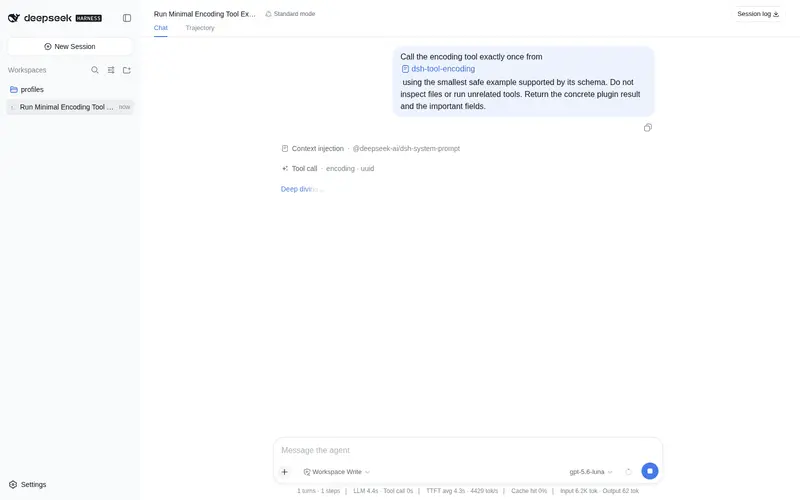
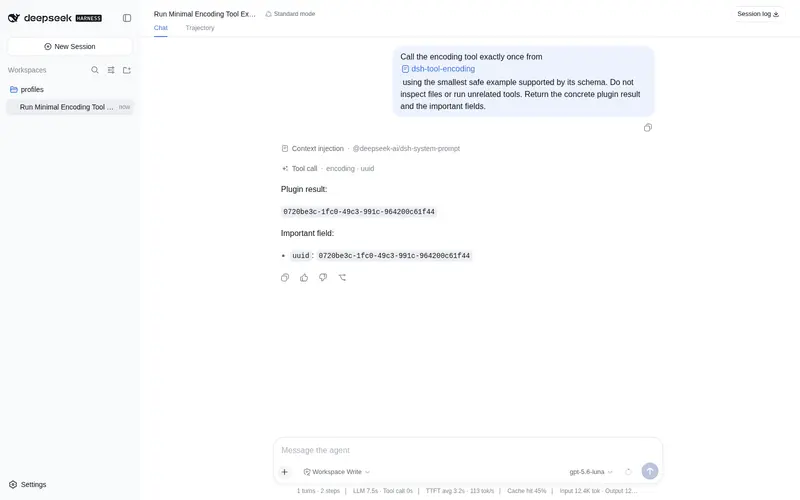
base64/url/hex encoding, common hashes, and UUID generation.
Best for
- Agents performing routine UTF-8 base64, base64url, URL-component, or hexadecimal conversion.
- Workflows generating UUIDs or computing MD5, SHA-1, SHA-256, or SHA-512 digests for compatibility and non-secret integrity checks.
- Cross-platform tasks that need strict canonical decoding without shell quoting or utility differences.
Not ideal for
- Arbitrary binary decoding when the result is not valid UTF-8.
- Security-sensitive hashing that requires HMAC, salting, password hashing, or key derivation; those operations are not provided.
- Form-style URL encoding where spaces must become '+', or full-query encoding rather than component encoding.
- Secret material, because tool arguments are recorded in session logs.
README
dsh-tool-encoding
DSH 编码/哈希工具插件 —— UTF-8 文本的 base64/base64url/url/hex 编解码 + 哈希 + UUID。零依赖、零进程、纯函数。
包名:
@deepseek-ai/dsh-tool-encoding(独立 bundle,非 monorepo 集成形态);lib/产物由仓库内npm run build(tsc)生成并随仓库提交。

动机
Agent 处理编码/哈希是日常高频操作:查看 API 响应里的 base64 字段(JWT payload)、构造 query 参数、校验文件完整性(sha256)、生成 UUID。当前做法 bash -c "echo ... | base64" 的问题:进程开销、引号转义地狱(base64 串嵌进 bash 命令再嵌进 JSON 参数,双层转义错误率极高)、跨平台工具命名不一致(md5 vs md5sum vs shasum -a 256)。
安全模型
无 eval、无 new Function。所有操作是 Buffer/node:crypto/TextDecoder/encodeURIComponent 的纯函数组合:
-
UTF-8 完整性:解码用 fatal 模式(
TextDecoder('utf-8', { fatal: true })),非法字节抛encoding: invalid UTF-8 output;合法 U+FFFD/控制字符不误伤(00NUL、0a换行、efbfbdU+FFFD 均合法,ff非法) -
base64 严格校验:无空白、
=仅末尾且 ≤2、长度必须为 4 的倍数、RFC 4648 canonical unused bits(Zh==等非 canonical 编码拒绝,防多串映射同文本) -
孤立 surrogate 统一拒绝:所有文本输入过
String.prototype.isWellFormed(),避免静默替换与 URIError 行为不一致 -
字节上限:输入 1 MB / 输出 4 MB(各 1,000,000 / 4,000,000 字节,
Buffer.byteLength;输出上限为分配前预估 + 最终检查的保险丝) -
哈希算法白名单:
Object.hasOwn查表(md5/sha1/sha256/sha512) - 错误统一
encoding:前缀,不透传底层URIError/TypeError
架构
DSH Agent
    │ ctx.tools.register()
    ▼
src/index.ts(Cordis 插件入口 + action 分发 + 独立校验)
    │
    ▼
src/encoding.ts
    ├── b64Encode/b64Decode — 标准 base64(严格校验)
    ├── b64UrlEncode/b64UrlDecode — base64url(canonical 无 padding,解码兼容)
    ├── urlEncode/urlDecode — component 语义(URIError 包装)
    ├── hexEncode/hexDecode — UTF-8 字节 hex(fatal 解码)
    ├── digest — 白名单哈希
    ├── newUuid — crypto.randomUUID()
    └── validateUnicode/assertInputBytes/decodeUtf8Strict — 校验器
工具声明
ctx.tools.register(defineTool({
  name: 'encoding',
  parameters: {
    action: {
      type: 'string', required: true,
      enum: ['base64_encode','base64_decode','base64url_encode','base64url_decode',
             'url_encode','url_decode','hex_encode','hex_decode','hash','uuid'],
    },
    input:     { type: 'string', description: 'Input string for encode/decode/hash' },
    algorithm: { type: 'string', enum: ['md5','sha1','sha256','sha512'], description: 'For hash' },
  },
  output: { schema: { type: 'json' }, render: (_a, v) => [{ type: 'text', text: JSON.stringify(v) }] },
  execute: (args) => Promise.resolve(executeAction(args.action, args) as JsonValue),
  timeoutMs: 1000,
}))
支持的操作
| action | 说明 | 示例 |
|---|---|---|
base64_encode / base64_decode
|
RFC 4648 标准 base64(严格校验) |
"foobar" → "Zm9vYmFy"
|
base64url_encode / base64url_decode
|
JWT 风格,输出无 padding,解码兼容 +/ 与可选 padding |
"\uFEFF" → "77u_"
|
url_encode / url_decode
|
component 语义(非完整 query):空格 %20 非 +,!'()* 不转义,decode("+") → "+"
|
"a b" → "a%20b"
|
hex_encode / hex_decode
|
UTF-8 字节 hex;解码结果必须合法 UTF-8 |
"AB" → "4142"
|
hash |
md5/sha1/sha256/sha512 hex 摘要;仅非安全用途 |
sha256("") → e3b0c442...
|
uuid |
UUID v4 字符串(crypto.randomUUID()) |
"550e8400-..." |
语义契约:
- v1 是 UTF-8 文本工具:所有输入输出为字符串;二进制内容用 hex 表示;解码结果必须合法 UTF-8
-
所有 action 返回字符串(含
uuid) - 不要对机密材料使用本工具:tool 参数会记录进会话日志
npm 0.1.0-rc.8 兼容(已验证)
本插件已迁移到 npm 0.1.0-rc.8 依赖线,并在 @deepseek-ai/dsh@0.1.0-rc.8 的隔离 consumer 中完成全链路验证:
-
类型/运行时:
@deepseek-ai/cordis@^4.0.1+@deepseek-ai/dsh-tools@>=0.0.1-rc.1 <0.2.0+@deepseek-ai/dsh-invariants@>=0.0.1-rc.1 <0.2.0(peer);不再依赖 unscopedcordis -
独立构建:
npm install(devDependencies 自包含 typescript/vitest/@types/node)→npm run typecheck→npm test→npm run build→npm pack -
消费验证:tarball 装入 0.1.0-rc.8 consumer →
dsh --profile compat --dump-config出现本插件 row → 工具真实注册与执行通过 -
启动方式:
npx -p @deepseek-ai/dsh@0.1.0-rc.8 dsh web(lib 生产模式;勿install -g全局安装)
版本适配
- 适配 DSH 版本: DSH 0.1.0-rc.8(npm)
-
bundle 声明:
package.json的dsh.bundle(patch 指向cordis.patch.yml)+exports导出 -
patch 格式:
cordis.patch.yml使用- insert:列表(patch 是 id-targeted 语义,裸- id:条目会报entry not found) -
files: 发布 tarball 含
lib/、src/、cordis.patch.yml
安装
插件源码仓库:https://github.com/omdsh-dev/dsh-tool-encoding(public)。
Profile Bundle(推荐)
将本插件作为独立 bundle 安装到 profile(DSH 0.1.0-rc.8,npm):
# 交互式(web)profile
dsh plugin --profile web add github:omdsh-dev/dsh-tool-encoding
# 一次性任务(headless)profile —— dsh run 默认使用 headless
dsh plugin --profile headless add github:omdsh-dev/dsh-tool-encoding
包内 dsh.bundle.patch(指向 cordis.patch.yml)会在安装后自动把插件加入 profile 的 layer stack;插件的 cordis.patch.yml 以 - insert: 插入 tool-encoding 条目。
⚠️ web 与 headless 是不同 profile:web 安装不会自动覆盖 headless;
dsh run默认使用 headless profile。
npm pack tarball 安装
npm pack    # 生成 dsh-tool-encoding-*.tgz
dsh plugin --profile web add ./dsh-tool-encoding-*.tgz
dsh plugin --profile headless add ./dsh-tool-encoding-*.tgz
验证安装
dsh --profile web --dump-config | grep tool-encoding
运行验证
dsh run "使用 encoding 工具把 hello 做 base64 编码"
手动安装与旧版本兼容
仅适用于不支持 Profile Bundle 的旧快照或插件开发调试环境:
- 放入 monorepo:
cp -r encoding ~/.dsh/source/master/packages/tools/encoding(开发调试) -
apps/cli/package.json加"@deepseek-ai/dsh-tool-encoding": "workspace:^";tsconfig.host.jsonreferences 加{ "path": "./packages/tools/encoding" } pnpm install && pnpm run build- 在 profile 用户层 patch 插入插件(
~/.dsh/profiles/<name>/cordis.patch.yml):
- insert:
    - id: tool-encoding
      name: '@deepseek-ai/dsh-tool-encoding'
- 验证:
dsh --profile <name> --dump-config | grep tool-encoding
注意:patch 是 id-targeted 语义——裸
- id:条目会报entry "xxx" not found,必须用- insert:列表包裹。已知限制
- 任意二进制(不可打印字节)编解码需 v2 的
output: "utf8" | "hex"模式 - hash 仅摘要,无 HMAC/加盐/密钥派生;MD5/SHA-1 仅兼容性/非安全完整性校验
- URL 是 component 语义;表单编码(空格 →
+)需独立 action(v2)
测试
pnpm test
功能/错误/攻击载荷共 41 个用例(RFC 4648/1321/6234 已知向量、UTF-8 边界区分、canonical padding 边界、surrogate 统一拒绝等)。完整清单见本地维护的设计文档。
许可
MIT
Frequently Asked QuestionsFAQ
Use the verified command dsh plugin --profile default add github:omdsh-dev/dsh-tool-encoding in a DSH-enabled shell. The command resolves the public package metadata and keeps the plugin attached to the catalog identity shown on this page.
Compatibility follows the bundle and profile status shown above. If a profile is not detected, keep the plugin disabled there and check the repository documentation before enabling it in production.
The GitHub link and activity metadata are the source of truth for releases and maintenance. Revisit this page after a new release to confirm the catalog has observed the latest version.