omdsh-dev/dsh-tool-regex
DSH 正则工具插件:测试匹配/提取捕获组/安全替换/静态解释正则(不执行代码),零依赖,注册 regex 工具
Listed
3
Tools
Bundle verified
Preview
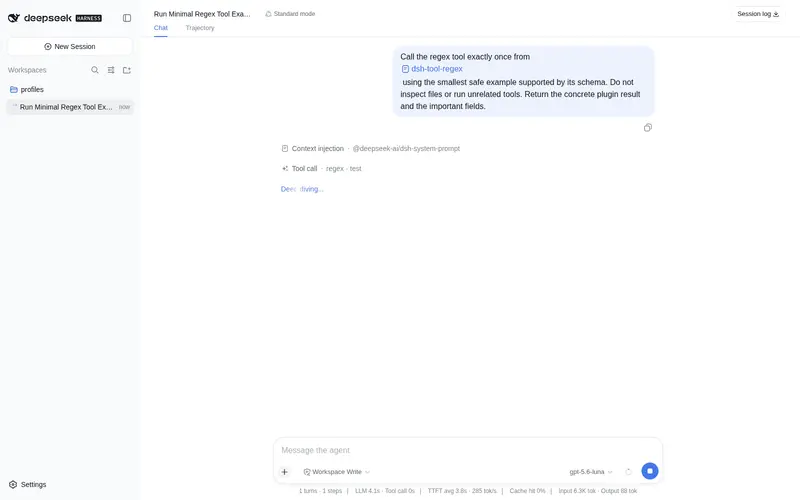
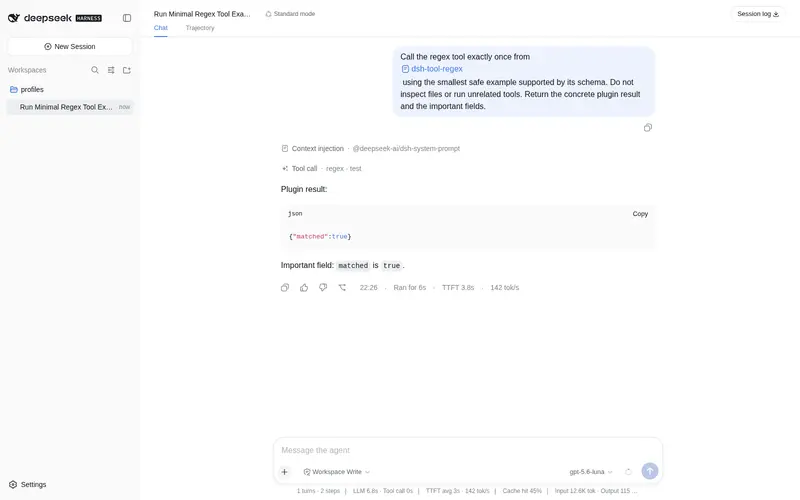
What it does
Test/extract/safe-replace/statically explain regexes without executing code.
Best for
- Agents testing JavaScript regex matches or extracting numbered and named capture groups from text.
- Text workflows performing string-based replacements with standard JavaScript replacement references.
- Reviewers who need a static, non-executing explanation of a regex's structure.
Not ideal for
- Matching inputs above 64 KB, patterns or replacements above 16 KB, or reports requiring more than 1,000 matches.
- Latency-sensitive workflows using pathological backtracking patterns; execution is terminated after the documented one-second budget.
- Regex dialects other than JavaScript syntax.
- Code-driven replacement callbacks; replacement is string-based and does not execute code.
README
dsh-tool-regex
DSH 正则工具插件 —— 测试匹配、提取捕获组、安全替换、静态解释正则含义(不执行任何代码)。零依赖、纯函数。

动机
模型经常需要验证用户给的 pattern、从日志/文本中提取字段、做文本替换。”心算”正则结果错误率极高,且无法给用户展示可验证的过程。现有替代是起 bash 进程跑 node -e 或 python——进程开销 + 模型现写脚本的正确性风险。内置 grep 只能做文件域搜索,无法对任意文本测试/提取/替换/解释。
本插件提供确定性正则工具,其中 explain 是差异化能力:静态解析 pattern 结构并给出人读解释,不执行匹配,天然免疫 ReDoS。
安全模型(ReDoS 多层防线)
JS 正则的灾难性回溯是真实威胁(如 (a+)+$ 配合超长输入)。防线:
-
worker 硬超时:test/find/replace 在可终止的 worker 线程内同步执行,1,000ms 预算到期
worker.terminate()并返回regex: execution timed out——灾难性回溯不再能阻塞宿主进程(工具管道的timeoutMs对同步阻塞体是协作式,仅靠它不够;worker 内会再次执行全部上限校验) - 输入长度上限:64,000 字节(UTF-8)——超限在入口直接拒绝,不进入回溯
- 资源上限:pattern ≤ 16KB、replacement ≤ 16KB、输出 ≤ 1MB、匹配数 ≤ 1,000(limit 钳制)
-
explain 零执行:只做静态 tokenizer,不构造
RegExp实例,任何 pattern 都即时返回
⚠️ 工具描述与 README 均明确警告模型:不要对不可信的大输入使用无锚点的嵌套量词 pattern(如
(a+)+、(.*)*)。
其余边界:无效 pattern 捕获 SyntaxError 报错(含位置信息);无效/重复 flag 逐字符校验;replace 使用 String.replace 字符串替换路径(JS 原生 $-语义,无 new Function、无 eval)。
工具声明
注册 regex 工具(@deepseek-ai/dsh-tool-regex,row id tool-regex),统一输出 JSON 文本字符串。
| 参数 | 类型 | 必填 | 说明 |
|---|---|---|---|
action |
string | ✅ |
test / find / replace / explain
|
pattern |
string | ✅ | 正则(JavaScript 语法,不含外围 /);≤ 16KB |
input |
string | 待匹配文本(test/find/replace 必需);≤ 64KB | |
flags |
string | 如 "gi";支持 g i m s u y d v,需唯一且合法 |
|
replacement |
string | replace 的替换文本,支持 $1/$2/$<name>/$$;≤ 16KB |
|
limit |
integer | find 最大报告匹配数,默认 50,上限 1,000 |
Actions
| action | 功能 | 输出示例 |
|---|---|---|
test |
判断是否匹配(整串语义由模型自行用 ^...$ 表达) |
{"matched":true} |
find |
全部匹配:index / 完整匹配 / 编号捕获组 captures / 命名组 groups(无 g 自动补 g) |
[{"index":0,"match":"a@b","captures":["a","b"],"groups":{"name":"a"}}] |
replace |
全局安全替换($1/$<name>/$$),返回结果与替换次数 |
{"result":"world hello","replaced":1} |
explain |
静态解析 pattern → 人读节点序列(不执行匹配;节点数 ≤ 4,096) | [{"kind":"escape","text":"\\d","meaning":"A digit [0-9]"}] |
示例
regex { action: "find", pattern: "(\\w+)@(\\w+)", input: "a@b x c@d" }
  → [{"index":0,"match":"a@b","captures":["a","b"],"groups":null},{"index":6,"match":"c@d","captures":["c","d"],"groups":null}]

regex { action: "replace", pattern: "(\\w+) (\\w+)", input: "hello world", replacement: "$2 $1" }
  → {"result":"world hello","replaced":1}

regex { action: "explain", pattern: "\\d{4}-\\d{2}" }
  → [{"kind":"escape","text":"\\d","meaning":"A digit [0-9]"},{"kind":"quantifier","text":"{4}",...},...]
边界行为
| 情况 | 处理 |
|---|---|
| 无效 pattern |
regex: invalid pattern: <SyntaxError 信息(含位置)>,不崩溃 |
| 无效 flag / 重复 flag |
regex: invalid flag "q" / regex: duplicate flag "g"
|
| 空 pattern | 合法(匹配空串);u/v 下空匹配按 code point 推进(surrogate pair 不会重复命中) |
| ReDoS(病理 pattern) | worker 硬超时:regex: execution timed out (1000ms),宿主不阻塞 |
| 命名组 / 编号组 | find 输出 groups: {name: value} 与 captures: [...];replace 支持 $<name>/$n
|
| 零匹配 | find 返回 [];replace 返回原文本 + replaced: 0
|
| 输入超 64KB / pattern 超 16KB / replacement 超 16KB | 入口拒绝(不截断) |
输出超 1MB(替换放大如 $ / $’) | regex: result/output exceeds 1000000 bytes`,拒绝而非截断 |
|
| find limit | 默认 50,钳制到 1,000(防输出膨胀) |
| explain 节点超 4,096 | regex: explain: pattern too complex |
$ 引用 |
走 JS 原生字符串替换路径:$$→$、$n→组(未参与→空串)、$<name>→命名组、未知引用字面保留($0/$<foo> 与 V8 一致) |
npm 0.1.0-rc.8 兼容(已验证)
本插件已迁移到 npm 0.1.0-rc.8 依赖线,并在 @deepseek-ai/dsh@0.1.0-rc.8(npm 私有包)的隔离 consumer 中完成全链路验证:
-
类型/运行时:peer 为
@deepseek-ai/cordis: ^4.0.1+@deepseek-ai/dsh-tools: >=0.0.1-rc.1 <0.2.0+@deepseek-ai/dsh-invariants: >=0.0.1-rc.1 <0.2.0;不再依赖 unscopedcordis -
独立构建:
npm install(devDependencies 自包含 typescript/vitest/@types/node)→npm run typecheck→npm test→npm run build→npm pack -
消费验证:tarball 装入 DSH 0.1.0-rc.8(npm)consumer →
dsh --profile compat --dump-config出现本插件 row → 工具真实注册与执行通过 -
启动方式:
npx -p @deepseek-ai/dsh@0.1.0-rc.8 dsh web(lib 生产模式;勿install -g全局安装)
安装
Profile Bundle(推荐)
将本插件作为独立 bundle 安装到 profile(DSH 0.1.0-rc.8(npm))。本仓库位于 omdsh-dev 组织,公开可访问:
# 交互式(web)profile —— 从 GitHub 仓库安装
dsh plugin --profile web add github:omdsh-dev/dsh-tool-regex
# 一次性任务(headless)profile —— dsh run 默认使用 headless
dsh plugin --profile headless add github:omdsh-dev/dsh-tool-regex
或使用 npm pack 生成的 tarball 安装:
npm pack     # 生成 dsh-tool-regex-<version>.tgz
# 交互式(web)profile
dsh plugin --profile web add ./dsh-tool-regex-<version>.tgz
# 一次性任务(headless)profile
dsh plugin --profile headless add ./dsh-tool-regex-<version>.tgz
包内 dsh.bundle.patch 会在安装后自动把插件加入 profile 的 layer stack(row id:tool-regex)。插件缺失的 peer 依赖(@deepseek-ai/cordis、@deepseek-ai/dsh-tools)由 profile 的 healed profiles/node_modules 回退安装提供。
⚠️ web 与 headless 是不同 profile:web 安装不会自动覆盖 headless;
dsh run默认使用 headless profile。Windows 路径使用正斜杠(C:/...)。
验证安装
dsh --profile web --dump-config | grep tool-regex
运行验证
dsh run "使用 regex 工具测试 d+ 是否匹配 abc123"
手动安装与旧版本兼容(monorepo 旧场景)
monorepo 方式仅适用于旧场景:不支持 Profile Bundle 的旧快照或插件开发调试环境(本地 junction/symlink、手动编辑 profile 层)。
测试
node <monorepo>/node_modules/vitest/vitest.mjs run tests
-
engine.spec.ts:test/find/replace 全分支 + flags/pattern 错误 + 64KB 上限 + ReDoS worker 用例(病理 pattern 在 3s 预算内被取消,不挂死测试进程) -
explain.spec.ts:字面量/字符类/分组/量词/转义/锚点/交替 + 未闭合报错 -
register.spec.ts:注册契约(AUDIT-CROSS-02 风格)
许可
MIT
Frequently Asked QuestionsFAQ
Use the verified command dsh plugin --profile default add github:omdsh-dev/dsh-tool-regex in a DSH-enabled shell. The command resolves the public package metadata and keeps the plugin attached to the catalog identity shown on this page.
Compatibility follows the bundle and profile status shown above. If a profile is not detected, keep the plugin disabled there and check the repository documentation before enabling it in production.
The GitHub link and activity metadata are the source of truth for releases and maintenance. Revisit this page after a new release to confirm the catalog has observed the latest version.