omdsh-dev/dsh-tool-schema
DSH JSON Schema 验证工具插件:validate/paths/explain/normalize,零网络零动态执行
Listed
3
Tools
Bundle verified
Preview
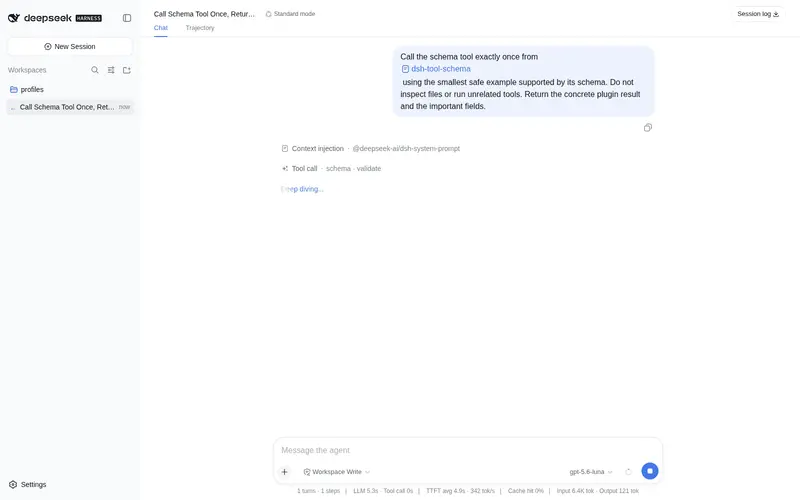
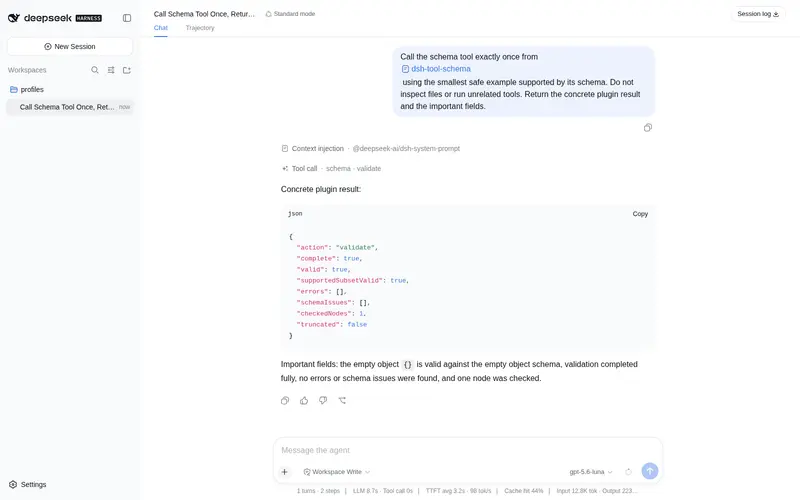
What it does
JSON Schema validation: validate/paths/explain/normalize.
Best for
- Teams validating API responses, plugin manifests, configuration, or event data against a JSON Schema subset.
- Debugging workflows that need stable RFC 6901 failure paths and keyword-level errors.
- Users who need a structural schema explanation or a validated copy with explicit defaults applied.
Not ideal for
- Schemas requiring unsupported draft 2020-12 keywords; strict mode fails them and non-strict mode cannot give a complete verdict.
- Schemas using remote or general URI references; only local '#' and '#/$defs/...' references are supported.
- Normalization that must coerce types, remove additional properties, mutate the input, or choose an ambiguous oneOf/anyOf branch.
- Data or schemas exceeding 256 KiB or the documented depth, node, reference-chain, and error budgets.
README
dsh-tool-schema
DSH JSON Schema 验证工具插件 —— 验证数据、列出失败路径、解释 schema 约束、安全应用 default。零网络、零动态代码执行。

动机
Agent 需要验证任意 JSON 数据是否符合 schema(API 响应结构、插件 manifest、配置文件、会话事件),并定位失败路径。现有路径没有这个能力:
-
defineTool参数 DSL 是作者 DSL——面向插件作者声明工具参数,不是面向任意用户 schema 的通用验证服务 -
dsh-tool-json只提供查询——能取路径、能筛选,但不验证结构、不给 RFC 6901 失败定位 -
模型”目测”验证不可靠——复杂嵌套 schema(allOf/oneOf/
$ref/pattern)组合下,手算通过/失败极易出错,且无法展示可验证的过程
本插件提供独立的纯函数 JSON Schema 验证内核:一次函数调用返回 verdict、路径化错误与 schema 问题。不执行任何代码、不访问网络,绝不静默忽略不支持的 schema 关键字。
安全模型
-
零动态执行:验证内核是纯数据遍历,不构造
RegExp(pattern 在独立 worker 内执行)、不eval、不访问网络、不读文件 -
不支持关键字绝不静默忽略:报告
unsupported-keywordschema issue;strictSchema=true(默认)直接失败(valid:false/complete:false),strictSchema=false验证已支持子集(valid:null/complete:false/supportedSubsetValid) -
ReDoS 防线:所有
pattern校验在可终止的 worker 线程内共享 1,000ms 硬预算,超时terminate()并报错——灾难性回溯不能阻塞宿主进程;pattern ≤ 16 KiB、每 schema ≤ 100 个 -
原型污染防护:所有对象访问用
Object.hasOwn,__proto__/constructor/prototype只作为普通 JSON 键处理 -
$ref安全性:仅支持本地引用(#与#/$defs/<token>,RFC 6901 转义);目标必须存在;环检测(schema-check 静态报告ref-cycle+ 验证期(schemaNode, instance)栈动态兜底) -
预算:
- data / schema 各 ≤ 256 KiB(超限直接报错)
- 嵌套深度 ≤ 64、schema 节点 ≤ 10,000、遍历节点 ≤ 100,000
- 错误 100(默认)/ 1,000(上限);
$ref链 ≤ 64 - canonical 输出 ≤ 1 MiB(超限截断 errors/schemaIssues 等并置
truncated)
- 工具参数会记入会话日志,不要传入敏感数据
工具声明
注册 schema 工具(@deepseek-ai/dsh-tool-schema,row id tool-schema),统一输出 JSON 文本字符串。
| action | 作用 | 输出 |
|---|---|---|
validate |
验证 instance 是否符合 schema | verdict + RFC 6901 instancePath/schemaPath 错误(稳定排序)+ schemaIssues + checkedNodes + truncated
|
paths |
只返回失败路径 |
paths(path + 关键字摘要)+ errorCount + truncated
|
explain |
静态解释 schema 约束 | 约束树节点序列(nodes,有限列表非自然语言长文)+ schemaIssues + truncated
|
normalize |
深拷贝 + 应用显式 default 后验证 |
appliedDefaults(path + value)+ warnings(default-invalid / normalize-skip-branch)+ 完整 validate 结果 |
| 参数 | 类型 | 必填 | 说明 |
|---|---|---|---|
action |
string | ✅ |
validate / paths / explain / normalize
|
data |
json | 待验证实例(validate/paths/normalize 必需;null 是合法数据) |
|
schema |
json | ✅ | JSON Schema(boolean 或 object;draft 2020-12 子集) |
strictSchema |
boolean | 不支持关键字时失败。默认 true
|
|
maxErrors |
integer | 最大错误报告数。默认 100,范围 1..1,000 |
支持的关键字:type/enum/const、对象(required/properties/additionalProperties/minProperties/maxProperties)、数组(items/minItems/maxItems/uniqueItems)、字符串(minLength/maxLength/pattern)、数值(minimum/maximum/exclusive*/multipleOf)、组合(allOf/anyOf/oneOf/not)、本地 $ref。
输出示例
{"action":"validate","complete":true,"valid":true,"supportedSubsetValid":true,
 "errors":[],"schemaIssues":[],"checkedNodes":3,"truncated":false}
{"action":"paths","valid":false,"paths":[{"path":"/a","keywords":["type"]}],
 "errorCount":1,"truncated":false}
{"action":"normalize","valid":true,
 "appliedDefaults":[{"path":"/b","value":5}],"warnings":[]}
设计要点
-
错误格式:
instancePath/schemaPath(RFC 6901 JSON Pointer)、keyword、稳定code、message(+expected/actual);排序稳定:instancePath → schemaPath → keyword 字典序 -
组合关键字:anyOf/oneOf 全部失败时返回顶层错误 +
branches有限摘要(每支 ≤ 3 条);oneOf 0 支/多支分别报告one-of/one-of-multiple;not 子 schema 通过即失败 -
数字语义:JSON number 必须有限;integer 用
Number.isInteger;multipleOf用缩放/容差策略(相对容差1e-9),不用% === 0,不承诺任意精度 - 字符串长度:按 Unicode code point 计;pattern 在可终止 worker 内共享 1,000ms 总预算执行
-
$ref语义:纯$ref环在 schema-check 静态报告;带 sibling 关键字的$ref按 draft 2020-12 一并生效(不做 2019-09 的$ref兄弟忽略) -
normalize 不越权:从不修改输入(新对象均
Object.create(null));只应用properties中缺失字段的显式default;default 必须 JSON-compatible 且通过对应子 schema(否则default-invalidwarning 并跳过);不强制类型、不删除 additional properties;oneOf/anyOf 仅当恰好一个分支在不应用 default 时已匹配才进入(否则normalize-skip-branchwarning) -
explain 不静默:输出附带
schemaIssues,不支持关键字在 explain 下同样被报告 -
可复现输出:错误与 issues 排序稳定;超限截断后置
truncated;canonical 输出 ≤ 1 MiB(契约断言)
构建与测试
# 构建(零依赖,仅需 monorepo 的 tsc)
node <monorepo>/node_modules/typescript/bin/tsc -p tsconfig.json

# 测试(vitest,125 个用例:scalar/object/array/combinators/ref/pattern/normalize/limits/register)
node <monorepo>/node_modules/vitest/vitest.mjs run tests
npm 0.1.0-rc.8 兼容(已验证)
本插件已迁移到 npm 0.1.0-rc.8 依赖线,并在 @deepseek-ai/dsh@0.1.0-rc.8 的隔离 consumer 中完成全链路验证:
-
类型/运行时:
@deepseek-ai/cordis@^4.0.1+@deepseek-ai/dsh-tools@>=0.0.1-rc.1 <0.2.0+@deepseek-ai/dsh-invariants@>=0.0.1-rc.1 <0.2.0(peer);不再依赖 unscopedcordis -
独立构建:
npm install(devDependencies 自包含 typescript/vitest/@types/node)→npm run typecheck→npm test→npm run build→npm pack -
消费验证:tarball 装入 0.1.0-rc.8 consumer →
dsh --profile compat --dump-config出现本插件 row → 工具真实注册与执行通过 -
启动方式:
npx -p @deepseek-ai/dsh@0.1.0-rc.8 dsh web(lib 生产模式;勿install -g全局安装)
安装
Profile Bundle(推荐)
仓库位于 omdsh-dev/dsh-tool-schema(public)。将本插件作为独立 bundle 安装到 profile(DSH 0.1.0-rc.8(npm)):
# 交互式(web)profile
dsh plugin --profile web add github:omdsh-dev/dsh-tool-schema
# 一次性任务(headless)profile —— dsh run 默认使用 headless
dsh plugin --profile headless add github:omdsh-dev/dsh-tool-schema
包内 dsh.bundle.patch 会在安装后自动把插件加入 profile 的 layer stack(row id:tool-schema)。插件缺失的 peer 依赖(cordis、@deepseek-ai/dsh-tools)由 profile 的 healed profiles/node_modules 回退安装提供。
⚠️ web 与 headless 是不同 profile:web 安装不会自动覆盖 headless;
dsh run默认使用 headless profile。Windows 路径使用正斜杠(C:/...)。
npm pack tarball 安装
本地构建后用 tarball 路径安装(不依赖 GitHub):
# tarball 方式(web 为例;headless 同)
npm pack
dsh plugin --profile web add <npm pack 产物 tarball 路径>
验证安装
dsh --profile web --dump-config | grep tool-schema
运行验证
dsh run "用 schema 工具验证 {name: 'x', age: 3} 是否符合给定 JSON Schema"
手动安装与旧版本兼容
旧场景(monorepo 集成、不支持 Profile Bundle 的旧快照或插件开发调试环境——本地 junction/symlink、手动编辑 profile 层)。
许可
MIT
Frequently Asked QuestionsFAQ
Use the verified command dsh plugin --profile default add github:omdsh-dev/dsh-tool-schema in a DSH-enabled shell. The command resolves the public package metadata and keeps the plugin attached to the catalog identity shown on this page.
Compatibility follows the bundle and profile status shown above. If a profile is not detected, keep the plugin disabled there and check the repository documentation before enabling it in production.
The GitHub link and activity metadata are the source of truth for releases and maintenance. Revisit this page after a new release to confirm the catalog has observed the latest version.