omdsh-dev/dsh-tool-stat
DSH 统计工具插件:描述统计/百分位数/频数分布/相关性,零依赖纯函数确定性
Listed
6
Tools
Bundle verified
Preview
What it does
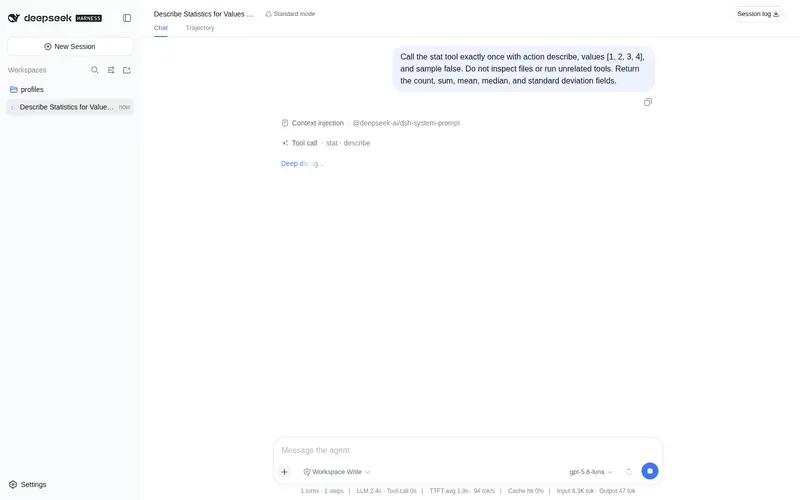
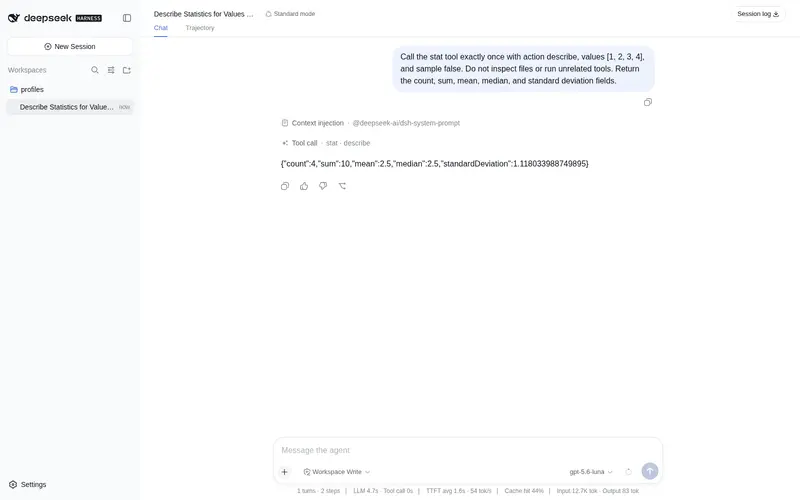
Descriptive statistics, percentiles, frequency distributions, and correlation.
Best for
- Analysts calculating descriptive statistics, percentiles, or frequency distributions from explicit numeric arrays.
- Workflows measuring Pearson or Spearman correlation between paired observations.
- CSV or JSON analysis pipelines that already extract finite numeric values and need reproducible aggregate results.
Not ideal for
- Datasets containing missing, non-numeric, NaN, or infinite values without prior cleaning.
- Statistical workflows requiring inferential tests, regression, weighted statistics, or arbitrary-precision arithmetic.
- Datasets above 100,000 observations or frequency reports requiring all of more than 10,000 distinct values.
- Correlation cases where a numeric coefficient is required despite zero variance; the plugin correctly reports it as undefined.
README
dsh-tool-stat
DSH 统计工具插件 —— 描述统计、百分位数、频数分布、相关性计算。零依赖、纯函数、确定性。

动机
Agent 处理数值数据时,从 CSV / JSON 提取出数值数组后往往需要聚合分析(均值、分位数、分布、相关性)。现有工具链没有这类能力:
-
calculator只做单表达式求值——一个表达式算不出分位数分布,更算不了相关系数 -
dsh-tool-csv的stats只报告行/列结构——不提供对一组观测值的统计聚合 - 模型”心算”统计不可验证——均值、方差、百分位、相关性涉及大量浮点运算,手算错误率极高,且无法给用户展示可复现的过程
本插件接收显式传入的有限数值数组或成对观测值,提供确定性的统计计算:一次函数调用,毫秒级返回结构化 JSON 报告。不读取文件、不访问网络、不创建进程、不保存状态——相同输入永远得到相同输出。
安全模型
- 零依赖:Neumaier 补偿求和、Welford 在线方差、线性插值百分位、Spearman midrank 全部手写,无第三方数值库
-
有限数强约束:拒绝
NaN/Infinity(错误信息带下标定位,如values[3] must be a finite number (got Infinity));-0在输入与输出中均规范化为0 -
溢出回检:所有结果在返回前再次做有限数检查,中间或最终结果溢出返回
numeric-overflow错误——canonical 输出绝不含非有限值 - 纯函数:输入数组永不被修改(只读遍历;需要排序时先拷贝)
-
零方差语义:
correlation遇零方差配对返回defined: false+reason: "zero-variance",而不是 NaN 或 ±Infinity -
预算:
- 观测值 1..100,000(超限直接报错)
- 百分位请求 ≤ 100 个
- distinct 输出 ≤ 10,000(超出按确定规则截断并标注)
timeoutMs: 2000
- 工具参数会记入会话日志,不要传入敏感数据
工具声明
注册 stat 工具(@deepseek-ai/dsh-tool-stat,row id tool-stat),统一输出 JSON 文本字符串。
| action | 作用 | 输出 |
|---|---|---|
describe |
描述统计 | count / sum / min / max / mean / median / variance / standardDeviation / q1 / q3 / iqr(Neumaier 补偿求和 + Welford 方差,population 或 sample) |
percentile |
百分位数 | 一个或多个百分位(线性插值 h=(n-1)*p,0..100),输出按请求顺序、重复保留 |
frequency |
频数分布 | value / count / ratio 分组(严格相等分组、升序输出、ratio 分母为原始计数) |
correlation |
相关系数 | Pearson 或 Spearman(midrank 平均秩)相关系数;零方差返回 defined:false + reason
|
| 参数 | 类型 | 必填 | 说明 |
|---|---|---|---|
action |
string | ✅ |
describe / percentile / frequency / correlation
|
values |
array | ✅ | 有限数值观测(1..100,000);-0 归一化为 0
|
other |
array | correlation 的配对观测;长度须与 values 相同(≥2) |
|
percentiles |
array | percentile 的百分位(0..100,1..100 项) |
|
method |
string | 相关系数方法:pearson(默认)/ spearman
|
|
sample |
boolean | 方差分母:true 用样本(n-1),默认 false(总体 n) |
输出示例
{"action":"describe","count":5,"sum":15,"min":1,"max":5,"mean":3,"median":3,"variance":2,
 "standardDeviation":1.4142135623730951,"q1":2,"q3":4,"iqr":2,"sample":false}
{"action":"correlation","method":"pearson","count":4,"defined":true,"value":1,"reason":null}
设计要点
-
Neumaier 补偿求和:
sum用补偿项修正大数 + 小数相加的舍入丢失;variance用 Welford 在线算法(单遍、数值稳定),describe 与 correlation 共用同一统计核心 -
线性插值百分位:
h=(n-1)*p,value = v[floor(h)] + (h - floor(h)) * (v[ceil(h)] - v[floor(h)]);输出保持请求顺序,重复百分位保留 - Spearman midrank:秩相等时取平均秩(midrank),再对秩做 Pearson;两两完全相同的观测不影响有界性
-
零方差语义:任一序列方差为 0 时相关系数无定义,返回
defined:false+reason:"zero-variance",绝不出 NaN/±Infinity - 频数截断规则:distinct 输出超过 10,000 时,按 count 降序 → value 升序选择前 10,000 项,再按 value 升序呈现(结果确定可复现)
- 确定性:无随机、无状态、无时间依赖;浮点运算顺序固定,相同输入永远相同输出
构建与测试
# 构建(零依赖,仅需 monorepo 的 tsc)
node <monorepo>/node_modules/typescript/bin/tsc -p tsconfig.json

# 测试(vitest,82 个用例:describe 20 / percentile 7 / frequency 7 / correlation 15 / limits 24 / register 9)
node <monorepo>/node_modules/vitest/vitest.mjs run tests
npm 0.1.0-rc.8 兼容(已验证)
本插件已迁移到 npm 0.1.0-rc.8 依赖线,并在 @deepseek-ai/dsh@0.1.0-rc.8(npm 私有包)的隔离 consumer 中完成全链路验证:
-
类型/运行时:peer 为
@deepseek-ai/cordis: ^4.0.1+@deepseek-ai/dsh-tools: >=0.0.1-rc.1 <0.2.0+@deepseek-ai/dsh-invariants: >=0.0.1-rc.1 <0.2.0;不再依赖 unscopedcordis -
独立构建:
npm install(devDependencies 自包含 typescript/vitest/@types/node)→npm run typecheck→npm test→npm run build→npm pack -
消费验证:tarball 装入 DSH 0.1.0-rc.8(npm)consumer →
dsh --profile compat --dump-config出现本插件 row → 工具真实注册与执行通过 -
启动方式:
npx -p @deepseek-ai/dsh@0.1.0-rc.8 dsh web(lib 生产模式;勿install -g全局安装)
安装
Profile Bundle(推荐)
将本插件作为独立 bundle 安装到 profile(DSH 0.1.0-rc.8(npm))。本仓库位于 omdsh-dev 组织,公开可访问:
# 交互式(web)profile —— 从 GitHub 仓库安装
dsh plugin --profile web add github:omdsh-dev/dsh-tool-stat
# 一次性任务(headless)profile —— dsh run 默认使用 headless
dsh plugin --profile headless add github:omdsh-dev/dsh-tool-stat
或使用 npm pack 生成的 tarball 安装:
npm pack     # 生成 dsh-tool-stat-<version>.tgz
# 交互式(web)profile
dsh plugin --profile web add ./dsh-tool-stat-<version>.tgz
# 一次性任务(headless)profile
dsh plugin --profile headless add ./dsh-tool-stat-<version>.tgz
包内 dsh.bundle.patch 会在安装后自动把插件加入 profile 的 layer stack(row id:tool-stat)。插件缺失的 peer 依赖(@deepseek-ai/cordis、@deepseek-ai/dsh-tools、@deepseek-ai/dsh-invariants)由 profile 的 healed profiles/node_modules 回退安装提供。
⚠️ web 与 headless 是不同 profile:web 安装不会自动覆盖 headless;
dsh run默认使用 headless profile。Windows 路径使用正斜杠(C:/...)。
验证安装
dsh --profile web --dump-config | grep tool-stat
运行验证
dsh run "使用 stat 工具计算 [1,2,3,4,5] 的描述统计"
手动安装与旧版本兼容(monorepo 旧场景)
monorepo 方式仅适用于旧场景:不支持 Profile Bundle 的旧快照或插件开发调试环境(本地 junction/symlink、手动编辑 profile 层)。
许可
MIT
Frequently Asked QuestionsFAQ
Use the verified command dsh plugin --profile default add github:omdsh-dev/dsh-tool-stat in a DSH-enabled shell. The command resolves the public package metadata and keeps the plugin attached to the catalog identity shown on this page.
Compatibility follows the bundle and profile status shown above. If a profile is not detected, keep the plugin disabled there and check the repository documentation before enabling it in production.
The GitHub link and activity metadata are the source of truth for releases and maintenance. Revisit this page after a new release to confirm the catalog has observed the latest version.