pitetow/dsh-notify-on-complete
Desktop notifications for DeepSeek Harness (dsh) — run completion, questions, approvals. Zero-dependency Cordis plugin. | DeepSeek Harness(dsh)桌面通知插件:运行结束 / 提问 / 审批时提醒,零依赖 Cordis 插件。
Listed
4
Notify
Bundle verified
Preview
What it does
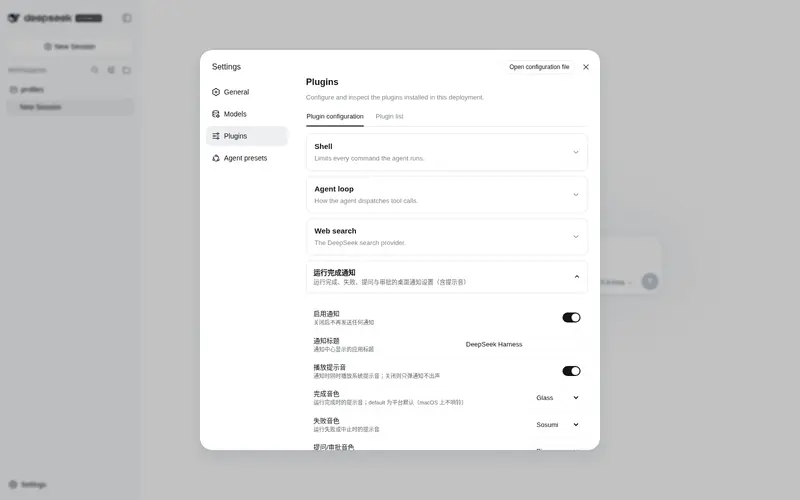
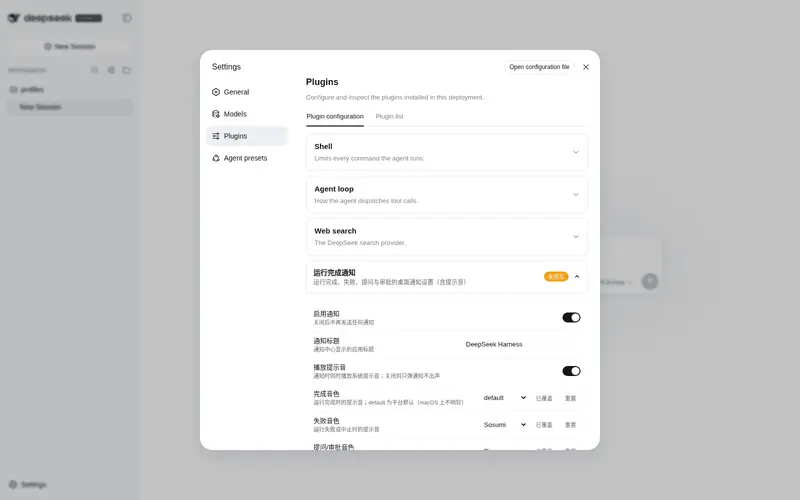
Desktop notifications for run completion, model questions, and approval requests with per-platform system sounds, zero runtime dependencies.
Best for
- Users who leave DSH running in the background and need an alert when a run finishes.
- Interactive Web workflows where model questions or approval requests may otherwise sit unattended.
- Cross-platform desktop users who want native notifications and optional system sounds without runtime packages.
Not ideal for
- Headless or CI environments with no desktop notification service.
- Users who need notifications for every subagent; the plugin intentionally filters subagent sessions.
- Headless approval policies where an `approval/asked` event may be immediately rejected rather than waiting for a person.
README
dsh-notify-on-complete — Desktop Notifications for DeepSeek Harness · DeepSeek Harness 桌面通知插件

Send desktop notifications from DeepSeek Harness (dsh): get a system notification when a run finishes, and an immediate one when the model asks you a question (ask_user_question) or waits for approval (sandbox escalation / tool permission). The body reflects the result (completed / error / aborted / max-tokens).
DeepSeek Harness(dsh)桌面通知插件:运行结束时向系统发送桌面通知;会话进行中模型提问(ask_user_question)或等待审批(沙箱提权 / 工具权限)时也会即时提醒你回来处理。正文按结果区分(成功 / 失败 / 中止 / 达到 token 上限)。
Author: Luozy · License: MIT · 中文文档:README.zh.md
-
Zero runtime dependencies: no
dshinternal packages, noctx.shell. Notifications are fired viachild_process.spawnas a detached child process — non-blocking and unaffected by the harness exit path. -
Cross-platform: the notifier command is picked from
process.platform(macOSosascript/ Linuxnotify-send→kdialog/ Windows PowerShell). Unsupported platforms are skipped at load with a warning, never throwing per-event. -
System sound: macOS system sound (
sound name "Glass"), Windows .NETSystemSounds, Linuxcanberra-gtk-play(falls back topaplay); disable withsound: false. -
In-session blocking notifications: fires immediately when the model calls
ask_user_question, or when a sandbox escalation / tool permission waits for approval — so you know to come back. Controlled byonBlocked/onQuestion/onApproval. -
Top-level runs only: subagent sessions are filtered out (
header.origin === 'subagent'), so a single CLI run produces a single notification.
功能特性(中文)
-
零运行时依赖:不依赖 dsh 内部包,通知用
child_process.spawn以 detached 子进程发出,不阻塞、不受 harness 退出影响。 -
跨平台:macOS
osascript/ Linuxnotify-send→kdialog/ Windows PowerShell 自动选择;不支持的平台加载时跳过并警告。 -
系统提示音:macOS
sound name "Glass"/ Windows SystemSounds / Linuxcanberra-gtk-play(回退paplay);可用sound: false关闭。 -
会话中阻塞即时通知:模型提问或等待审批时立即提醒你回来;可用
onBlocked/onQuestion/onApproval精细控制。 -
只通知顶层运行:过滤子代理(
header.origin === 'subagent'),一次 CLI 运行只弹一条。
完整中文文档见 README.zh.md。
How it works
The plugin listens to two events to decide when “a run has ended”:
-
session/event→turn/end: records the latestreason.kindof a root session (origin !== 'subagent'). A run can span many turns (goal rounds, follow-ups, steering), each with its ownturn/end; the plugin only remembers the last one. -
agent/status→'idle': the harness’s own “run ended” signal (the web UI’s running indicator andagent.whenIdle()both derive from it). When the root agent returns to idle, the whole activity has converged, so the plugin sends the recorded final result once and clears it.
So one notification per complete run, not per turn: a multi-round goal run fires once at the end, with the final result; intermediate “task completed” moments never fire early. Body format: result — session title (session: sessionId), e.g. 任务已完成 — 修复登录bug (session: 3f9a…); if the title hasn’t been generated yet it degrades to result (session: sessionId). The title comes from the last session/title event in the session log — an async projection, so very early notifications (e.g. a question right at session start) may not have one yet. Notification commands run with detached: true + unref(), so a normal exit or crash never affects delivery.
reason.kind |
Notification body |
|---|---|
completed |
任务已完成 (Task completed) |
error |
任务失败 (Task failed) |
aborted |
任务已中止 (Task aborted) |
max-tokens |
任务达到 token 上限 (Task hit the token limit) |
| other (unknown) | 任务结束 (Task ended) |
Requirements
- Node.js ^22 (same as DeepSeek Harness)
- An installed
dshCLI (any version — the plugin registers via Cordis events and does not depend on a specific CLI version) - Peer dependency
@deepseek-ai/cordis@^4.0.1(provided by thedshCLI itself; pnpm resolves it automatically on install)
Installation (one-liner, GitHub source distribution, no npm)
Prerequisite: DSH installed (dsh web runs), Node.js ^22 + pnpm.
macOS / Linux / Windows (Git Bash or WSL):
curl -fsSL https://raw.githubusercontent.com/pitetow/dsh-notify-on-complete/main/scripts/install.sh | bash
Other profiles (default web):
curl -fsSL https://raw.githubusercontent.com/pitetow/dsh-notify-on-complete/main/scripts/install.sh | bash -s -- --profile headless
The script does 4 things (all idempotent, safe to re-run):
- Downloads the source to
~/.dsh/plugins/dsh-notify-on-complete/(skips if it exists — never overwrites; add--forceto overwrite/update, which asks for confirmation first, or--yesto skip it); - Runs
pnpm install && pnpm build; - Runs
dsh plugin --profile <name> add link:<dir>: the CLI reads the package’sdsh.bundle.patchdeclaration (cordis.patch.yml) and auto-registers it into the profile’s bundle stack, so it mounts on the next start — no manual config file edits; - Idempotently removes any leftover manual mount lines to avoid double-mounting (two notifications per run).
curl | bash runs remote code — the script is open source (scripts/install.sh); download and review it first if you like.
Verify
dsh --profile web --dump-config | grep -n notify-on-complete
Seeing - id: notify-on-complete followed by name: dsh-notify-on-complete means the plugin is in the composed tree. Run a real task and watch for a desktop notification to confirm.
Restart to take effect:
-
CLI one-shot runs: the next
dsh --profile headless "task"just works, no extra step. -
Web GUI: restart the web process (stop the current
dsh web, then start it again). If HMR is enabled, saving files also picks it up automatically.
Update
curl -fsSL https://raw.githubusercontent.com/pitetow/dsh-notify-on-complete/main/scripts/install.sh | bash -s -- --force
--forcedeletes and re-downloads the source (local edits in that directory are lost) and asks for confirmation first; add--yesto skip it:bash -s -- --force --yes
Or manually: cd ~/.dsh/plugins/dsh-notify-on-complete && git pull && pnpm install && pnpm run build, then re-run dsh plugin --profile web add link:..
Uninstall
dsh plugin --profile web remove dsh-notify-on-complete
rm -rf ~/.dsh/plugins/dsh-notify-on-complete
Then restart dsh.
Frequently Asked QuestionsFAQ
Use the verified command dsh plugin --profile default add github:pitetow/dsh-notify-on-complete in a DSH-enabled shell. The command resolves the public package metadata and keeps the plugin attached to the catalog identity shown on this page.
Compatibility follows the bundle and profile status shown above. If a profile is not detected, keep the plugin disabled there and check the repository documentation before enabling it in production.
The GitHub link and activity metadata are the source of truth for releases and maintenance. Revisit this page after a new release to confirm the catalog has observed the latest version.