Qing45/dsh-feishu-chat
Feishu (Lark) bot bridge for DeepSeek Harness: two-way chat with your agent, settings page for bot credentials and workspace routing. · 飞书机器人 ↔ DSH 双向聊天桥
Listed
0
Notify
Bundle verified
Preview
What it does
Two-way Feishu (Lark) chat bridge for DeepSeek Harness over the official WebSocket long connection: messages route to the bound workspace's latest session and replies return automatically; bot credentials and workspace routing are configurable from the settings page.
Best for
- Teams that want to converse with a DSH agent from Feishu or Lark through an official WebSocket long connection.
- Users who need inbound bot messages routed to the latest session of a selectable DSH workspace.
- Agents that need to push messages back to the most recent Feishu chat or an explicit `chat_id`.
Not ideal for
- Users without a Feishu app ID and app secret or without permission to configure a Feishu bot.
- Burst-heavy workflows requiring ordered replies; each inbound message spawns a subagent without queueing, so replies may arrive out of order.
- Security-sensitive environments that cannot accept relaxed TLS certificate verification for the long connection.
README
dsh-feishu-chat
Feishu (Lark) bot bridge for DeepSeek Harness: send a message to your Feishu bot and your DSH agent answers; the agent can also push messages back to Feishu.
Features
-
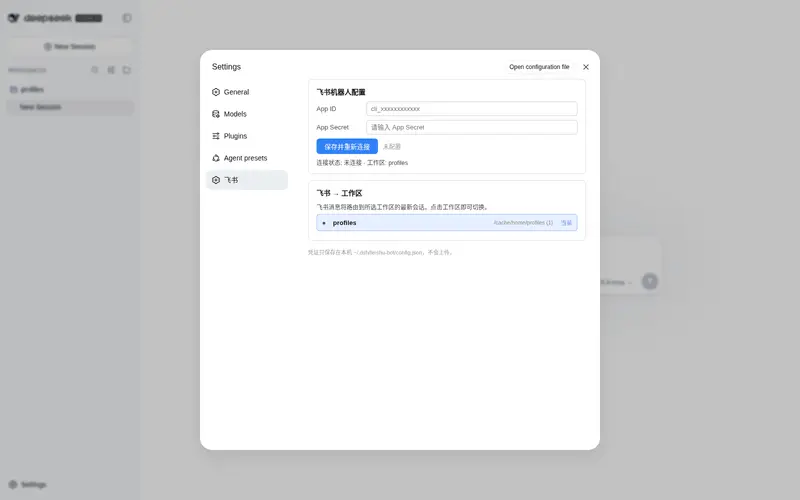
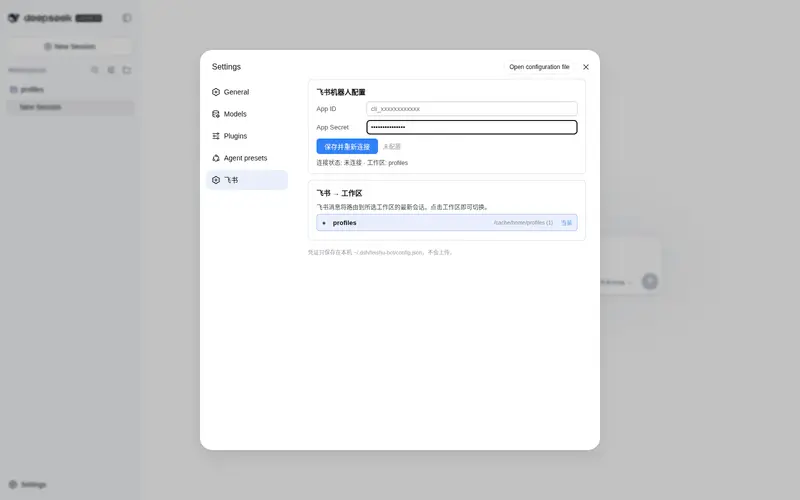
Connect your Feishu bot by filling in App ID / App Secret — install the plugin, open
设置 → 飞书, paste the two values from Feishu Open Platform → your app → 凭证与基础信息, click 保存并重新连接, and the long connection comes up immediately. No config files to edit by hand. - Switch the bound workspace at any time — the same settings page lists every workspace the profile knows about (name + path + last activity). Click any row to retarget inbound Feishu messages to that workspace; the choice persists and the router reroutes live without restarting the harness.
-
Two-way chat — Feishu messages arrive over the official WebSocket long connection (
im.message.receive_v1) and are delegated to a subagent of the bound workspace’s latest session; the text reply is sent back to the same chat automatically. -
Agent → Feishu tool — the model gets a
feishu_send_messagetool, so any session can push a message to the last chat that contacted DSH (or a givenchat_id). -
Robust long connection — protobuf frame decode (
pbbp2), automatic ack, ping keep-alive, fragment merging (sum/seq), and reconnect with backoff, all in-process; stopping or updating the plugin tears everything down cleanly.
Install
# from npm (once published) or from this repo:
dsh plugin --profile web add dsh-feishu-chat
# or directly from GitHub:
dsh plugin --profile web add github:Qing45/dsh-feishu-chat
Then restart dsh web and open 设置 → 飞书:
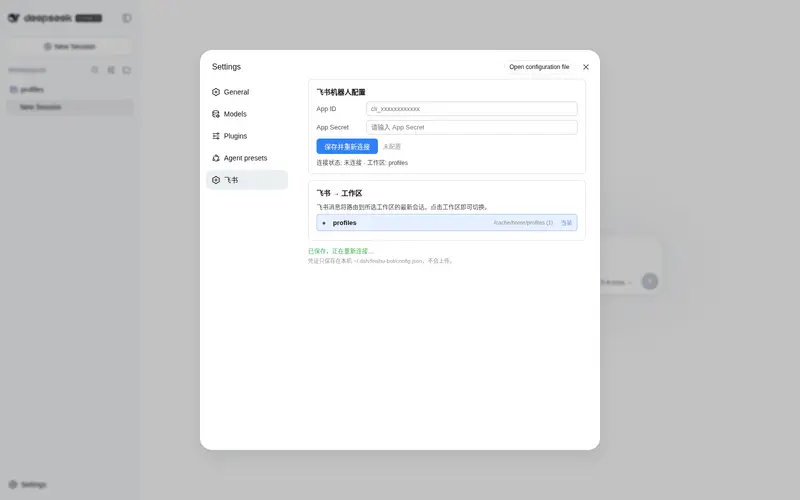
- Connect the bot — fill in the App ID and App Secret (Feishu Open Platform → your app → 凭证与基础信息), click 保存并重新连接. The status line turns green when the long connection is up.
- Pick the workspace — the workspace list shows every workspace the profile knows about (name + path + last activity). Click any row to bind it; inbound Feishu messages will be routed to that workspace’s latest session from now on. Switch any time, no restart needed.
⚠️ This plugin is community third-party code — installing it runs it with your own permissions. Check the source before installing. Credentials stay local in
$DSH_HOME/feishu-bot/config.jsonand are never committed or uploaded.
How it works
| Piece | File | Role |
|---|---|---|
| Host entry | lib/index.js |
Cordis plugin (export const name + export function apply), wires config, router, WS client, tool and HTTP routes |
| Feishu API | lib/feishu.js |
node:https helpers: tenant token, send message, WS endpoint |
| WS client | lib/ws.js |
in-process long connection: protobuf pbbp2.Frame, auto-ack, ping, fragment merge, reconnect |
| Router | lib/router.js |
inbound message → resolve parent agent (initiator → live agent → resume) → subagent → reply |
| Config | lib/config.js |
$DSH_HOME/feishu-bot/config.json persistence |
| Routes | lib/routes.js |
HTTP routes for the settings UI (same-origin writes only) |
| Client | client/client.js |
window.__ModuleLoader__.load bundle registering the 设置 → 飞书 section |
The package is a standard DSH bundle: package.json declares dsh.bundle.patch (layer insertion) and dsh.client (web bundle), and cordis.patch.yml inserts the plugin row into the profile tree.
Development / local install without a GUI restart
The profile’s own patch layer ($DSH_HOME/profiles/<profile>/cordis.patch.yml) is hot-reloaded:
pnpm --dir "$DSH_HOME/profiles/web" add /path/to/dsh-feishu-chat
Then append to cordis.patch.yml:
- insert:
    - id: feishu-bot
      name: 'dsh-feishu-chat'
Refresh the browser — the settings section appears without restarting the harness.
Caveats
- One subagent is spawned per inbound message (no queueing); replies may arrive out of order under a burst.
- The TLS verification is relaxed (
rejectUnauthorized: false) so the long connection works behind corporate MITM proxies / broken certificate stores; review this trade-off for your environment. - The tool name is
feishu_send_message;chat_iddefaults to the most recent chat that contacted DSH.
License
MIT
Frequently Asked QuestionsFAQ
Use the verified command dsh plugin --profile default add github:Qing45/dsh-feishu-chat in a DSH-enabled shell. The command resolves the public package metadata and keeps the plugin attached to the catalog identity shown on this page.
Compatibility follows the bundle and profile status shown above. If a profile is not detected, keep the plugin disabled there and check the repository documentation before enabling it in production.
The GitHub link and activity metadata are the source of truth for releases and maintenance. Revisit this page after a new release to confirm the catalog has observed the latest version.