qq1376868542-lang/dsh-tools
dsh web通用工具箱插件,纯AI制作(包括仓库),零人工含量,可能不会维护,请谨慎使用。
Listed
0
Tools
Bundle verified
Preview
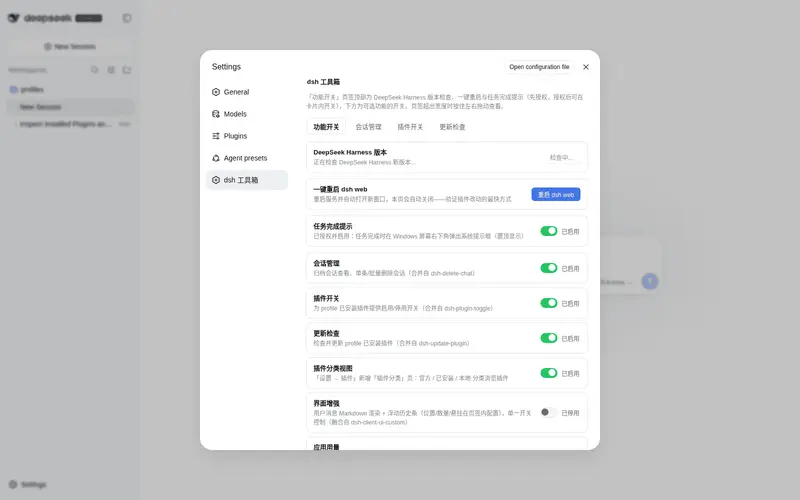
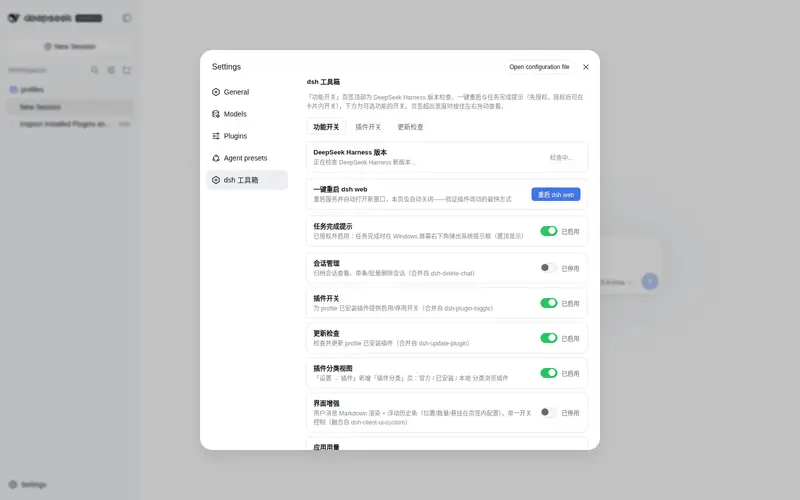
What it does
Personal toolbox for the dsh web profile with per-feature toggles: task-done desktop notifications, one-click restart, session deletion, plugin enable/disable, update checks, and UI utilities.
Best for
- DSH Web users who want restart, session cleanup, plugin controls, update checks, notifications, and UI utilities in one configurable toolbox.
- Operators who regularly manage installed plugins or inspect archived sessions and their disk usage.
- Users who want optional usage analytics, interface enhancements, or a WeChat bridge without enabling every toolbox feature.
Not ideal for
- Users seeking a narrowly scoped plugin rather than a broad, community-maintained toolbox whose repository warns it may not be maintained.
- Notification workflows where the browser may be closed or permission unavailable; desktop alerts require an open, authorized browser.
- Multi-tab users expecting one completion alert, because each tab can issue its own notification.
README
dsh-tools
DSH web 插件:个人通用工具箱。一个插件收纳多个功能/工具想法,设置页 (设置 → dsh 工具箱)采用页签式导航:「功能开关」页签顶部为 DeepSeek Harness 版本检查、一键重启 (常驻,强制开启无开关)与「任务完成提示」卡片(授权与开关合一:未授权时显示授权按钮,授权完成后在卡片内展示启用/停用开关), 下方为可选功能的开关列表;每个已启用的可选功能一个页签入口(页签超出 宽度时可按住左右拖动查看);开关即时生效并持久化(重启后保留)。
⚠️ 使用提示:本插件纯 AI 制作,无人工含量,可能后续不会对其进行维护,请谨慎使用。
当前功能
| key | 功能 | 说明 | 默认 |
|---|---|---|---|
notify.task-done |
任务完成提示 | 当前对话任务完成且网页未聚焦时,在 Windows 桌面右下角弹出系统提示框(置顶),点击跳回会话;开关关闭时不监听、不弹提示 | 开 |
harness.check |
DeepSeek Harness 版本检查 | 「功能开关」页签顶部卡片:检查 DeepSeek Harness 当前版本与 GitHub 最新 Release/tag,仅检查不升级;每次 dsh web 启动后仅首次打开时自动检查,之后手动点「重新检查」 | 强制开启(无开关) |
restart.web |
一键重启 dsh web | 「功能开关」页签顶部按钮:重启服务并自动刷新页面(开发测试快循环) | 强制开启(无开关) |
delete-chat |
会话管理 | 归档会话查看(每次 dsh web 启动后首次打开自动加载,可手动刷新)、单条/批量删除会话;列表显示每个会话与工作区占用的磁盘空间;删除会话页点击工作区路径可打开对应文件夹 | 开 |
plugin-toggle |
插件开关 | profile 已安装插件的启用/停用开关;点击插件名可跳转其 GitHub 页(有则显示),行内展示插件功能描述 | 开 |
update-plugin |
更新检查 | 检查/更新/卸载 profile 已安装插件;支持 npm 注册表与 GitHub(github: / git+https://github.com/... / URL spec,Releases/tags API 探测)安装来源;点击插件名可跳转其 GitHub 页(有则显示);每次 dsh web 启动后仅首次打开该页签时自动检查,之后需手动点「重新检查」 |
开 |
plugin-catalog |
插件分类视图 | 「设置 → 插件」新增「插件分类」页签:官方(安装 Harness 自带)/ 已安装(插件市场 / GitHub / npm)/ 本地(link:/file: 开发)三个分类筛选浏览;开关关闭时页签自动消失 | 开 |
ui.enhance |
界面增强 | 单一开关收纳:用户消息 Markdown 渲染(标题、列表、代码块、@子代理 / @技能 引用)+ 浮动历史条(悬停波浪高亮、点击跳转对应回合,支持「悬挂」;位置 / 数量在「界面增强」页签配置) | 关 |
ui.usage |
应用用量 | 「应用用量」页签:按时间跨度(今年 / 本月 / 近 7 天 / 近 3 天 / 自定义日期)与模型过滤聚合各会话用量(Token、缓存命中、时长、会话 / 步数);趋势柱图优先读取会话日志按自然日统计真实 usage(磁盘缓存 + 增量扫描),悬停显示具体数据,会话用量列表展示 Token / 命中率 / 估算费用,支持价格配置(默认 DeepSeek 官方价格表,元 / 百万 tokens) | 关 |
wechat.openclaw |
微信接入(OpenClaw) | 扫码绑定个人微信,通过腾讯 openclaw-weixin / iLink 协议与 DSH Agent 文字聊天;支持白名单、room / per-user 会话模式、网关启停 | 关 |
融合功能与参考来源
融合了开源插件的功能(均 MIT 许可,源码文件头与下方条目标注来源;融合版
默认关闭,开启后行为与上游一致,但配置存 dsh-tools 自身的 featureConfig,
设置入口统一在「dsh 工具箱」内):
| 功能 | 来源 | 许可 |
|---|---|---|
ui.enhance(Markdown 渲染 + 浮动历史条)/ ui.usage
|
yoli-mi/dsh-client-ui-custom | MIT(Copyright (c) 2026 Yoli-mi) |
说明:ui-custom 的
appearance(外观)、shortcuts(快捷键)与marketplace(插件市场)模块未融合。
安装
dsh-tools 是 DSH web profile 的常驻插件(bundle 插件)。傻瓜式安装,一条命令:
dsh plugin --profile web add dsh-tools
该命令自动完成:依赖安装(npm 官方源分发)+ 激活层写入(dsh.profile.bundles)。
执行后重启 dsh web,从 设置 →「dsh 工具箱」管理各功能开关。
提示:裸
pnpm add/npm i只安装依赖、不会激活插件(依赖 ≠ 激活); 激活靠dsh.profile.bundles列表,dsh plugin add会自动写入。
已装有 dsh-tools 且依赖 spec 为 github: 形式的环境,更新检查页签会通过
GitHub Releases/tags API 自动检测本仓库新版本并一键更新(更新会固定到 #tag)。
配置
私有 JSON:<DSH_HOME>/profiles/web/plugins-data/dsh-tools.json(首次修改
时自动生成,写入前自动备份 .bak)。结构为
{ "features": { "<key>": true|false }, "featureConfig": { "<key>": {...} } }:
缺失的 key 一律回落到功能默认值(带默认配置的功能,其 featureConfig
在读取时自动与模块 defaultConfig 合并)。
微信接入(OpenClaw)
wechat.openclaw 是可选功能(默认关),启用后会在「dsh 工具箱」出现
「微信接入」页签:
- 扫码登录个人微信(复用腾讯 openclaw-weixin / iLink 协议层)。
- 微信文字消息会进入 DSH Agent 会话,Agent 的回复会发回微信。
- 白名单为空时也可以启动网关(仅记录模式),所有消息会被拦截并在 「最近发送者 ID」中记录;配置白名单(每行一个微信 ID)后重启网关即可放行。
- 会话模式:
room(所有微信用户共享一个 DSH 会话)或per-user(每个微信用户独立会话)。 - 微信凭据保存在用户主目录的
~/.openclaw/openclaw-weixin/accounts/, 聊天记录仍由 DSH 会话持久化保存,不写入 dsh-tools 配置。
注意:同一微信账号同时只能有一个轮询网关;如果该账号已被 OpenClaw / hermes-agent 等其他程序占用,启动会因实例互斥失败。
微信媒体能力
-
图片 / 视频 / 文件收发:不需要外接模型。微信图片/文件会下载到
~/.openclaw/weixin-dsh/media/inbound/{images,videos,files,voice}/, Agent 回复中写[image:路径]/[video:路径]/[file:路径]即可发送。 -
语音转文字(ASR):需要 OpenAI 兼容 ASR 接口,配置
AI_ASR_BASE_URL/AI_ASR_KEY/AI_ASR_MODEL(默认SenseVoiceSmall), 或全局AI_GATEWAY_BASE_URL/AI_GATEWAY_KEY。 -
图像理解(Vision):需要 OpenAI 兼容视觉接口,配置
AI_VISION_BASE_URL/AI_VISION_KEY/AI_VISION_MODEL(默认qwen2.5-vl)。 未配置时,如果已安装@liustack/modlens,微信图片会自动提示 Agent 使用modlens_read_image读取。 -
文生图(Image):需要 OpenAI 兼容图像生成接口,配置
AI_IMAGE_BASE_URL/AI_IMAGE_KEY/AI_IMAGE_MODEL(默认gpt-image-2)。 配置后 dsh-tools 会注册generate_image工具,Agent 可以主动画图并发给微信。 - 以上 AI 凭据统一从环境变量或
~/.openclaw/weixin-dsh/.env读取(权限 0600)。 - 「微信接入」页签的 AI 能力 下拉框内:
- 显示当前 AI 能力配置状态;
- 提供 Base URL / API Key / Model 表单,可直接保存到
~/.openclaw/weixin-dsh/.env; - 内置示例配置说明。
- 页签还提供媒体缓存路径列表与「清理聊天文件缓存」按钮。
示例 ~/.openclaw/weixin-dsh/.env:
AI_ASR_BASE_URL=https://your-gateway/v1
AI_ASR_KEY=sk-xxx
AI_ASR_MODEL=SenseVoiceSmall

AI_VISION_BASE_URL=https://your-gateway/v1
AI_VISION_KEY=sk-xxx
AI_VISION_MODEL=qwen2.5-vl

AI_IMAGE_BASE_URL=https://your-gateway/v1
AI_IMAGE_KEY=sk-xxx
AI_IMAGE_MODEL=gpt-image-2
也可以只配一组全局:
AI_GATEWAY_BASE_URL=https://your-gateway/v1
AI_GATEWAY_KEY=sk-xxx
参考来源
微信接入的协议层与部分媒体逻辑参考/改写自以下开源项目(MIT 许可):
- shaodushu/dsh-weixin-gateway —— 微信消息网关 dsh 插件:复用腾讯 openclaw-weixin 协议层,dsh 作为执行层
- Tencent/openclaw-weixin —— 腾讯微信渠道插件(协议/接口参考)
dsh-tools 已将所需代码迁入 lib/wechat/vendor/,不再把 dsh-weixin-gateway 作为运行时依赖。
传输协议安全
- 与微信 iLink 服务通信统一使用 HTTPS(
https://ilinkai.weixin.qq.com等)。 - 微信 bot token 只保存在本机
~/.openclaw/openclaw-weixin/accounts/,不写入 dsh-tools 配置、不进入 git。 - 日志与 API 返回中对 token 做脱敏,不输出完整凭据。
- 媒体下载/上传走微信 CDN,涉及加密媒体时使用 AES 解密/加密;媒体文件只保存在本机
~/.openclaw/weixin-dsh/media/。 - 所有 dsh-tools 本地 API 继续沿用同源 + 信任围栏(
api.fence),非回环/未授权来源会被拒绝。 - AI 能力凭据(
AI_*)只写入权限 0600 的~/.openclaw/weixin-dsh/.env,不进入插件配置或 git。
宿主 API(同源 + 信任围栏,POST 除注明外)
框架路由:
-
POST /dsh-tools/api/config— 配置快照(全部功能的元数据 + 开关 + featureConfig) -
POST /dsh-tools/api/config/set{key, enabled}— 改开关,写盘并热应用 -
POST /dsh-tools/api/config/feature{key, config}— 写某功能的配置项(与模块默认值合并后写盘;客户端据此实时渲染) -
POST /dsh-tools/api/ping— 健康检查(客户端重启探测用) -
POST /dsh-tools/api/restart— 重启 dsh web(restart.web启用时) -
POST /dsh-tools/api/harness-check— DeepSeek Harness 版本检查(harness.check启用时;仅检查,不升级) -
POST /dsh-tools/api/plugin-catalog— 插件分类投影:loader 条目 + 来源分类(plugin-catalog启用时;分类规则见lib/features/plugin-catalog.js) -
POST /dsh-tools/api/usage/daily— 按自然日聚合真实 usage(ui.usage启用时;读取会话日志,带磁盘缓存 + 增量扫描) -
GET /dsh-tools/api/events— SSE 推送(notify.task-done启用时)
合并功能路由(对应功能启用时注册):
POST /dsh-tools/delete-chat/api/{list,delete}POST /dsh-tools/plugin-toggle/api/{list,set}POST /dsh-tools/update-plugin/api/{check,update,uninstall}POST /dsh-tools/wechat.openclaw/api/{status,login/start,login/poll,login/verify,login/cancel,gateway/start,gateway/stop,account/logout,media/list,media/clean,media/open,ai/config}
SSE 消息格式:data: {"type":"turn-done","data":{"sessionId":"..."}}。
应用用量按天统计说明
- 趋势柱状图优先读取会话日志(
<DSH_HOME>/sessions/**/session.jsonl.zstd)中的真实assistant/messageusage,按请求实际发生日期聚合,而不是把整个会话累计值记到最后活跃日期。 - 首次请求会全量扫描并写入磁盘缓存;后续只对
size/mtime变化的日志增量重扫。 - 缓存文件:
<DSH_HOME>/profiles/web/plugins-data/dsh-tools-usage-daily.json。 - 费用按模型分别计价后求和;悬停柱状图可查看该日期的 Token、会话数、命中率与估算费用。
新增一个「工具想法」
- 在
lib/features/下新建<key>.js:
export const key = "my.idea";            // 唯一 key,同时是开关存储键
export const label = "我的新功能";        // 设置页显示名
export const description = "一句话说明这个功能做什么";
export const defaultEnabled = true;      // 首次启用的默认开关
export const kind = "tool";              // "tool"=模型工具 | "feature"=UI/服务类

// 注册逻辑;宿主在开关开启时调用,关闭时调用返回的 disposer。
// ctx 为宿主 Cordis 上下文;api 提供 config()/featureEnabled()/broadcast()/
// fence/writeOk/writeError/readJsonBody/log。
export function register(ctx, api) {
  // 例:注册一个模型工具
  const tools = ctx.get("tools");
  if (tools === undefined) return () => {};
  const dispose = tools.register({
    name: "my_tool",
    description: "…",
    parameters: { type: "object", properties: {}, required: [] },
    execute: async () => ({ ok: true }),
  });
  return () => dispose();
}

// 可选:贡献 POST 方法到 /dsh-tools/api/<方法名>
export const methods = {
  "my/action"(req, res, api, payload) {
    api.writeOk(res, { ok: true });
  },
};
- 在
lib/features/index.js里 import 一行并加入FEATURES数组。 - 重启 dsh web(用设置页「功能开关」页签顶部的一键重启按钮最快),新功能即出现在 dsh 工具箱设置页并带开关。
一键重启的实现说明
restart.web 捕获当前进程的 process.argv / env / cwd,落盘一个
PowerShell 延迟启动器(dsh-tools-restart-launcher.ps1 + 同名 .cmd),
由 explorer.exe 分发执行——启动器链完全脱离服务器进程树,因此不
受服务器所在 kill-on-close job 的连坐清除(直接由服务器派生子进程的
方案实测会在 Start-Process 之前被连坐杀死)。启动器等待 2s 规避端口
占用竞态后 Start-Process 拉起原命令,先回包、600ms 后退出当前进程;
客户端轮询 ping,服务恢复即 location.reload()。
关键实现细节(均由 test/restart-launcher-smoke.mjs 用真实生成器文本
验证):
- 启动器以单字符串
-ArgumentList传参并手工按 CommandLineToArgvW 规则加引号(Windows PowerShell 5.1 的数组形式不会给含空格元素加引号, 会导致参数截断);try/catch 保持在单行(}; catch是解析错误); - 全流程取证落盘在
<DSH_HOME>/profiles/web/plugins-data/:dsh-tools-restart-capture.json(argv/env 快照)、-ran.log、-ok.log、-failed.log、-restart.log(错误)、-port-up/down.log(端口存活探测)。新进程日志直接输出到它自己的控制台窗口。
仅支持 Windows;桌面端环境优先走 window.dshDesktop.restartService() 桥。
新进程会在一个独立的控制台窗口中运行(日志直接可见、可随时关闭)。依赖
explorer.exe 常驻(交互式桌面的常态)。若重启仍失败,把上述日志文件
发来即可定位。
客户端构建
lib/client.js 是由 lib/client/ 下的源码片段构建生成的单文件客户端 bundle。修改 lib/client/ 后运行:
npm run build:client
发布到 npm / GitHub Release 时 prepack 会自动执行构建,确保 lib/client.js 与源码一致;github: / git+https 直装方式需要仓库中已提交构建后的 lib/client.js。
测试
node test/smoke.mjs            # 宿主框架:启动/配置热应用/SSE 管线/围栏/方法门控/featureConfig 路由/插件分类路由
node test/plugin-catalog-smoke.mjs  # 插件分类:分类判定纯函数(scope/spec/余量桶/投影)
node test/client-smoke.mjs     # 客户端 bundle:执行/槽位注册/初始渲染/提示判定/标签页模型/用量与外观纯函数
node test/mutations-smoke.mjs  # profile 文件改写(plugin-toggle / update-plugin,假 profile)
node test/update-github-smoke.mjs   # GitHub 安装来源:spec 分类/解析/版本探测/检查流程(假 profile)
node test/restart-launcher-smoke.mjs  # 一键重启启动器(真实生成器文本,无害载荷)
node test/explorer-dispatch-smoke.mjs # explorer 分发链(cmd→隐藏 powershell)
node test/restart-sequence-smoke.mjs  # 真实 restart 方法:响应+自退出(一次性牺牲进程)
node test/wechat-openclaw-smoke.mjs  # 微信接入:白名单/登录状态机/feature 元数据(不连真实微信)
八个测试都不需要真实服务器,全部在临时目录下运行(通过临时 DSH_HOME
隔离;仅 client-smoke.mjs 以只读方式解析真实 profile 中的 react 用于
可选的服务端渲染,其余测试绝不触碰真实 profile)。注意:
restart-sequence-smoke.mjs 的”复活进程”阶段在 DSH agent 沙箱内无法
完成 explorer 分发链而跳过——在普通终端运行该测试会完整断言整条重生链。
任务完成提示(桌面通知)说明
页面未聚焦时,任务完成提示优先使用浏览器的 Notification API —— Windows 会把它渲染成屏幕右下角置顶的系统提示框,点击回到会话。 首次使用需要在「dsh 工具箱」设置页点击一次「授权桌面通知」;浏览器 必须保持打开(页面级通知不注册 Service Worker)。权限被拒时回退为 页面内提示框(页面未聚焦时不可见)。Windows「专注助手」开启时系统 可能吞掉通知。
已知边界
- 多标签页各自弹各自的任务完成提示;
- 子代理完成不提示(宿主按根 Agent 过滤);
- 桌面通知依赖浏览器打开并已授权(设置页有授权按钮);
- 重启按钮依赖当前进程以
dsh web直接启动(npm 包装器等父子进程 场景下重生的新窗口可能不受原包装器管理)。
Frequently Asked QuestionsFAQ
Use the verified command dsh plugin --profile default add github:qq1376868542-lang/dsh-tools in a DSH-enabled shell. The command resolves the public package metadata and keeps the plugin attached to the catalog identity shown on this page.
Compatibility follows the bundle and profile status shown above. If a profile is not detected, keep the plugin disabled there and check the repository documentation before enabling it in production.
The GitHub link and activity metadata are the source of truth for releases and maintenance. Revisit this page after a new release to confirm the catalog has observed the latest version.