qyw233/dsh-deeplink
DSH WebUI 深链插件:?session=/?workspace= 直接打开指定项目对话
Listed
4
Ui
Bundle verified
Preview
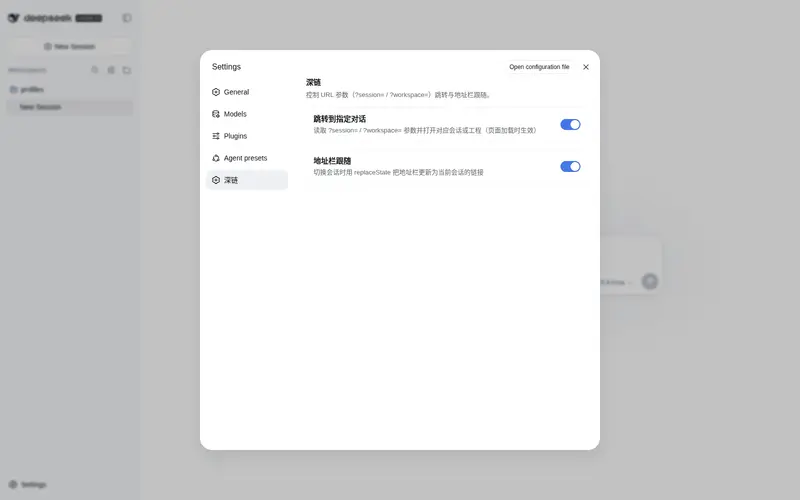
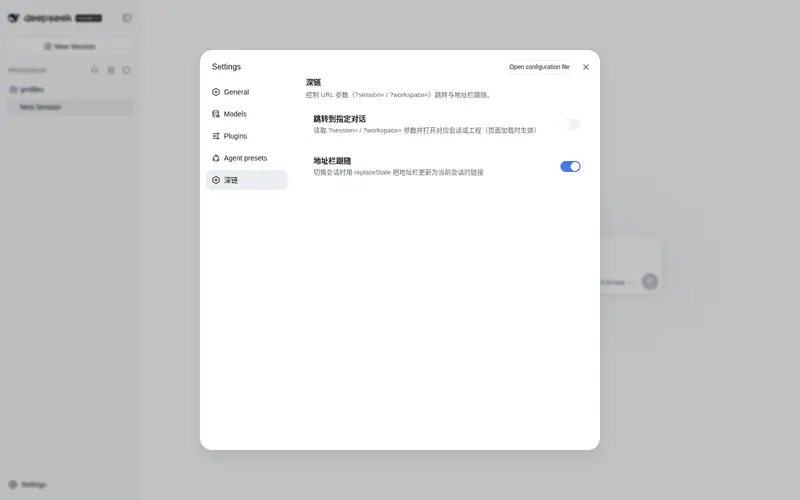
What it does
Deep links: open a specific session or workspace via `?session=` / `?workspace=`.
Best for
- People who bookmark or share links to specific DSH conversations or workspaces.
- Workflows that frequently move between related projects or past sessions.
- Web UI users who want the address bar to track the current conversation automatically.
Not ideal for
- Workflows that do not use the DSH Web UI or URL-based navigation.
- Cases where archived, hidden, or nonexistent targets must produce an explicit error; these fall back silently.
- Users who expect each session switch to create a browser history entry; updates use `replaceState`.
README
dsh-deeplink — WebUI deep-link plugin
A DeepSeek Harness Web UI plugin that opens a specific project conversation directly from a URL query parameter, instead of always returning to the last session.
-
?session=<session-id>→ open that conversation -
?workspace=<workspace-id>→ open that project’s latest/blank conversation - Persistent links: the address bar follows the current conversation, so you can copy/bookmark/share the link at any time
- Settings toggles to enable/disable jumping and address-bar following independently
- Ships a model prompt section so the model surfaces clickable deep links when a reply refers to another conversation or project
License: MIT
Features
- Reads
?session=/?workspace=from the page URL and switches once the session/workspace list baseline is ready -
sessionwins when both parameters are present - When the target session/workspace does not exist (or is archived/hidden), it silently falls back to the default behavior (restore the last session) — no errors, no impact on the page
- Persistent links: whenever the current session changes (deep-link switch or a manual switch in the UI), the address bar is rewritten to
?session=<current-session-id>viahistory.replaceState; when no session is current, the parameters are cleared. No history pollution, no reload - Settings toggles: two independent switches (Settings → 深链) —
jump(process?session=/?workspace=on load, default on) andfollow(address-bar following, default on), both persisted inlocalStorage - The node half registers a global prompt section so the model knows deep links exist and can attach links when a reply refers to other conversations/projects
- Pure browser half + a lightweight node half; no cordis import, no peerDependencies
Install
The plugin is installed into a profile via the standard dsh plugin mechanism — no DSH source changes required.
# Official profile (ships dsh-base + dsh-web-app, which provide the systemPrompt/webServer services):
dsh plugin --profile web add github:qyw233/dsh-deeplink
# Or a local checkout:
dsh plugin --profile web add /path/to/dsh-deeplink
The repository ships its build output (lib/ is committed), so no additional build step is required after install.
After installing, restart the Web UI and refresh the browser page. The plugin appears in the browser boot graph (__DSH_BOOT__).
Usage
Append query parameters to the WebUI URL:
| Parameter | Meaning | Example |
|---|---|---|
?session=<session-id> |
Open that conversation | http://127.0.0.1:3080/?session=session-304ae36e-1e66-453a-a946-2b0a9a2b173d |
?workspace=<workspace-id> |
Open that project’s latest/blank conversation | http://127.0.0.1:3080/?workspace=fc8b75ae-107c-4b6c-978c-276270b03b8b |
New window/tab behavior:
- Clicking a deep link inside a conversation: the GUI’s markdown renderer adds
target="_blank"to all http(s) links, so a new tab opens and the plugin switches THAT tab to the target conversation. - Pasting
?session=...into the current tab’s address bar and pressing Enter: the current page switches.
Persistent links:
- After a deep link opens, the address bar updates to
?session=<actual-session-id>(theworkspaceparameter is consumed and removed). - Manually switching conversations in the UI updates the address bar the same way.
- Switching to the “no session / new” state clears the parameters and returns the address bar to
/. - Updates use
history.replaceState, so each conversation is not left in the browser back/forward history.
Settings
The plugin registers a 深链 section in the Settings panel with two independent toggles (both default on, persisted in localStorage):
| Toggle | Key | Effect |
|---|---|---|
| 跳转到指定对话 | dsh-deeplink.jump |
Process ?session= / ?workspace= deep links on page load. Read once per load — toggle it before opening a deep link. |
| 地址栏跟随 | dsh-deeplink.follow |
Keep the address bar following the current session. Read on every sync, so toggling takes effect immediately. |
Model prompt
The node half registers a global prompt section (plugin:dsh-deeplink, order −97, after web-surface and before persona) that tells the model:
- This GUI supports
?session=/?workspace=deep links (a click opens them in a new tab); - When a reply refers to another conversation or project (an earlier discussion, a different workspace, a follow-up of another session), attach the corresponding link so the user can jump there in one click;
- How to discover real ids: read
$DSH_HOME/storages/workspace.json(the keys oftables.workspacesare workspace ids; each record’ssessionIdslists its session ids), or list$DSH_HOME/sessions/<project>/directories (each directory name is a session id); - Only emit ids that actually exist; never invent one.
How to find ids
- Session id: the directory name under
~/.dsh/sessions/--<project>--/<session-id>/; ortables.workspaces[].sessionIdsin~/.dsh/storages/workspace.json. - Workspace id: the key (UUID) of
tables.workspacesin~/.dsh/storages/workspace.json.
Develop
- Browser half
lib/client.js: changes are picked up by the running server’s HMR (stat-poll, ~0.5s); refresh the page to see them. - Node half
lib/index.js: changes require restartingdsh web. - This plugin has no build step;
lib/is authored directly.
Version compatibility
The browser half is pure client: no cordis import, no peerDependencies, and depends only on the runtime-provided sessions / workspaces services and their list snapshots. The node half depends on the systemPrompt / webServer services (both provided by the dsh-base and web compositions). It has been adapted to the httpServer → webServer service rename and ships a dsh.bundle declaration (cordis.patch.yml) for the newer dsh plugin bundle mechanism.
License
MIT · Copyright (c) 2026 DSH Community Contributors
Changelog
2026-08-13 · v0.5.0 — Settings toggles
- Added a 深链 section in Settings with two independent toggles:
jump(deep-link jump, default on) andfollow(address-bar following, default on), both persisted inlocalStorage.
2026-08-13 · v0.4.0 — Persistent links + newer-version compatibility
- Address bar follows the current session: after a deep-link switch or a manual switch, the URL is rewritten to
?session=<current-session-id>viahistory.replaceState; cleared when no session is current. No history pollution, no reload. - Adapted to the
httpServer→webServerservice rename. - Added the
dsh.bundledeclaration andcordis.patch.ymlfor the newerdsh pluginbundle mechanism.
2026-08-12 · v0.3.0 — Dropped the new-window parameter, unified new-tab open
- Reverted the
&new=1window.openlogic (the renderer already forces_blankon http links, sonewwould open two windows). - Prompt and README aligned: a deep-link click opens a new tab.
2026-08-12 · v0.2.0 — New-window mode + model prompt (reverted)
- (Reverted)
&new=1new-window mode. - Node half registers the
plugin:dsh-deeplinkprompt section so the model knows deep links exist and can attach links when referring to other conversations/projects.
2026-08-12 · v0.1.0 — Initial release
-
?session=/?workspace=deep-link support; unknown targets fall back silently; read-only, never rewrites the URL.
Frequently Asked QuestionsFAQ
Use the verified command dsh plugin --profile default add github:qyw233/dsh-deeplink in a DSH-enabled shell. The command resolves the public package metadata and keeps the plugin attached to the catalog identity shown on this page.
Compatibility follows the bundle and profile status shown above. If a profile is not detected, keep the plugin disabled there and check the repository documentation before enabling it in production.
The GitHub link and activity metadata are the source of truth for releases and maintenance. Revisit this page after a new release to confirm the catalog has observed the latest version.