Small-tailqwq/dsh-deep-whale#maid-atelier
DSH Web 鲸鱼娘皮肤系列(深海女仆工坊 maid-atelier)——CC BY-NC-SA 4.0
Listed
1285
Theme
Bundle verified
Preview
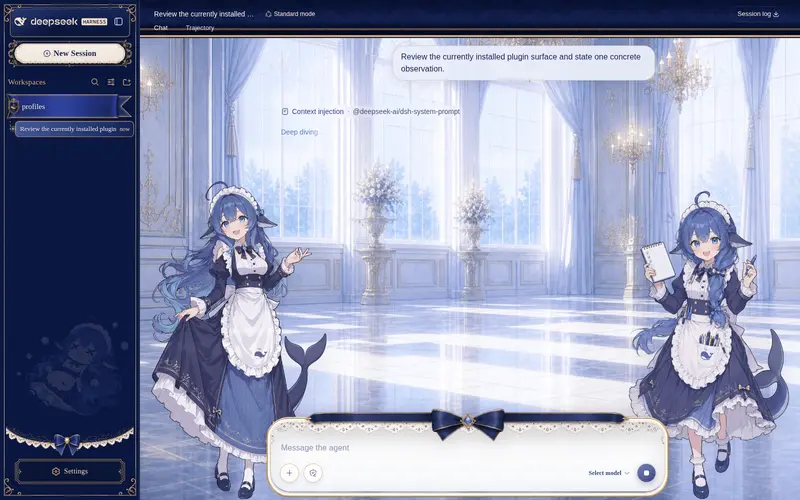
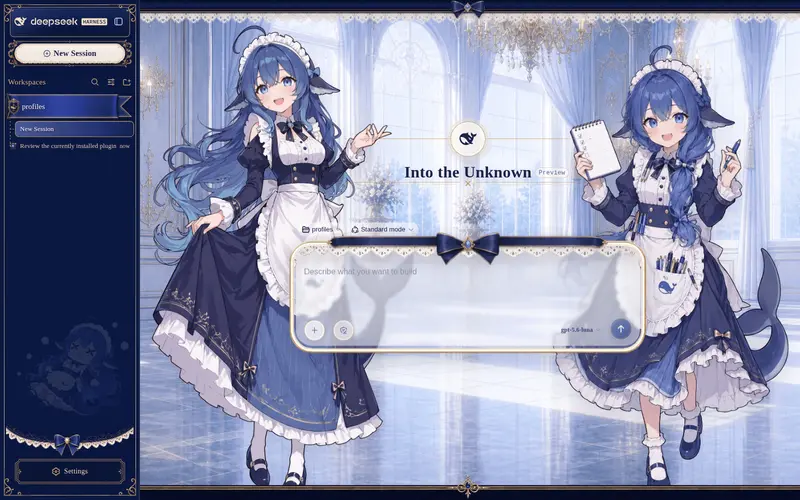
What it does
Whale-girl skin series for the DSH Web UI (maid-atelier).
Best for
- DSH Web users who want the maid-atelier or orca-link whale-girl visual theme.
- Users who want coordinated light and dark skins with illustrated backgrounds and themed interface styling.
Not ideal for
- Commercial use, which is prohibited by the CC BY-NC-SA 4.0 license.
- Users seeking workflow or agent-function improvements; these packages change the Web UI appearance.
- Users unwilling to provide attribution or share adaptations under the same license terms.
README
dsh-deep-whale · 鲸鱼娘皮肤系列
DeepSeek Harness Web GUI 的鲸鱼娘主题皮肤系列(独立分发仓库)。
效果预览
点击图片可查看完整尺寸。
| 皮肤 | 亮色模式 | 暗色模式 |
|---|---|---|
| maid-atelier |  |
 |
| orca-link |  |
 |
住户
| 皮肤 | 包名 | 说明 | 许可 |
|---|---|---|---|
| maid-atelier | @dsh-external/dsh-client-ui-skin-maid-atelier |
深海女仆工坊:双女仆背景、深海蓝蕾丝界面与 Q 版侧栏 | CC BY-NC-SA 4.0 |
| orca-link | @dsh-external/dsh-client-ui-skin-orca-link |
虎鲸链路:珍珠白机械舱、黑曜虎鲸操作员与电蓝链路信号 | CC BY-NC-SA 4.0 |
版权所有人
| 版权所有人 | 版权所有内容 | 对应皮肤 | 个人主页 |
|---|---|---|---|
| 上善 | 鲸鱼娘角色形象原作 | maid-atelier / orca-link | Pixiv · Bilibili(上善无形) |
| ZipZipPipe | 加入 DeepSeek 元素的女仆鲸鱼娘二次设计 | maid-atelier | Pixiv · Bilibili(ZipZipPipe) |
*反馈问题尽可能在 issue 中发起,而不是跑去联系上面两位老师。但是,看鲸鱼娘二创可以去关注一下,谢谢喵
安装
懒人版
对你的 dsh 说:
安装一下这个皮肤包:https://github.com/Small-tailqwq/dsh-deep-whale
dsh 会按 dsh-skin-install 技能走完整流程:列出全部皮肤、交代署名链与许可、用绝对路径注册并激活你选的那一套。
手动安装(推荐绝对路径)
git clone https://github.com/Small-tailqwq/dsh-deep-whale   # clone 到任意位置
dsh plugin --profile web add <clone 的绝对路径>/maid-atelier   # 深海女仆工坊
dsh plugin --profile web add <clone 的绝对路径>/orca-link      # 虎鲸链路
Windows 示例(正斜杠与反斜杠均可,pnpm 会自动规范化):
dsh plugin --profile web add C:/Users/<你>/code/dsh-deep-whale/maid-atelier
相对路径的规则(容易踩坑)
- 相对路径(
./、../开头)按 dsh 命令的调用目录解析,不是皮肤仓库目录。 -
不要直接写裸目录名:
dsh plugin --profile web add maid-atelier会被当作 npm 包名去 registry 拉取而 404 失败。请用./maid-atelier(已在皮肤仓库目录内)、../dsh-deep-whale/maid-atelier(与 dsh-deep-whale 同级)或绝对路径。 -
cd <harness>后用../dsh-deep-whale/maid-atelier的前提是 dsh-deep-whale 与你的 harness 目录同级;clone 到别处时相对路径会 link 到错误位置(命令不报错、但皮肤不生效)。不确定就用绝对路径。
安装后验证
dsh plugin --profile web list          # 应看到 @dsh-external/dsh-client-ui-skin-* 的 link: 依赖
dsh --profile web --dump-config        # 皮肤行在组合配置中,disabled 状态正确
刷新浏览器页面即可看到皮肤;皮肤开关走配置热重载,无需重启 dsh(新增/删除插件包才需要重启)。
安装失败排查
| 现象 | 原因 | 处理 |
|---|---|---|
ERR_PNPM_FETCH_404 ... <名字> |
传了裸目录名(如 add maid-atelier),被当成 npm 包名 |
改为绝对路径或 .//../ 前缀路径 |
命令成功但 dsh plugin list 没有该包 |
相对路径解析到了错误位置(clone 位置与假设不符) | 用绝对路径重新 add |
pnpm not found on PATH |
环境缺少 pnpm | 安装 pnpm(npm i -g pnpm)后重试 |
| 包在列表里但页面无效果 | 皮肤被 disabled(多皮肤互斥开关)或浏览器未刷新 |
--dump-config 核对 disabled;刷新页面 |
懒人版 · 自带技能
本仓库自带 dsh-skin-install 技能(.agents/skills/)。dsh 在仓库目录内运行时自动发现该技能;对你的 dsh 说”安装一下这个皮肤包”或”切换皮肤”,它会列出仓库全部皮肤、询问你要激活哪一套,并交代作者署名链与许可边界后再安装。无需自行克隆到 dsh 源码里,皮肤开关走配置热重载,无需重启。
许可
本仓库各皮肤为衍生创作,整体以 CC BY-NC-SA 4.0(署名-非商业性使用-相同方式共享)发布,禁止商业性使用。署名链见各皮肤 NOTICE。
皮肤工程脚手架来自 zhu1090093659/dsh-web-ui ,本仓库仅分发皮肤成品,不包含脚手架。
Frequently Asked QuestionsFAQ
Use the verified command dsh plugin --profile default add github:Small-tailqwq/dsh-deep-whale#path:/maid-atelier in a DSH-enabled shell. The command resolves the public package metadata and keeps the plugin attached to the catalog identity shown on this page.
Compatibility follows the bundle and profile status shown above. If a profile is not detected, keep the plugin disabled there and check the repository documentation before enabling it in production.
The GitHub link and activity metadata are the source of truth for releases and maintenance. Revisit this page after a new release to confirm the catalog has observed the latest version.