STARDUSTLC666/dsh-calendar
DeepSeek Harness 日历插件:calendar_list/create/update/delete/search 五工具,CalDAV 协议支持 Google/iCloud/Nextcloud/自定义端点,RRULE 重复事件自动展开,插件级 proxyUrl 代理,配置缺失不崩启动;纯 Node 全平台。· CalDAV calendar tools for DeepSeek Harness agents.
Listed
3
Tools
Bundle verified
Preview
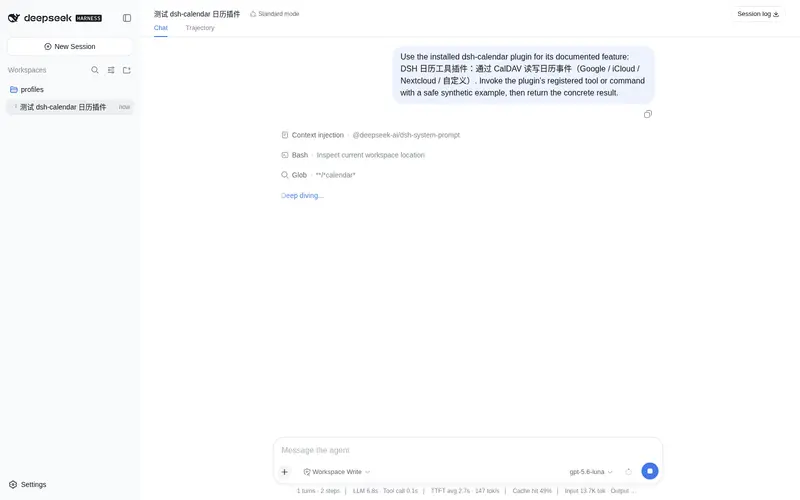
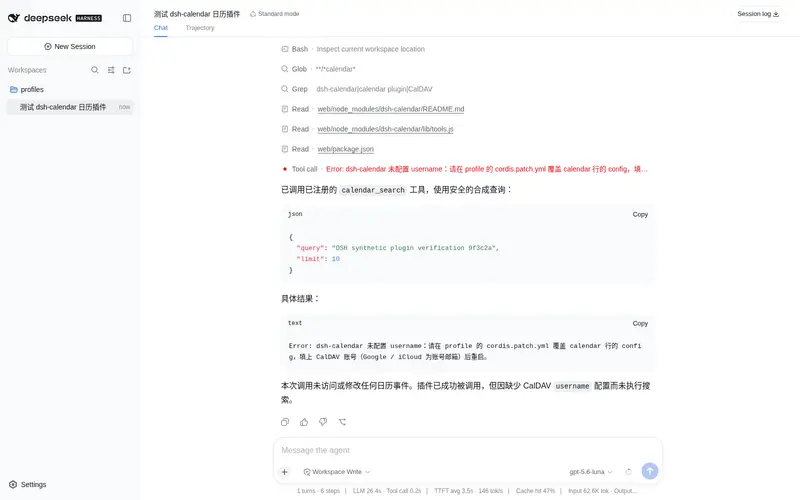
What it does
CalDAV calendar tools (list/create/update/delete/search) for Google/iCloud/Nextcloud/custom endpoints, with RRULE expansion.
Best for
- Agents that need to list, create, update, delete, or search events on a CalDAV calendar.
- Google, iCloud, Nextcloud, or custom CalDAV users who can provide Basic-auth credentials or app-specific passwords.
- Scheduling workflows that need recurring events expanded into individual occurrences when listing events.
Not ideal for
- Environments that require OAuth authentication rather than Basic auth or app-specific passwords.
- Workflows that must edit or delete one occurrence within a recurring series; operations apply to the whole series.
- Users needing automatic calendar discovery, multi-calendar selection, or a Web settings UI.
- Calendar workflows requiring precise handling of named time zones, daylight-saving transitions, or complex all-day boundaries.
README
dsh-calendar
agent 从此会排期:CalDAV 读写日历,重复日程自动展开。





DSH 社区插件:通过 CalDAV 读写日历事件。提供 5 个面向模型的工具(calendar_list / calendar_create / calendar_update / calendar_delete / calendar_search),支持 Google / iCloud / Nextcloud 及任意 CalDAV 服务器。本轮为 node 半身,不含设置页 UI,配置全部走 profile 的 cordis.patch.yml。
安装
dsh plugin --profile web add dsh-calendar
安装后重启 dsh。插件会向 profile 插入一行 id 为 calendar 的配置行(见本包的 cordis.patch.yml)。默认 provider 为 custom 且未填任何凭证,此时插件照常加载,但工具在调用时会抛出中文指引错误,提示你补全配置。
配置
所有配置都在你的 profile 的 cordis.patch.yml 里,按 id 覆盖 calendar 行(覆盖整行的 config)。通用字段:
-
provider:googleicloud nextcloud custom -
caldavUrl:完整日历集合 URL(custom / icloud 必填;google / nextcloud 也可手填覆盖预设) -
username:CalDAV 账号(Google / iCloud 为账号邮箱) -
password:密码;Google / iCloud 请用应用专用密码。推荐用环境变量DSH_CALENDAR_PASSWORD,避免明文入库。 -
proxyUrl:本机代理地址(如 http://127.0.0.1:7890)。中国大陆访问 Google / iCloud 必填,详见上文「特殊代理配置」专节;国内可直连的 CalDAV 服务无需填写。 -
calendarId:google 专用,日历 ID(通常是你的邮箱) -
host/user/calendar:nextcloud 专用
中国用户:特殊代理配置(Google / iCloud)
Google 与 iCloud 的 CalDAV 端点在中国大陆不可直连,需要配合你常用的梯子/特殊代理使用。插件内置 proxyUrl 配置:把 CalDAV 请求路由到你本机代理客户端的端口,不影响其他插件,也无需改任何系统设置。
- id: calendar
  config:
    provider: google
    username: you@gmail.com
    calendarId: you@gmail.com
    password: 你的应用专用密码
    proxyUrl: http://127.0.0.1:7890   # 改成你代理客户端的本地端口
常见代理客户端本地端口
| 客户端 | 本地端口 |
|---|---|
| Clash / Clash Verge(HTTP) | 7890 / 7897 |
| v2rayN(HTTP / SOCKS) | 10808 / 10809 |
| Shadowsocks | 1080 |
在客户端界面确认你的实际端口,填进 proxyUrl 即可。国内可直连的 CalDAV 服务(如自建 Nextcloud)则无需填写。
Google 示例
- id: calendar
  name: dsh-calendar
  config:
    provider: google
    username: you@gmail.com
    calendarId: you@gmail.com
    # password 推荐用环境变量 DSH_CALENDAR_PASSWORD
Google 的 CalDAV 集合 URL 由插件拼成:https://apidata.googleusercontent.com/caldav/v2/<calendarId>/events。
iCloud 示例
- id: calendar
  name: dsh-calendar
  config:
    provider: icloud
    username: you@icloud.com
    caldavUrl: https://caldav.icloud.com/123456789/calendars/<日历ID>/
    # password 推荐用环境变量 DSH_CALENDAR_PASSWORD
iCloud 需要完整日历集合 URL(含你的用户 ID 与日历 ID),在 icloud.com 的日历 CalDAV 设置里可找到具体日历地址。
Nextcloud 示例
- id: calendar
  name: dsh-calendar
  config:
    provider: nextcloud
    username: alice
    host: https://cloud.example.com
    user: alice
    calendar: personal
    # password 推荐用环境变量 DSH_CALENDAR_PASSWORD
插件会拼成:https://cloud.example.com/remote.php/dav/calendars/alice/personal/。
自定义 CalDAV 示例
- id: calendar
  name: dsh-calendar
  config:
    provider: custom
    caldavUrl: https://dav.example.com/calendars/me/work/
    username: me
    # password 推荐用环境变量 DSH_CALENDAR_PASSWORD
应用专用密码指引
Google:登录 myaccount.google.com → 安全 → 两步验证(需先开启)→ 应用专用密码,选择「其他」生成 16 位密码,填到 password 或 DSH_CALENDAR_PASSWORD。不能用你的 Google 登录密码。
iCloud:登录 appleid.apple.com → 登录与安全 → App 专用密码,生成后填到 password 或 DSH_CALENDAR_PASSWORD。不能用你的 Apple ID 密码。
若调用报 401/403,多半是密码不对(用了登录密码而非应用专用密码),插件会返回中文提示。
工具清单
-
calendar_list:列出某时间段事件(start/end,ISO 8601,缺省未来 7 天)。默认展开重复事件(expand默认 true,maxOccurrences默认 30、clamp 1-200):每个实例独立成行,带isOccurrence: true与seriesStart;非重复事件保持isOccurrence: false。expand=false时重复事件按原始单条返回并带rrule。结果按开始时间稳定排序 -
calendar_create:新建事件(summary/start/end 必填,description/location/allDay/rrule 可选)。严格校验真实日历日期与end >= start -
calendar_update:按 uid 改事件(summary/start/end/description/location/allDay/rrule 可选,未提供保留原值,重复规则不再丢失) -
calendar_delete:按 uid 删事件 -
calendar_search:按关键词搜事件(客户端过滤标题/描述/地点/UID,不区分大小写;limit默认 50、clamp 1-200,结果按开始时间排序)
事件稳定标识 uid 为 CalDAV href(完整对象 URL),calendar_update / calendar_delete 使用它。
时间与时区
输入输出统一 ISO 8601。定时事件输出为 UTC(如 2025-01-15T01:00:00Z),全天事件输出 YYYY-MM-DD。输入可带时区偏移(如 2025-01-15T09:00:00+08:00),插件内部转 UTC 存储。
v0.3.2 优化
- 修复
calendar_update更新其他字段时丢失rrule的问题。 - 更新与新建都会校验
end >= start,并拒绝2025-02-30这类不存在的日期。 -
calendar_list/calendar_search输出按开始时间稳定排序;搜索limitclamp 到 1-200。 - CalDAV 客户端创建失败后清空缓存,下一次调用可自动重试,不再永久复用 rejected promise。
已知限制
-
国内网络:Google 与 iCloud 的 CalDAV 端点在中国大陆不可直连;可用
proxyUrl走本机梯子/特殊代理,或改用国内可直连的 CalDAV 端点(自建 Nextcloud/Radicale)。 - 重复事件展开:calendar_list 默认用 ICAL.RecurExpansion 展开 RRULE(
expand=true),受maxOccurrences封顶;calendar_search 仍返回原始系列(不展开)。 - 不支持单次实例的改/删:calendar_update / calendar_delete 针对整个重复系列(按 uid 操作),无法只修改或删除某一次发生(不支持 RECURRENCE-ID 实例级操作)。
- 不做 OAuth:仅支持 Basic 认证(应用专用密码),不支持 Google / iCloud 的 OAuth 登录流程。
- 时区规则:带 TZID(命名时区)的事件输出会转成 UTC(Z);全天边界、夏令时等复杂时区规则不做精细化处理。
- 无设置页 UI:本轮为 node 半身,配置只走 cordis.patch.yml,不提供 Web 设置页。
- 日历发现:iCloud 需手动填完整日历集合 URL;不做 principal 自动发现与多日历选择。
- 取消/超时:工具依赖 timeoutMs(60 秒)做整体超时,不在单次网络请求上透传 AbortSignal。
开发
pnpm install
pnpm test   # 构建 + node --test
构建产物在 lib/,测试在 test/*.test.mjs(不依赖真实账号)。
相关插件
- dsh-calendar — CalDAV 日历五件套
- dsh-slack — Slack 通知/收件箱
- dsh-dingtalk — 钉钉群通知(零依赖)
Frequently Asked QuestionsFAQ
Use the verified command dsh plugin --profile default add github:STARDUSTLC666/dsh-calendar in a DSH-enabled shell. The command resolves the public package metadata and keeps the plugin attached to the catalog identity shown on this page.
Compatibility follows the bundle and profile status shown above. If a profile is not detected, keep the plugin disabled there and check the repository documentation before enabling it in production.
The GitHub link and activity metadata are the source of truth for releases and maintenance. Revisit this page after a new release to confirm the catalog has observed the latest version.