STARDUSTLC666/dsh-code-security
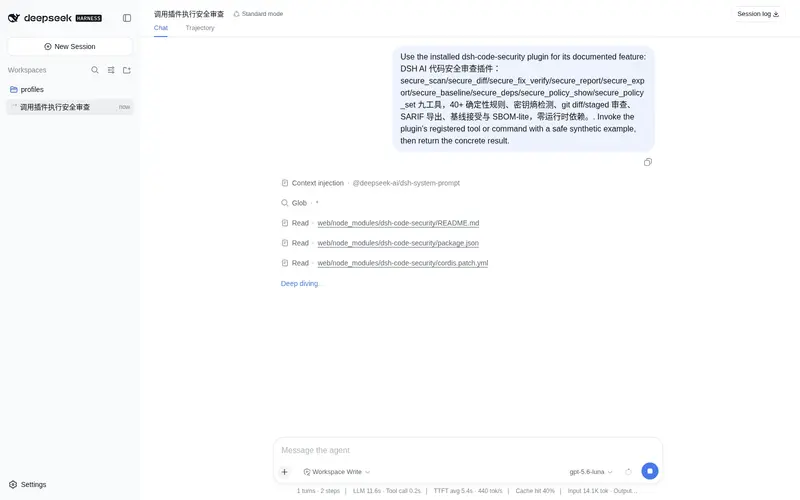
DSH AI 代码安全审查插件:九工具确定性扫描、基线接受与 SBOM-lite,零运行时依赖。
Listed
1
Security
Bundle verified
Preview
What it does
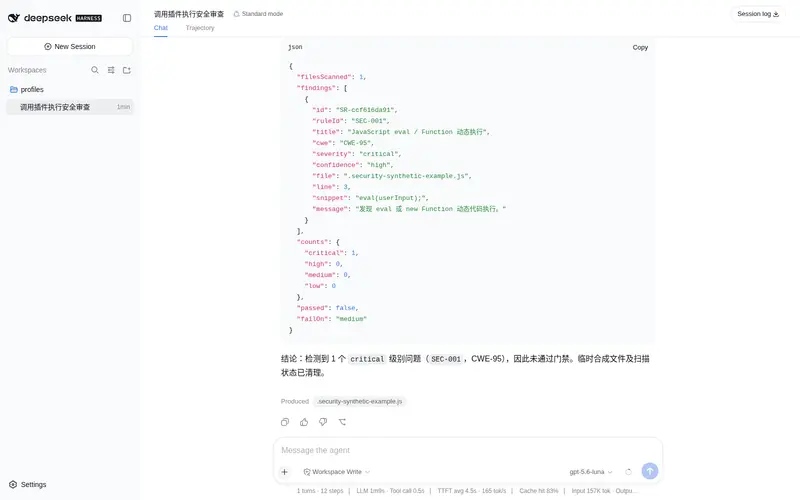
Deterministic code security review: 40+ rules, secret entropy detection, staged-diff review, SARIF export, baseline acceptance and SBOM-lite dependency inventory.
Best for
- Development workflows needing reproducible local rule-based security checks with file, line, CWE, and snippet evidence.
- Teams reviewing only newly added staged or Git-diff lines before delivery.
- Projects that need SARIF or Markdown reports, accepted baselines, policy gates, or a lightweight dependency inventory.
Not ideal for
- Security reviews requiring semantic data-flow analysis, runtime testing, or proof of exploitability beyond deterministic rules.
- Teams expecting the scanner itself to propose fixes; findings intentionally contain evidence without remediation advice.
- Workflows needing a full dependency vulnerability database rather than an SBOM-lite inventory and version-constraint checks.
README
dsh-code-security
让 agent 每次改完代码,先过一道本地安全扫描,修复完了才准交付。
DeepSeek Harness AI 代码安全审查插件:确定性规则引擎 + git diff 增量审查 + 修复闭环 + 策略门禁。借鉴 Codex 安全技能的方法论(漏洞分级、证据优先、供应链分层、Agent 安全),实现为可复现工具。零运行时依赖。
工具
| 工具 | 作用 | 写操作 |
|---|---|---|
secure_scan |
扫描文件/目录,输出 CWE/严重度/行号/代码片段证据 | 写状态 |
secure_diff |
只审查 git diff 新增行 | 写状态 |
secure_fix_verify |
修复后复扫:关闭 / 仍存在 / 新引入 | 写状态 |
secure_report |
按规则/文件聚合 + 门禁结论 | 否 |
secure_export |
导出 SARIF 2.1.0 / Markdown 报告 | 写文件审批 |
secure_baseline |
接受当前已知问题为基线,之后只按新增判定 | 审批门 |
secure_deps |
SBOM-lite:解析依赖清单与版本约束风险 | 否 |
secure_policy_show |
查看 .code-security.json 策略 | 否 |
secure_policy_set |
写入策略(排除/忽略/阈值) | 审批门 |
规则覆盖(40+)
- 注入:eval / exec / shell=True / SQL 拼接 / innerHTML
- 反序列化:pickle / yaml.load / ObjectInputStream / Marshal / unserialize
- 加密:弱哈希、ECB、硬编码 IV/密钥、JWT none、TLS 校验关闭、Shell TLS 绕过(curl -k / wget –no-check-certificate / git sslVerify=false)
- 凭据:硬编码密码、令牌、私钥、高熵密钥
- 配置:chmod 777、Docker privileged / latest、npm audit=false、CORS *
- 泄露:敏感日志、错误堆栈外发、路径穿越、SSRF
发现只包含客观证据与 CWE 编号,不附修复建议——修复方案由 agent 基于证据生成。
安装
dsh plugin --profile web add dsh-code-security
使用
secure_scan { target: src }
secure_diff { base: HEAD }
secure_fix_verify { target: src }
secure_baseline { reason: 历史遗留 }
secure_deps { target: . }
策略示例(.code-security.json):
{
  "version": 1,
  "exclude": ["vendor/**", "generated/**"],
  "ignore": [{ "ruleId": "SEC-206", "file": "test/**", "reason": "非安全敏感" }],
  "failOn": "high"
}
工程
pnpm test # 构建 + 24 个测试
MIT
Frequently Asked QuestionsFAQ
Use the verified command dsh plugin --profile default add github:STARDUSTLC666/dsh-code-security in a DSH-enabled shell. The command resolves the public package metadata and keeps the plugin attached to the catalog identity shown on this page.
Compatibility follows the bundle and profile status shown above. If a profile is not detected, keep the plugin disabled there and check the repository documentation before enabling it in production.
The GitHub link and activity metadata are the source of truth for releases and maintenance. Revisit this page after a new release to confirm the catalog has observed the latest version.