STARDUSTLC666/dsh-dingtalk
DeepSeek Harness 钉钉群机器人通知插件:dingtalk_notify/dingtalk_text 两工具,自定义机器人 webhook + HMAC 加签安全模式,手写签名实现、零运行时依赖;纯 Node 全平台。· DingTalk group-robot notifications for DeepSeek Harness agents.
Listed
3
Notify
Bundle verified
Preview
What it does
DingTalk group-robot notifications (webhook + HMAC signing, zero runtime dependencies).
Best for
- Agents that need to push Markdown or plain-text notifications to a DingTalk group.
- Teams using DingTalk custom group robots with webhook and optional HMAC signing.
- Cross-platform Node environments wanting a small outbound notification integration.
Not ideal for
- Bots that must receive group messages, reply to mentions, or support two-way interaction.
- Workflows requiring enterprise DingTalk applications or message types such as images, Link, FeedCard, or ActionCard.
- Users who need a Web settings page instead of profile YAML and environment-variable configuration.
- Robot setups relying on custom-keyword enforcement unless every message is constructed to include the required keyword.
README
dsh-dingtalk
让 agent 在钉钉群里说话:Markdown / 纯文本通知,加签安全,零依赖。





DeepSeek Harness 钉钉群机器人通知插件:让 agent 能单向推送 Markdown / 纯文本消息到钉钉群。纯插件实现,零核心改动,安装即可用。
纯 Node 实现,全平台通用(Windows / macOS / Linux 同一份代码),只依赖 node:crypto 与内置 fetch,无运行时依赖、无原生二进制。
工具一览
| 工具 | 作用 |
|---|---|
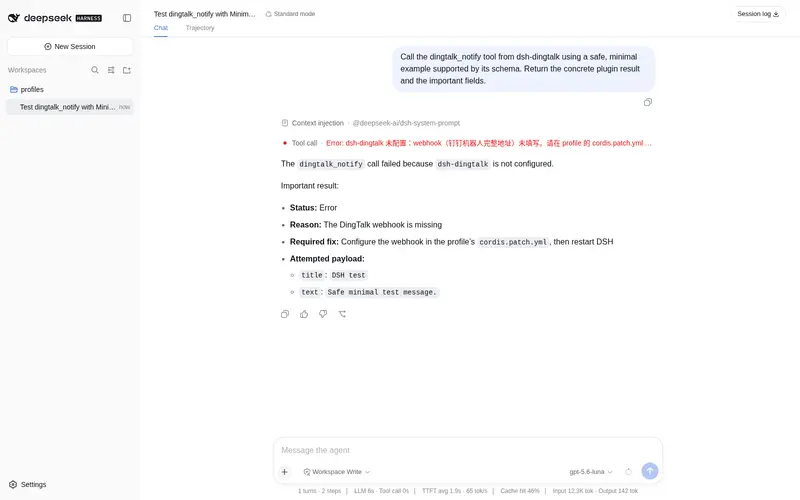
dingtalk_notify |
向配置的钉钉群发一条 Markdown 消息(title 标题 + text Markdown 正文) |
dingtalk_text |
向配置的钉钉群发一条 纯文本 消息(content) |
示例对话:
帮我给钉钉群发一条消息:标题「构建完成」,正文「流水线 #123 已通过 ✅」。
安装
dsh plugin --profile web add dsh-dingtalk
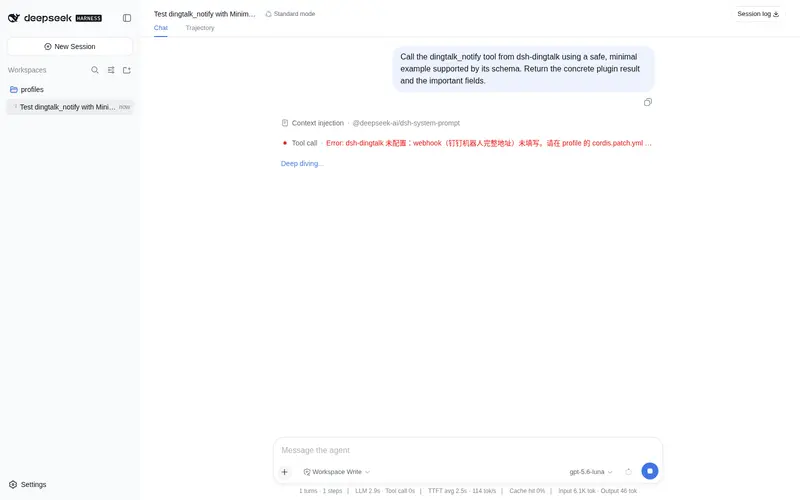
装好后重启 dsh web。插件自带空配置,不会弄崩启动;配置前调用任何 dingtalk_* 工具都会返回明确的中文配置提示。
第一步:拿到 webhook 与加签密钥
用钉钉【自定义机器人】方式,不需要企业应用、不需要管理员权限:
- 打开目标钉钉群 → 群设置 → 智能群助手 → 添加机器人 → 自定义(通过 Webhook 接入自定义服务)
- 机器人名称随意,安全设置勾选「加签」,完成
- 复制两样东西:
-
Webhook 地址:形如
https://oapi.dingtalk.com/robot/send?access_token=xxxx -
加签密钥(secret):形如
SECxxxx(勾选「加签」后才会出现)
-
Webhook 地址:形如
安全设置推荐只勾选「加签」。如果同时勾选了「自定义关键词」,机器人会校验消息里是否包含关键词——那是钉钉服务端行为,本插件不处理(见「已知限制」)。
配置
在你 profile 的 cordis.patch.yml 里覆盖 tool-dingtalk 行(在 $DSH_HOME/profiles/<name>/ 下),然后重启:
- id: tool-dingtalk
  config:
    webhook: https://oapi.dingtalk.com/robot/send?access_token=你的token
    secret: SEC你的加签密钥        # 可选,但强烈建议;也可用环境变量 DSH_DINGTALK_SECRET
完整配置项
| 字段 | 默认 | 说明 |
|---|---|---|
webhook |
必填 | 机器人完整 Webhook 地址(?access_token=...) |
secret |
空 | 加签密钥;省略时回退环境变量 DSH_DINGTALK_SECRET。不填=不加签 |
timeoutMs |
10000 |
请求超时毫秒数(1000–60000) |
用环境变量存 secret
不想把密钥写进 YAML 的话,可以只写 webhook,然后设置环境变量:
# Windows PowerShell
$env:DSH_DINGTALK_SECRET = "SEC你的加签密钥"
# 或系统环境变量里加一条 DSH_DINGTALK_SECRET
显式写在 YAML 里的 secret 优先于环境变量。
安全须知
-
webhook 就是群通知的钥匙:知道它的人可以往群里发消息。请勿把
cordis.patch.yml提交到任何 Git 仓库;secret更推荐用环境变量DSH_DINGTALK_SECRET。 - 本插件只做单向通知(agent → 钉钉群),不会读取群里任何消息,也没有双向机器人能力。
- 本插件不做任何联网上报;
secret只在内存中用于计算 HMAC 签名,签名拼进 URL 发给钉钉官方接口。
加签算法(对照官方)
secret 存在时,请求 URL 追加 timestamp(毫秒时间戳)与 sign:
stringToSign = timestamp + "
" + secret
sign = urlencode(base64(HmacSHA256(secret, stringToSign)))
与本插件 computeDingTalkSign 一致,等价于官方 Python 示例的 urllib.parse.quote_plus(base64(...))。
已知限制
- 仅单向通知:不支持企业自建应用、不支持接收群消息 / 双向机器人(@机器人 回复等),这些是 v0.2+ 的方向。
- 不支持自定义关键词校验的自动规避:如果机器人在钉钉侧勾选了「自定义关键词」,消息必须包含关键词,否则钉钉返回错误(errcode 310000 也可能因此出现)。本插件把 310000 归因于加签,请同时检查关键词设置。
-
无设置页:v0.1 是「node 半身」,配置只能走
cordis.patch.yml(+ 环境变量)。Web 设置页在 v0.2+。 -
消息类型:目前只支持 Markdown(
dingtalk_notify)与纯文本(dingtalk_text)两种;图片/Link/FeedCard/ActionCard 等类型后续再加。 - Markdown 渲染:钉钉机器人 Markdown 语法与标准 Markdown 略有差异(如标题、链接),请按钉钉语法书写。
错误码速查
| errcode | 含义 | 建议 |
|---|---|---|
0 |
成功 | — |
310000 |
加签校验失败(也见上面关键词说明) | 检查 secret 是否填对、是否与机器人「加签」设置一致 |
120001 |
access_token 失效 |
到钉钉群重新复制 webhook 地址,覆盖 webhook
|
| 其他 | 服务端错误 | 看返回的 errmsg
|
开发
pnpm install
pnpm run build   # tsc → lib/
pnpm test        # 构建 + node --test(加签算法/配置解析/客户端封装/注册与中文报错)
协议
MIT。这是一个社区插件,与 DeepSeek 官方及钉钉官方无关;@deepseek-ai/* 为官方保留命名空间。
相关插件
- dsh-calendar — CalDAV 日历五件套
- dsh-dingtalk — 钉钉群通知(零依赖)
- dsh-email — 邮件六件套 + Web 设置页
Frequently Asked QuestionsFAQ
Use the verified command dsh plugin --profile default add github:STARDUSTLC666/dsh-dingtalk in a DSH-enabled shell. The command resolves the public package metadata and keeps the plugin attached to the catalog identity shown on this page.
Compatibility follows the bundle and profile status shown above. If a profile is not detected, keep the plugin disabled there and check the repository documentation before enabling it in production.
The GitHub link and activity metadata are the source of truth for releases and maintenance. Revisit this page after a new release to confirm the catalog has observed the latest version.