STARDUSTLC666/dsh-ffmpeg
DeepSeek Harness 视频处理插件:ffmpeg_probe/cut/concat/encode/subtitle/extract/gif 七工具,走官方 subprocess 服务、argv 数组无 shell 注入、零运行时依赖;纯 Node 全平台。· Video processing tools for DeepSeek Harness agents.
Listed
4
Tools
Bundle verified
Preview
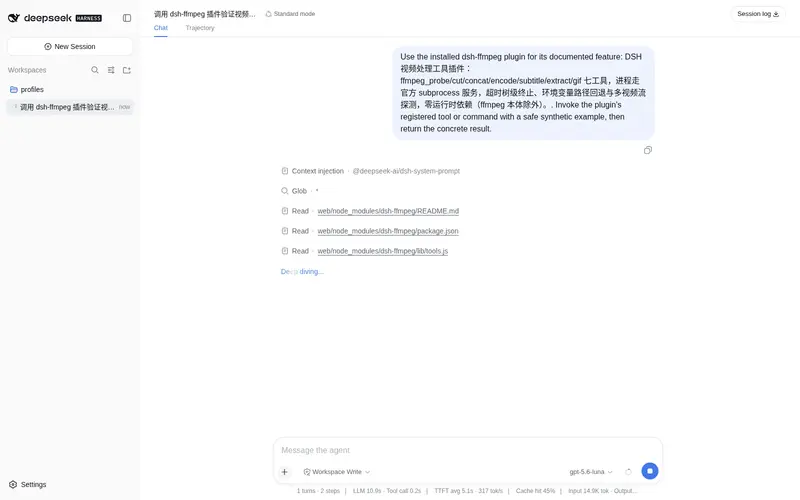
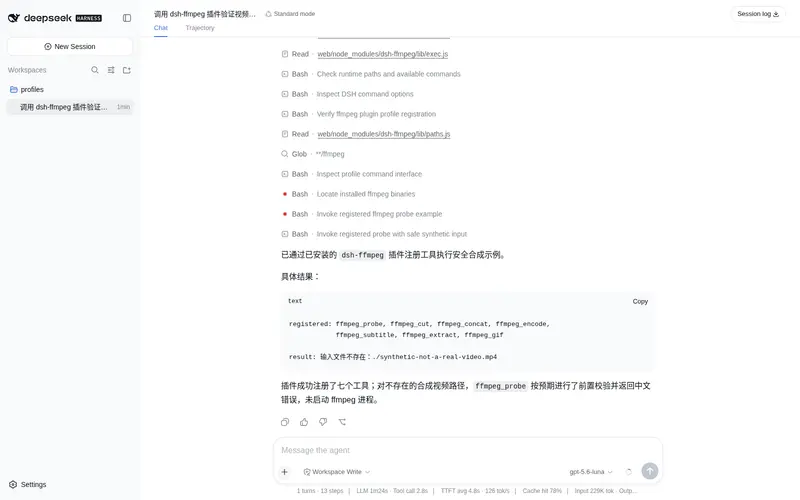
What it does
Seven video tools (probe/cut/concat/encode/subtitle/extract/gif) on the official subprocess service: shell-free argv, zero runtime dependencies.
Best for
- Agents performing routine video inspection, cutting, concatenation, encoding, subtitle burn-in, extraction, or GIF creation.
- Cross-platform workflows that want validated, shell-free access to FFmpeg through DSH's subprocess service.
- Video pipelines that benefit from built-in output collision protection and common encoding presets.
Not ideal for
- Machines without installed and reachable FFmpeg and FFprobe executables.
- Workflows requiring arbitrary FFmpeg filter graphs or options outside the seven documented tool interfaces.
- Long-running operations that cannot fit within the configurable two-hour maximum timeout.
README
dsh-ffmpeg
你的 agent 会剪视频了:探测/剪辑/拼接/转码/字幕/抽帧/GIF,七个工具一条命令。





DSH(DeepSeek Harness)视频处理工具插件:七个工具覆盖探测、剪辑、拼接、转码、字幕、提取与 GIF 制作,全部由 ffmpeg/ffprobe 完成。
安装
dsh plugin --profile web add dsh-ffmpeg
需要本机已安装 ffmpeg(ffmpeg -version 能出结果即可);不在 PATH 上时可用 ffmpegPath/ffprobePath 显式指定,或设置环境变量 DSH_FFMPEG_PATH / DSH_FFPROBE_PATH。
配置
在你自己的 profile 的 cordis.patch.yml 里覆盖本插件行(缺省时全部用默认值):
- id: ffmpeg
  name: 'dsh-ffmpeg'
  config:
    # ffmpegPath: C:\tools\ffmpeg\bin\ffmpeg.exe   # 非 PATH 时显式指定(也可用 DSH_FFMPEG_PATH)
    # ffprobePath: C:\tools\ffmpeg\bin\ffprobe.exe # 也可用 DSH_FFPROBE_PATH
    timeoutMs: 300000                                # 单次操作超时(默认 5 分钟,10 秒 - 2 小时)
    # overwrite: true                                 # 允许覆盖同名输出(默认自动加 _1/_2 序号)
工具一览
| 工具 | 作用 | 关键参数 |
|---|---|---|
ffmpeg_probe |
探测媒体信息(格式/时长/分辨率/帧率/码率/音轨/字幕轨;多视频流时返回完整 videos 列表) |
input 必填 |
ffmpeg_cut |
剪辑片段(默认流拷贝秒级,可精确重编码) |
input 必填;start/end/duration
|
ffmpeg_concat |
拼接 2-20 个片段(同编码流拷贝 / 混合编码重编码) |
inputs 数组必填 |
ffmpeg_encode |
转码(B 站 1080p/4K、竖屏 1080p、web-720p 预设 + crf/fps/scale 覆盖) |
input 必填;preset 可选 |
ffmpeg_subtitle |
字幕烧录(SRT/ASS 硬字幕) |
input+subtitle 必填 |
ffmpeg_extract |
提取音轨(m4a)/ 抽帧序列 / 单帧 / 字幕流 |
input+what 必填 |
ffmpeg_gif |
视频转高质量 GIF(两遍调色板) |
input 必填;fps/width/duration 可选 |
示例
ffmpeg_probe { input: E:\videos\raw.mp4 }
ffmpeg_cut { input: E:\videos\raw.mp4, start: 10, end: 30 }
ffmpeg_encode { input: E:\videos\raw.mp4, preset: bilibili-1080p }
ffmpeg_subtitle { input: E:\videos\raw.mp4, subtitle: E:\videos\subs.srt }
ffmpeg_gif { input: E:\videos\raw.mp4, duration: 3, width: 480 }
安全设计
- 无 shell:所有参数以独立 argv 数组传递,用户输入不可能注入命令
- 进程走 DSH 官方 subprocess 服务:超时 AbortSignal 会真正触发树级终止(SIGTERM → 强杀,Windows taskkill /T),本插件零运行时依赖
- 防覆写:默认不覆盖同名文件(自动加序号),输出与输入相同直接拒绝
- 超时钳制:单次操作 10 秒 - 2 小时;探测额外限制 60 秒
- 参数校验:时间格式、预设枚举、crf/fps/scale 范围全部前置校验,输入目录、抽帧无扩展名输出等边界也有中文错误/自动修复
开发
pnpm install
pnpm test       # 构建 + 57 个测试(含真实 ffmpeg 端到端集成,缺 ffmpeg 自动跳过)
License
MIT
Frequently Asked QuestionsFAQ
Use the verified command dsh plugin --profile default add github:STARDUSTLC666/dsh-ffmpeg in a DSH-enabled shell. The command resolves the public package metadata and keeps the plugin attached to the catalog identity shown on this page.
Compatibility follows the bundle and profile status shown above. If a profile is not detected, keep the plugin disabled there and check the repository documentation before enabling it in production.
The GitHub link and activity metadata are the source of truth for releases and maintenance. Revisit this page after a new release to confirm the catalog has observed the latest version.