STARDUSTLC666/dsh-ppt
DSH 技能插件:一句话生成完整演示文稿(HTML 放映 + PPTX 导出 + manifest),5 套视觉主题,中英双语,零运行时依赖。· One prompt to a full presentation for DeepSeek Harness.
Listed
1
Docs
Bundle verified
Preview
What it does
Presentation skill and tools: one sentence or one document to an HTML slideshow plus editable PPTX, with five built-in themes, default theme/language config and bilingual support.
Best for
- Teams turning a short prompt or Markdown outline into both an HTML slideshow and an editable PPTX.
- Chinese, English, or bilingual presentation workflows that benefit from configurable defaults and five built-in themes.
- Users who need a structured JSON manifest alongside the presentation outputs.
Not ideal for
- Decks requiring charts, images, speaker notes, animations, or smart master placeholders.
- Workflows expecting bilingual mode to translate the supplied content automatically.
- One-sentence inputs that must produce a detailed deck without first expanding the material into an outline.
README
dsh-ppt
一句话 / 一篇文档 → 完整演示文稿:HTML 网页放映 + PPTX 导出,5 套视觉主题,中英双语。





DSH(DeepSeek Harness)演示文稿技能 + 工具插件:把一句话、一段文字或一篇 Markdown 文档变成可直接放映的 HTML 网页 与可编辑的 PPTX。纯 Node 实现,零运行时依赖,Windows / macOS / Linux 同一份代码。
能力一览
| 能力 | 说明 |
|---|---|
ppt_create 工具 |
Markdown / 结构化 slides → *.html + *.pptx + *.json 三件套 |
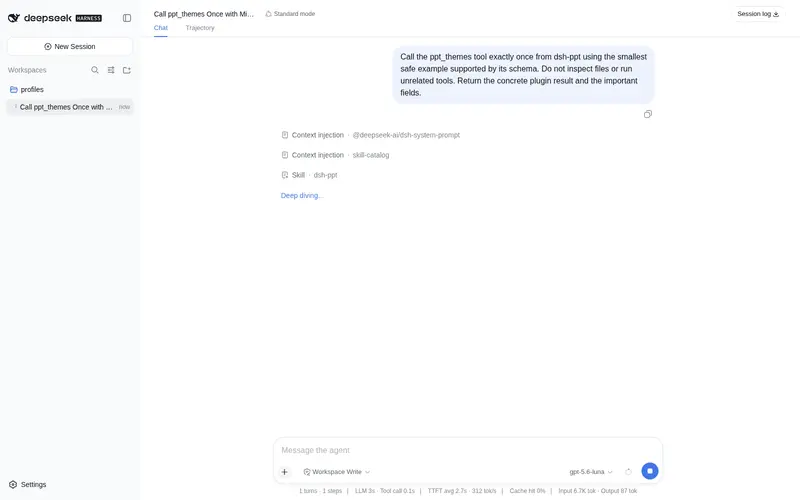
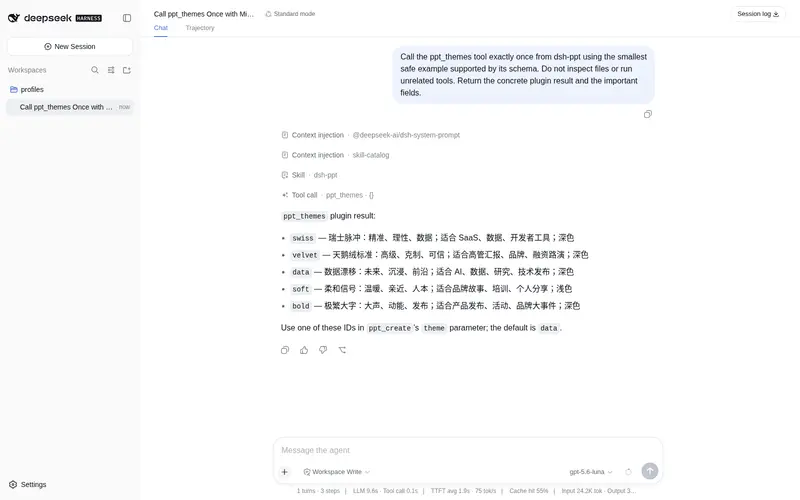
ppt_themes 工具 |
列出 5 套内置主题与适用场景 |
dsh-ppt 技能 |
完整 SOP 注册进 DSH:从一句话到成品 deck 的六步流水线 |
| 裸 SKILL.md | 把 skills/dsh-ppt/ 复制到 Claude Code / Cursor / Gemini CLI / Codex 即可跨 harness 使用 |
| 视觉引擎 | 复用 hyperframes 视觉风格库,5 套主题 HTML 与 PPTX 同源同色 |
示例对话:
把这句话做成 PPT:「AI 客服把首次响应时间压缩到 8 秒」,主题用科技感深色。
把
docs/季度汇报.md做成双语演示文稿,导出 PPTX。
安装
dsh plugin --profile web add dsh-ppt
重启后即可使用 ppt_create / ppt_themes 工具,并自动加载 dsh-ppt 技能。插件自带空配置,不会弄崩启动。
快速开始
DSH 内(推荐)
1. ppt_themes                        # 看 5 套主题
2. ppt_create {
     title: "把会议减半",
     content: "# 问题\n- 周会太多\n\n# 方案\n- 异步决策",
     theme: "data",
     lang: "zh"
   }
3. 打开返回的 HTML 路径(浏览器放映),PPTX 用 PowerPoint / WPS / Keynote 编辑
任意 harness(裸 SKILL.md)
把 skills/dsh-ppt/ 复制到任意 Agent Skills 目录,然后:
node <skill-dir>/scripts/build-deck.mjs \
  --title "产品发布" \
  --content deck.md \
  --theme data \
  --lang zh \
  --out dist/deck
输出三件套:
| 文件 | 用途 |
|---|---|
*.html |
独立网页放映:方向键/滚轮/触屏翻页,F 全屏,G 总览,P 打印或另存 PDF |
*.pptx |
16:9 可编辑演示文稿(OOXML 由插件手写,zip 用 node:zlib,无第三方依赖) |
*.json |
结构化 manifest(版本、主题、语言、每页内容) |
内置主题
| ID | 名称 | 情绪 | 适用 |
|---|---|---|---|
data |
数据漂移(默认) | 未来 / 沉浸 | AI、技术发布、研究 |
swiss |
瑞士脉冲 | 精准 / 理性 | 数据、SaaS、开发者工具 |
velvet |
天鹅绒标准 | 高级 / 克制 | 高管汇报、品牌、融资路演 |
soft |
柔和信号 | 温暖 / 人本 | 品牌故事、培训、个人分享 |
bold |
极繁大字 | 大声 / 动能 | 产品发布、活动、大事件 |
主题灵感来自 hyperframes 的 visual-styles.md,完整色板见 skills/dsh-ppt/references/themes.md。
Markdown 输入规则
- 第一个
# 标题→ 封面标题;其下第一段 → 封面副标题。 - 每个
## 小节→ 一页:有列表生成bullets页,无内容生成section过渡页。 - 没有标题的纯文本 → 第一段作封面,后续每 5 句一页。
- 只有一句话 → 自动生成「封面 → 核心观点 → 结束页」三页完整结构。
- 需要精确控制时用结构化
slides(cover | section | bullets | statement | closing)。
配置
插件无必填配置。可选:
- id: dsh-ppt
  config:
    outputDir: E:\decks   # 可选;默认会话工作目录
    maxSlides: 40         # 可选;默认 60(3–120)
    defaultTheme: data    # 可选;ppt_create 未指定 theme 时使用
    defaultLang: zh       # 可选;ppt_create 未指定 lang 时使用(zh/en/bilingual)
也可用环境变量 DSH_PPT_OUTPUT_DIR 指定默认输出目录;ppt_create 的 outputDir/theme/lang 参数优先级最高。
中英双语
-
lang参数:zh(默认)/en/bilingual,控制播放器界面、页码与结束页默认文案。 - 内容语言由你撰写:双语 deck 推荐「中文标题 + 英文副标题」,或同一大纲分别生成中英两份。
- 插件自身文档、技能正文、错误提示均中英双语。
工程质量
- 纯 Node,零运行时依赖:HTML 模板、OOXML、zip 全部手写,只用
node:fs/node:path/node:zlib。 - 技能与工具共用一个引擎(
skills/dsh-ppt/scripts/deck-core.mjs),不会出现「DSH 一个效果、裸技能另一个效果」。 - 单元测试覆盖注册契约、JSON Schema、主题解析、Markdown 解析、三件套落盘、PPTX 部件完整性、CLI。
- 无
eval/child_process/ 密钥;产物只写用户指定的本地目录。
开发
pnpm install
pnpm run build      # tsc → lib/
pnpm test           # 构建 + node --test(注册/配置/引擎/CLI)
pnpm run smoke:cli  # 裸 CLI 冒烟,生成 .smoke-deck
已知限制
- PPTX 采用空白版式 + 文本框实现:PowerPoint / WPS 中可正常编辑文字,但暂不生成智能母版占位符。
- 一句话输入自动生成三页最小结构;更丰富的内容需要先扩写成 Markdown 大纲再调用
ppt_create。 -
bilingual只双语化播放器界面,不自动翻译内容。 - 暂不支持图表、图片、演讲者备注与 PPT 动画;这些在 v0.2+ 规划。
协议
MIT。社区插件,与 DeepSeek 官方无关;@deepseek-ai/* 为官方保留命名空间。
相关项目
- dsh-hyperframes — HTML 视频创作技能(本插件视觉风格来源)
- dsh-remotion — React 编程式视频技能
- dsh-email — 邮件六件套
Frequently Asked QuestionsFAQ
Use the verified command dsh plugin --profile default add github:STARDUSTLC666/dsh-ppt in a DSH-enabled shell. The command resolves the public package metadata and keeps the plugin attached to the catalog identity shown on this page.
Compatibility follows the bundle and profile status shown above. If a profile is not detected, keep the plugin disabled there and check the repository documentation before enabling it in production.
The GitHub link and activity metadata are the source of truth for releases and maintenance. Revisit this page after a new release to confirm the catalog has observed the latest version.