stevenx65/dsh-balance-plugin
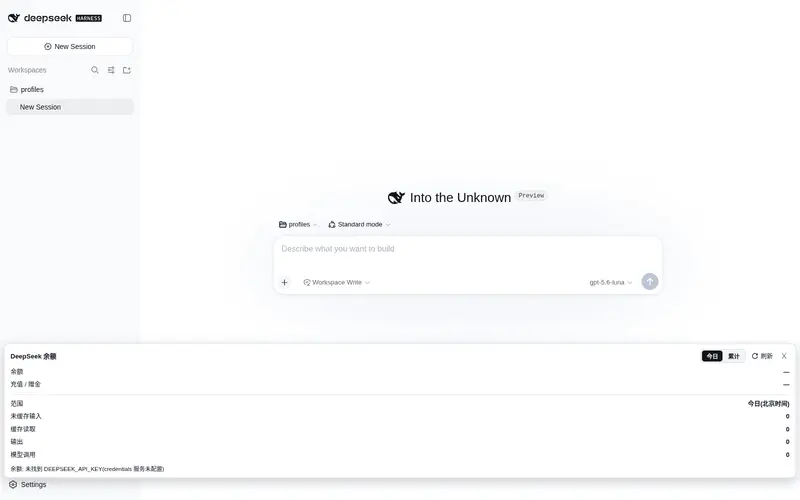
DeepSeek balance and token usage in the web sidebar, with a today/all-time toggle and provider filtering.
Listed
7
Usage
Bundle verified
Preview
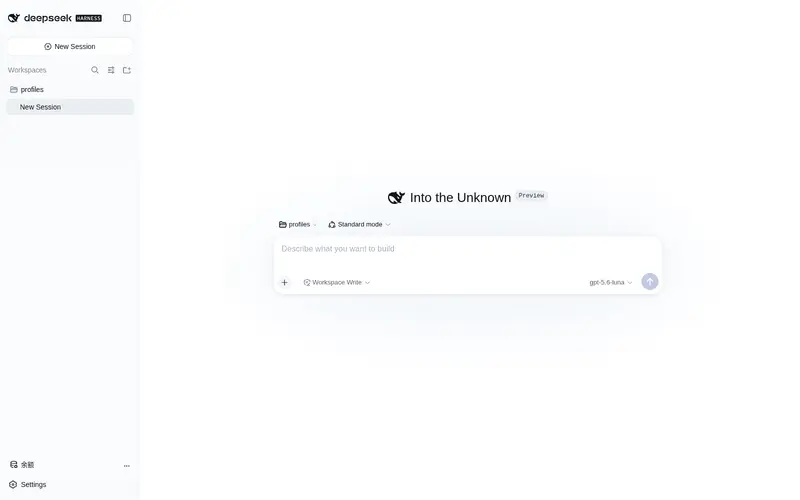
What it does
DeepSeek balance and token usage in the web sidebar, with a today/all-time toggle and provider filtering.
Best for
- DeepSeek API users who want current balance and token usage visible in the DSH Web sidebar.
- Teams comparing today's Beijing-time usage with all recorded usage.
- Multi-provider DSH users who want the panel restricted to deepseek-official activity.
Not ideal for
- Users who need usage or balance reporting for providers other than deepseek-official.
- Environments without the zstd CLI required to decompress session logs.
- Deployments without reusable DeepSeek credentials or access to the official balance endpoint.
- Headless or non-Web profiles where a sidebar panel provides no value.
README
dsh-balance-plugin

A DeepSeek Harness (dsh) web plugin: shows DeepSeek API balance and token usage at the bottom of the web sidebar (port 3080), with a Today / All-time toggle, filtered by provider (only deepseek-official, ignoring other vendors).
Features
- 💰 Balance: calls DeepSeek’s official
GET /user/balance, reusing dsh’s credentials (~/.dsh/.credentials.yaml) — no manual key entry - 📊 Token usage: reads dsh session logs (
session.jsonl.zstd), aggregates by provider- Uncached input / cache read / output / model call count
- 🔄 Today / All-time toggle: today (Beijing time) or full history
- 🎨 Auto-adapts to light/dark theme
Screenshot

Install (from the plugin market)
dsh plugin --profile web add dsh-balance-plugin
Restart dsh web, then refresh the page — a balance button appears at the bottom of the sidebar.
Architecture
Browser (3080 page)
  client.js ──fetch──▶ /dsh-balance/data?scope=today|all
                              │
node side (index.js, inside the dsh process)
  ├── credentials.resolve("DEEPSEEK_API_KEY")  ← reuses dsh's key
  ├── fetch(https://api.deepseek.com/user/balance)
  └── decompress ~/.dsh/sessions/*/*/session.jsonl.zstd
      filter assistant/message rows + provider=deepseek-official
-
index.js: node-side cordis plugin, registers HTTP route/dsh-balance/data -
client.js: browser-side plugin, injects intosidebar.footer.action(sidebar bottom button + floating panel) -
package.json:dsh.bundle+dsh.client.platform: "web"+exports["./client"] -
cordis.patch.yml: bundle patch registering the node entry
Manual install
mkdir -p ~/.dsh/profiles/web/node_modules/dsh-balance-plugin
cp index.js client.js cordis.patch.yml package.json ~/.dsh/profiles/web/node_modules/dsh-balance-plugin/
Then add to ~/.dsh/profiles/web/cordis.patch.yml:
- insert:
    - id: dsh-balance
      name: dsh-balance-plugin
Restart dsh web and refresh the browser.
Dependencies
- node side: Node built-ins only (
node:fs,node:child_process,node:path); requires thezstdCLI for decompressing session logs - browser side:
@deepseek-ai/dsh-client-ui-primitives(peer dep, ships with dsh 0.1.0-rc.6)
Data source
Session logs at ~/.dsh/sessions/<scope>/<session-id>/session.jsonl.zstd. Each assistant/message row:
{
  "type": "assistant/message",
  "time": 1786635270943,
  "data": {
    "message": { "source": { "kind": "model", "provider": "deepseek-official", "model": "deepseek-v4-pro" } },
    "usage": { "inputTokens": 8702, "outputTokens": 298, "cacheReadTokens": 0 }
  }
}
Pack
npm pack # produces dsh-balance-plugin-0.1.0.tgz
License
MIT
Frequently Asked QuestionsFAQ
Use the verified command dsh plugin --profile default add github:stevenx65/dsh-balance-plugin in a DSH-enabled shell. The command resolves the public package metadata and keeps the plugin attached to the catalog identity shown on this page.
Compatibility follows the bundle and profile status shown above. If a profile is not detected, keep the plugin disabled there and check the repository documentation before enabling it in production.
The GitHub link and activity metadata are the source of truth for releases and maintenance. Revisit this page after a new release to confirm the catalog has observed the latest version.