Sttrevens/dsh-cost-meter
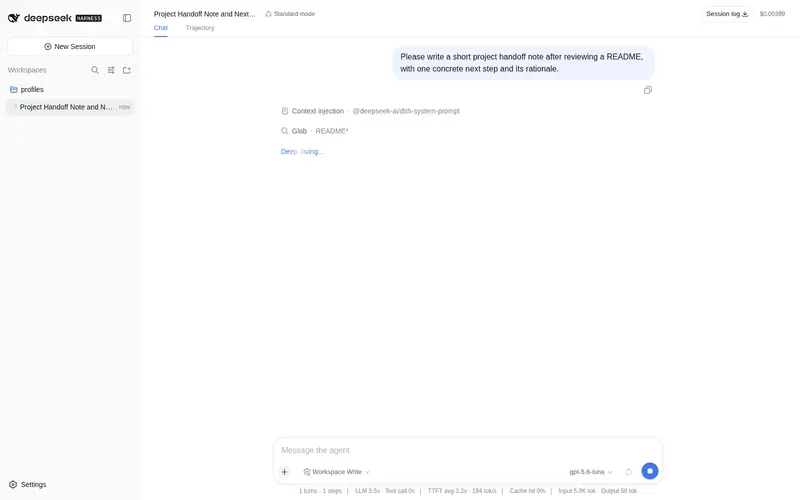
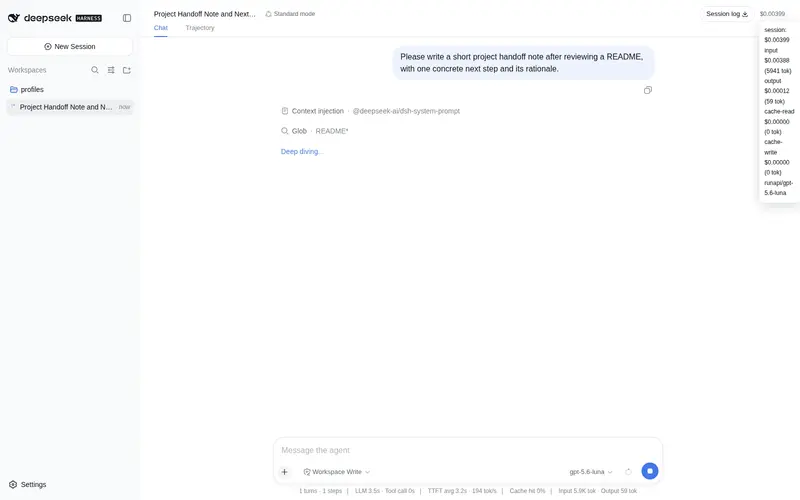
dsh plugin: per-turn USD cost badge in the Web UI (session total + per-message footer, hover breakdown) from token usage x a configurable pricing table.
Listed
1
Usage
Bundle verified
Preview
What it does
Per-turn USD cost badge in the Web UI: session total in the header and per-turn cost in each message footer, with a hover breakdown.
Best for
- DSH Web users who want visible per-turn and whole-session USD estimates while chatting.
- Teams comparing token costs across providers or models with their own per-million-token pricing table.
- Users who need input, output, cache-read, and cache-write costs separated in a hover breakdown.
Not ideal for
- Workflows seeking billing enforcement, spending limits, or automatic budget controls rather than informational estimates.
- Deployments that cannot maintain an accurate pricing table; unlisted models use the configured default or report zero when no default exists.
- Users who do not use the DSH Web conversation UI and therefore do not benefit from its visible badges.
README
@steven-wu/dsh-cost-meter
Out-of-tree dsh plugin that shows a live USD cost badge for the open conversation in the Web UI.
It is a dual-face dsh.client package:
-
Host half (
lib/index.js) registers asessionCostprojection on the session-projection seam. The fold tracks the current provider/model fromrequest/headerevents and accumulates cost from the provider-reported usage buckets (uncached input / output / cache-read / cache-write), reusing token-meter’s “replace the same(turn, step)sample instead of double-counting” rule. The view exposes the whole-session totals plus abyTurnmap keyed by turn number. -
Client half (
lib/client.js) registers a badge into theconversation.chat.assistant-actionsslot — the action row at the end of each assistant message, alongside the turn’s time/duration info. Each badge shows that turn’s cost; hovering opens a tooltip with the per-bucket breakdown (input / output / cache-read / cache-write) plus the session total.
Pricing table
Pricing is USD per million tokens, keyed by provider/model:
{
  "per": 1000000,
  "currency": "USD",
  "default": { "input": 0.6525, "output": 1.9575, "cacheRead": 0.02175, "cacheWrite": 0 },
  "models": {
    "deepseek-official/deepseek-v4-pro":   { "input": 0.6525, "output": 1.9575,  "cacheRead": 0.02175, "cacheWrite": 0 },
    "deepseek-official/deepseek-v4-flash": { "input": 0.2175, "output": 0.6525,  "cacheRead": 0.00725, "cacheWrite": 0 }
  }
}
The plugin reads ~/.dsh/cost-pricing.json on boot (override the path with the
DSH_COST_PRICING env var or the row’s config.pricingPath). On first run it
writes the default table to that path; edit it and restart dsh web to apply
changes. A model without a models entry falls back to default (zero cost
when no default is present).
Install
The package declares a dsh.bundle manifest, so dsh plugin add installs it
and adds it to the profile’s bundle layers automatically — no manual patch
edit:
dsh plugin --profile web add @steven-wu/dsh-cost-meter
# restart the web profile, then refresh the page
For a local checkout during development:
dsh plugin --profile web add file:/path/to/dsh-cost-meter
Notes:
-
@deepseek-ai/dsh-*are declared as peerDependencies (resolved from the harness), never asdependencies— installing them into a profile shadows the harness copy and can pull a stale dist-tag. - The Settings “Plugins” panel is read-only (inventory + config cards); install
happens only through
dsh plugin --profile … add. - Purely-cordis mounting (a
cordis.patch.ymlinsert row) also works — the shippedcordis.patch.ymlholds that row for either path.
The sessionCost projection is delivered through the same seam as
tokenUsage / sessionStats, so it also appears in every projection carrier
(history tail page, session/projection push frames) without extra wiring.
Frequently Asked QuestionsFAQ
Use the verified command dsh plugin --profile default add github:Sttrevens/dsh-cost-meter in a DSH-enabled shell. The command resolves the public package metadata and keeps the plugin attached to the catalog identity shown on this page.
Compatibility follows the bundle and profile status shown above. If a profile is not detected, keep the plugin disabled there and check the repository documentation before enabling it in production.
The GitHub link and activity metadata are the source of truth for releases and maintenance. Revisit this page after a new release to confirm the catalog has observed the latest version.