Taler97/dsh-rollback
File-mutation rollback plugin for DeepSeek Harness
Listed
0
Tools
Bundle verified
Preview
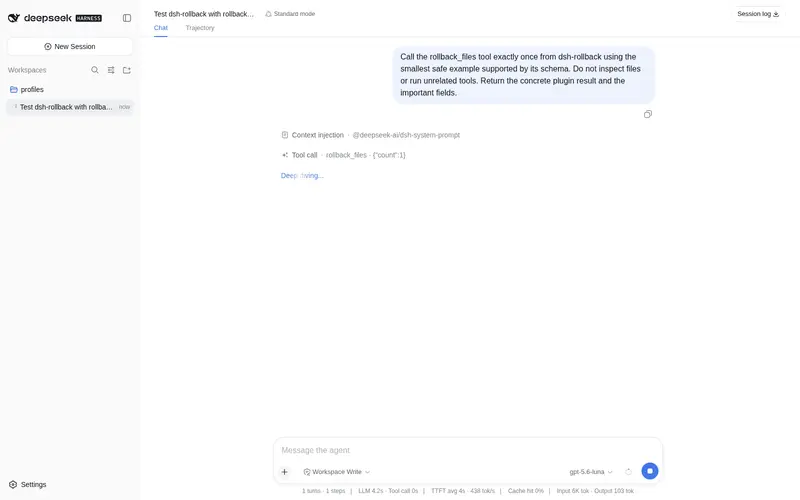
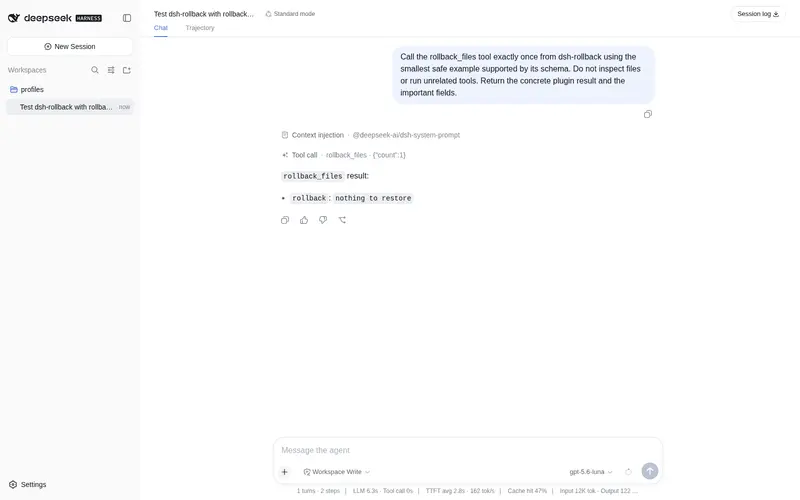
What it does
Observational file-mutation rollback for the fs tools: write/edit pre-images are checkpointed as git blobs or snapshots and restored through a model-facing rollback_files tool or a /rollback command.
Best for
- DSH agents that need to undo recent mistakes made through the standard `write` or `edit` tools.
- Git workspaces that can store pre-images efficiently as git blobs, with snapshots available as an alternative.
- Users who want both model-initiated rollback and a human `/rollback` command scoped to the session workspace.
Not ideal for
- Mutations performed through shell commands, `str_replace_editor`, or raw subprocesses, because they are not checkpointed.
- Binary-file rollback, because captured pre-images are UTF-8 text only.
- Workflows requiring automatic rollback on failure, global cross-directory restore, or guaranteed long-term retention of unreferenced git blobs.
README
dsh-rollback


| English | 中文 |
File-mutation rollback plugin for DeepSeek Harness: it observes every successful tool result for the pre-image a write/edit mutation reports, checkpoints that pre-image into the workspace git object database or a snapshot store, and exposes restore through a model-facing rollback_files tool and a /rollback human command. It registers no service and changes no loop code — capture rides the tools/result observation event, and restore writes files directly (never through the fs policy seam or the sandbox, because undoing a mutation must not be gated by the policy the mutation passed).
Install
The package is an installable bundle (declares dsh.bundle), so it plugs into a profile without touching the harness. All you need is a dsh CLI; the runtime peer packages (@deepseek-ai/dsh-tools, @deepseek-ai/cordis, …) resolve from the dsh installation itself, so nothing else is installed.
Prerequisites
- A
dshCLI on the machine (dsh pluginshells out topnpm, sopnpmmust be onPATH). - A profile to install into —
demobelow is initialized on first use; use any name.
Install from npm (recommended)
dsh plugin --profile demo add dsh-rollback
Other sources work the same way:
# straight from git (sources are built by the prepare script; pin a commit)
dsh plugin --profile demo add github:you/dsh-rollback#<sha>

# or from a local tarball
dsh plugin --profile demo add ./dsh-rollback-0.1.0.tgz
Verify the install
- The profile manifest under
$DSH_HOME/profiles/demo/($DSH_HOMEdefaults to~/.dsh) now listsdsh-rollbackindependenciesand indsh.profile.bundles— the reconciler adds it automatically because the package declaresdsh.bundle. The equivalent manual patch layer row:
- id: rollback
  name: dsh-rollback
  config:
    mode: auto          # auto | git | snapshot
    storeDir: ''        # '' = <harness home>/rollback
    maxRecords: 200
    gitPath: git
- Start a session. Any of these proves the plugin is live:
- the model sees a
rollback_filestool in its tool list, - typing
/rollbackanswersrollback: nothing to restore(instead of an unknown-command error) before any mutation happened.
- the model sees a
Usage
30-second quickstart
- Open a session whose working directory is a git repository.
-
writea filenotes.mdwith the contenthello. -
writeit again withgoodbye— the first content is silently checkpointed. - Tell the model “restore the file you just overwrote” (it calls
rollback_files), or type/rollbackyourself. - Read
notes.md: it sayshelloagain.
For humans — /rollback [count]
Type it in the chat input (base web and headless profiles mount the command registry the command needs):
-
/rollback— undo the single most recent captured mutation in this session’s working directory, -
/rollback 3— undo the three most recent ones.
The output lists every restored file and its action:
rollback: restored 2 file mutation(s):
  restored  /ws/src/lib/parse.ts
  deleted   /ws/src/lib/generated.ts
For models — rollback_files
One model-facing tool, rollback_files {count} (no prompt section). It is meant for the model to undo its own write/edit mistakes instead of asking the user. Restores are scoped to the calling session’s working directory and reported as a per-file summary — restored file contents are not echoed.
What is captured
Only successful write/edit tool results that carry a before pre-image. Mutations through bash, str_replace_editor, or raw subprocesses carry no pre-image and are not captured (see Known Limitations). A session can only restore records at or under its own working directory.
Demo: before and after
One write overwrite, undone. Same file, four states:
| Step | Action | notes.md |
|---|---|---|
| 1 | original state | hello |
| 2 | model writes a broken edit — pre-image captured |
goodbye |
| 3 | model calls rollback_files {"count": 1}
|
(transparent) |
| 4 | restored, byte-for-byte | hello |
The full transcript of that turn:
# 1. original
$ cat /ws/notes.md
hello

# 2. the model overwrites it; tools/result carries the pre-image "hello",
#    and the capture listener checkpoints it into the git object database
> tool/call   write {"path": "/ws/notes.md", "content": "goodbye"}
> tool/result {"path": "/ws/notes.md", "before": "hello", ...}

# 3. the model realizes the mistake and undoes it
> tool/call   rollback_files {"count": 1}
> tool/result "rollback: restored 1 file mutation(s):
               restored  /ws/notes.md"

# 4. back to the pre-mutation content
$ cat /ws/notes.md
hello
Under the hood: git hash-object -w wrote the pre-image into git’s object database (zero index/branch/working-tree pollution), and one line was appended to the durable manifest.jsonl — the same undo works after a restart.
How it works
flowchart TD
    M[模型调用 write/edit] --> R["tools/result 观察事件"]
    R --> C{结果带 before 改前映像?}
    C -- 否 --> X[忽略]
    C -- 是 --> S[CheckpointStore 捕获]
    S --> G{工作区是 git 仓库?}
    G -- 是 --> B["git hash-object -w 存 blob"]
    G -- 否 --> P["写 storeDir/snapshots/ 快照"]
    S --> MF["追加 manifest.jsonl"]
    U["模型调 rollback_files / 用户 /rollback"] --> RS["restore 按 session.cwd 作用域"]
    RS --> RR["git cat-file / 快照 / 删除文件"]
The diagram above is a full worked example with a before/after transcript — see Demo.
Plugin (namespace: rollback)
A function/namespace plugin (name / inject / Config / apply), not a service. It is a loop-hygiene guard in the same family as dsh-tool-call-timeout-policy: it layers a safety net over the documented tools/* extension points instead of touching the agent loop.
Config
| Key | Type | Default | Meaning |
|---|---|---|---|
mode |
'auto' \| 'git' \| 'snapshot' |
'auto' |
git checkpoints every pre-image as a git blob (requires a repository; a non-repository path fails loud and captures nothing); snapshot always copies pre-images under storeDir/snapshots/; auto picks git per file when the workspace is a repository and snapshots otherwise. |
storeDir |
string | '' |
Root holding the durable manifest.jsonl and snapshots/. Empty resolves to rollback under the Harness home. |
maxRecords |
number | 200 |
Upper bound on in-memory records per store; the oldest are dropped beyond it (the durable manifest keeps everything). |
gitPath |
string | 'git' |
Git executable name or absolute path. |
Behavior
Capture. A tools/result listener converts a successful write/edit outcome into a checkpoint: the outcome’s before field is the pre-mutation content (null records a file that did not exist). blob pre-images are written with git hash-object -w --stdin inside the file’s repository (discovered by walking up to .git, cached per directory) — zero index/branch/working-tree pollution, content-addressed and deduplicated by git itself. Every record is appended as one JSONL line to manifest.jsonl; a store replay on plugin load restores the in-memory list, so restores survive restarts. Only absolute local display paths are captured; relative or remote display paths (non-local filesystem backends) are ignored.
Restore. restore(count, under) re-materializes the count most-recent records whose path lies at or under under (the calling agent’s session working directory): blob via git cat-file blob <hash>, snapshot from storeDir/snapshots/<ref>, and absent by deleting the file. Writes are atomic (temp file + rename) and create parent directories. Restored records are removed from the in-memory list; the manifest stays append-only, so a restart replays the same records and a later restore re-applies the identical pre-image (idempotent, no double-undo).
Exposure.
-
rollback_filestool — model-facing restore, parametercount(integer, default 1). Registered onctx.tools; not concurrency-safe. It refuses when the calling execution has no session working directory. -
/rollback [count]command — the same restore for the receiving agent’s session; the command child activates only when a command registry is composed (basewebandheadlessprofiles mountdsh-commands).
Why git, and why direct spawn
Git blobs are the same mechanism ccAgent uses: hash-object -w writes the pre-image without touching index, refs, or the working tree; cat-file restores bytes verbatim; unreferenced blobs are reclaimed by git’s own gc. Git is spawned directly via node:child_process (never through ctx.shell or ctx.subprocess): a restore is a deliberate system-level undo, so it must not be confined by the sandbox or shell policy it is undoing.
Model Experience
Model-facing restore tool
What the model sees
This plugin adds one model-facing tool, rollback_files (integer parameter count, string output), and no prompt section. It changes no other tool’s schema or system prompt. The /rollback command is a human command plane entry; it never reaches the model.
Token effect
Zero tokens on normal operation. A rollback_files call adds its small tool/result pair; the restored file content is not echoed (only a summary line). Capture itself is invisible to the model.
KV Cache effect
Append-only; the added tool schema and result follow the reusable request prefix and do not invalidate existing KV-cache entries.
Known Limitations and Deferred Work
-
Only
write/editmutations are checkpointed — mutations made throughbash,str_replace_editor, or raw subprocesses carry nobeforepre-image in their result and are not captured. A plan-scoped batch backup (capture every file a plan touches before execution) is the corresponding generalization, deferred. - UTF-8 text only — pre-images travel as strings; binary content is outside scope (matching the fs tools’ text-only contract).
- Restores are workspace-scoped — records outside the calling agent’s session working directory are never restored by that caller; there is no cross-directory or global restore entry point.
-
Append-only manifest, no pruning — restored records remain in
manifest.jsonland re-appear on replay (idempotent re-restore, never a double-undo), but a long-lived harness home grows without compaction. - Git gc can prune long-lived blobs — default gc reclaims unreferenced objects after a retention window; checkpoints older than that window may fail to restore. A keep-alive ref namespace is deferred.
-
No automatic restore on failure —
restoreOnFailureis deliberately not offered in v1; auto-restore would need to attribute failure to specific mutations first.
Development
pnpm install     # peer packages resolve from npm releases
pnpm run build   # tsdown -> lib/ (ESM + d.mts), self-contained
pnpm test        # vitest, 9 store-level tests
License
MIT
Frequently Asked QuestionsFAQ
Use the verified command dsh plugin --profile default add github:Taler97/dsh-rollback in a DSH-enabled shell. The command resolves the public package metadata and keeps the plugin attached to the catalog identity shown on this page.
Compatibility follows the bundle and profile status shown above. If a profile is not detected, keep the plugin disabled there and check the repository documentation before enabling it in production.
The GitHub link and activity metadata are the source of truth for releases and maintenance. Revisit this page after a new release to confirm the catalog has observed the latest version.