TaurusWood/dsh-plugin-appshot
dsh-plugin-appshot — a DeepSeek Harness plugin (tool template).
Listed
0
Vision
Bundle verified
Preview
What it does
Codex Appshots for DSH: capture the frontmost active window via global shortcut and seamlessly mount it into the composer for agent queries.
Best for
- macOS 14+ users who frequently ask agents about the frontmost browser, IDE, Finder, or terminal window.
- DSH desktop workflows that benefit from a global shortcut, automatic window capture, attachment mounting, and refocusing.
- Users who want to collect one or more window screenshots in the composer before adding instructions and sending.
Not ideal for
- Windows users or browser-only users needing the full global-shortcut and cross-app window-raising experience.
- Machines where Screen Recording and Accessibility permissions cannot be granted.
- Workflows requiring region selection, full-screen capture, annotation, OCR, or screenshot-history management.
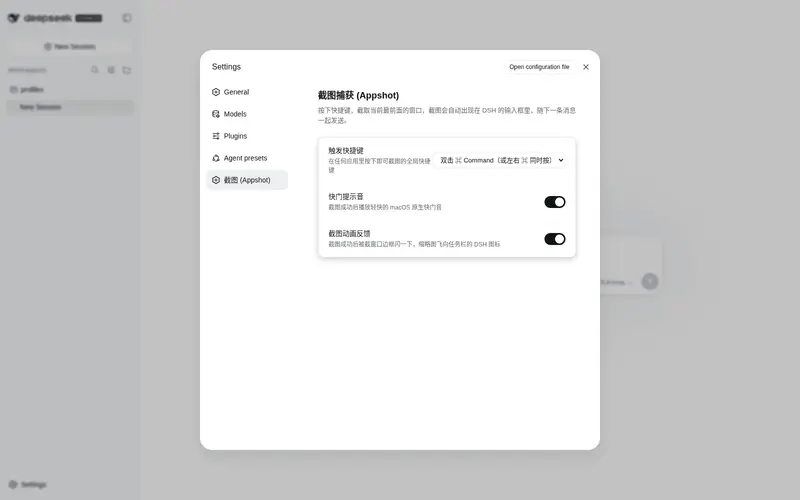
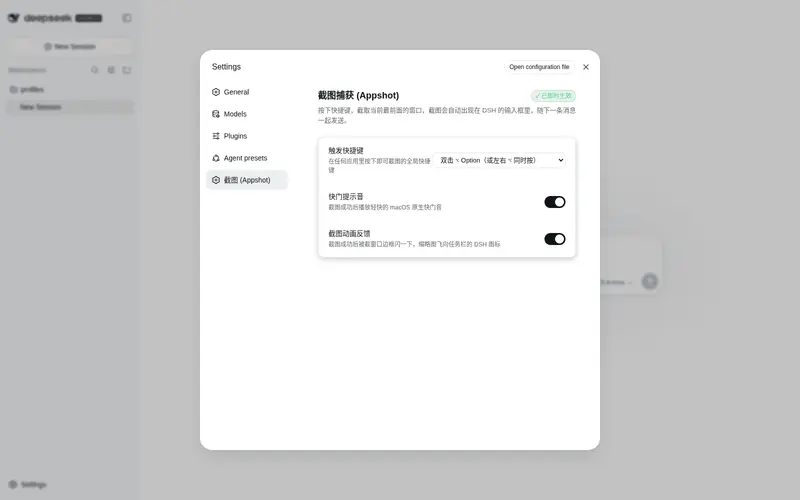
- Users who require a visual shortcut configuration panel; the shortcut is currently fixed to both Command keys.
README
dsh-plugin-appshot
macOS 全局快捷键「一键截图当前窗口」,自动作为图片上下文挂入 DeepSeek Harness (DSH) 的 Composer —— 把当前工作窗口零摩擦交给 Agent。
English · 中文 · Changelog · 更新日志





安装(一条命令)
dsh plugin --profile web add dsh-plugin-appshot
- npm 包为预构建产物:宿主插件 + 客户端模块 + Native Agent 已全部打包,无需本地编译、无需构建授权;
- 安装后重启 dsh,启动日志出现
[dsh-plugin-appshot] plugin applied successfully、native agent ready即加载成功; - 首次触发截图时 macOS 会弹出授权引导,需授予屏幕录制与辅助功能权限(见权限)。
从源码安装(开发/贡献者):在插件目录
pnpm install && pnpm build && pnpm build:native,然后在插件父目录执行dsh plugin --profile <name> add ./dsh-plugin-appshot(dsh plugin add的相对路径锚定调用目录)。
这是什么
DSH 版的「Codex Appshots」:为 DeepSeek Harness 带来全局快捷截屏上下文体验。
典型场景:无论你是在浏览器中查阅文档、在 IDE 中调试代码,还是在终端中排查报错——在任何应用的任何窗口中遇到疑问,只需按下 左 ⌘ + 右 ⌘,当前窗口截图便会瞬间自动传递到 DSH 客户端并挂入 Composer;附上你的问题即可直接向 Agent 提问,彻底告别「手动截图 → 切换窗口 → 粘贴上传」的繁琐流程。
截的是「当前窗口」,不是「整个屏幕」——与 Codex 官方对 Appshots 的描述一致(“An appshot captures the frontmost window only.”,Appshot 只截取最前面的那个窗口):
| ✅ 截取 | ❌ 不截取 |
|---|---|
| 触发瞬间正在操作的那一个前台窗口(Chrome / VS Code / Finder / Terminal…) | 整个屏幕、桌面壁纸、菜单栏/Dock、其他窗口、后台应用 |
按下 左⌘+右⌘ → 截取当前前台窗口 → 截图挂入 Composer → 输入描述并 Send
目前支持 macOS 14+;Windows 版本正在开发中。
使用
- 在任意应用(Chrome、VS Code、Finder、Terminal…)中同时按下左 ⌘ 与右 ⌘——截的就是你眼前正在看的这一个窗口,不是整屏;
- 截图完成落盘后 DSH 窗口自动唤起并聚焦(先截后唤,不会截到 DSH 自身;窗口唤起仅对 DSH 桌面端生效,
dsh web下截图仍会挂入 Composer,只是不唤起窗口);
| 触发前(正在操作的前台窗口) | 触发后(自动截取并挂入 Composer) |
|---|---|
 |
 |
- 截图已挂载在当前会话 Composer 草稿中(可点击打开查看大图,或连续触发追加多张);

- 输入描述(如「分析当前界面上的这个报错」)后点击发送,截图随文本一起提交。
截图进入 Composer 而非直接触发 Agent——你可以补充说明、追加截图或删除不需要的附件,意图完全由你掌控。
特性
- 全局双 Command 快捷键:左 ⌘ + 右 ⌘ 组合状态机触发(与 Codex Appshots 同款),带 1s 冷却防抖,DSH 在后台/最小化时也能响应。
- 单窗口精准截图:只截前台窗口本身(过滤透明层、Shadow、Tooltip),基于 ScreenCaptureKit,保留 Retina 高清分辨率;多显示器下只截目标窗口所在屏幕。
- 先截后唤(防自截):截图完成并落盘后,才由 Native Agent 唤起并置顶 DSH 主窗口,杜绝竞态导致「截到 DSH 自己」。
- Composer 自动挂载:截图经宿主持久化为 DSH Attachment 后,通过自建 SSE 通道推送到客户端模块,自动挂到当前活跃 Session 的 Composer 草稿并聚焦输入框。
- 连续追加:多次触发可在一轮输入中追加多张截图附件。
-
权限反馈:缺少 Screen Recording / Accessibility 权限时弹出系统授权引导,并用系统通知(
UNUserNotificationCenter)提示失败原因。 -
无残留:临时 Staging 文件在
saveImage成功后立即删除;插件启动时自动清理崩溃遗留的孤儿文件。
工作原理
系统由三方组成,数据单向流动:
┌─────────────────────────┐     NDJSON IPC (stdio)     ┌──────────────────────────┐
│  macOS Native Agent      │ ────────────────────────▶  │  Node / Cordis 宿主插件    │
│  (Appshot Agent.app)     │    type: "appshot"         │  (src/)                   │
│  · 双 Command 状态机      │                            │  · fs.readFile 读字节      │
│  · 前台窗口识别           │                            │  · attachments.saveImage   │
│  · ScreenCaptureKit 截图  │                            │  · 所有权原子转移 + unlink  │
│  · 截图落盘后唤起 DSH     │                            │  · webServer SSE 广播      │
└─────────────────────────┘                            └────────────┬─────────────┘
                                                                     │ SSE (appshot/ready)
                                                                     ▼
┌─────────────────────────┐
│  DSH Client 模块 (Renderer) │
│  · 识别活跃 sessionId      │
│  · 挂载 ImageAttachmentRef │
│  · 聚焦 Composer 输入框     │
└─────────────────────────┘
关键设计:
-
防自截硬约束:任何模块在截图落盘前都禁止唤起/显示/聚焦 DSH 窗口;窗口唤起是 Native 能力(
NSRunningApplication),不是 DSH API。 -
确定性所有权转移(Single Owner):
saveImage成功前 Staging 文件归插件;成功后所有权移交 DSH AttachmentStore,插件立即unlink;失败分支finally清理;启动时执行孤儿文件 GC。
权限
首次触发截图时,macOS 会弹出授权引导,需授予:
| 权限 | 用途 |
|---|---|
| 屏幕录制 (Screen Recording) | ScreenCaptureKit 捕获前台窗口画面 |
| 辅助功能 (Accessibility) | 全局按键状态机监听 + 窗口唤起置顶 |
拒绝授权时本次截图终止,并通过系统通知提示;可在 系统设置 → 隐私与安全性 中补授后重试。
限制
- 目前仅支持 macOS 14+;Windows 版本正在开发中(计划基于 Win32 / Windows.Graphics.Capture);WebUI 暂不支持(浏览器沙箱无法获取全局快捷键与跨应用置顶)。
- 窗口唤起仅对 DSH 桌面端(macOS)生效;
dsh web下截图仍可入 Composer,但不唤起/置顶窗口。 - 不含区域框选、全屏截图、图片标注、OCR 与历史图库管理(均为后续规划)。
- 快捷键默认为双 Command,暂无可视化配置面板。
开发
src/                 宿主插件(Cordis apply(ctx) 入口 + agent/ingest/sse/staging/ipc/client 模块)
native/macos/        Swift Native Agent(ScreenCaptureKit + 双 Command 状态机)
docs/                requirements.md(PRD)/ technical.md(技术方案)/ tasks.md(阶段验收)
tests/               各 Phase 契约测试(node --test)
常用命令:
pnpm build          # esbuild 打包宿主插件与客户端模块 → dist/
pnpm typecheck      # tsc --noEmit
pnpm test           # 契约测试(DSH_DISABLE_AGENT_SPAWN=1 避免拉起真实 Agent)
pnpm build:native   # 构建 Appshot Agent.app

# Native 诊断(在 native/macos 内)
swift build && .build/debug/appshot-macos --list-windows          # 列出可捕获窗口
.build/debug/appshot-macos --cli-capture --output /tmp/test.png    # 前台窗口截图 PoC
依赖约束:@deepseek-ai/dsh-tools 与 @deepseek-ai/cordis 均为 peerDependencies(宿主提供;代码中只 import type,运行时由宿主注入 ctx);版本锁定 0.1.0-rc.6 线(npm latest 是过期 0.0.1-rc.1,勿用 npm i 覆盖)。
发布:pnpm publish(prepack 会自动执行 pnpm build && pnpm build:native,产物含 dist、cordis.patch.yml 与预构建的 Appshot Agent.app,用户安装无需任何构建授权)。
License
本项目基于 MIT 协议开源。
Frequently Asked QuestionsFAQ
Use the verified command dsh plugin --profile default add github:TaurusWood/dsh-plugin-appshot in a DSH-enabled shell. The command resolves the public package metadata and keeps the plugin attached to the catalog identity shown on this page.
Compatibility follows the bundle and profile status shown above. If a profile is not detected, keep the plugin disabled there and check the repository documentation before enabling it in production.
The GitHub link and activity metadata are the source of truth for releases and maintenance. Revisit this page after a new release to confirm the catalog has observed the latest version.