text2future/flowix#dsh-flowix-memory
Notes for you, Memory for your agents. / 内置 Deepseek harness Agent / 适用 办公 & 写作 & Coding
Listed
316
Memory
Bundle verified
Preview
What it does
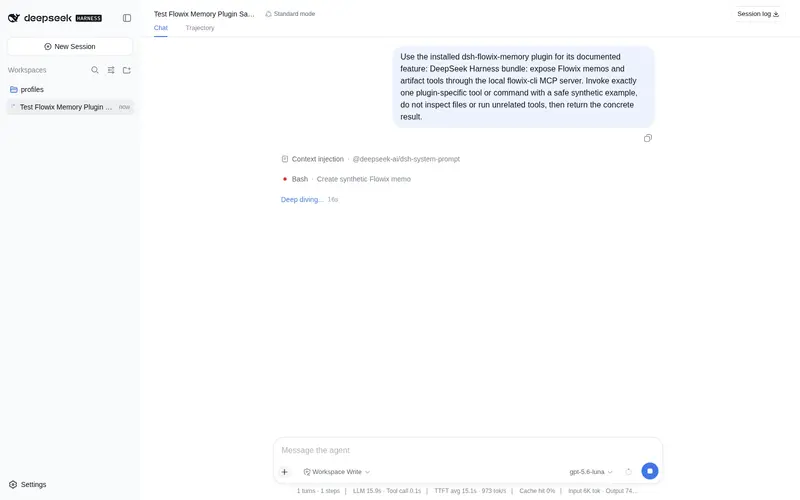
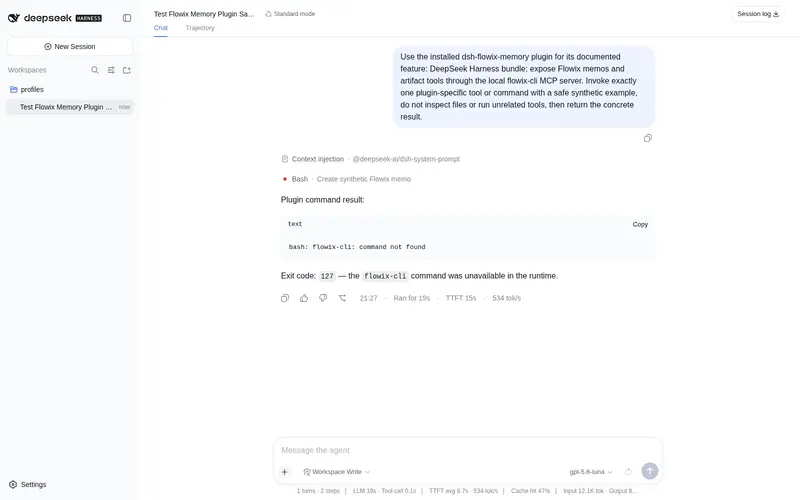
Registers the local flowix-cli MCP server so the agent can search, read, create, and edit Flowix memos and mind-map artifacts.
Best for
- Flowix users who want DSH agents to search, read, create, and edit their local Markdown memos.
- Product, development, research, and personal-knowledge workflows that reuse durable context across agents.
- Users managing memo and mind-map artifacts through a shared local Flowix notebook.
- Teams that want multiple MCP- or CLI-capable agents working from the same selected notes.
Not ideal for
- Users without a Flowix notebook or a flowix CLI available on PATH or through FLOWIX_CLI_PATH.
- Installations requiring a published npm package; the plugin is currently installed from a Flowix source checkout.
- Workflows whose source of truth is outside Flowix and do not need local memo or mind-map operations.
README
| 简体中文

Notes for you,
Memory for your agents.
The Markdown notebook where your words seamlessly become durable context for AI agents.
Markdown · Open Source · Multi Agent · MCP & CLI

Flowix turns notes into working memory
Write in Markdown, point an agent to the context it needs, and save the result back to the same note — ready to review, edit, and reuse next time.

Keep work moving
Keep product work, development, research, and personal knowledge together, so agents can continue without starting over.
| Use case | What it does |
|---|---|
| Product work | Keep requirements, feedback, decisions, and PRDs up to date. |
| Software development | Give coding agents the context to continue your project. |
| Research | Keep sources, analysis, and conclusions together and reusable. |
| Personal knowledge | Turn notes, plans, and preferences into useful agent context. |

Connect every agent to the same memory
Use agents inside Flowix or connect Codex, Claude Code, OpenCode, Hermes, and other MCP or CLI tools — all working from the same notes and context.

dsh-flowix-memory plugin
dsh-flowix-memory is a DeepSeek Harness plugin that connects any Harness agent to your local Flowix notes through the bundled flowix-cli MCP server: the agent gets the mcp__dsh-flowix-memory__flowix_memo tool to search, read, create, and edit Flowix memos (including mind maps).
Install it into a Harness profile (--profile <name> is required; shipped profiles: web, headless), from the flowix-main checkout (not yet published to npm):
dsh plugin --profile <name> add ./app/flowix-dsh-host/bundles/dsh-flowix-memory
Requires the flowix CLI on PATH (or set FLOWIX_CLI_PATH) with access to your notebook data (~/.flowix). See the plugin README for details.
Your notes stay local and under your control
Flowix keeps your work as plain Markdown files on your device. You choose what agents can access, when context is sent, and how your files are synced, backed up, or versioned.
- Files you can open anywhere — Your notes are saved as plain Markdown on your device, so you can read and edit them with other apps.
- Agents see only what you choose — Share a single note, a folder, or a whole notebook — only when you want an agent to use it.
- Use the agents you already trust — Connect Codex, Claude Code, OpenCode, or another external agent. Flowix shares only the context you choose, when you start a task.
- Sync and back up your way — Use the sync, backup, or version-control tools you already trust. There’s nothing to export.
Product preview
 Note library with tags |
 Note detail with agent presets |
 Agent model picker |
 Full-text and file search |
 Provider and MCP configuration |
 Code file browsing and editing |
Quick start
- Download and install Flowix from the website.
- Create a new local folder, or register an existing folder as a notebook.
- Create a document and write down the task background, reference materials, goals and constraints.
- Call an agent from within the document, or keep organizing content with tags and properties.
Local development
git clone https://github.com/text2future/flowix.git
cd flowix
npm install

npm run tauri dev
npm run dev
npm run tauri build
The development environment requires Node.js 20+, Rust 1.75+ and Tauri v2; the desktop app supports macOS 14+ and Windows 10+.
License
Flowix is open source under the MIT License.
Frequently Asked QuestionsFAQ
Use the verified command dsh plugin --profile default add github:text2future/flowix#path:/app/flowix-dsh-host/bundles/dsh-flowix-memory in a DSH-enabled shell. The command resolves the public package metadata and keeps the plugin attached to the catalog identity shown on this page.
Compatibility follows the bundle and profile status shown above. If a profile is not detected, keep the plugin disabled there and check the repository documentation before enabling it in production.
The GitHub link and activity metadata are the source of truth for releases and maintenance. Revisit this page after a new release to confirm the catalog has observed the latest version.