tttwh/dsh-plugin-Audit
将DeepSeek Harness插件列表按来源分组展示——官方插件与自行安装插件,一目了然。
Listed
1
Market
Bundle verified
Preview
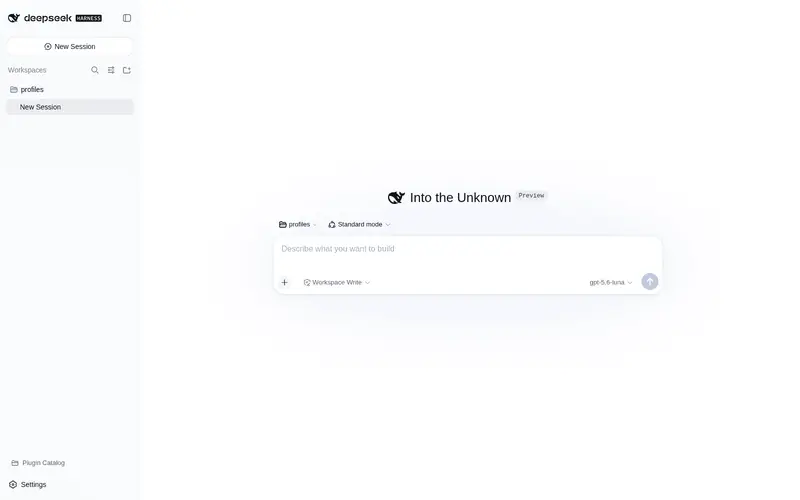
What it does
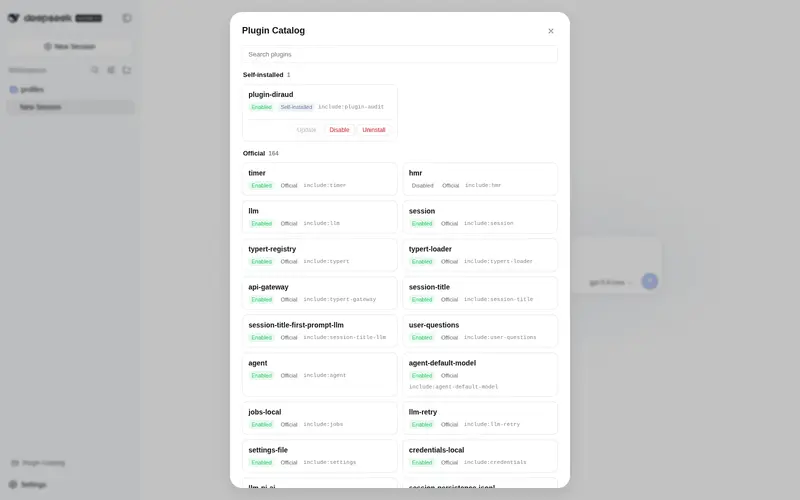
Installed-plugin catalog for DSH: group plugins by origin (official vs self-installed) in a searchable panel with enable/disable, uninstall, and one-click update.
Best for
- DSH administrators who need a searchable inventory separating official and self-installed plugins.
- Users who want to enable or disable self-installed plugins from either the catalog panel or composer commands.
- Teams that want installed-versus-latest npm version checks and one-click updates for supported self-installed packages.
Not ideal for
- Users who need to toggle or update official, built-in, or this plugin's own entry, which are locked.
- Update workflows centered on link dependencies or local links, which are labeled rather than updated.
- Environments without the documented pnpm and dsh CLI prerequisites.
README
dsh-plugin-diraud
| English | 中文 |
A DeepSeek Harness (DSH) plugin-management enhancement: group the plugin list by source so you can tell official plugins apart from the ones you installed yourself at a glance.
Features
-
/plugin-auditcommand: lists the currently loaded plugins grouped by official / self-installed, withuser/official/ keyword filtering; -
Self-installed plugin toggles (two surfaces):
- Sidebar footer Plugin Catalog entry (icon button; click to open a panel): an enable/disable button on every self-installed card;
- Composer:
/plugin-audit disable|enable <keyword>; - Both persist to the profile’s
cordis.patch.yml(kept across restarts, reversible) and callctx.loader.updatefor live effect (HMR-independent); official/builtin plugins are locked;
- Plugin Catalog panel (sidebar footer entry): grouped cards with a source badge, search box, installed version and description. When package metadata provides a GitHub repository, the card links directly to its full feature documentation (v0.8; independent of the built-in “Plugin list” page);
-
Self-installed plugin updates (v0.6): the panel’s top “Update” section
checks the npm registry on open, shows the installed vs. latest version for
every self-installed plugin, and runs
pnpm updateon click (corepack/npx fallback, live output). Desktop-managedlink:dependencies and local links are labeled instead of being falsely reported as updated; official/builtin plugins and this plugin itself are locked;
Screenshot
Sidebar footer Plugin Catalog entry (since v0.5) — click to open the panel: self-installed plugins grouped by origin, each card with an enable/disable toggle:

Quick start
Prerequisites: pnpm, the dsh CLI.
# Install (recommended: from npm)
dsh plugin --profile web add dsh-plugin-diraud

# Or from the GitHub main branch
dsh plugin --profile web add https://github.com/tttwh/dsh-plugin-diraud/archive/refs/heads/main.tar.gz
Restart dsh web, then:
- Type
/plugin-auditin the composer, or - Click the Plugin Catalog entry at the sidebar footer.
Commands
| Command | Purpose |
|---|---|
/plugin-audit |
Overview: self-installed one-by-one + official count |
/plugin-audit user |
Self-installed only |
/plugin-audit official |
Official only (full list) |
/plugin-audit <keyword> |
Filter by package / entry keyword |
/plugin-audit disable <keyword> |
Disable a matching self-installed plugin (persisted) |
/plugin-audit enable <keyword> |
Enable a matching self-installed plugin (persisted) |
dsh plugin --profile web remove dsh-plugin-diraud |
Uninstall |
How toggles persist:
disable/enablewrites a- id: <raw config id>+disabled: trueoverride into the profile’scordis.patch.yml(the user config layer). dsh watches that file (watchUserPatches), so the change applies live without a restart, survives restarts, and deleting the row restores the default.Why the raw id (fixed in v0.4): loader entries carry a path-prefixed full id (
include:ssh), but the patch layer matches each config row’s ownidfield (ssh). Older versions wrote the prefixed id into the patch file, so the row was skipped at boot (“patch: entry not found”) and the toggle was silently lost on restart. v0.4 writes the raw id, keeps the full id forctx.loader.update, and cleans up legacyinclude:<id>rows.
Configuration
Origin is derived from the package scope by default; edge cases (e.g. a
third-party package published under @deepseek-ai/) are overridden via
extraUserPackages. Override this plugin’s row in the profile’s
cordis.patch.yml:
- id: plugin-audit
  config:
    extraUserPackages:
      - '@deepseek-ai/dsh-my-fork'   # force-classify as self-installed
Repository layout
dsh-plugin-diraud/
  src/classify.ts        origin-classification pure function (single source of truth)
  src/patch.ts           cordis.patch.yml read/write (persist toggles)
  src/toggle.ts          shared toggle core (persist + ctx.loader.update)
  src/contract.ts        typert wire contract (pluginAudit/toggle)
  src/typert.ts          host manifest registration
  src/runtime.ts         PluginAuditRuntime (@Remote toggle; executeToggle unit-tested)
  src/index.ts           host: /plugin-audit command + remote registration
  src/client/            Sidebar Plugin Catalog entry (React) + toggle buttons + client remote
  build.mjs              esbuild build (host ESM + client bundle)
  cordis.patch.yml       profile bundle patch (inserts this plugin)
  demo/                  demo & verification scripts (real-profile output)
Docs
- DESIGN.md — design rationale and source evidence (why a new tab instead of modifying the official one; classification rules and edge cases)
Related
- deepseek-harness — DeepSeek Harness official repo (DSH itself)
- omdsh-dev/community — community plugin submissions & collaboration hub
License
MIT · Copyright (c) 2025 tttwh
Frequently Asked QuestionsFAQ
Use the verified command dsh plugin --profile default add github:tttwh/dsh-plugin-Audit in a DSH-enabled shell. The command resolves the public package metadata and keeps the plugin attached to the catalog identity shown on this page.
Compatibility follows the bundle and profile status shown above. If a profile is not detected, keep the plugin disabled there and check the repository documentation before enabling it in production.
The GitHub link and activity metadata are the source of truth for releases and maintenance. Revisit this page after a new release to confirm the catalog has observed the latest version.