urzeye/dsh-outline
DeepSeek Harness(DSH)Web GUI 的实时大纲插件,移植自 Ophel Atlas
Listed
11
Ui
Bundle verified
Preview
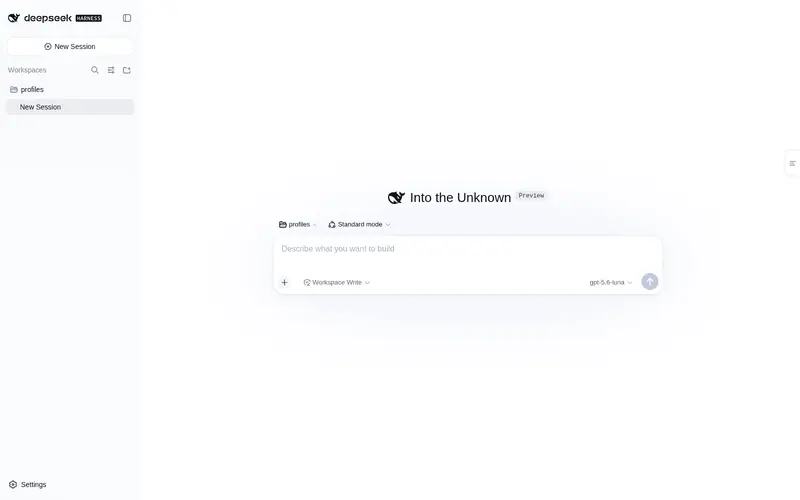
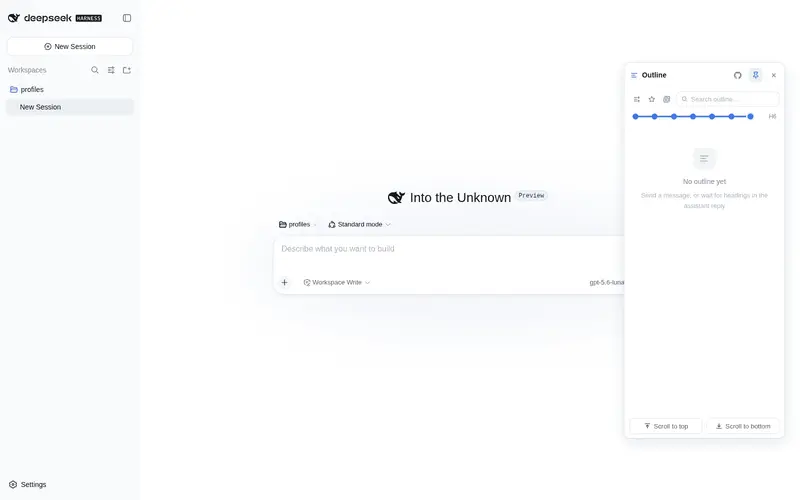
What it does
Real-time outline panel for the DSH Web session page: user questions plus a Markdown heading tree (H1–H6) that updates live during streaming, with click-to-locate highlighting, expand-depth control, search, and per-session favorites.
Best for
- Readers navigating long, structured DSH Web conversations with many user questions and Markdown headings.
- Users who need a live outline while an assistant response is still streaming.
- Workflows that revisit selected sections through search, per-session favorites, and click-to-locate navigation.
- Users who want an overlay navigator that does not reduce the chat area's width.
Not ideal for
- Short conversations with few questions or no meaningful Markdown heading structure.
- Non-Web DSH profiles or pages outside the Web session view.
- Workflows that need an outline derived from arbitrary rendered DOM content; the tree is built from conversation events and Markdown headings.
- Environments that cannot restart `dsh web` after initial installation or host-side changes.
README
dsh-outline






DeepSeek Harness(DSH)Web GUI 的实时大纲插件:在会话页提供一棵”用户问题 + Markdown 标题(H1~H6)”的大纲树,流式生成时实时更新,点击节点即可定位正文并高亮当前阅读位置。

[!TIP] 若您以浏览器方式使用 DeepSeek Harness,建议优先体验 Ophel:专为浏览器场景深度优化,功能更全面、体验更流畅。
特性
实时大纲
- 大纲由会话事件流构建(用户问题为一级节点,助手回复中的 Markdown 标题挂在其下),不抓取 DOM
- 流式生成时随 token 实时更新;刷新、重连、历史分页由 DSH runtime 自动重建,无需自行处理
- 点击节点滚动定位正文,并高亮当前阅读位置
层级与视图
- 层级滑块控制展开深度(0~6 档),节点可单独展开/收起,支持一键展开/收起全部
- 关键词搜索(带匹配计数)、按会话收藏、”只看收藏”模式
- 一键复制大纲、回到顶部/底部
面板形态
- 面板为
shell.overlay浮层:右缘触发条悬停预览、可固定常驻、可拖拽移动,不挤压聊天区
主题与国际化
- 跟随 DSH 主题变量与明暗模式;界面文案中英文随 DSH 语言切换
环境要求
- DeepSeek Harness(DSH)Web GUI
- Node.js ≥ 22.13(仅本地开发与构建时需要,pnpm 11 的最低要求)
安装
以下命令均通过 dsh plugin 转发给 profile 目录内的 pnpm。安装后需重启 dsh web 生效(插件的 host 部分在 DSH 启动时加载)。
从 npm 安装(推荐)
dsh plugin --profile web add dsh-outline@latest
已经装过时请带 @latest:裸包名会沿用 lockfile 里的旧版本,不会自动升级。
从 tarball 安装
无需发布 npm,也不需要任何构建授权。可自行 pnpm pack,或从 GitHub Releases 下载:
pnpm pack                                          # 产出 dsh-outline-<version>.tgz
dsh plugin --profile web add ./dsh-outline-0.1.5.tgz
本地路径安装(开发调试)
先在本仓库构建,再把本地路径 link 进 DSH 的 web profile:
cd /path/to/dsh-outline
pnpm install
pnpm build
若先前装过 npm 上的 dsh-outline,先卸掉,避免仍在跑旧包:
dsh plugin --profile web remove dsh-outline
dsh plugin --profile web add /path/to/dsh-outline   # 或相对路径 ./dsh-outline
第一次安装(以及任何 host 半变更)后需重启 dsh web。打开任意会话页,悬停右缘大纲触发条,确认面板出现。
之后改 src/client/** 时另开终端盯构建即可,不必重启 dsh web:
cd /path/to/dsh-outline
pnpm watch
保存后 tsdown 重写 lib/client.js,DSH client HMR 会自动刷新。
| 改动 | 要不要重启 dsh web
|
|---|---|
src/client/**(面板、定位、抽取) |
否,pnpm watch + HMR |
src/index.ts / host 半、cordis.patch.yml、dsh.plugin.json
|
要 |
第一次 dsh plugin add
|
要 |
常见问题:
- 命令必须带
--profile web,否则加不到 Web GUI 那套 profile。 - 面板不出现:看
dsh web终端有没有插件加载报错;确认装的是本地路径而不是 npm 旧版。 - 改了代码页面没变:看
pnpm watch有没有写出lib/client.js,必要时浏览器强刷一次。
卸载
dsh plugin --profile web remove dsh-outline
使用
- 启动
dsh web,打开任意会话页。 - 鼠标悬停会话页右缘的大纲触发条,即可预览大纲面板。
- 点击触发条或面板右上角的固定按钮,将面板固定常驻;拖动标题栏移动面板位置(拖动即固定)。
- 面板内:点击节点跳转正文;顶部滑块调整展开层级;节点行内提供展开/收起与收藏按钮;支持关键词搜索。
开发
把本仓库 link 进 DSH、HMR 与何时重启,见上文「本地路径安装(开发调试)」。
pnpm install       # 安装依赖(prepare 会自动构建 lib/)
pnpm build         # tsc 类型 + tsdown client bundle
pnpm test          # vitest(core 纯逻辑 + DOM 锚点)
pnpm typecheck
| 命令 | 说明 |
|---|---|
pnpm install |
安装依赖(prepare 自动构建 lib/) |
pnpm build |
构建(tsc 类型 + tsdown client bundle) |
pnpm test |
运行 vitest 测试 |
pnpm typecheck |
类型检查 |
pnpm watch |
监听构建,配合本地 link 安装 HMR 调试 |
src/
├── core/            # 纯逻辑:标题解析、大纲树、滚动计算(不依赖 DSH/DOM)
├── client/          # 适配层:会话事件流订阅、面板组件、槽位注册
│   └── panel/       # 大纲面板 React 组件
└── index.ts         # host 侧入口
tests/               # vitest 测试(core 纯逻辑 + DOM 锚点)
docs/                # 可行性分析与技术方案
架构纪律见 AGENTS.md:src/core/ 只放纯逻辑,DSH API 调用只出现在适配层与槽位注册代码里。
文档
| 文档 | 内容 |
|---|---|
| docs/feasibility.md | 可行性分析(证据、能力映射、边界) |
| docs/technical-plan.md | 技术方案与分阶段实施计划 |
贡献
欢迎通过 Issue 与 Pull Request 参与贡献。
- 改动
src/core/:运行pnpm test - 改动适配层/面板:运行
pnpm typecheck,并在本地 DSH 实例冒烟验证
社区
使用问题请提交 Issue;社区讨论可前往 LINUX DO。
致谢
- 交互形态移植自 Ophel(浏览器扩展)
- 插件形态遵循 DSH 官方打包与安装约定,参考 DSH-better-sidebar
许可证
Frequently Asked QuestionsFAQ
Use the verified command dsh plugin --profile default add github:urzeye/dsh-outline in a DSH-enabled shell. The command resolves the public package metadata and keeps the plugin attached to the catalog identity shown on this page.
Compatibility follows the bundle and profile status shown above. If a profile is not detected, keep the plugin disabled there and check the repository documentation before enabling it in production.
The GitHub link and activity metadata are the source of truth for releases and maintenance. Revisit this page after a new release to confirm the catalog has observed the latest version.