V-dev-388/dsh-usage-meter
DSH (DeepSeek Harness) model usage dashboard plugin: settings panel with per-provider/model token summary and today/7d/30d trends
Listed
0
Usage
Bundle verified
Preview
What it does
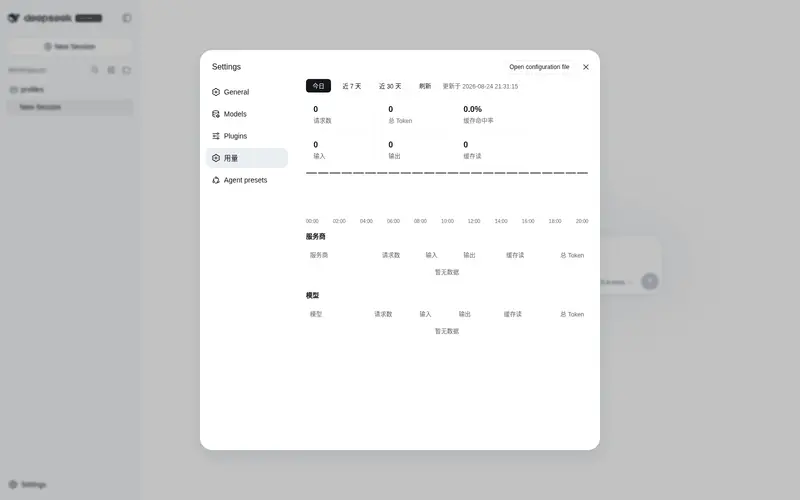
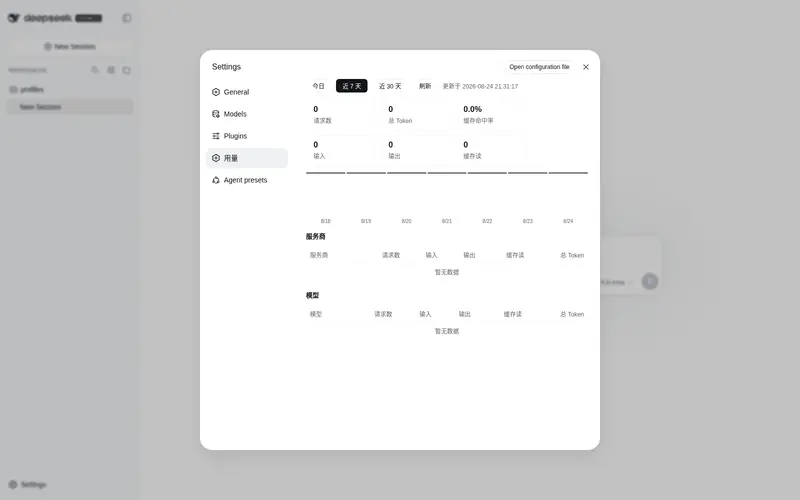
Settings-page usage dashboard: per-provider/model token summary across all sessions, with today/7-day/30-day CSS-bar trends and a cache-hit rate.
Best for
- DSH users who need aggregate token consumption by provider and model across all sessions, including subagents.
- Operators comparing usage trends for today, the last 7 days, or the last 30 days.
- Users monitoring request counts, input/output/cache-read tokens, and cache-hit rate from a settings dashboard.
- Privacy-conscious local workflows that do not need telemetry or network reporting.
Not ideal for
- Teams that need monetary cost estimates; the plugin does not calculate cost.
- Auditing workflows that require a per-request log table.
- Usage analysis that must include failed requests without an `assistant/message` usage event.
- Users who only need statistics for one selected session rather than aggregate reporting.
README
dsh-usage-meter
DSH(DeepSeek Harness)模型用量仪表盘插件。在设置页新增「用量」板块,按服务商/模型汇总全部会话的 token 用量,支持今日 / 近 7 天 / 近 30 天三档时间范围趋势图。
- 官方 bundle 格式:
package.json声明dsh.bundle,随dsh plugin add自动加入 profile 层栈 - 零外部依赖:Host 端只用官方 Cordis 服务(
sessions/fs/sessionQuery/webServer)与官方内置包@deepseek-ai/dsh-home-paths,不 import 任何第三方包 - 历史回放走官方
ctx.sessionQuery(live-preferred 语料),持久层内部完成 zstd 解压与回放校验,不依赖外部命令 - 数据落盘
$DSH_HOME/storages/usage-meter.json,经ctx.fs.writeText原子写(tmp + rename) - 完全被动:只在本机监听会话事件,不联网、无遥测
功能
- 汇总卡:请求数 / 总 Token / 缓存命中率 / 输入 / 输出 / 缓存读取
- 时间范围:今日(24 根小时柱)/ 近 7 天 / 近 30 天(按天柱),本地时区切日
- 服务商表、模型表:请求数、输入、输出、缓存读取、总 Token
- 60s 自动轮询 + 手动刷新
- 全部会话都计入(含子 agent 会话)
数据口径
- 只统计
assistant/message且带usage的事件(失败请求无 message,不计) - 归属取
data.message.source.provider / model - 缓存命中率 =
cacheRead ÷ (input + cacheRead) - 不做费用估算,不做逐请求日志表
安装(官方方式,dsh web profile)
插件已发布到 npm,并声明 dsh.bundle manifest:
dsh plugin --profile web add dsh-usage-meter
dsh plugin add 会将包追加进 profile 的 dsh.profile.bundles 层栈,其 cordis.patch.yml 自动插入插件行;client 部分经 dsh.client 声明被 dsh-client-modules 扫描进 __DSH_BOOT__。
安装后重启 dsh web(或刷新页面加载 client bundle),打开 设置 → 用量 即可查看。
HTTP 接口
| 接口 | 说明 |
|---|---|
GET /dsh-usage-meter/summary?range=today\|7d\|30d |
汇总 + byProvider + byModel + series(今日按小时、其余按天),全部按 range 过滤 |
GET /dsh-usage-meter/sessions |
每会话对账数据 [{sessionId, watermark, requests, totalTokens, provider, model}]
|
summary 返回字段:
{
  "updatedAt": "2026-08-15T01:06:33.031Z",
  "range": "today",
  "requests": 36, "inputTokens": 19049, "outputTokens": 42036,
  "cacheReadTokens": 4378368, "cacheWriteTokens": 0,
  "totalTokens": 4439453, "cacheHitRate": 0.995668,
  "byProvider": [{ "provider": "opencode-go", "requests": 36, /* ... */ }],
  "byModel": [{ "provider": "opencode-go", "model": "deepseek-v4-flash", "requests": 36, /* ... */ }],
  "series": [{ "label": "08:00", "requests": 28, "totalTokens": 3240870, "cacheReadTokens": 3199360 }]
}
数据存储与幂等
- 启动回填:
ctx.sessionQuery.listSessions()列出全量会话语料;活会话折内存session.events全量 +session/event事件增量,历史会话经ctx.sessionQuery.readSession()读完整原始日志 - 每会话存 watermark(已折最后 seq),重复回放不重复计数;会话日志变短(最后 seq < watermark)则清空该会话重折
- 变更 debounce 2s 后经
ctx.fs.writeText原子写usage-meter.json
开发
node test/verify.mjs # 自包含合成测试:口径 / 幂等 / 日志变短 / summary 自洽
License
Frequently Asked QuestionsFAQ
Use the verified command dsh plugin --profile default add github:V-dev-388/dsh-usage-meter in a DSH-enabled shell. The command resolves the public package metadata and keeps the plugin attached to the catalog identity shown on this page.
Compatibility follows the bundle and profile status shown above. If a profile is not detected, keep the plugin disabled there and check the repository documentation before enabling it in production.
The GitHub link and activity metadata are the source of truth for releases and maintenance. Revisit this page after a new release to confirm the catalog has observed the latest version.