vinyumao/dsh-opencode-usage
DSH plugin: OpenCode Go 套餐用量显示(滚动/每周/每月用量百分比与重置倒计时 + Agent 工具 opencode_go_usage)。官方 bundle 插件,安装: dsh plugin --profile web add github:vinyumao/dsh-opencode-usage#<ref>
Listed
4
Usage
Bundle verified
Preview
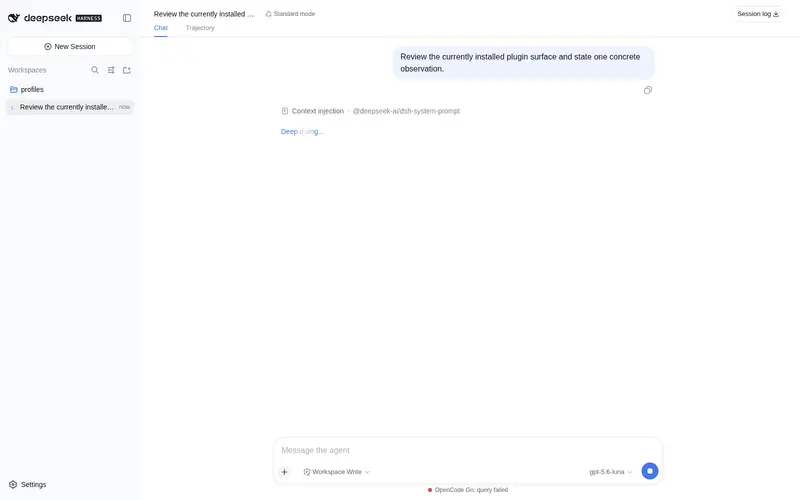
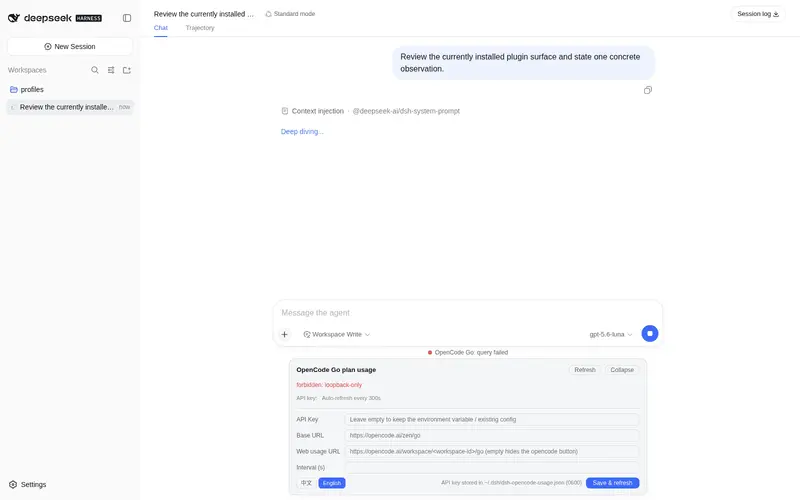
What it does
OpenCode Go plan usage display for the DSH web GUI: a persistent badge under the composer shows rolling/weekly/monthly usage percents with reset countdowns; click to expand a card; agents can query the balance via the `opencode_go_usage` tool.
Best for
- OpenCode Go subscribers who want rolling, weekly, and monthly quota usage visible beside the DSH composer.
- Agents that need to query OpenCode Go usage and reset countdowns directly during a conversation.
- Users who prefer configuring the API key, endpoint, refresh interval, and dashboard link from the web UI.
Not ideal for
- OpenCode Zen users, because Zen has no equivalent supported API-key-authenticated balance endpoint.
- Workflows that require a stable, officially documented quota API; the Go usage endpoint is undocumented and may change.
- Users who need the badge outside an active DSH session, because it is hidden when no session is open.
README
dsh-opencode-usage
OpenCode Go plan usage display for the DSH web GUI — a persistent badge under the composer shows usage percents and reset countdowns; click to expand a card; agents can query the balance via the opencode_go_usage tool.
Official DSH bundle plugin. Install with one command:
dsh plugin --profile web add github:vinyumao/dsh-opencode-usage#<ref>
| English | 中文 |
Capability surface
| Tool | Description |
|---|---|
opencode_go_usage |
Query OpenCode Go plan balance in chat: used percent + reset countdown for the three windows (no arguments) |
| UI capability | Description |
|---|---|
| Persistent badge | One line under the composer input: OpenCode Go:滚动用量 0% · 每周用量 0% · 每月用量 0%, auto-refreshing on a configurable interval |
| Usage card | Click the badge to expand: progress bars for the three windows + used percent + per-second reset countdown + instant refresh + an opencode link that opens the web usage dashboard in a new tab |
| Config form | Fill in API key / Base URL / refresh interval / web usage URL right in the card; saved immediately |
| Bilingual UI | 中文 / English — every string follows the global DSH locale (Settings → General → Language), and the card footer has a built-in 中文 / English toggle that switches the whole GUI |
| Key reuse | API key defaults to the OPENCODE_GO_API_KEY environment variable — the same one the DSH opencode-go model provider config uses (apiKeyEnv in settings.yaml), so it usually works with zero configuration
|
How it works
Usage comes from the OpenCode Go subscription quota endpoint:
GET https://opencode.ai/zen/go/v1/usage
Authorization: Bearer <API_KEY>     # the regular Anthropic-compatible API key
Example response:
{
  "usage": {
    "rolling": { "status": "ok", "percent": 0, "resetsAt": "2026-…Z" },
    "weekly":  { "status": "ok", "percent": 0, "resetsAt": "2026-…Z" },
    "monthly": { "status": "ok", "percent": 0, "resetsAt": "2026-…Z" }
  }
}
⚠️ Unverified: this endpoint is not part of the official public documentation — it was surfaced by the cc-switch community (issue includes a verification script). The response shape may change as opencode evolves; this plugin parses defensively (both
usage.-prefixed and bare windows, bothresetsAtand numericresetsInSecondsforms), so please defer to the live response if the structure changes.
The browser never talks to the upstream directly: every request goes through the host process’s /api/dsh-opencode-usage/* routes (same-origin fetch), so the API key never enters the browser.
About OpenCode Zen
This plugin is Go-plan specific — it shows the subscription quota windows, which only exist for OpenCode Go. OpenCode Zen is a separate pay-as-you-go gateway (prepaid balance, per-token billing) and has no equivalent API-key-authenticated balance endpoint: the official feature request (anomalyco/opencode#10448, “Add Zen balance API endpoint”) is still open, and community tools that show Zen balances rely on brittle browser-cookie scraping of the workspace billing page (e.g. CodexBar). If a public Zen balance API ships, this plugin can add a plan option to consume it.
Installation
Zero runtime SDK imports: the host half imports no
@deepseek-ai/*packages at runtime — the agent tool is written in the raw registrable shapectx.tools.registeraccepts (standard JSON Schema inoutput.schema, plainrender/execute), instead of being built withdefineToolfrom@deepseek-ai/dsh-tools. That is what makes a git vendoring install (dsh plugin add github:..., which clones into a workspacevendor/dir) work out of the box: Node never has to resolve@deepseek-ai/*from the plugin’s ownnode_modules, because the plugin never imports them. (Earlier revisions importeddefineTool; if you hitERR_MODULE_NOT_FOUNDfor@deepseek-ai/dsh-tools, update to the latest ref.)
Method 1: one dsh plugin command (recommended)
From anywhere:
dsh plugin --profile web add github:vinyumao/dsh-opencode-usage#<ref>
package.json declares dsh.bundle.patch, so the install automatically joins the profile’s dsh.profile.bundles layer stack and mounts cordis.patch.yml. Then restart dsh web — the badge appears under the composer.
A git install fetches source; this plugin is pure source (
index.mjs/client.js, no build step), so it works right away with nopreparescript. If pnpm asks for anallowBuildspermission, copy the package key it prints into the profile’spnpm-workspace.yamland retry. For reproducible installs, pin<ref>to a commit SHA (#<sha>).
Method 2: manual wiring
- Add to the profile’s
package.jsondependencies:"@chen-001/dsh-opencode-usage": "github:vinyumao/dsh-opencode-usage#<ref>" - Run
pnpm installin the profile directory. - Confirm
dsh.profile.bundlescontains the package (dsh pluginreconciles automatically); or add to the profile’scordis.patch.yml: ```yaml- insert:
- id: opencode-usage name: ‘@chen-001/dsh-opencode-usage’ ```
- insert:
-
Restart
dsh web— the badge appears under the composer.
Installation guide for AI agents
When an AI assistant installs this on the user’s behalf, follow these steps:
-
Confirm the dsh CLI:
dsh --version. In a source checkout, usepnpm dsh ...instead. -
Install (pin
<ref>to the latest commit SHA):dsh plugin --profile web add github:vinyumao/dsh-opencode-usage#<ref>- First use initializes the profile (auto-bundles
@deepseek-ai/dsh-base). - If pnpm refuses to run a git dependency’s prepare script, add the printed package key to
allowBuildsin$DSH_HOME/profiles/web/pnpm-workspace.yamland re-run.
- First use initializes the profile (auto-bundles
-
Verify the layer stack:
dsh --profile web --dump-configshould show a# == @chen-001/dsh-opencode-usagelayer (with theopencode-usagerow). -
Restart web: quit the running
dsh webprocess and start it again. -
Smoke test: open the DSH web GUI — the
OpenCode Go:…badge should appear under the composer; ask the agent to run theopencode_go_usagetool, which should return the three windows. -
Troubleshooting: if the badge shows “query failed”, check whether
OPENCODE_GO_API_KEYis set, or click the badge and fill in the API key in the config form.
Uninstall
The same dsh plugin command that installed it removes it: it runs pnpm remove in the profile directory and automatically drops the plugin from the dsh.profile.bundles layer stack (so no manual cordis.patch.yml / bundles editing is needed):
dsh plugin --profile web remove @chen-001/dsh-opencode-usage
Then restart dsh web — the badge disappears, and the /api/dsh-opencode-usage/* routes, the opencode_go_usage tool, and the agent announcement are unloaded.
Optional cleanup
-
Config file: the API key is stored in plaintext at
~/.dsh/dsh-opencode-usage.json(mode 0600). If you do not plan to reinstall, delete it:rm ~/.dsh/dsh-opencode-usage.json. (The key may also be referenced by the DSH opencode-go model provider through theOPENCODE_GO_API_KEYenvironment variable — that configuration is independent of this plugin.) -
allowBuilds entry: if the install required adding the printed package key to the profile’s
pnpm-workspace.yamlallowBuilds, that entry can be removed as well.
Manual fallback
If dsh plugin is unavailable, remove the dependency and the bundle row by hand in the profile directory (~/.dsh/profiles/web):
pnpm remove @chen-001/dsh-opencode-usage- Delete the
"@chen-001/dsh-opencode-usage"row fromdsh.profile.bundlesinpackage.json - Restart
dsh web
Verify
-
dsh --profile web --dump-configshould no longer list a# == @chen-001/dsh-opencode-usagelayer. - After the restart, the
OpenCode Go:…badge is gone.
Configuration
API key resolution order: plugin config file → OPENCODE_GO_API_KEY environment variable → none.
| Config | Default | Description |
|---|---|---|
apiKey |
env var | Stored to ~/.dsh/dsh-opencode-usage.json (mode 0600) when filled in via the card’s config form |
baseUrl |
https://opencode.ai/zen/go |
Upstream gateway base; /v1/usage is appended automatically |
refreshSeconds |
300 |
Badge auto-refresh interval (seconds, min 10) |
webUsageUrl |
(empty) | Web usage dashboard opened by the card’s opencode button, e.g. https://opencode.ai/workspace/<workspace-id>/go. Workspace IDs are account-specific — configure your own rather than copying someone else’s; empty hides the button |
enabled / announceToAgent
|
true |
Master switch / whether to announce the plugin to agents |
Optional file-based config:
// ~/.dsh/dsh-opencode-usage.json
{ "apiKey": "sk-…", "baseUrl": "https://opencode.ai/zen/go", "refreshSeconds": 300, "webUsageUrl": "https://opencode.ai/workspace/<workspace-id>/go" }
Agent tool
opencode_go_usage (no arguments) returns:
OpenCode Go 用量(https://opencode.ai/zen/go)
滚动用量:0%,重置于 3 小时 20 分钟
每周用量:0%,重置于 2 天 9 小时
每月用量:0%,重置于 30 天 22 小时
抓取时间:…
Security
-
/api/dsh-opencode-usage/*is loopback-only (with same-origin checks); a LAN-exposed deployment cannot leak the proxied key. - The API key is stored in plaintext at
~/.dsh/dsh-opencode-usage.json(0600) — the same trust model as the dsh-ssh credential store. - The config read endpoint only returns
hasApiKey/apiKeySource; the key itself never leaves the host.
Plugin management
Manage installed plugins with the plugin-registry console (a browser panel): manage the profile plugin install state (bundle layer stack + insert rows + enable/disable) without hand-editing config. Install:
dsh plugin --profile web add github:vlln/plugin-registry/packages/plugin/console
Development
node tests/sanity.mjs   # pure-logic checks (parse/format/config store), no dsh runtime needed
node tests/routes.mjs   # route-layer integration (loopback fence/method guards/JSON bodies)
Known limitations
- The badge hangs in the composer dock (visible when a session is open); it is hidden when no session is active.
- The usage endpoint is not officially documented; the shape may change (see “How it works”).
- The config form’s key input is “append/overwrite” semantics: saving with an empty key keeps the current key; to fall back to the environment variable, edit the config file and remove the
apiKeyfield.
License
Frequently Asked QuestionsFAQ
Use the verified command dsh plugin --profile default add github:vinyumao/dsh-opencode-usage in a DSH-enabled shell. The command resolves the public package metadata and keeps the plugin attached to the catalog identity shown on this page.
Compatibility follows the bundle and profile status shown above. If a profile is not detected, keep the plugin disabled there and check the repository documentation before enabling it in production.
The GitHub link and activity metadata are the source of truth for releases and maintenance. Revisit this page after a new release to confirm the catalog has observed the latest version.